You call round(2.5) to show an average score as a whole number and get 2, not 3. Rounding to two places with round(2.675, 2) gives 2.67, not 2.68. Both look like bugs, but they have different causes. After reading this you will be able to explain each result and choose which rounding to use for display, money and statistics.
The examples were run on 2026-10-11 on macOS 27.0.1 with Python 3.12.14 (a uv-installed build), and the same script printed the same output on the system Python 3.9.6. The JavaScript comparison ran on Node.js v24.21.0. All numbers are example values chosen for illustration.
2.5 goes to the even side
The rounding taught at school sends 0.5 upward. Python's built-in round() is defined differently. The official documentation says that when two candidates are equally close, rounding goes to the even choice, and gives round(0.5) and round(-0.5) both as 0 and round(1.5) as 2. The rule is commonly called banker's rounding, or round half to even.
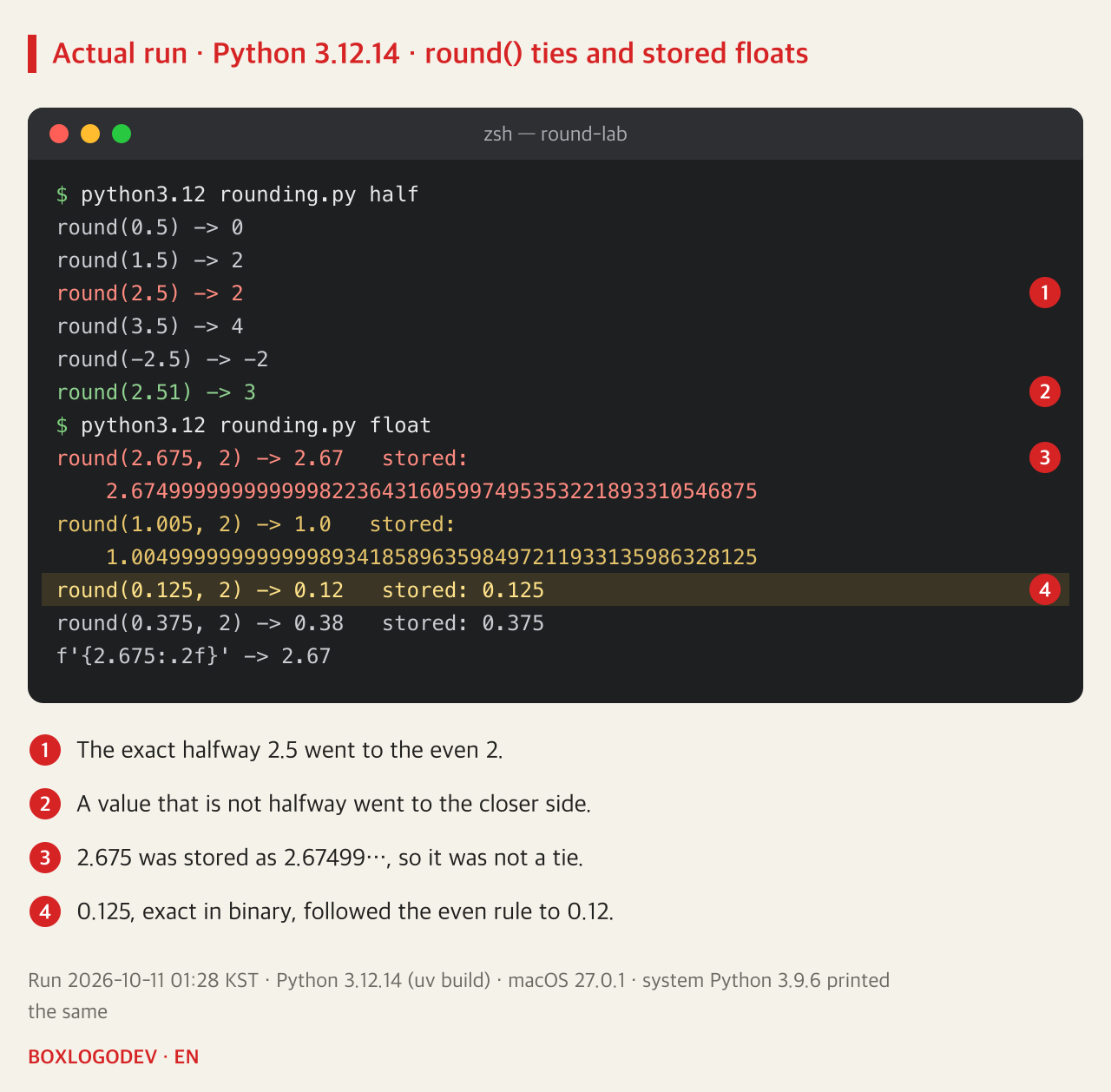
Running it gave round(0.5) → 0, round(1.5) → 2, round(2.5) → 2, round(3.5) → 4 and round(-2.5) → -2. Only values exactly halfway are split this way; when one side is closer, as with 2.51, the value goes to the closer side as usual, and round(2.51) was 3. The string format format(2.5, '.0f') also returned '2' on both Python versions.
This rule changed in Python 3.0. The What's New in Python 3.0 page says exact halfway cases are now rounded to the nearest even result instead of away from zero, so round(2.5) returns 2 rather than 3. Expectations carried over from old Python 2 examples or other languages break here.
DEV NOTES
Where does an exact halfway value go?
The same 2.5 and -2.5 under three rules
Python round()
2.5 -> 2 · -2.5 -> -2- To the even side
- decimal's default too
ROUND_HALF_UP
2.5 -> 3 · -2.5 -> -3- Away from zero
- Must be passed explicitly
JavaScript Math.round()
2.5 -> 3 · -2.5 -> -2- Toward +∞
- Negatives move toward zero
Run on Python 3.12.14 and 3.9.6 and Node.js v24.21.0, 2026-10-11. ROUND_HALF_UP was applied with quantize to Decimal('2.5') and Decimal('-2.5').
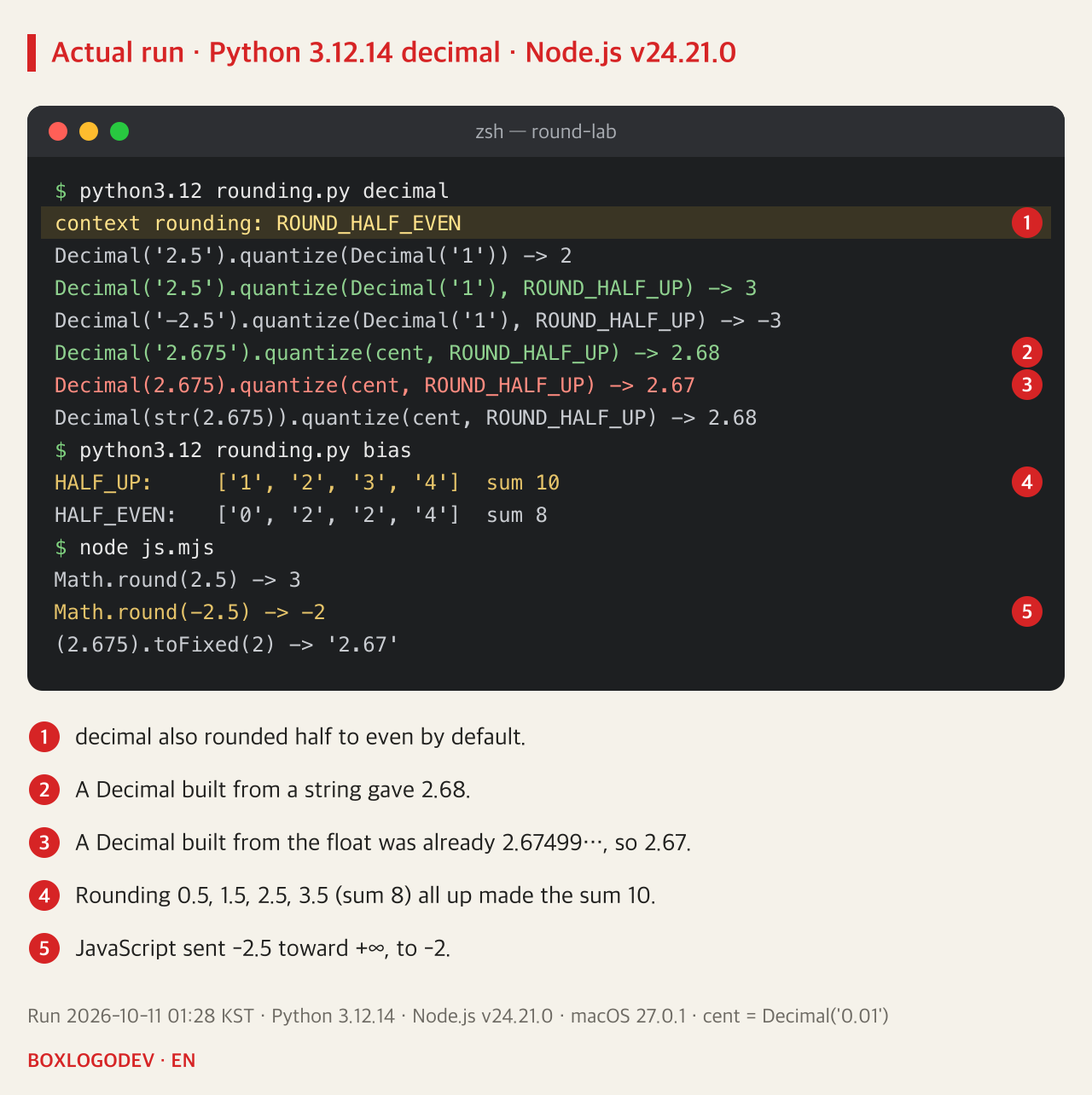
Why even? If halfway values always go up, totals drift upward when many of them are added. 0.5, 1.5, 2.5, 3.5 add up to 8. Rounding all of them up gives 1, 2, 3, 4, a total of 10; sending them to the even side gives 0, 2, 2, 4, and the total stayed 8. Half go up and half go down, so the bias cancels out. These four values were picked so that the cancellation is exact; in real data the totals will not always match exactly.
2.675 was never 2.675
round(2.675, 2) giving 2.67 is not the even rule at work. The second digit 7 is odd, so the even rule would actually give 2.68. The cause is how the value is stored. A Python float is binary floating point, so it cannot hold most decimal fractions such as 2.675 exactly and stores the nearest binary value instead. The official round() entry uses this very example and explains that it is not a bug.
To see the stored value, convert the float to Decimal, as in Decimal(2.675); a Decimal made from a float carries the binary value over to decimal without loss. The output was 2.67499999999999982236431605997495353221893310546875. That is a hair below the halfway point 2.675, so it is not a tie, and going to the closer 2.67 is correct. round(1.005, 2) gives 1.0 for the same reason: the stored value was 1.00499999….
Values that binary can represent exactly show the even rule plainly. 0.125 and 0.375 were stored exactly as 0.125 and 0.375, and round(0.125, 2) gave the even 0.12 while round(0.375, 2) gave 0.38. The f-string f'{2.675:.2f}' works on the same stored value and showed 2.67.
DEV NOTES
Why is round(2.675, 2) 2.67?
The value typed is not the value stored
Typed
round(2.675, 2)- Decimal fraction 2.675
- Looks like a tie at 2 places
Stored as float
2.674999999999999822…- The nearest binary value
- A little below 2.675
Rounded
-> 2.67- Not a tie, so
- the closer 2.67
The stored value was checked with Decimal(2.675). 0.125, exact in binary, followed the even rule: round(0.125, 2) -> 0.12.
Round money with a Decimal made from a string
When prices or taxes must be computed in decimal digits and rounded by a fixed rule, use the decimal module. Two things need to be known.
First, decimal also rounds half to even by default. The default context's rounding was ROUND_HALF_EVEN, and Decimal('2.5').quantize(Decimal('1')) was 2. For school-style rounding you must pass ROUND_HALF_UP explicitly, which gives 3. According to the documentation, ROUND_HALF_UP sends ties away from zero.
Second, build the Decimal from a string. Decimal('2.675').quantize(Decimal('0.01'), ROUND_HALF_UP) was 2.68, but the same expression with the float Decimal(2.675) was 2.67, because passing through a float already turns it into 2.67499…. If the value has already arrived as a float, Decimal(str(x)) went through the short form '2.675' and returned 2.68, but that only works when the float's short form matches the original input. Where possible, accept input as a string or as an integer in the smallest unit (cents, won) from the start.
from decimal import Decimal, ROUND_HALF_UP

price = Decimal("2.675")          # a string, not a float
print(price.quantize(Decimal("0.01"), rounding=ROUND_HALF_UP))  # 2.68
Which rounding is right is not the code's decision. Taxes, settlements and loyalty points often have their rounding method and number of digits set by law, terms or company policy, so check that rule and state it in the rounding argument.
If you are coming from JavaScript
The same values behave differently again in JavaScript. In Node.js, Math.round(2.5) was 3, Math.round(0.5) was 1 and Math.round(-2.5) was -2. MDN explains that when the fractional part is exactly 0.5 the value goes to the next integer in the direction of +∞. So it matches school rounding for positive numbers and moves toward zero for negative ones. Meanwhile (2.675).toFixed(2) was '2.67' and (1.005).toFixed(2) was '1.00': the binary storage issue was the same in JavaScript.
That makes three rules. Python's round() and the decimal default go to the even side, ROUND_HALF_UP goes away from zero, and JavaScript's Math.round() goes toward +∞. If a service handles the same numbers in both languages, the server and the page can show different values, so it is safer to finish rounding on one side and pass the result as a string.
DEV NOTES
Which rounding to use
By what the value is for and how it arrived
Display
f'{x:.2f}'- Default round() or format
- Works on the binary value
Statistics, totals
round(x)- Half to even by default
- Less drift in totals
Money, tax
Decimal('2.675').quantize(…, ROUND_HALF_UP)- Decimal from a string
- State the required rule
Alongside JavaScript
Math.round(-2.5) -> -2- Math.round() goes to +∞
- Round once, pass a string
Law, terms or policy often fix the rounding method and digits for money. The code's job is to state that rule in the rounding argument.
When you see round( in code, ask two questions: which way should this value go when it is exactly halfway, and did it arrive as a float? For display or statistics the default round() is enough; for amounts with a defined rule, use a Decimal built from a string and state the rounding mode.
Add your perspective.
Share a question, another approach, or something you have tried.
Checking sign-in…
Loading comments…