It is easy to feel reassured when a file bearing today's date appears in the backup folder. But the file's existence tells you only that something was saved. You need to open it again to know whether it contains the notes you need, whether another environment can read it, and whether its contents represent the point in time you intended. When checking a personal app's backup, add a small restoration exercise after the successful-copy message.
This article uses a fictional app that stores notes in SQLite. It separates the original database, backup, and restored copy, then checks structure, relationships, and content in turn. No real service data was used. The original September 23, 2026 execution record documents temporary data tested with Python 3.9.6 and SQLite 3.51.0. It does not document recovery of an app interface or production server.
1. Restore somewhere separate from the original
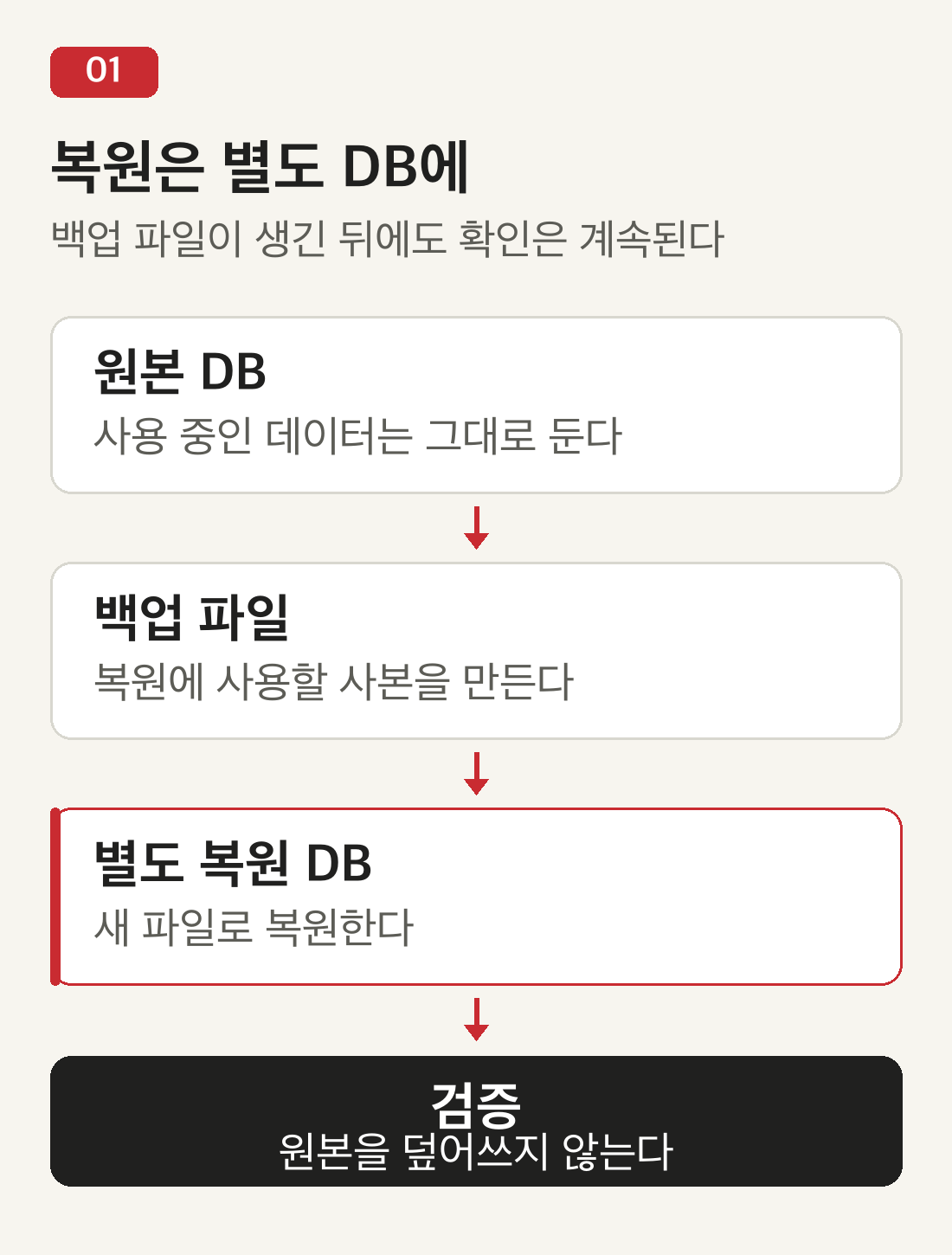
Start by assigning three files distinct roles. source.db represents the original data currently in use; backup.db is the copy to keep; restored.db is the restored copy used for a reading test. If you overwrite the original with the backup during practice, a verification exercise becomes a rollback of current data. Check the path each connection points to, as well as the filenames.
SQLite's Online Backup API copies the contents of one database into another. In Python, pass the destination connection to the original connection's backup method. Thus src.backup(bak) goes from original to backup, and bak.backup(out) goes from backup to restored copy. Existing contents at the destination can be replaced, so this example creates a new temporary directory every time it runs.
The API is designed to back up databases while they are running, but this exercise did not test concurrent writes or the time needed to process a large database. Nor does it mean a file can be attached to a production app at any moment during copying. Apps differ in how connections are closed, which permissions they need, and where they store files. It is easier to reason about the process when you first obtain a separate restored copy and check its contents, then treat switching production to that copy as a later step.
2. A healthy structure can still contain the wrong data
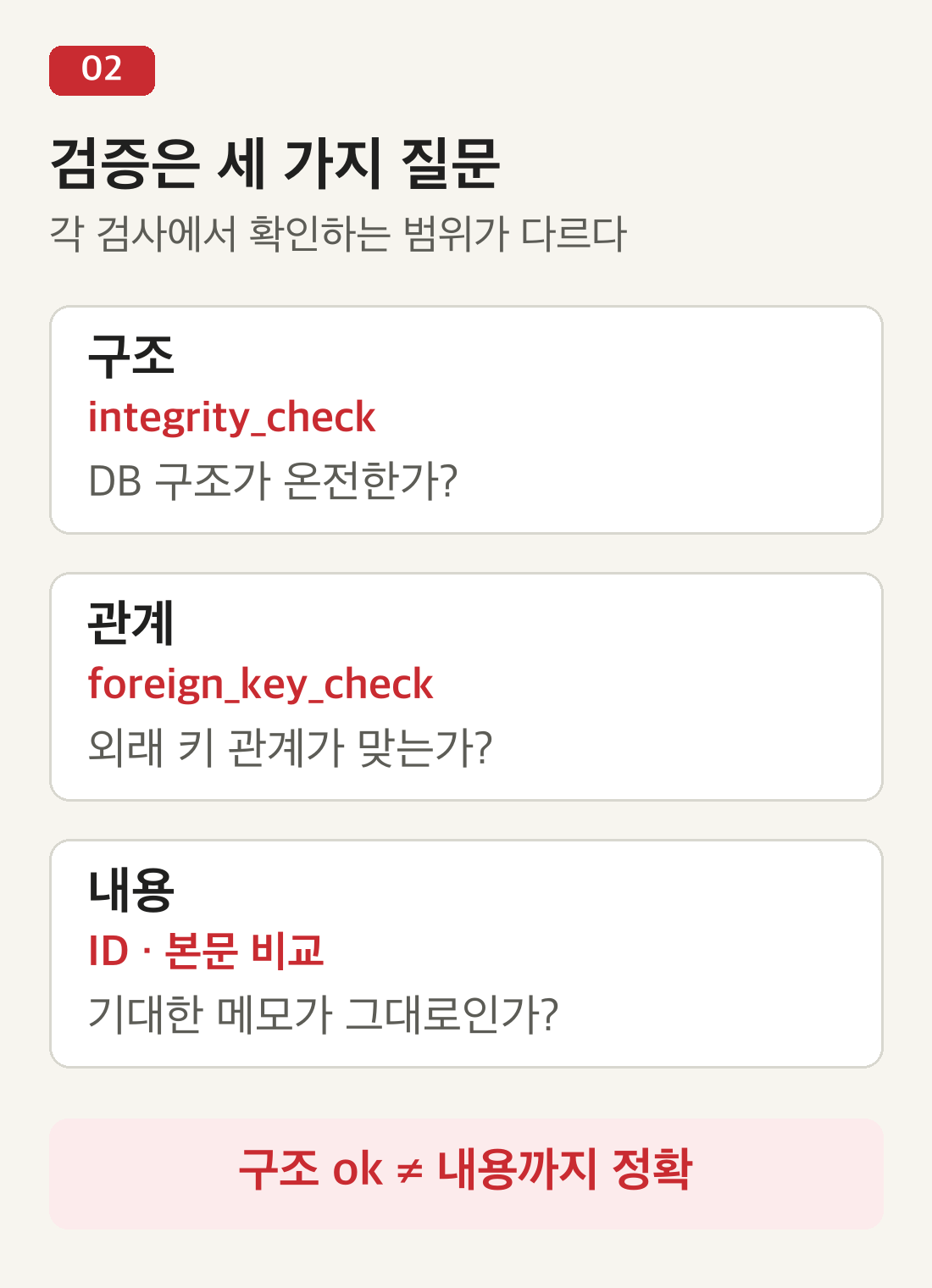
Running PRAGMA integrity_check on the restored database checks its low-level structure and consistency. When it finds no problems, it returns a single row containing ok. This is necessary evidence, but it does not establish that the sentence you expected was saved. A perfectly valid UPDATE can change a note to the wrong text while leaving the database structure intact.
Check relationships separately. If the app declares a foreign key that connects each note tag to a note, add PRAGMA foreign_key_check. Violations appear in its results. The integrity_check command does not find foreign-key errors. However, the separate command cannot discover relationships that were never declared as foreign keys, so an empty result does not mean every business rule has been validated.
Finally, compare the contents. Do not stop at matching a total of three rows; compare note IDs and bodies together. Include dates or statuses if those values matter to the app. Where the list has a defined sort order, use the same query conditions so that comparison stays stable. Separating these three checks also makes a failure easier to explain: is it a structural problem, a broken relationship, or a difference in an expected value?
3. A small exercise with three notes
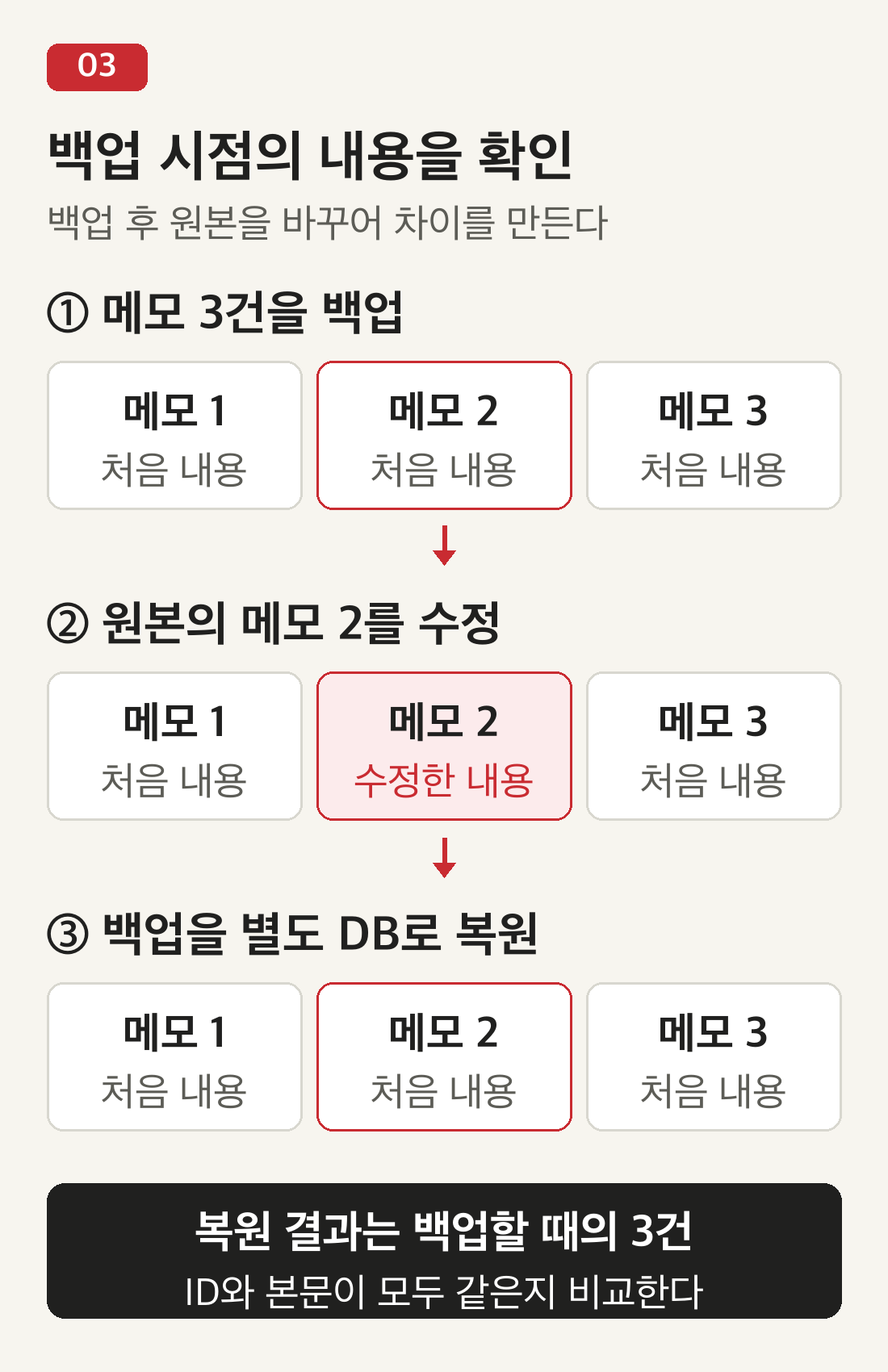
The criterion is simple. Save notes 1, 2, and 3, commit those changes, and make a backup. Then change only the body of note 2 in the original database. When the backup is restored into a new database, note 2 should still contain its earlier text, “우유와 빵” (“milk and bread”). If it does, this exercise has distinguished the backup's point in time from the current original. A difference between the restored copy and the latest original is not automatically a failure.
The code below uses only Python's standard library. Save it as a new file and run it with python3. It accepts no existing database path: all three files are created inside a temporary directory, and the practice files are removed after the connections close. The expected values are defined before data is saved, rather than being derived later by reading the database. This avoids accidentally accepting an incorrectly restored value as the correct answer. The original Korean sample strings and output labels are retained to match the recorded example exactly.
from contextlib import ExitStack, closing
from pathlib import Path
from tempfile import TemporaryDirectory
import sqlite3

with TemporaryDirectory() as tmp, \
     ExitStack() as stack:
    db = {}
    for name in ("source", "backup", "restored"):
        path = Path(tmp) / (name + ".db")
        db[name] = stack.enter_context(
            closing(sqlite3.connect(path)))
    src, bak, out = [db[n] for n in db]
    expected = [(1, "메모 하나"),
                (2, "우유와 빵"),
                (3, "앱 아이디어")]
    src.execute(
        "CREATE TABLE notes("
        "id INTEGER PRIMARY KEY, body TEXT)")
    src.executemany(
        "INSERT INTO notes VALUES (?, ?)",
        expected)
    src.commit()
    src.backup(bak)

    src.execute(
        "UPDATE notes SET body=? WHERE id=2",
        ("수정한 문장",))
    src.commit()
    bak.backup(out)

    structure = out.execute(
        "PRAGMA integrity_check").fetchall()
    actual = out.execute(
        "SELECT id, body FROM notes "
        "ORDER BY id").fetchall()
    assert structure == [("ok",)]
    assert actual == expected
    print("구조 검사:", structure)
    print("복원한 메모:", len(actual), "건")
    print("2번 메모:", actual[1][1])
The recorded output was structure check [('ok',)], three restored notes, and “우유와 빵” for note 2. An assert causes execution to fail when the result differs from the expectation. This short example defines no foreign-key relationship, so it includes no relationship check. In a separate synthetic experiment recorded during the original research, a tag was made to reference a nonexistent note. The structure check returned ok, while the foreign-key check reported one violation.
Another recorded experiment changed only a body in the restored copy. The row count remained three and the structure check still returned ok, but comparison against the predefined IDs, titles, and bodies failed. That is why a backup's file size or row count alone makes a weak completion criterion. Checks are more useful when they detect different kinds of failure than when they merely increase the number of tests.
4. What remains between database restoration and app recovery
A readable database does not mean the whole app is back. For example, if attached photos are stored in a separate folder, the database may contain only their filenames. Restoring only the database could bring back the list while leaving the photos inaccessible. Write down the intended restoration scope in advance: which configuration files, app version, and external files must accompany it?
For a real app, the next step is to connect the restored copy to a test environment and check core actions such as listing notes, opening one, and searching. Keep that environment separate so it does not trigger production notifications or external transmissions. The recorded work described here covered SQL queries and synthetic-data comparisons. It does not establish that any particular app's interface, attachments, or deployment procedure passed.
5. What a success record should contain besides a filename
A restoration record should identify the backup used, the point in time its data represents, the restoration location, and the checks performed and their results. “IDs and bodies match for three notes; structure check ok; app interface still needs checking” is more useful for the next decision than a single line saying “backup successful.” Recording what remains unchecked helps future readers understand the actual scope of verification.
Backup frequency connects to this record too. Notes written after the last backup are absent from that copy, so consider how much work you could reasonably enter again. Testing with a separate file verifies restoration; it does not by itself prepare you for losing every file on the same device. Begin with small synthetic data to learn the procedure, then expand verification to match the app's actual storage scope and backup locations.