Node.js 24 can run a TypeScript file directly, as in node app.ts. Yet code with the wrong types runs to the end without a warning, while an everyday enum or an interface imported without type stops with a SyntaxError. Node never checks types, so checking has to be a separate step with tsc, the TypeScript compiler. After reading this note you will be able to tell what Node does and does not do with a .ts file.
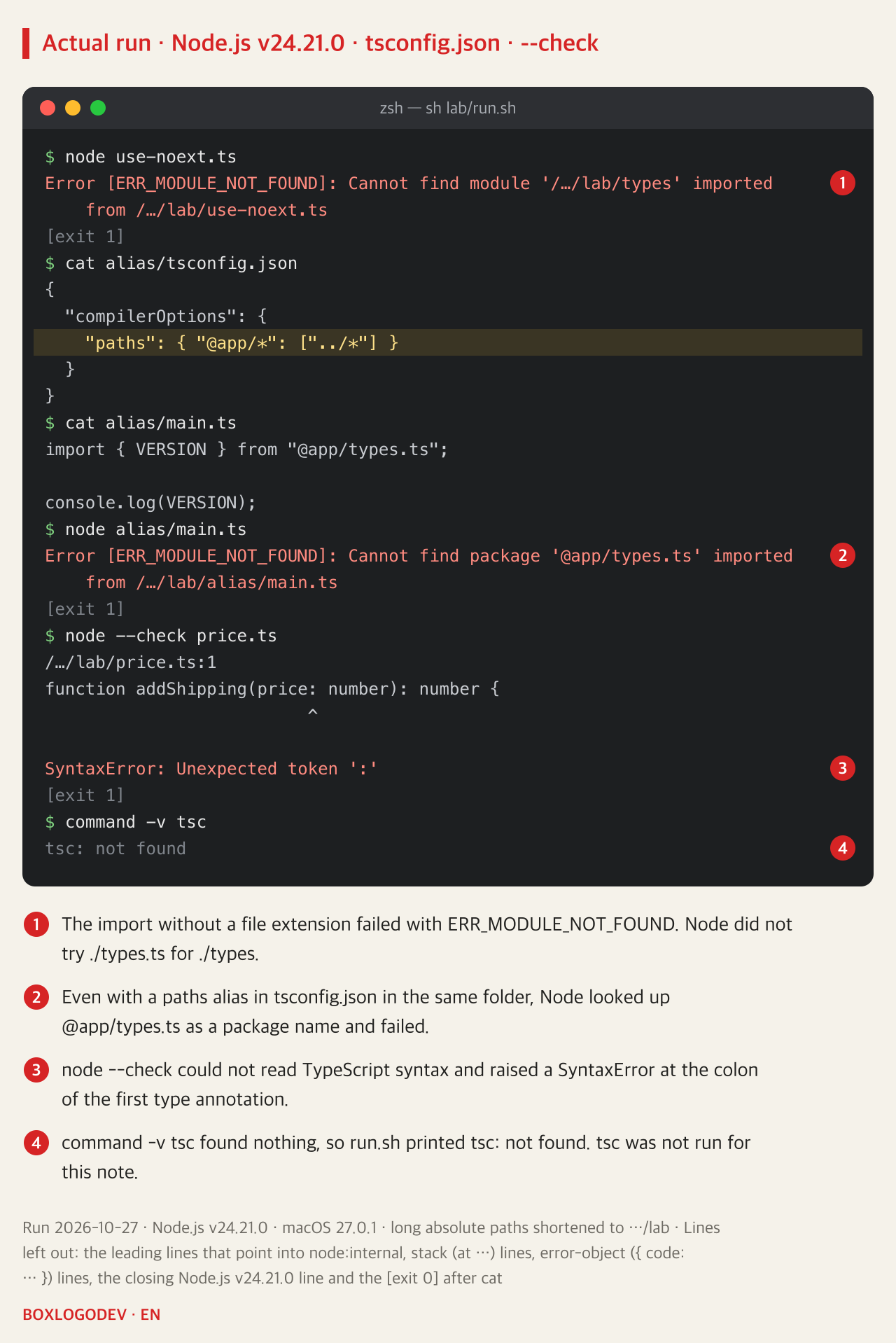
The examples were run on 2026-10-27 on macOS 27.0.1 with Node.js v24.21.0, where process.features.typescript was strip. The example folder's package.json sets "type": "module". The price and order code is a made-up example. This Mac has no tsc on its PATH (command -v tsc fails), so tsc was not run. Node's behaviour follows the v24 documentation (v24.22.1 edition) and later changes follow the v26 documentation (v26.12.1 edition), both checked on 2026-10-27. Node.js 26 became LTS on 2026-10-28, and its documentation up to the v26.13.0 edition describes type stripping, syntax that cannot be erased, imports without type and tsconfig.json the same way as the v24 documentation (checked on 2026-10-30; v26 was not run).
Wrong types still run to the end
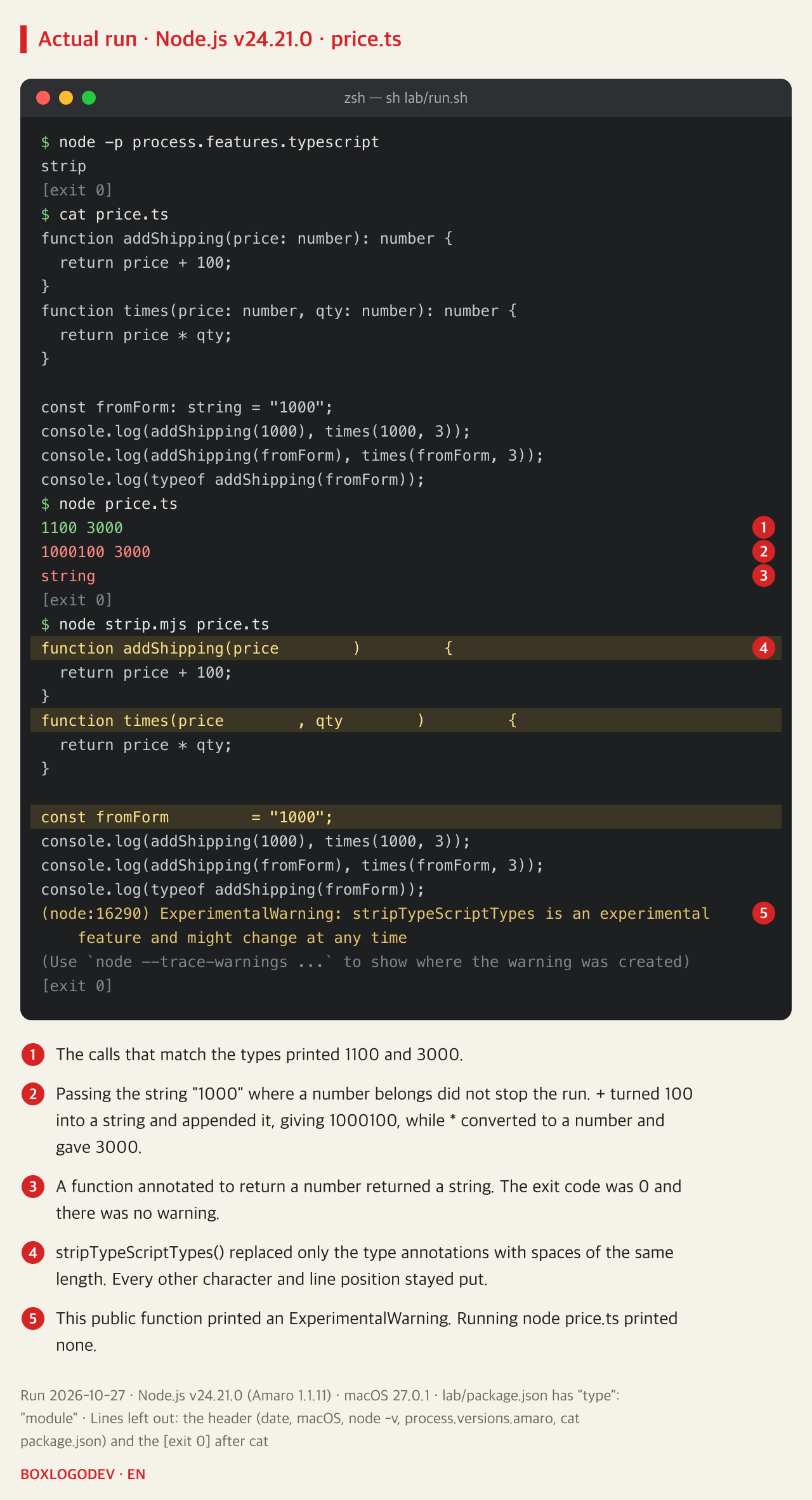
Both functions declare price as a number, but the last two lines pass the string "1000", as if it had been read from a form.
function addShipping(price: number): number {
  return price + 100;
}
function times(price: number, qty: number): number {
  return price * qty;
}

const fromForm: string = "1000";
console.log(addShipping(1000), times(1000, 3));
console.log(addShipping(fromForm), times(fromForm, 3));
console.log(typeof addShipping(fromForm));
node price.ts printed 1100 3000, 1000100 3000 and string without a warning and exited with code 0. When one side of + is a string, the two values are joined, which gave "1000100". * converts both values to numbers, so times(fromForm, 3) happened to give the right answer, 3000. The same type error showed up as a wrong value in one call and a right one in the other, so eyeballing the output of a run will not catch every mistake of this kind. Type annotations have no effect on how a program behaves at run time, as the last line shows: a function declared to return a number returned a string.
Node only turns the types into spaces
The one thing Node does to a .ts file is type stripping. It blanks out the TypeScript syntax with spaces, runs what is left, and never checks whether the types agree. This is by design, not a bug.
You can see the stripped result with stripTypeScriptTypes(), a public function in node:module. Given price.ts, it turned only the : number and : string annotations into spaces of the same length, and the character count (328) and line count (11) stayed the same. Since nothing moves, stack traces need no source map to show the right line numbers. The function printed an ExperimentalWarning (its stability index is 1.2), and its output may differ between Node versions. Running node price.ts printed no warning.
Type stripping was switched on by default in v23.6.0; its experimental warning went away in v24.3.0, and it became stable in v24.12.0. Node.js 22 has it on by default from v22.18.0.
Syntax that cannot be erased, and imports without type
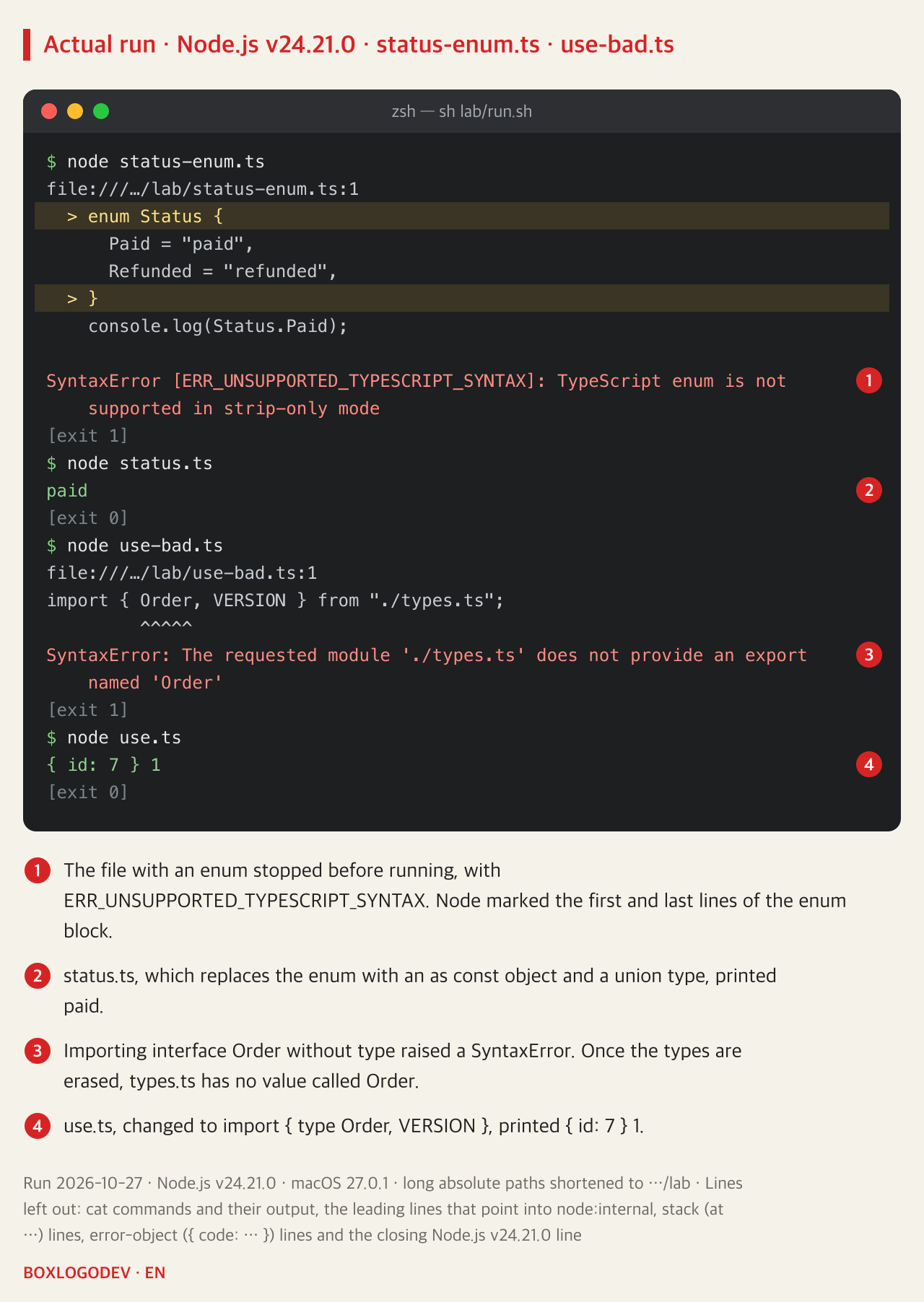
Some syntax cannot run once it has merely been blanked out. An enum creates an object the program uses at run time, so erasing it would erase that object too. A file containing enum Status stopped before printing anything, with SyntaxError [ERR_UNSUPPORTED_TYPESCRIPT_SYNTAX]. A namespace with runtime code, class parameter properties and import aliases such as import Bar = container.Bar belong to the same group; those three were not run here.
Node v24 has a --experimental-transform-types flag that converts such syntax before running it, but the flag was removed in v26.0.0. It was therefore neither run here nor used as a fix. Rewriting the enum as a plain object plus a union type printed paid instead.
const Status = {
  Paid: "paid",
  Refunded: "refunded",
} as const;
type Status = (typeof Status)[keyof typeof Status];
Imports hit a similar wall. With types.ts exporting interface Order and the value VERSION, import { Order, VERSION } from "./types.ts" raised a SyntaxError saying the module does not provide an export named 'Order'. Node treats an import without a type marker as a value import, and once the types are erased, types.ts has no value called Order. With its default settings tsc drops imports used only as types when it writes JavaScript (import elision); Node does no such thing. Changing the line to import { type Order, VERSION } printed { id: 7 } 1.
What Node will not do: fill in extensions or read tsconfig.json
Node does not fix up import paths. An import statement or import() has to spell out the extension, as in ./types.ts; writing ./types gave ERR_MODULE_NOT_FOUND.
Node does not read tsconfig.json either, so anything that depends on it, such as paths aliases or compiling newer syntax down to older JavaScript, is left out on purpose. With a tsconfig.json holding the alias "@app/*": ["../*"] in the alias folder, running import { VERSION } from "@app/types.ts" made Node look up @app/types.ts as a package name and stop with Cannot find package. The closest thing Node offers is subpath imports: names that start with # in the imports field of package.json (not run here).
Checking only the syntax first with node --check did not help either. TypeScript syntax is not supported in the REPL or with --check, and the colon of the first annotation raised SyntaxError: Unexpected token ':'.
Type checking means running tsc separately
node erases the types and runs the code, and no step along the way checks the types. That job has to be left to the TypeScript compiler, tsc, run as a separate step. The Node v24 documentation recommends TypeScript 5.8 or newer with the tsconfig.json settings below.
{
  "compilerOptions": {
    "noEmit": true,
    "target": "esnext",
    "module": "nodenext",
    "rewriteRelativeImportExtensions": true,
    "erasableSyntaxOnly": true,
    "verbatimModuleSyntax": true
  }
}
With noEmit on, tsc writes no JavaScript, source maps or declaration files and only checks types. If you build and ship .js files, you do not need it. erasableSyntaxOnly, added in TypeScript 5.8, makes tsc report most TypeScript-only syntax that has runtime behaviour, such as an enum. It exists because type-stripping tools only tell you about such code when you actually run it. With verbatimModuleSyntax on, tsc also keeps every import that lacks a type marker, following the same rule as Node, and it reports error TS1484 when a type-only name such as an interface is imported without type. rewriteRelativeImportExtensions changes the .ts extension in relative imports when tsc writes JavaScript.
Run the check on its own, before running the code. Install TypeScript as a development dependency (npm install typescript --save-dev; as of 2026-10-27 this installs 7.0.2) and start node only once tsc passes. In a folder that has a tsconfig.json, giving tsc a file name, as in npx tsc price.ts, makes TypeScript 5.x quietly ignore the config, while 6.0 and 7.0 report an error (in 6.0 its number is TS5112). To check with your settings, run npx tsc with no file name. Add --ignoreConfig only when you mean to skip the config. From 6.0 the types option also defaults to an empty list, so code that uses Node APIs such as process or node:fs may need @types/node installed and "types": ["node"] added. This paragraph follows the TypeScript documentation and the npm registry and was not run.
npx tsc        # reads tsconfig.json and only checks types (noEmit)
node app.ts    # run once the check passes
DEV NOTES
node runs it; tsc checks the types separately
Node.js v24 erases the types and runs the code; it never checks whether they match
Running .ts files with node (observed)
- Wrong types still run: 1000100, exit 0
- enum → SyntaxError (not supported in strip-only mode)
- A type imported without type → SyntaxError (no such export)
- No file extension, tsconfig paths → ERR_MODULE_NOT_FOUND
tsc (TypeScript, not run)
npx tsc- Reads tsconfig.json and checks the types
- With noEmit it only checks and writes no JS
- File names on the command line: 5.x ignores tsconfig.json; 6.0+ reports an error (TS5112 in 6.0)
Options that bring tsc closer to Node
"erasableSyntaxOnly": true- erasableSyntaxOnly: reports most TS syntax that has runtime behaviour
- verbatimModuleSyntax: keeps every import without a type marker
- TypeScript 5.8 or newer
The first box is what Node.js v24.21.0 did on 2026-10-27. The other two follow the TypeScript and Node.js documentation; tsc was not run.
Put npx tsc in front of the command that runs your code, and turn on erasableSyntaxOnly and verbatimModuleSyntax in tsconfig.json to bring tsc's rules closer to Node's. According to the TypeScript documentation, from then on the wrong-type calls and the enum in this note would show up at the tsc step rather than at run time.
Add your perspective.
Share a question, another approach, or something you have tried.
Checking sign-in…
Loading comments…