Before editing a user's details on a settings screen, you made a copy with const draft = { ...user }. The idea was to leave the original alone until the save button is pressed, yet after pressing cancel the address on screen has already changed. The copy did not fail: spread syntax copies only one level by design. After reading this, you will be able to tell in advance which values change together with the original, and decide between copying only what you need and copying everything.
The examples were run on 2026-10-14 with Node.js v24.21.0 (V8 13.6.233.17) on macOS 27.0.1. Each case ran in its own node process, and the names, cities and order quantities are all fictional. The behaviour was checked against MDN and the official Node.js documentation. Nothing was run in a browser.
Spread creates only a new outer object
First, the problem reproduced as is.
const user = { name: 'Mina', address: { city: 'Seoul' }, tags: ['dev'] };
const copy = { ...user };
copy.name = 'Jun';
copy.address.city = 'Busan';
copy.tags.push('admin');
Printing the original user afterwards showed name still Mina, but city had become Busan and tags was now ["dev","admin"]. copy.address === user.address was also true. The two variables hold different outer objects, but the address and tags inside them point to the same objects.
MDN calls this a shallow copy and says that spreading a single object creates a shallow copy of the original. A property that holds a value directly, such as a string or a number, can be changed in the copy without touching the original. When a property holds an object or an array, though, what gets copied is only the reference that says where that object lives. Changing copy.address.city therefore edits the one address that both sides share.
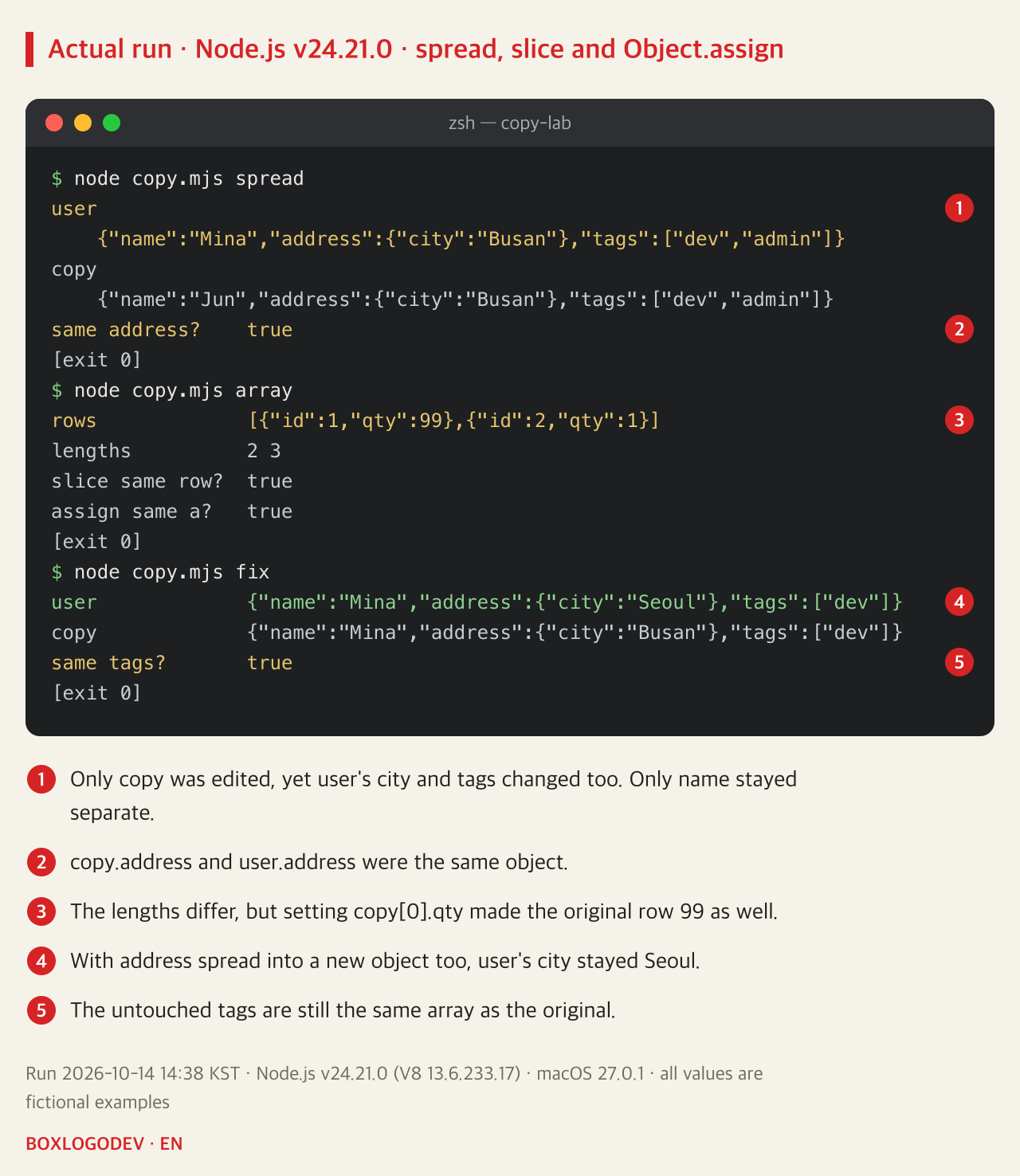
Arrays behaved the same way. After copying with [...rows] and adding a row with push, the lengths went their own ways: 2 for the original and 3 for the copy, because the array itself is new. But setting the first row's quantity with copy[0].qty = 99 made the original's first row 99 as well. The first row of a copy made with slice() was the same object as the original's, and the inner object of a copy made with Object.assign({}, src) was the original's too. MDN notes that spread effectively goes one level deep when copying an array, and that the same is true of Object.assign().
DEV NOTES
What { ...user } actually creates
Only the outer object is new; inner objects are shared with the original
The outer object
copy !== user- copy is a new object
- Changing copy.name leaves user alone
Strings and numbers
name: 'Mina'- The value itself is copied
- Each side changes on its own
Nested objects
copy.address === user.address- Only the reference is copied
- copy.address.city changes user too
Nested arrays
copy.tags.push('admin')- push lands in the same array
- user.tags gains 'admin' too
Run on Node.js v24.21.0 on 2026-10-14. Object.assign({}, user), [...rows] and slice() also copied only one level the same way.
Copy the path you change and the original survives
You do not need a deep copy of everything to fix this. The original changed because address was edited instead of being replaced, so it is enough to create new objects along the path to the value you change.
const copy = { ...user, address: { ...user.address, city: 'Busan' } };This line creates a new outer object, spreads address into a new object as well, and then overrides only city. When run, the original's city stayed Seoul and only the copy became Busan. This is also the pattern the official React documentation shows for updating nested state. Only the changed path becomes new objects and everything else is reused, so little is copied.
One caution remains. Even in a copy made this way, copy.tags === user.tags was true. The parts you did not touch are still shared, so editing them in place later, as in copy.tags.push(…), changes the original again. When you change an array, create that path anew too, as in tags: [...user.tags, 'admin'].
DEV NOTES
Copy only the path you change
Which objects must be new when the city changes
Find the path
user → address → city- The value is user.address.city
- It passes through user and address
Spread each object on it
{ ...user, address: { ...user.address, city } }- Both user and address are new
- Only city gets the new value
Leave the rest shared
copy.tags === user.tags- user.address.city stays Seoul
- Untouched tags remain shared
If the shared tags are later changed with push, the original changes again. Each change needs its own path copied.
When you need a fully independent copy: structuredClone
Sometimes, as with a draft on an editing screen, you cannot know in advance what will be changed and you need a copy completely separate from the original. That is what structuredClone() is for. MDN describes it as creating a deep clone of a value, and Node.js has had it as a global function since 17.0.0.
The same user object was extended with a sign-up Date, a Map of roles and a note key whose value is undefined, then run. Changing city on the structuredClone copy left the original at Seoul; the Date stayed a Date, the Map stayed a Map, and the note key was still there.
The long-standing JSON.parse(JSON.stringify(user)) gave a different result. The sign-up date became the string "2026-10-15T00:00:00.000Z", the Map became an empty object {}, and the note key disappeared. As MDN's description of JSON.stringify() says, undefined and functions inside an object are omitted, a Date becomes an ISO string, and a Map or Set becomes {}. Data made only of strings, numbers, plain objects and arrays is fine; anything else quietly turns into different values.
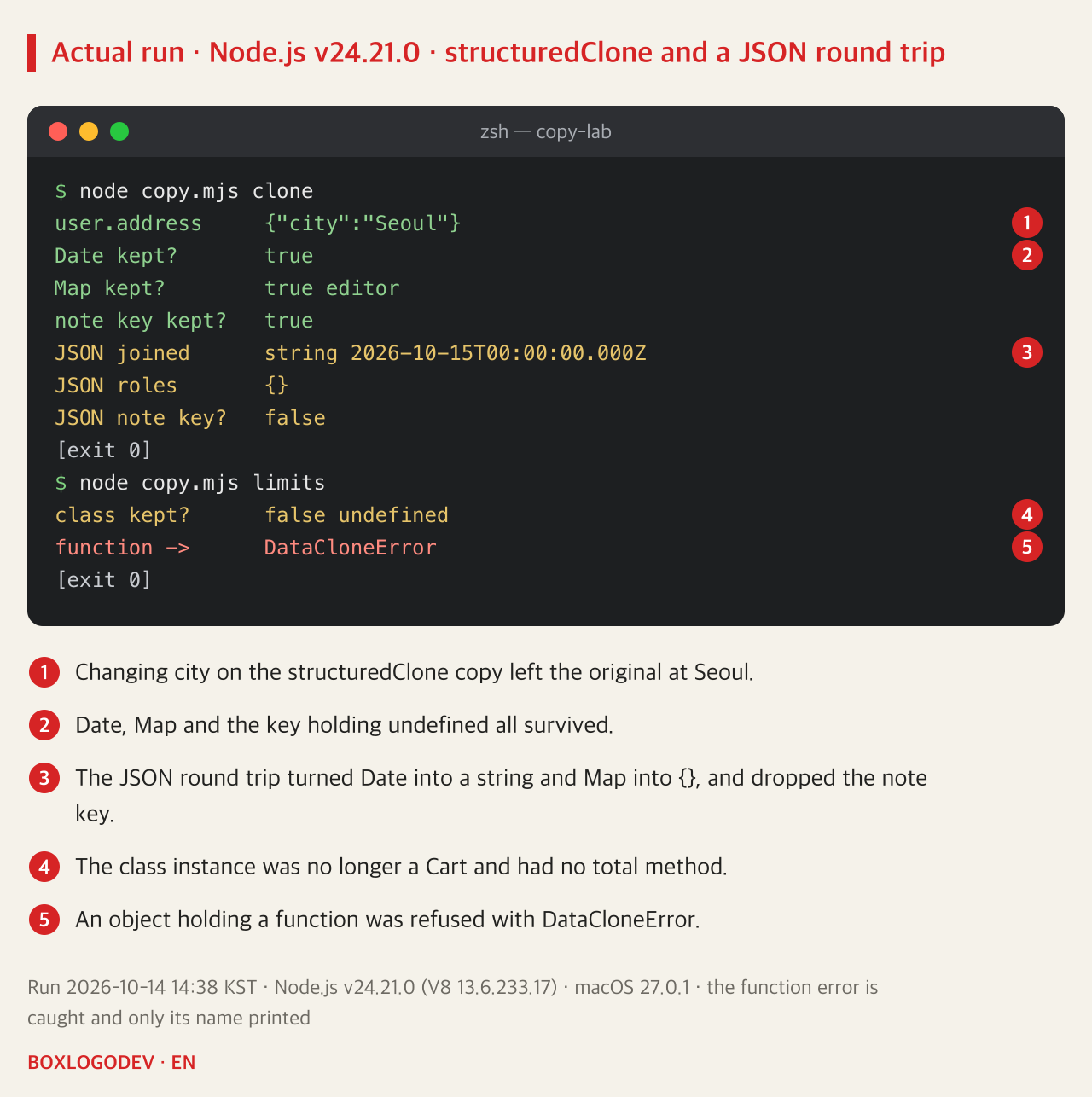
structuredClone has limits too. Copying an instance of a class Cart with a method produced something that was not a Cart and had no total method. MDN's page on the structured clone algorithm says the prototype chain is not walked or duplicated, so a class instance becomes a plain object with only its properties. An object holding a function as a property threw a DataCloneError outright. The same page says property descriptors such as getters and setters, and class private elements, are not duplicated either; those two were not run for this note.
DEV NOTES
What survives a full copy
Differences checked by running them on Node.js v24.21.0
Spread, Object.assign
{ ...user }- Only one level is new
- Inner values stay shared
structuredClone
structuredClone(user)- Copies all the way down
- Keeps Date, Map, undefined
What structuredClone can't do
instanceof Cart → false- A function throws DataCloneError
- Class instances become plain objects
JSON round trip
JSON.parse(JSON.stringify(user))- Date becomes a string, Map {}
- Keys holding undefined vanish
structuredClone has been a global in Node.js since 17.0.0. Results are from a run on 2026-10-14.
What to check before editing a copy
If editing a copy changed the original, first check whether the value you edited sits inside an object or an array. If it does, that inner object is still one and the same with the original. A comparison such as console.log(copy.address === user.address) confirms it immediately.
When you know what will change, creating only that path anew, as in { ...obj, key: { ...obj.key, … } }, is lighter and makes the intent clear. For an editing draft where anything may change, use structuredClone(), but first make sure no class instances or functions are mixed in. JSON.parse(JSON.stringify(…)) is safest only when you are sure there are no dates or Maps.
Add your perspective.
Share a question, another approach, or something you have tried.
Checking sign-in…
Loading comments…