The order lookup is wrapped in try/catch, yet an order number that does not exist never reaches the catch block, and the page prints undefined. fetch does not treat a 404 or a 500 from the server as a failure. After this note you will be able to tell when fetch resolves and when it rejects, and write a small function that turns both status codes and timeouts into errors in one place.
The order API in the example (/orders/1001, product MUG-1, quantity 1) is fictional. The same requests were sent on September 27, 2026 to a local server on this computer (127.0.0.1:4310) and run in Node.js v24.21.0 and in a Chromium 152 browser. The result screens below are that output unchanged. The rules come from the Fetch Standard as updated on September 21, 2026, and from MDN.
fetch tells you whether a response arrived
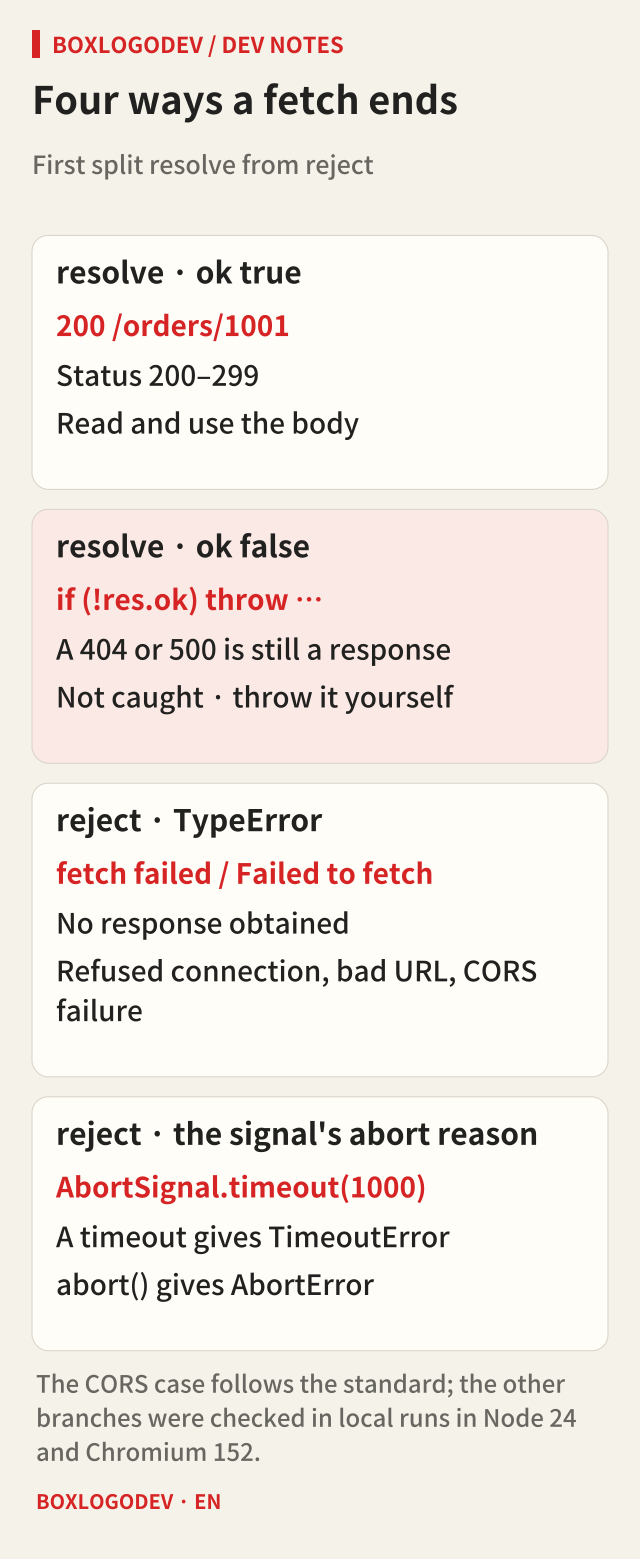
The promise returned by fetch resolves when a response arrives, whether its status is 200, 404 or 500. If the server clearly answered “there is no such order”, the request succeeded as far as the network is concerned. Success is a separate check on Response.ok, which is true only when the status is between 200 and 299.
A rejection happens when no response could be obtained at all. A refused connection because the server is down, a malformed URL, or a failed CORS check rejects with a TypeError. The standard says that if the response is a network error, the promise is rejected with a TypeError; any other response resolves as a Response object.
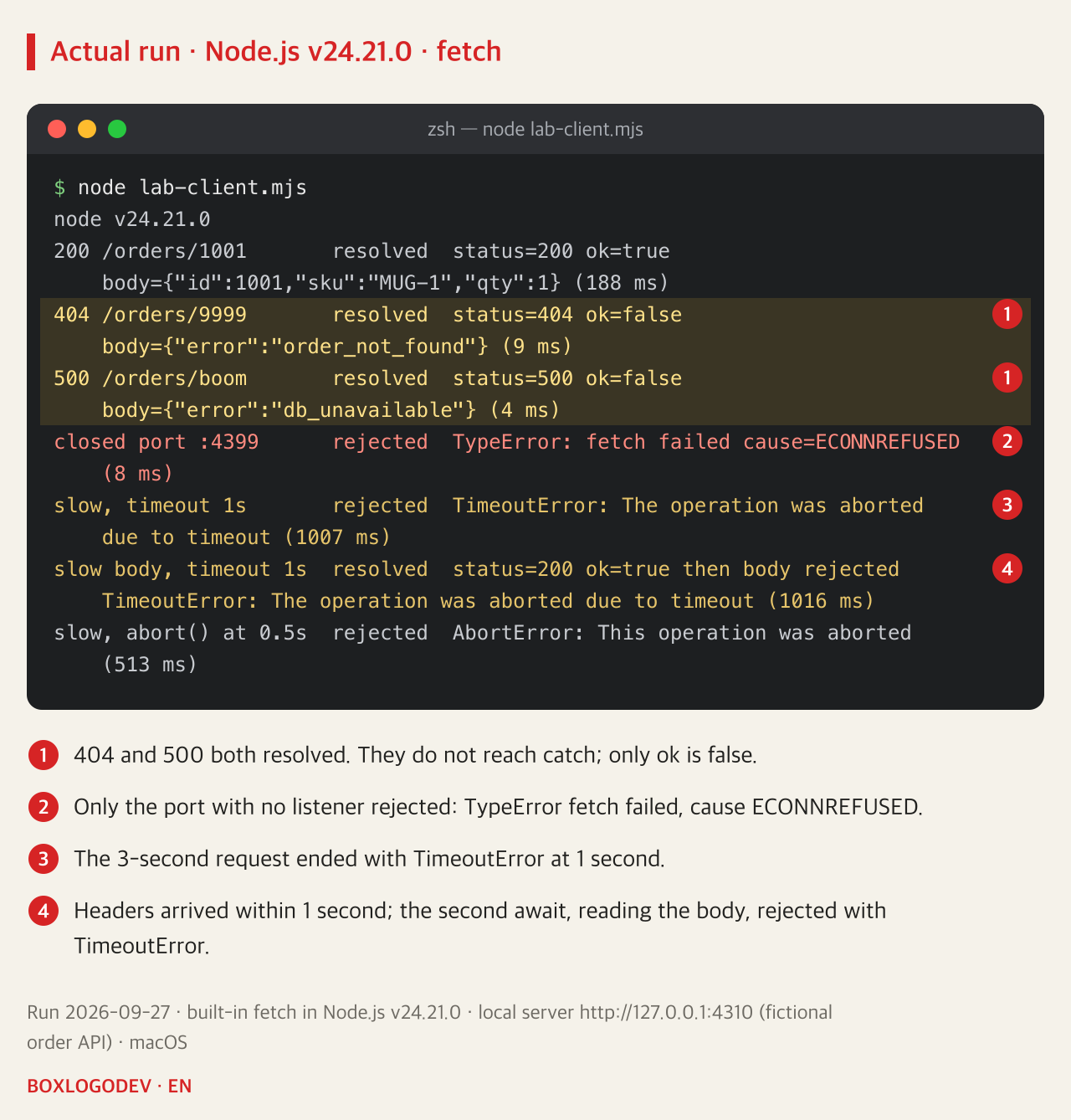
The local run matched. /orders/9999 returned 404 and /orders/boom returned 500, yet both resolved, with only ok set to false. Their JSON bodies were read normally. Only the request to port 4399, where nothing was listening, was rejected, and Node reported “fetch failed” with ECONNREFUSED in cause.
A timeout and a cancel arrive under different names
fetch has no timeout option. Passing AbortSignal.timeout(1000) as the signal aborts that signal after one second, and fetch rejects with the signal's abort reason. For a timeout the reason is a DOMException named TimeoutError. When a user presses a button that calls abort() on an AbortController, the reason is AbortError unless another reason is given. In the local run, /orders/slow, which takes three seconds, ended with TimeoutError at one second, and the case that called abort() at half a second ended with AbortError.
The distinction helps when choosing the message on screen. A TimeoutError can say “The response is slow. Please try again.” An AbortError was the user's own cancel, so showing nothing is usually right. A TypeError is a connection or configuration problem, and a response with ok set to false is judged by the status and body the server sent. That makes four branches.
Aborting does not take the request back. The server log shows that /orders/slow, abandoned after one second, had still reached the server. The client only stopped waiting. That does not mean work such as saving an order was not done on the server. Before resending a POST after a timeout, check separately that the same order cannot be created twice.
Two awaits mean two places to fail
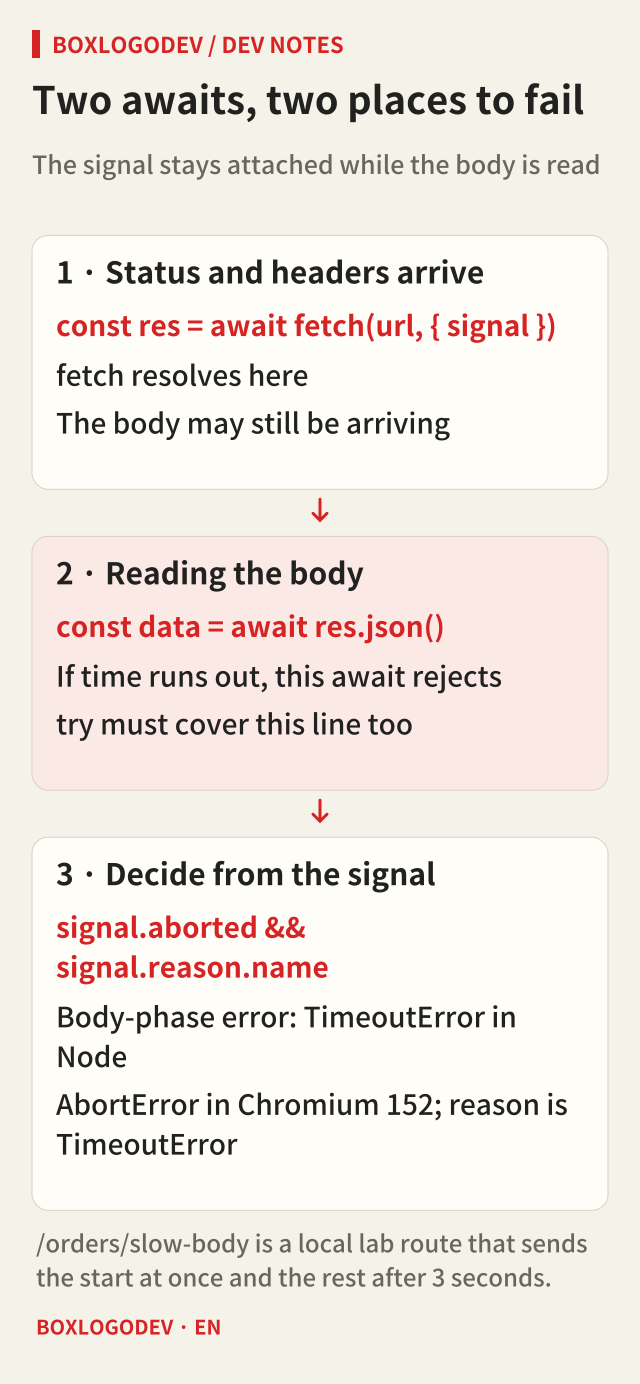
When await fetch(…) finishes, the status and headers have arrived, not the whole body. The body is read when you await res.json() or res.text(). The signal you passed stays attached during that time, so if the time runs out while the body is being read, the second await rejects.
/orders/slow-body is a route that sends the headers and the start of the JSON at once, and the rest three seconds later. With a one-second limit, fetch resolved with 200 and ok true, and the following res.json() rejected at about one second. The try block therefore has to cover the line that reads the body, not only the fetch line.
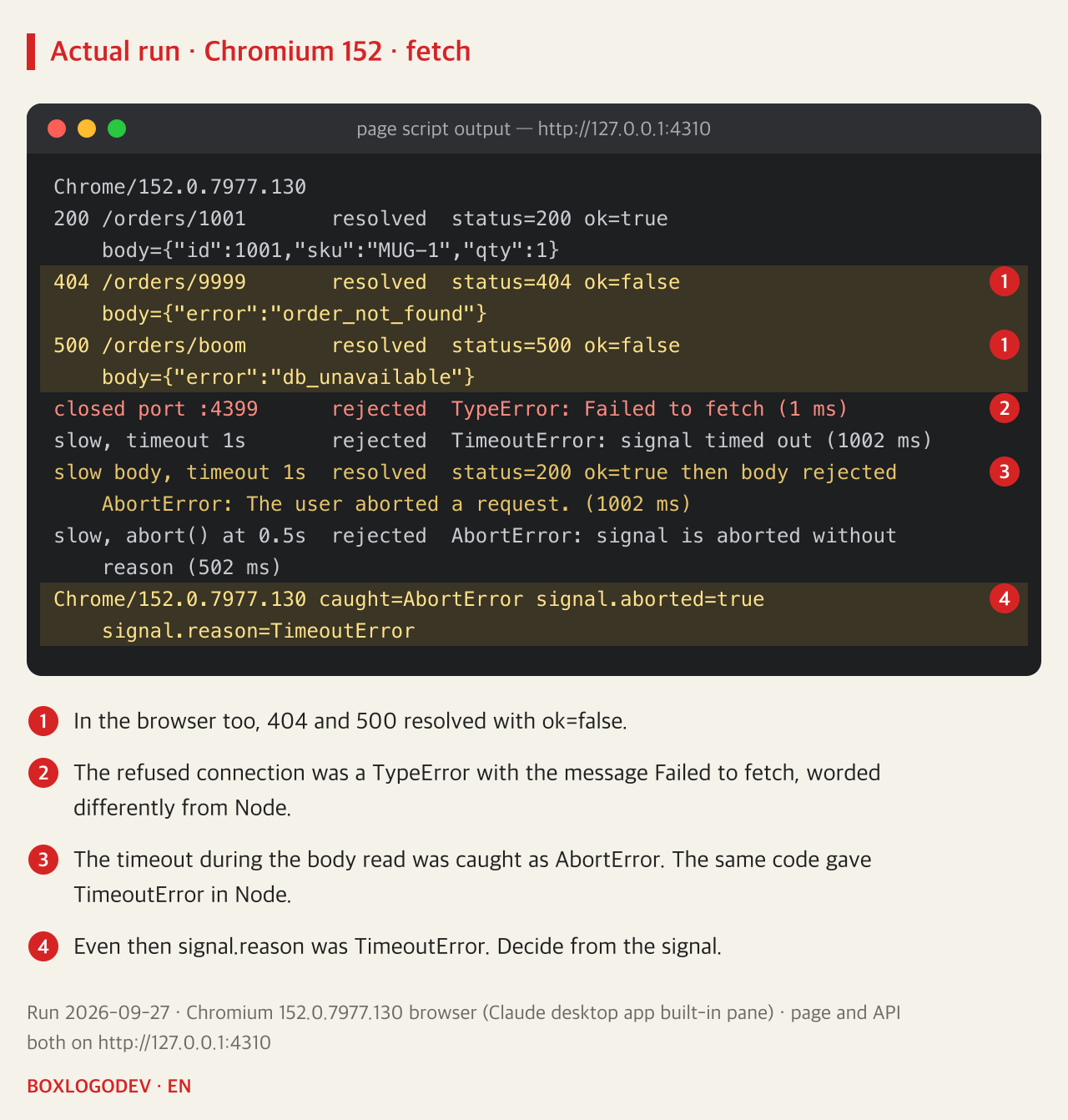
This is where the two runtimes differed. The standard says the body stream is also errored with the signal's abort reason, and Node reported TimeoutError in the body phase as well. When the same code ran in Chromium 152, the fetch phase gave TimeoutError but the body phase gave AbortError. Other browsers were not run this time. Rather than relying on the name alone, check the aborted flag and reason of the signal you created, and both runtimes lead to the same decision.
Put the status check and the body read in one function
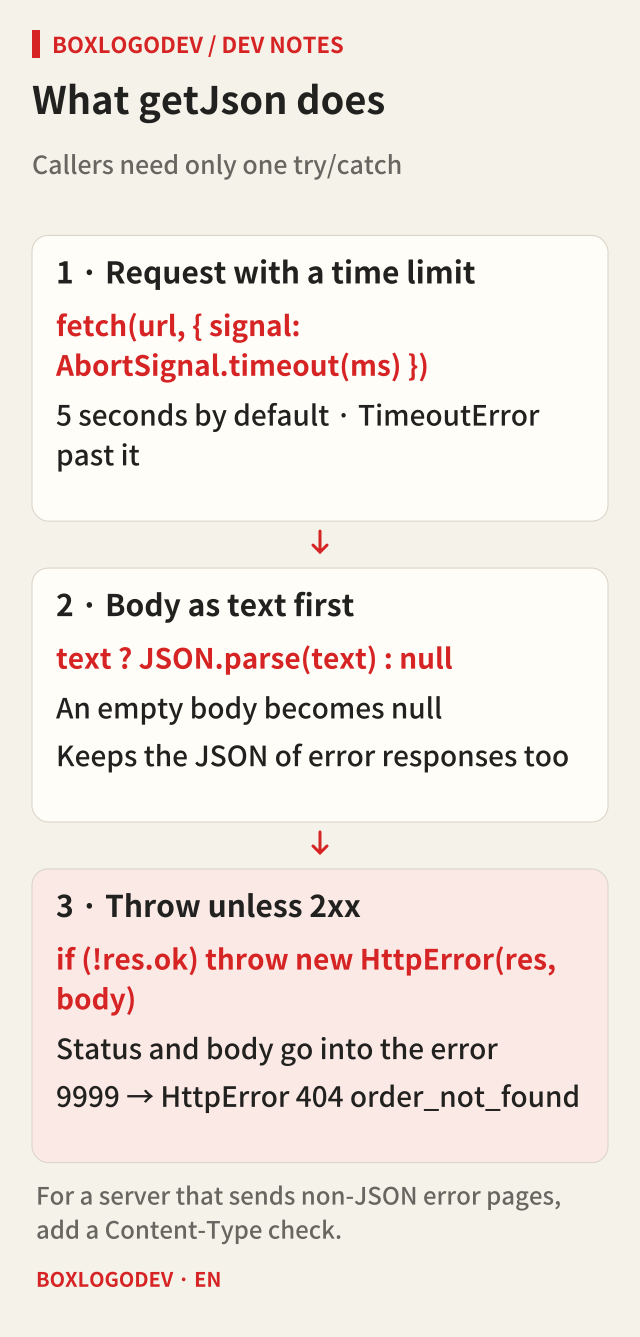
When every caller checks ok on its own, one of them eventually forgets. Put the request, the time limit, the body read and the status check in a single function that throws an error carrying the status and body for anything other than 2xx, and callers need only one try/catch. getJson below is the code used in this run.
class HttpError extends Error {
  constructor(res, body) {
    super(`HTTP ${res.status} ${res.url}`);
    this.name = 'HttpError';
    this.status = res.status;
    this.body = body;
  }
}
async function getJson(url, { timeoutMs = 5000 } = {}) {
  const res = await fetch(url, { signal: AbortSignal.timeout(timeoutMs) });
  const text = await res.text();
  const body = text ? JSON.parse(text) : null;
  if (!res.ok) throw new HttpError(res, body);
  return body;
}
Reading the body as text first lets an empty body and the JSON of an error response go down the same path. Calling res.json() directly on an empty body throws a SyntaxError. Against the same local server, /orders/1001 returned its data, /orders/9999 reached the catch block as HttpError 404 with the body {"error":"order_not_found"}, and /orders/boom as HttpError 500 with {"error":"db_unavailable"}. If a server sends an error page that is not JSON, JSON.parse throws a SyntaxError, so for such a server add a line that checks Content-Type first.
Check ok before trusting catch
When you read fetch code, check one thing. Is there a line that looks at res.ok, and does it throw after the body has been read? Without that line, 404s and 500s are passing quietly as successes right now. If you use a time limit, keep the await that reads the body inside the same try, and let your retry logic reflect that aborting stops the waiting, not the request.
Add your perspective.
Share a question, another approach, or something you have tried.
Checking sign-in…
Loading comments…