If you set a time limit on fetch() and the screen still sits on loading, look first at when the timer gets cleared. The fetch() promise settles when the headers arrive, and the body is read separately afterwards. After reading this you can write a time limit that covers the body, tell a timeout apart without relying on the error's name, and choose between limiting the total time and limiting the gap between chunks.
The examples were run on 2026-11-01 on macOS 27.0.1. The same file (cases.mjs) ran on Node.js v24.21.0 (undici 7.29.1) and in the Claude desktop app's built-in browser (Chromium 152.0.7977.167), against a local server on localhost:4392. /stall-headers never answers, /stall-body sends the headers and the start of the body and then stops, and /trickle sends its body in pieces over 2 seconds. Every limit is 500 ms. The behaviour was checked against the Fetch Standard, MDN and the undici docs. Google Chrome, Safari, Firefox and real internet paths were not run.
Clear the timer right after fetch() and the body is unprotected
Take code like this. The response has come, so the timer gets cleared.
async function clearedEarly(url, ms, mark) {
  const controller = new AbortController();
  const timer = setTimeout(() => controller.abort(), ms);
  const res = await fetch(url, { signal: controller.signal });
  clearTimeout(timer);
  mark('fetch resolved');
  return await res.json();
}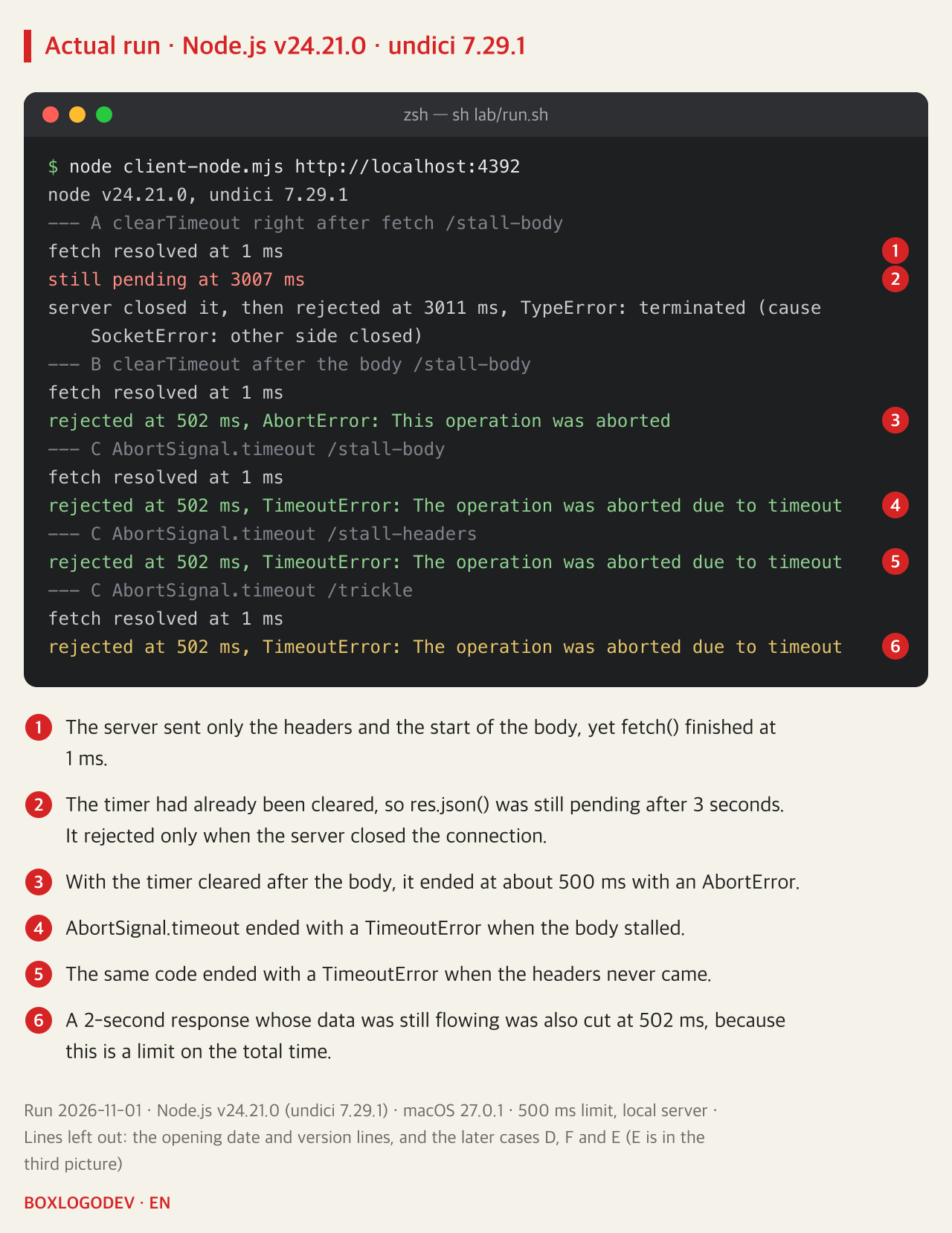
On /stall-body, fetch() finished at 1 ms and res.json() had not finished after 3 seconds. It rejected only after the test code told the server to close the connection. In the Fetch Standard, the fetch() promise is fulfilled in the process-response step, and processing the end of the body is a separate step. In other words the promise settles with just the status and headers. Changed as follows, the timer stays alive until the body has been read, and the call ended at 502 ms with an AbortError.
async function clearedAfterBody(url, ms, mark) {
  const controller = new AbortController();
  const timer = setTimeout(() => controller.abort(), ms);
  try {
    const res = await fetch(url, { signal: controller.signal });
    mark('fetch resolved');
    return await res.json();
  } finally {
    clearTimeout(timer);
  }
}
AbortSignal.timeout limits the total time
To avoid managing a timer yourself, pass AbortSignal.timeout(ms) to fetch(). The same code ended at 502 ms both when headers never came and when the body stalled. But this is a limit on the total time. /trickle, whose data was still arriving, was also cut at 502 ms. A short value on a large file or a streaming response will cut a healthy response. MDN adds that the clock only runs while the code is active, so it effectively stops in a suspended worker or a document held in the back-forward cache.
The error name depended on where it was cut
Running the same file in the browser gave a different result than expected.
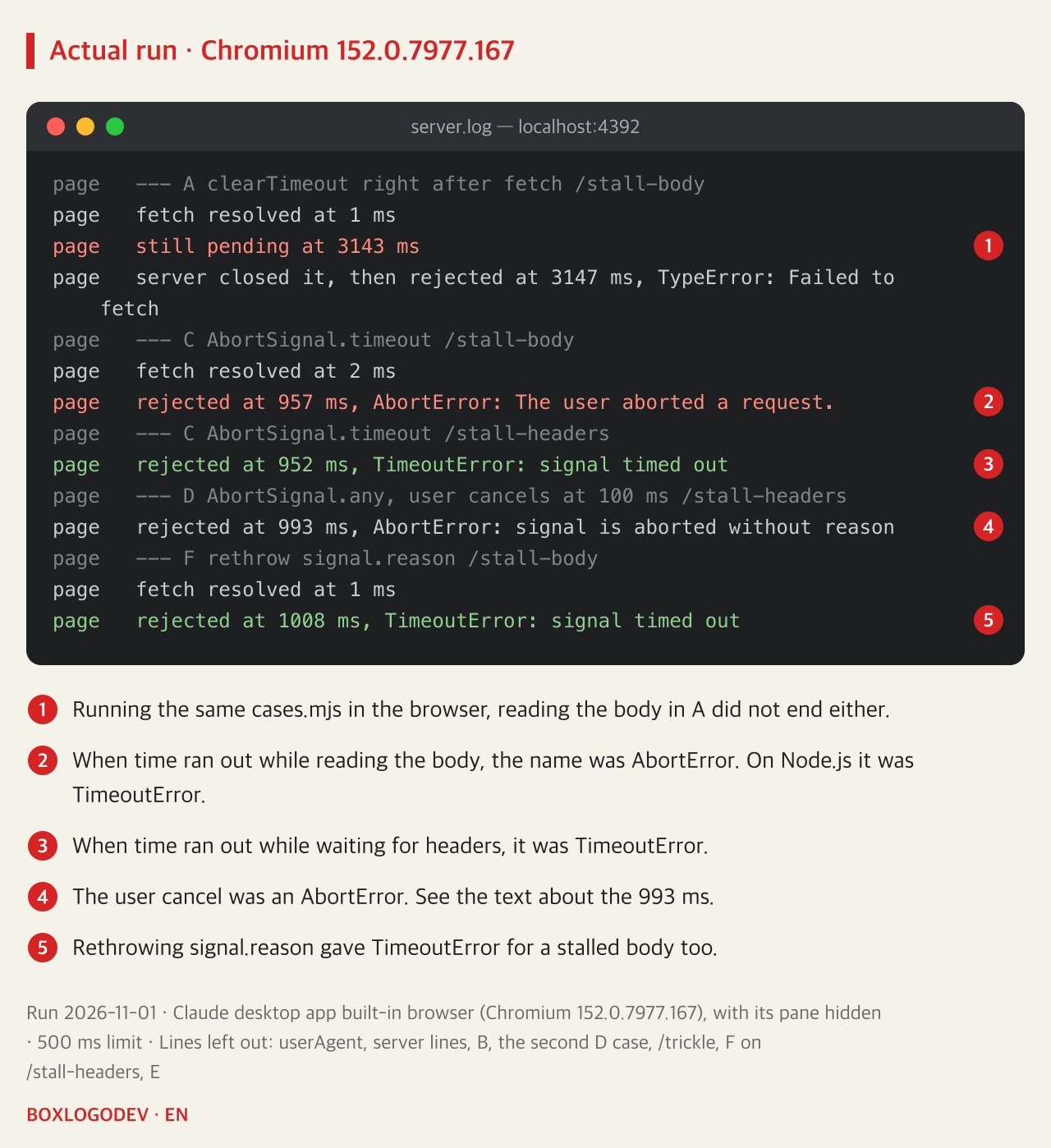
The request cut while waiting for headers was a TimeoutError, but the one cut while reading the body was AbortError: The user aborted a request., although no user had cancelled anything. On Node.js both were TimeoutError. The Fetch Standard has the body error with the abort reason, so as the author reads it, TimeoutError belongs there. Why it differs was not investigated, and other browsers and other versions were not run, so please take this as what was seen on this build only.
Even so, code checking only err.name === 'TimeoutError' misses a body timeout in this browser. MDN's AbortSignal.timeout example also keeps reading the body inside its try and branches on the error's name, so used as is, this case goes to the AbortError branch. Asking the signal instead of the name made the two environments agree.
async function getJson(url, ms, mark) {
  const signal = AbortSignal.timeout(ms);
  try {
    const res = await fetch(url, { signal });
    mark('fetch resolved');
    return await res.json();
  } catch (err) {
    throw signal.aborted ? signal.reason : err;
  }
}
To accept a user cancel as well, combine them with AbortSignal.any([userSignal, AbortSignal.timeout(ms)]). While waiting for headers, the name of whichever came first came through unchanged: AbortError for the cancel and TimeoutError for the timeout.
The browser's times were roughly 1000 ms rather than 500 ms. Even the rejection for the cancel set at 100 ms came at 993 ms. The browser pane was hidden during the run, and MDN's setTimeout page says browsers enforce a minimum timer delay in inactive tabs. Whether that was the cause was not tested separately. Still, it is safer not to expect a time limit in a background tab to fire exactly on time. In the picture above, look at the error names rather than the times.
To keep slow responses, measure the gap between chunks
If a long download is fine and only a stall is the problem, measure the gap between chunks instead of the total time. The Fetch Standard has no such request option, so you read the stream yourself.
async function readWithIdleLimit(url, ms, mark) {
  const controller = new AbortController();
  const expire = () => controller.abort(new DOMException(`no data for ${ms} ms`, 'TimeoutError'));
  let timer = setTimeout(expire, ms);
  try {
    const res = await fetch(url, { signal: controller.signal });
    mark('fetch resolved');
    const reader = res.body.getReader();
    const decoder = new TextDecoder();
    let text = '';
    for (;;) {
      clearTimeout(timer);
      timer = setTimeout(expire, ms);
      const { done, value } = await reader.read();
      if (done) return JSON.parse(text);
      text += decoder.decode(value, { stream: true });
    }
  } catch (err) {
    throw controller.signal.aborted ? controller.signal.reason : err;
  } finally {
    clearTimeout(timer);
  }
}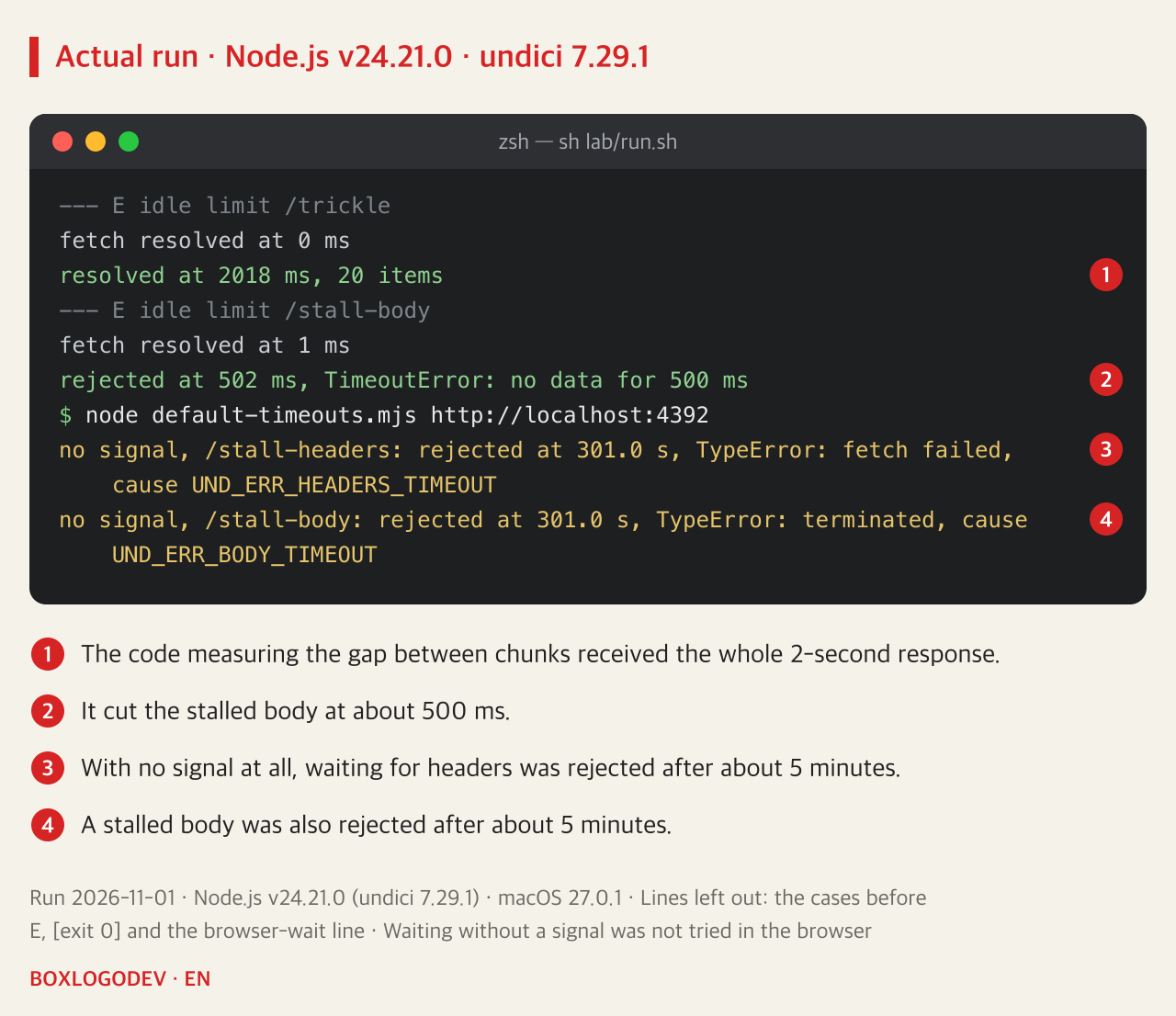
On Node.js, /trickle received all 20 items at 2018 ms and /stall-body was cut at 502 ms. The browser gave the same names and outcomes (2023 ms and 981 ms). This code does not limit the total time, so it cannot cut a response that keeps arriving a little at a time forever. If you need that, add a total limit with AbortSignal.any. That combination was not run.
With nothing set, Node.js waited about 5 minutes
fetch on Node.js with no signal was rejected at 301.0 seconds both when waiting for headers and when the body stalled. The cause codes were UND_ERR_HEADERS_TIMEOUT and UND_ERR_BODY_TIMEOUT. That matches the 300-second defaults of headersTimeout and bodyTimeout in the undici 7.29.1 docs. According to those docs, bodyTimeout measures the gap between chunks, not the total time. The current undici docs (main branch) add that these timeouts may not fire at the exact millisecond. Until the rejection, the user or the calling function waits. Waiting to the end without a signal was not tried in the browser.
DEV NOTES
How far does the time limit reach?
Three approaches, run with a 500 ms limit
Clear the timer right after fetch()
clearTimeout(timer)- It reaches the headers only
- With a stalled body it had not ended after 3 seconds
Limit the total time
AbortSignal.timeout(ms)- It reaches the headers and reading the body
- A 2-second response with data flowing was cut too
- Error names can differ by environment, so check signal.reason
Limit the gap between chunks
await reader.read()- Restart the timer on each chunk
- The 2-second response finished and the stalled one was cut
- It does not limit the total time
The author's summary of runs on Node.js v24.21.0 and Chromium 152.0.7977.167 on 2026-11-01. Google Chrome, Safari and Firefox were not run.
Look through your project for places where clearTimeout comes before res.json() or res.text(). Move those timers into finally and give abort() a reason, as readWithIdleLimit does, or switch to AbortSignal.timeout. Then decide whether something timed out with signal.aborted and signal.reason rather than err.name.
Add your perspective.
Share a question, another approach, or something you have tried.
Checking sign-in…
Loading comments…