You sort the score array [10, 9, 1, 100, 25] with sort() and get [1, 10, 100, 25, 9]. No error, no warning. After reading this you will know what the default sort() compares, what a compare function must return, when the original array changes, and what to use for file names and multilingual strings. Every example was run with node -p on 2026-10-02 in Node.js v24.21.0 (V8 13.6, ICU 78.3) on macOS 27.0.1.
The default sort compares strings, not numbers
When sort() is called without a compare function, JavaScript converts each element to a string and compares those strings by UTF-16 code unit order. That is what the CompareArrayElements step in the ECMAScript specification says: with no compare function, both values go through ToString and the strings are compared.
So 10 becomes "10" and 9 becomes "9". Strings are compared from the first character, so "1", "10" and "100", which all start with "1", come first, then "25", which starts with "2", and finally "9". It is dictionary order. For the same reason [-1, -2, 3].sort() returns [-1, -2, 3]: "-1" and "-2" differ at their second characters, 1 and 2.
![Three steps. 1 [10, 9, 1, 100, 25].sort() is called without a compare function. 2 Each value becomes the string "10" "9" "1" "100" "25" and they are compared by UTF-16 code units. 3 Values starting with "1" come first, giving [1, 10, 100, 25, 9]. For numeric order, an a - b compare function gives [1, 9, 10, 25, 100].](/images/en/js-array-sort-numbers-as-strings-01.svg)
To sort by numeric value, pass a compare function. With sort((a, b) => a - b) the same array becomes [1, 9, 10, 25, 100]. For descending order use b - a.
undefined and empty slots are handled separately. The specification never passes undefined to the compare function and always moves it to the end, and it places empty slots (elements that do not exist) after that. In the run, [3, undefined, 1, , 2].sort() returned [1, 2, 3, undefined, <1 empty item>].
![Node.js v24.21.0 output. [10, 9, 1, 100, 25].sort() gives [1, 10, 100, 25, 9]. An a - b compare function gives [1, 9, 10, 25, 100]. An a > b compare function leaves [10, 9, 1, 100, 25]. [3, undefined, 1, empty, 2].sort() gives [1, 2, 3, undefined, 1 empty item]. After sort, the original a is [1, 9, 10] and b === a is true. After toSorted, the original is [10, 9, 1] and the new array is [1, 9, 10].](/images/en/js-array-sort-numbers-as-strings-run-01.png)
A compare function must return a negative number, zero or a positive number
A compare function (a, b) must return a negative number if a should come first, a positive number if it should come later, and zero if their order does not matter. If it breaks this contract, the specification calls the resulting order implementation-defined. It can differ between engines and between array lengths.
A common mistake is sort((a, b) => a > b). It returns true or false, and the specification converts that to a number: true is 1 and false is 0. It never returns a negative number, so it has no way to say “a comes first.” In this run the array came back unchanged as [10, 9, 1, 100, 25]. The real danger is that another engine or another length might happen to look sorted.
a - b is not universal either. On the BigInt array [30n, 4n, 100n], (a, b) => a - b returns a BigInt, and when the specification tries to convert it to a Number the call stops with TypeError: Cannot convert a BigInt value to a number. A function that returns only the sign is safe here: (a, b) => (a < b ? -1 : a > b ? 1 : 0). The run returned [4n, 30n, 100n].
![Four boxes. For Numbers, a - b returns negative, zero or positive and sorts ascending. a > b returns only true (1) or false (0), never a negative, and the run left [10, 9, 1, 100, 25] unchanged. a - b on BigInts throws a TypeError. Returning only the sign with a < b ? -1 : a > b ? 1 : 0 gives [4n, 30n, 100n].](/images/en/js-array-sort-numbers-as-strings-02.svg)
sort changes the original array and returns the same array
const sorted = list.sort(...) looks as if it creates a new array, but sort() sorts in place and returns the same array. In the run, a was already [1, 9, 10] after a.sort(...), and b === a was true. Sorting React state or an array received as a function argument this way also changes the order wherever else it is used.
To keep the original, use toSorted(). It returns a new array sorted by the same rules and leaves the original alone. In the run, a stayed [10, 9, 1] and only the new array was [1, 9, 10]. MDN lists toSorted() as available across major browsers since July 2023. If you must support older environments, copy first with [...list].sort(...). The two methods treat empty slots differently: sort() keeps them as empty slots, while toSorted() fills them with undefined.
Stability is worth knowing too. Since ECMAScript 2019, sort() must be stable: elements that compare as 0 keep their original order. Sorting A, B, C and D with ages 30, 25, 30 and 25 by age gives B D A C. Within each age, B stays before D and A before C. That is why sorting by name and then by department keeps names in order within each department.
Use Intl.Collator for strings and file names
It is tempting to sort strings with the default sort(), but code unit order is not the order people expect. ["banana", "Zoe", "apple", "Éclair"].sort() gives ["Zoe", "apple", "banana", "Éclair"]. The code of Z is 90, a is 97 and É is 201, so capitals come before lowercase letters and accented letters go to the end. Comparing with localeCompare(b, "en") gives ["apple", "banana", "Éclair", "Zoe"].
File names with numbers in them have the same problem. Sorting img10.png, img2.png and img1.png by default puts img10.png before img2.png. Passing the compare method of new Intl.Collator("en", { numeric: true }) treats the digits as numbers and gives img1, img2, img10. For large arrays MDN recommends creating one Intl.Collator object and using its compare rather than calling localeCompare each time.
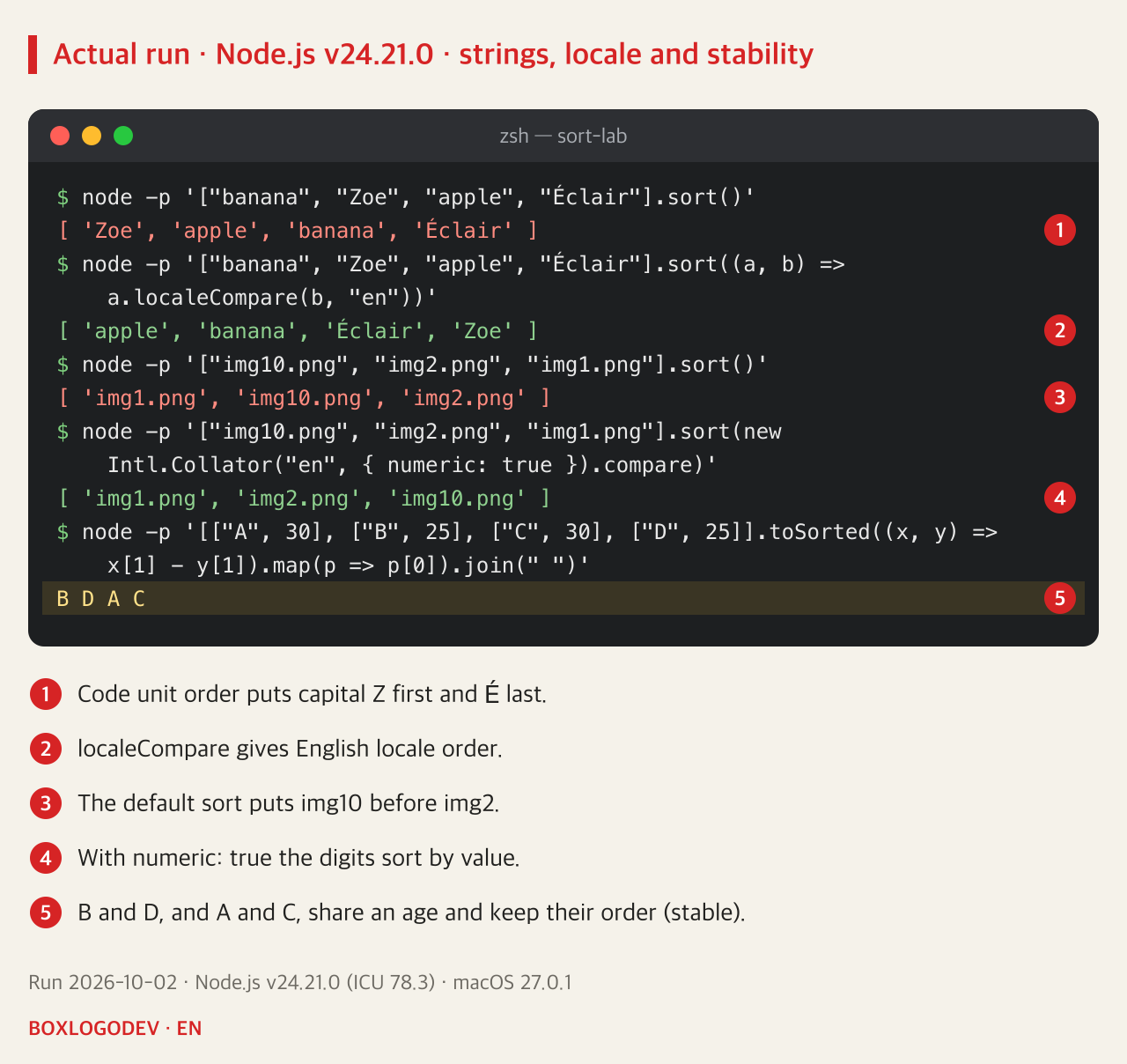
Locale-aware results can vary with the locale and the ICU data. The results above come from Node.js v24.21.0 with ICU 78.3; other browsers and versions were not run. The values localeCompare returns are not fixed at -1 and 1 either, so check only the sign.
![Four boxes. sort() changes the original and returns the same array, so b === a is true. toSorted() keeps the original [10, 9, 1], returns a new array and turns empty slots into undefined. localeCompare(b, "en") gives apple banana Éclair Zoe. Intl.Collator with numeric: true gives img1, img2, img10; for big arrays create it once.](/images/en/js-array-sort-numbers-as-strings-03.svg)
What to check before writing sort code
When a sort looks wrong, first look at what the array holds. Numbers, strings that look like numbers, BigInts, or a mix with undefined and empty slots each call for a different tool. Use (a, b) => a - b for Numbers, a sign-only compare function for values like BigInt whose difference cannot be converted to a Number, and Intl.Collator for strings and file names shown to people. Where the original must stay intact, use toSorted() or sort a copy.
The shortest rule to remember: never call sort() without a compare function on an array of numbers. When a code review shows a bare .sort(), ask what the array contains.
Add your perspective.
Share a question, another approach, or something you have tried.
Checking sign-in…
Loading comments…