Imagine a habit-tracking app. You record a workout in Korea at 12:30 a.m. on September 20, but the list shows September 19. Before adding a day to the date, place the input, the value sent to the server, and the screen's display rules side by side.
The central distinction is between a date selected on a calendar and the instant when something happened. If both are handled with the same data type and functions, code that looks fine during the day can reveal problems around midnight or in another time zone. A small example makes it easier to follow a value through the system.
First decide what “when” means
“A task for September 20” is a calendar date. The user did not select an hour or minute and may not expect the due date to become the 19th when opening the app abroad. “The record was created at 12:30 a.m. on September 20,” by contrast, describes an instant. Expressing the same instant on clocks in Seoul and another region can change even the calendar date.
Separate field names make this easier to judge. Use a distinction such as dueDate for the task's date and createdAt for its creation timestamp. Validate a date when only a date is needed, and make the time reference explicit when recording an instant. A single habit entry can store both the activity date selected by the user and the instant they pressed Save.
If someone enters yesterday's workout after midnight, decide whether the calendar should show yesterday's activity or a record written today. Without that rule, even a correctly stored instant can disagree with the date the user expects.
Follow the same instant from input to storage to screen
JavaScript's Date represents an instant. It does not separately retain the regional time zone of the original input. In 2026-09-20T00:30:00+09:00, the +09:00 offset means a time nine hours ahead of UTC. Expressed in UTC, the same instant is 3:30 p.m. on the previous day, September 19.
The diagram shows an app that has chosen UTC strings for storing and exchanging event timestamps. Different date portions in the input and stored value are not, on their own, evidence of an error if both represent the same instant. A screen intended to show Seoul dates must apply the Seoul time zone again.
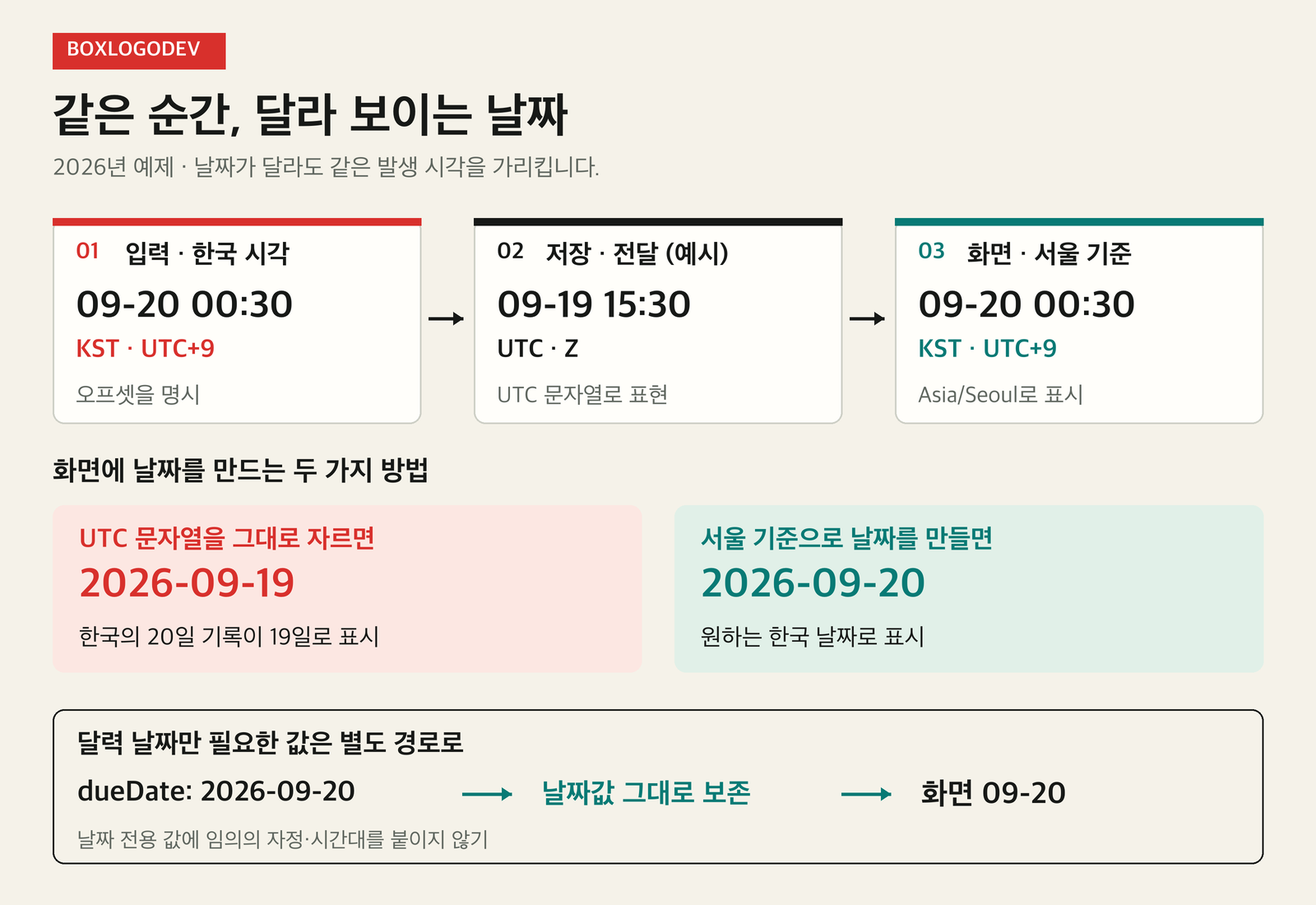
Exchange timestamps through the API using strings with an explicit offset, and check that storage preserves the same instant. Standardizing on UTC strings is one option. Timestamp data types and settings differ between storage products, so do not turn this frontend example directly into a universal database-design rule. If the region where the activity took place also matters, treat that regional time zone as separate information.
Why cutting the front of a string can shift the date
toISOString() always returns a string expressed in UTC, indicated by the final Z. This code prints the same instant as both a UTC string and a date in Seoul.
const recordedAt = new Date("2026-09-20T00:30:00+09:00");

console.log(recordedAt.toISOString());
// 2026-09-19T15:30:00.000Z

const displayDate = new Intl.DateTimeFormat("ko-KR", {
  timeZone: "Asia/Seoul",
  year: "numeric", month: "2-digit", day: "2-digit",
});
console.log(displayDate.format(recordedAt));
// 2026. 09. 20.
Using toISOString().slice(0, 10) here leaves 2026-09-19. Those first ten characters are the calendar date as seen in UTC. If you cut them out to obtain the record's date in Seoul, you used the wrong frame of reference. Slicing a string does not perform a date conversion.
For display, pass the time zone selected by the service to Intl.DateTimeFormat. The ko-KR locale controls Korean formatting conventions, while timeZone determines the time zone in which the instant is expressed. Selecting a Korean locale and selecting the Seoul time zone are separate decisions. Managing these rules in a shared formatting function reduces the number of places to change when they would otherwise be scattered across screens.
What happens when a date-only value becomes midnight
A standard date-only string such as new Date("2026-09-20") is interpreted as midnight UTC. Display that instant in Los Angeles and the date becomes September 19. The user chose the 20th on a calendar, but the code converted that choice into a specific instant in UTC, then moved it to another time zone.
For a field that needs only a date, consider storing and exchanging a valid YYYY-MM-DD value. Its meaning as a calendar date should remain intact through the API and storage layer. Do not check only string length and hyphen positions; reject nonexistent dates such as February 30 too. Displaying a year, month, and day does not necessarily require converting the value into a Date object.
Conversely, if the actual deadline is “6 p.m. on September 20 in Seoul,” a date alone is insufficient. Define the time and the time zone that applies. Rather than applying “dates as strings, times as UTC” mechanically, begin by asking what promise that field makes to the user.
Compare one record at four points when fixing the problem
First choose one record that reproduces the issue. Immediately after input, inspect the user's original selection and the meaning of the field. Next, check whether an offset or Z was lost in the API request. Compare the response received after storage to see whether it preserves the same instant or the same date. Finally, inspect the locale and time-zone options supplied to the screen.
For example, if both the request and response contain 2026-09-19T15:30:00.000Z, but the screen alone shows the 19th, start with the display rules. If the request had +09:00 but the response lost its time-zone notation, inspect interpretation on the server or in storage. Recording the original and converted values separately narrows the place that needs fixing.
Include inputs just before and just after midnight, as well as the last day of a month and the first day of the next. Define the expectation that a screen using Seoul time must show the same date even when the host time zone changes between Seoul, UTC, and Los Angeles. Separately verify that a date-only field preserves the user's selected date in every environment.
Blindly adding nine hours when a date looks wrong can apply a correction twice to a value that was already converted. When asking AI to help with a fix, provide the original input, current output, desired output, reference time zone, and field meaning together. For this example, a clear goal is: “Show an activity recorded for the 20th in Seoul as the 20th, while preserving the instant the record was created.”
The existing September 20, 2026 execution record confirms the article's code output with Node.js v24.19.0 and ICU 78.3. Its scope was string conversion and date formatting; it did not cover integration with a real app's API or storage.