When an input validator passes a value once and fails the same value the next time, or when filter() drops about half the rows that should match, look first at the regex's g flag. A regex object with g remembers where its last search ended. After reading this you can tell which methods use that position and decide whether to remove g or keep it.
The examples were run on 2026-11-01 on macOS 27.0.1 with Node.js v24.21.0 (V8 13.6.233.17). The behaviour was checked against the ECMA-262 draft (October 31, 2026) and MDN, and nothing was run in a browser. All values in the examples are fictional.
A regex object remembers its last position
Here is a digit check kept as a constant at the top of a module, with a g it does not need.
const digits = /^\d+$/g;

for (let call = 1; call <= 4; call++) {
  const before = digits.lastIndex;
  const result = digits.test("12345");
  console.log(`call ${call}: lastIndex ${before} -> ${digits.lastIndex}, test = ${result}`);
}
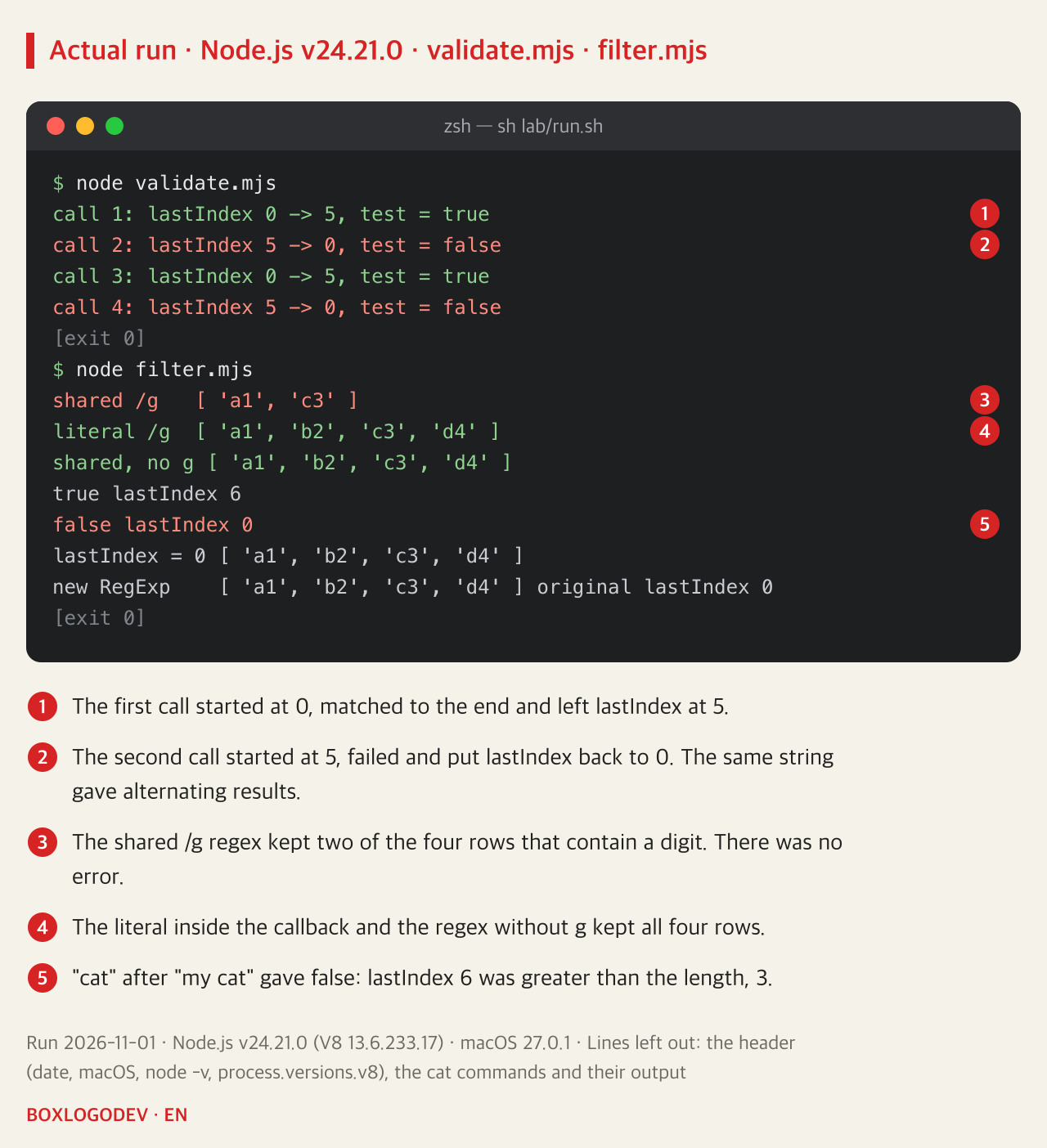
The string is "12345" every time, yet the results were true, false, true, false. The cause is the lastIndex property. The first call started at 0, matched to the end and left lastIndex at 5. The second call started at 5, where ^ cannot match, so it failed, and the failure put lastIndex back to 0. So the third call matches again.
The specification's RegExpBuiltinExec says the same. It reads lastIndex but uses 0 when neither g nor y is set, and only when one of those flags is set does it write back the end position on success or 0 on failure. test() goes through exactly this and then returns only whether it matched.
The position carries over to other strings
The problem is not limited to checking one string twice. MDN points out that while test() keeps returning true, lastIndex does not reset even for a different string. This array has a digit in every row, filtered with a shared regex.
const rows = ["a1", "b2", "c3", "d4"];

const shared = /\d/g;
console.log("shared /g  ", rows.filter((s) => shared.test(s)));

console.log("literal /g ", rows.filter((s) => /\d/g.test(s)));

const noFlag = /\d/;
console.log("shared, no g", rows.filter((s) => noFlag.test(s)));
The shared regex kept only a1 and c3. After matching a1, lastIndex was 2, and b2, which has length 2, has no characters left from position 2, so it failed. No error appears; the rows just go missing. A shorter string after a longer one does the same. /cat/g matched "my cat" and lastIndex became 6, and then "cat" gave false. As the specification says, when lastIndex is greater than the string's length the match fails and it returns to 0.
/\d/g written directly inside the callback kept all four rows. Under the specification a regex literal creates a new object each time it is evaluated, so each call of the callback used an object with lastIndex 0. So code that worked can start going wrong the moment the same expression is moved out into a constant.
Each method treats lastIndex differently
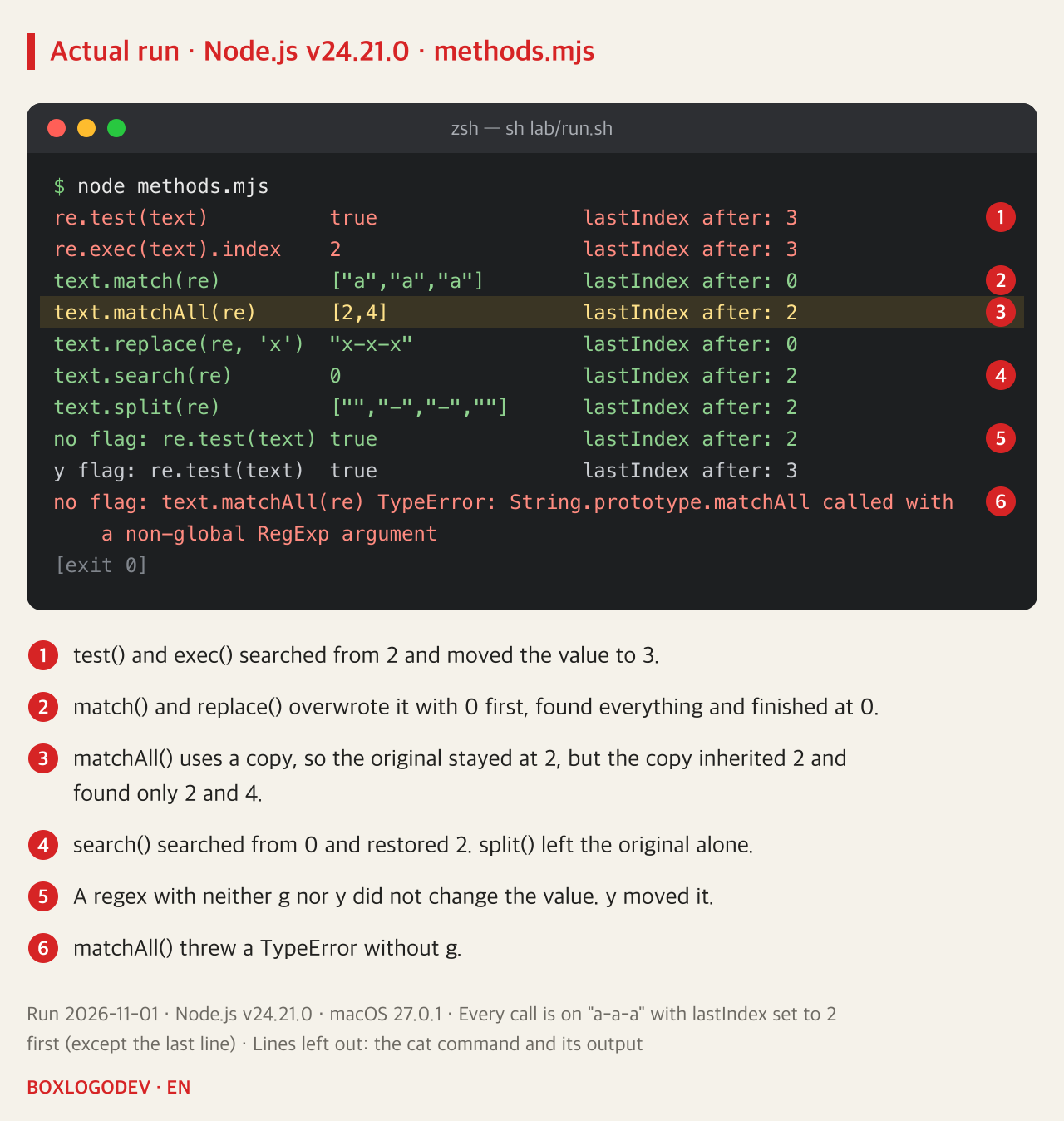
With the string "a-a-a" and /a/g, each method was called with lastIndex set to 2 beforehand, and its result and the value afterwards were printed.
test()andexec()searched from 2 and moved the value to 3. These two are the methods that carry the position forward.match()andreplace(), withg, overwrite it with 0 first, so they found or replaced all three and finished at 0.matchAll()works on a copy of the regex, so the original stayed at 2. But the copy also inheritslastIndex, so it found only the matches at 2 and 4. It does not always start from the beginning.search()searched from 0 and restored the value to 2 afterwards.split()builds a new regex, so the original was unaffected.- With neither
gnory,test()ignoredlastIndexand did not change it.ymoves the position asgdoes and, per the specification, must match right at that position.
matchAll() throws a TypeError without g. So do not remove g from a regex you pass to matchAll().
An exec() loop is what this position is for
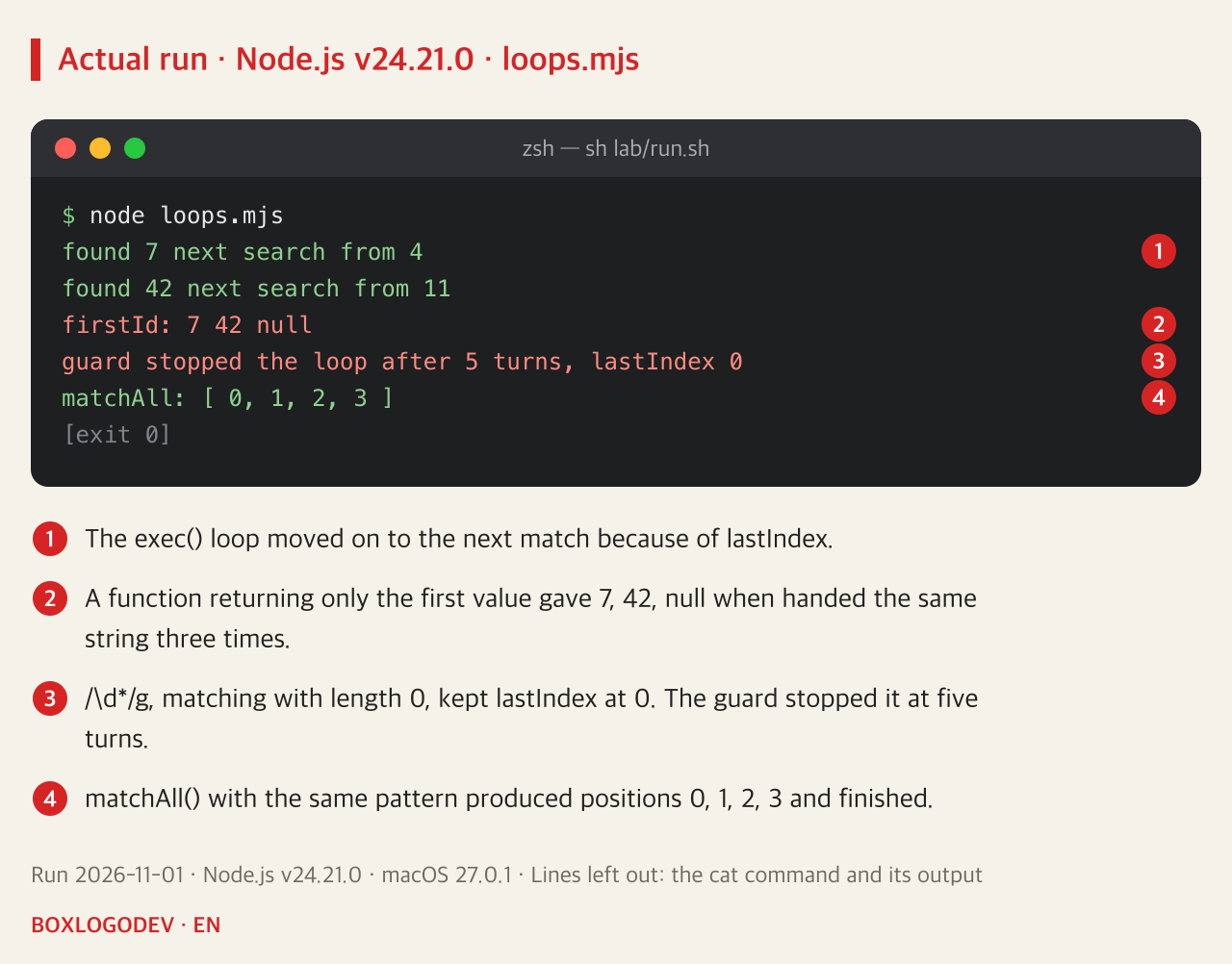
lastIndex itself is not the problem. A while ((m = id.exec(text)) !== null) loop moves on to the next match because of it. Running /id=(\d+)/g over "id=7, id=42" found 7 and then 42.
The trap is stopping before the end. A function that returns only the first value, using that same constant, gave 7, 42 and null when handed the same string three times. Patterns that can match an empty string need care too. exec() with /\d*/g on "abc" matched with length 0 and lastIndex stayed at 0; without the guard that stopped it after five turns, this loop would not have ended. MDN also lists this as an infinite-loop trap and says such code can usually be replaced with matchAll(). The same pattern in matchAll() produced positions 0, 1, 2 and 3 and finished.
The fix depends on what you want
If you only want to know whether it matches, remove g. Shared like noFlag above, it kept every row. If you want every match, use match() or matchAll() in place of an exec() loop. With g, match() returns only the whole matches, so /id=(\d+)/g from earlier gave id=7 and id=42. If you need capture groups, use matchAll(), which gave 7 and 42 through m[1]. If you receive a regex with g from elsewhere and cannot remove it, set re.lastIndex = 0 right before each call, or make a fresh copy with new RegExp(re) for each call. A copy keeps g too, so a single copy that you share has the same problem. Done on each call, both kept all four rows, and with the copy the original's lastIndex stayed at 0.
DEV NOTES
Before using a g regex, decide what you want
test() and exec() are the methods that carry lastIndex forward
Only want to know if it matches
const noFlag = /\d/;- Remove g
- Even as a shared constant, it kept all four rows
Want every match
[...text.matchAll(re)]- Use match() or matchAll()
- matchAll() throws a TypeError without g
- If the original's lastIndex is not 0, matchAll() starts there
Cannot remove g
re.lastIndex = 0;- Set lastIndex to 0 before each call
- Or copy it with new RegExp(re) on each call
- Both kept all four rows
Based on runs on Node.js v24.21.0 on 2026-11-01, the ECMA-262 draft (October 31, 2026) and MDN. Nothing was run in a browser.
Look through your code for variables and constants that hold a regex with g or y, and see whether they are passed to test() or exec(). If one is used with test() only to ask whether a string matches, not to step through the matches in one string, that g is usually a character you can delete.
Add your perspective.
Share a question, another approach, or something you have tried.
Checking sign-in…
Loading comments…