The server log shows order 9007199254740993, but the value your page got from res.json() is 9007199254740992. One digit at the end changed, and a cancel request sent with that value may cancel a different order. After reading this you will be able to check for yourself where this starts, and choose between sending large IDs as strings and keeping the exact value with JSON.parse source text access.
The examples were run on 2026-10-07 on macOS 27.0.1 with Node.js v24.21.0 (V8 13.6). The server is a small fake order API in Python 3.9.6 on the same machine (127.0.0.1); orders A and B and their numbers are made up for this note.
JSON has no size limit for numbers, but JavaScript numbers do
The JSON grammar itself does not limit how many digits a number has. Instead, the JSON standard (RFC 8259) lets receivers set limits on range and precision, and notes that implementations using the widely available IEEE 754 double precision (binary64) agree exactly only on integers from -(253-1) to 253-1.
JavaScript's number is exactly that binary64. So the moment JSON.parse or res.json() turns a number in the JSON text into binary64, an integer it cannot represent is rounded to the nearest value it can. The boundary is Number.MAX_SAFE_INTEGER, which is 9007199254740991. From 253 up to 254, representable integers are only 2 apart, and above that the gap widens to 4, then 8.
DEV NOTES
Past 2^53, integers start to have gaps
What JSON.parse returned · Node.js v24.21.0
Up to …991 · unchanged
9007199254740991 → …991- Number.MAX_SAFE_INTEGER = 2^53-1
- isSafeInteger → true
2^53 to 2^54 · steps of 2
…993 → …992 · …995 → …996- Odd integers cannot be stored
- Halfway values round to even
19 digits · wider gaps
1234567890123456789 → …800- Several trailing digits change
- Different IDs become one value
Values are the parse.mjs output from 2026-10-07. RFC 8259 notes that binary64 implementations agree exactly only on integers within ±(2^53-1).
parse.mjs fed numbers around the boundary in one at a time. Up to 9007199254740991 they came back unchanged and Number.isSafeInteger was true. 9007199254740993 became 9007199254740992, and 9007199254740995 became 9007199254740996. Both sit exactly halfway between two representable values, so the round-half-to-even rule sent one down and the other up. The 19-digit 1234567890123456789 printed as 1234567890123456800. And JSON.parse("9007199254740992") === JSON.parse("9007199254740993") was true: two different IDs became the same value.
A different order is cancelled, with no error or warning
The fake API holds order A (9007199254740992) and order B (9007199254740993). GET /orders/latest sends order B with a numeric id and a string idText, and POST /cancel looks up the order by the id it receives and logs it. Python's json reads large integers exactly, so nothing changes on the server side.
The client did the usual thing: it took id from await res.json() and sent it back with JSON.stringify({ id }). The id it received was 9007199254740992, and the server logged that it got {"id":9007199254740992} and found order A. The user meant to cancel B; A was processed instead. There was no exception and no console warning.
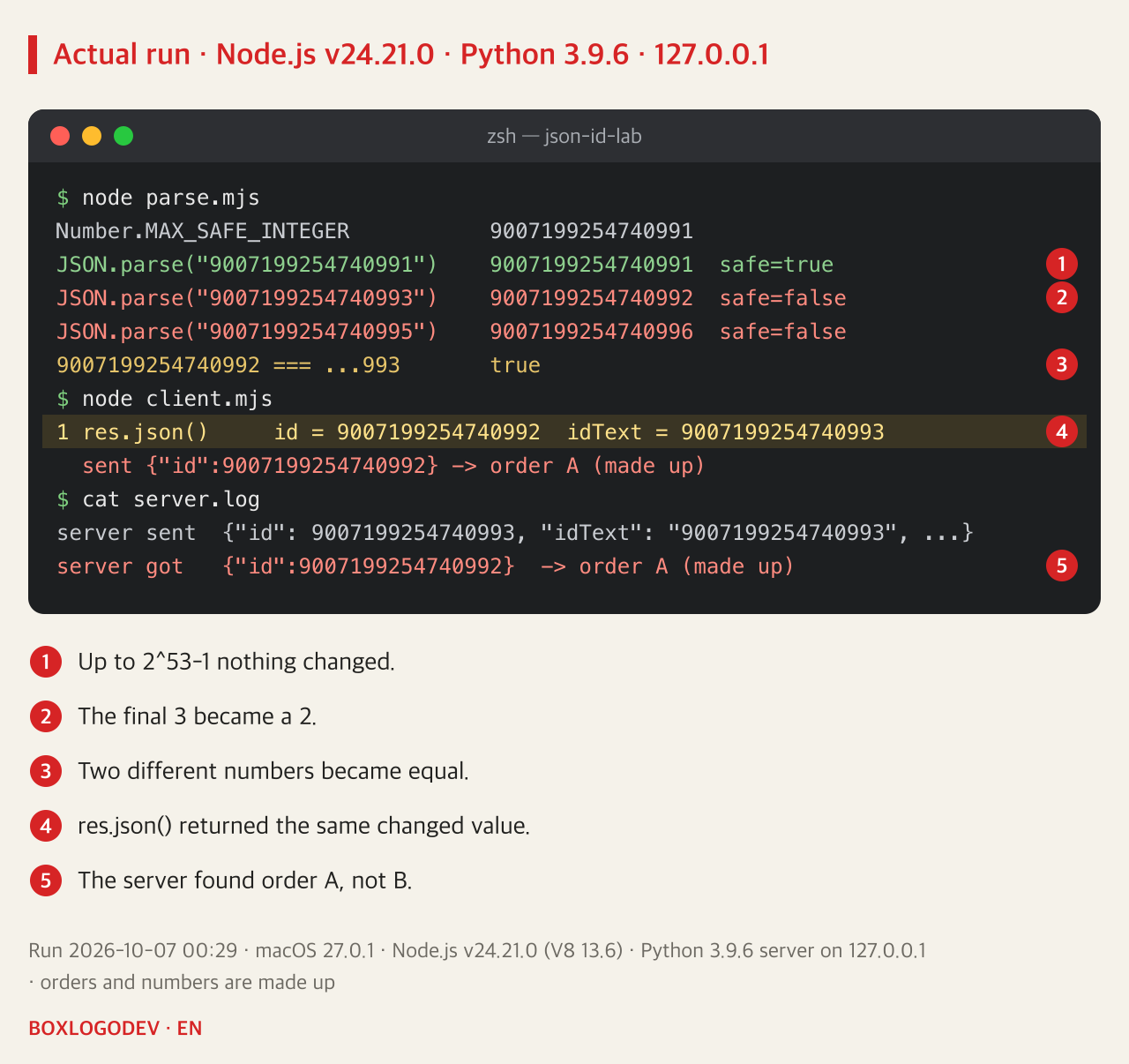
This also shows why the problem surfaces late. While IDs in development data are small, like 1, 2 and 3, nothing happens. Symptoms appear only once production data starts producing values above 253, such as 64-bit integer IDs built from a timestamp and a server number, and because only part of the value changes, it tends to be reported as "sometimes the wrong item opens".
DEV NOTES
How cancelling order B processed order A
A fake order API on 127.0.0.1 · orders and numbers are made up
Server sends
{"id": 9007199254740993}- Python json keeps big integers
- Order B's number
res.json()
id = 9007199254740992- Rounded on the way to binary64
- No error, no warning
JSON.stringify
{"id":9007199254740992}- Sends the changed value back
Order the server found
-> order A (made up)- A, not B
Taken from the run log of a Node.js v24.21.0 client and a Python 3.9.6 server, 2026-10-07.
Fix 1: send IDs as strings
The simplest fix, and one that works everywhere, is for the server to send large IDs as JSON strings. With "id": "9007199254740993" the client never turns it into a number; it keeps the text and sends it back as is. In the run, sending back idText made the server receive {"id":"9007199254740993"} and find order B.
An ID is an identifier you never add or multiply, so nothing is lost by making it a string. If you can change the API, start here. If the API already sends numbers, a safe order is to add a string field, move clients to it, then retire the numeric field.
Fix 2: read the source text into a BigInt and send it back unchanged
If you cannot change the API, the client has to catch the original digits. There is a common trap here: the reviver, the second argument to JSON.parse, is called after the number has been converted. Calling BigInt(value) inside the reviver only turns the already changed 9007199254740992 into a BigInt.
Recent JavaScript gives the reviver a third argument, context. For primitive values such as strings and numbers, context.source holds the original characters from the JSON text. In the run the client read the response with res.text() instead of res.json() and parsed it like this:
const data = JSON.parse(text, (key, value, context) =>
  typeof value === "number" && !Number.isSafeInteger(value)
    ? BigInt(context.source)
    : value);
The result was 9007199254740993n, of type bigint. Passing that straight to JSON.stringify, though, throws TypeError: Do not know how to serialize a BigInt. To send it, insert the digits as text that is already JSON with JSON.rawJSON:
const body = JSON.stringify(data, (key, value) =>
  typeof value === "bigint" ? JSON.rawJSON(value.toString()) : value);
With {"id":9007199254740993} sent this way, the server found order B. This fits APIs that must keep the numeric format.
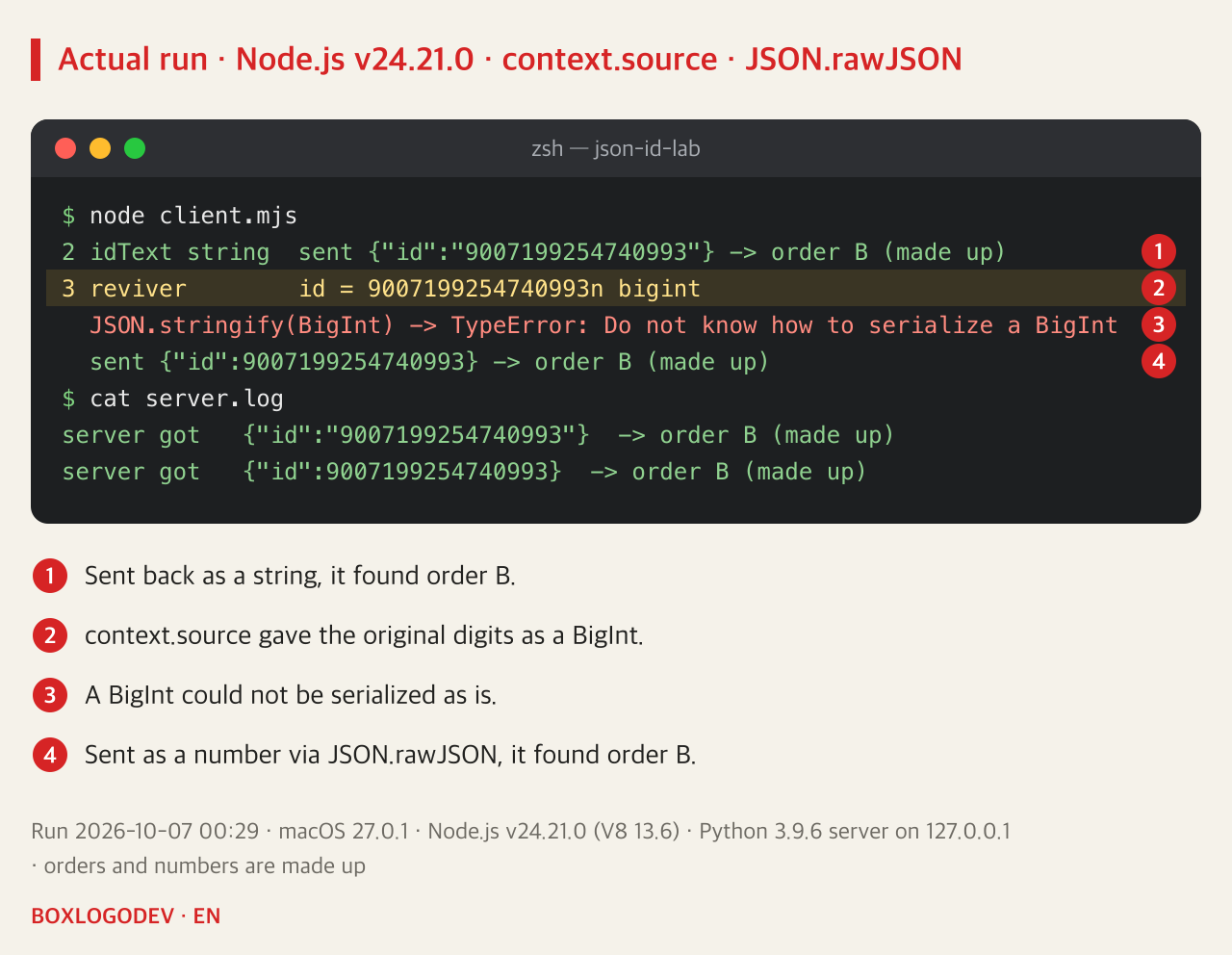
Check support before relying on it. The feature came from the TC39 proposal "JSON.parse source text access", and in this run Node.js v24.21.0 handled both context.source and JSON.rawJSON. MDN marks JSON.rawJSON as Baseline 2025, available in current versions of the major browsers since 2025. If you must support older browsers or runtimes, fix 1 is safer. This run did not include a browser.
Keep a boundary check either way
If you cannot fix it right away, you can at least make it fail loudly instead of silently. Check numeric IDs with Number.isSafeInteger(id), and when it returns false, log an error rather than sending the request. In the range where Number.MAX_SAFE_INTEGER + 1 === Number.MAX_SAFE_INTEGER + 2 is true, even comparisons cannot be trusted.
DEV NOTES
Three ways to keep a large ID intact
With the order the server found in the run
1 · Send it as a string
{"id":"9007199254740993"} -> B- First choice if you own the API
- Works in every runtime
2 · context.source + rawJSON
{"id":9007199254740993} -> B- When the format must stay numeric
- Read res.text() and parse it yourself
3 · Boundary check
Number.isSafeInteger(id)- A guard until the real fix
- If false, log it, don't send
Results for 1 and 2 are from the Node.js v24.21.0 run on 2026-10-07. 3 is a recommended check, not part of the run. A BigInt passed straight to JSON.stringify throws a TypeError.
In short, the changed last digits are not a network or server fault but rounding at the moment a JSON number becomes a JavaScript number. Look through the API responses you use for numeric fields that can exceed 253-1; make them strings if you can, and keep the original digits with context.source and JSON.rawJSON if you cannot.
Add your perspective.
Share a question, another approach, or something you have tried.
Checking sign-in…
Loading comments…