Put Cache-Control: no-cache on a response and it sounds as if the browser will keep nothing, but storing is not what this directive prevents. It prevents reuse without checking with the server. After reading this you can decide between no-cache, no-store and max-age, and check for yourself whether a response was stored, using a server log, transferSize and a cache-only request.
The examples were run on 2026-11-01 on macOS 27.0.1. The browser was the Claude desktop app's built-in browser (Chromium 152.0.7977.167) and the server was a local one built with Node.js v24.21.0 (localhost:4391). The behaviour was checked against RFC 9111, the Fetch Standard and MDN. Google Chrome, Safari, Firefox, page navigation, reloads and CDNs were not run, so the observations below are this browser's fetch() results. The response content (v1, v2 and the padding) is made up; the status codes, sizes and log lines are real output from the 2026-11-01 run.
no-cache allows storing but requires a check before each reuse
RFC 9111 says a response with no-cache must not be used for another request until it has been forwarded to the server for validation and a successful answer has come back. There is no sentence forbidding storage. MDN's Cache-Control page also notes separately that it is not for preventing storage. The same page notes that no-cache does not guarantee revalidation for history navigations such as the Back button. Those were not run here.
The test server sends the same size of JSON (2000 bytes) and changes only the headers.
'no-cache+ETag': { cc: 'no-cache', etag: true },
'no-store+ETag': { cc: 'no-store', etag: true },
'no-cache only': { cc: 'no-cache', etag: false },
'max-age=60+ETag': { cc: 'max-age=60', etag: true },
'max-age=0+ETag': { cc: 'max-age=0', etag: true },
'Last-Modified only': { lastModified: true, etag: false },
The page makes the same requests in the same order for each directive. It reads the same URL twice, changes the server's content from v1 to v2, reads once more, and finally reads from the cache only. only-if-cached is a mode that looks in the HTTP cache without going to the server, and here it is used to ask directly whether the response is stored.
await get(name, url, 'fetch 1');
await get(name, url, 'fetch 2');
await fetch(`/bump/${run}/${id}`, { method: 'POST', cache: 'no-store' });
await get(name, url, 'fetch 3');
await get(name, url, 'only-if-cached', { cache: 'only-if-cached', mode: 'same-origin' });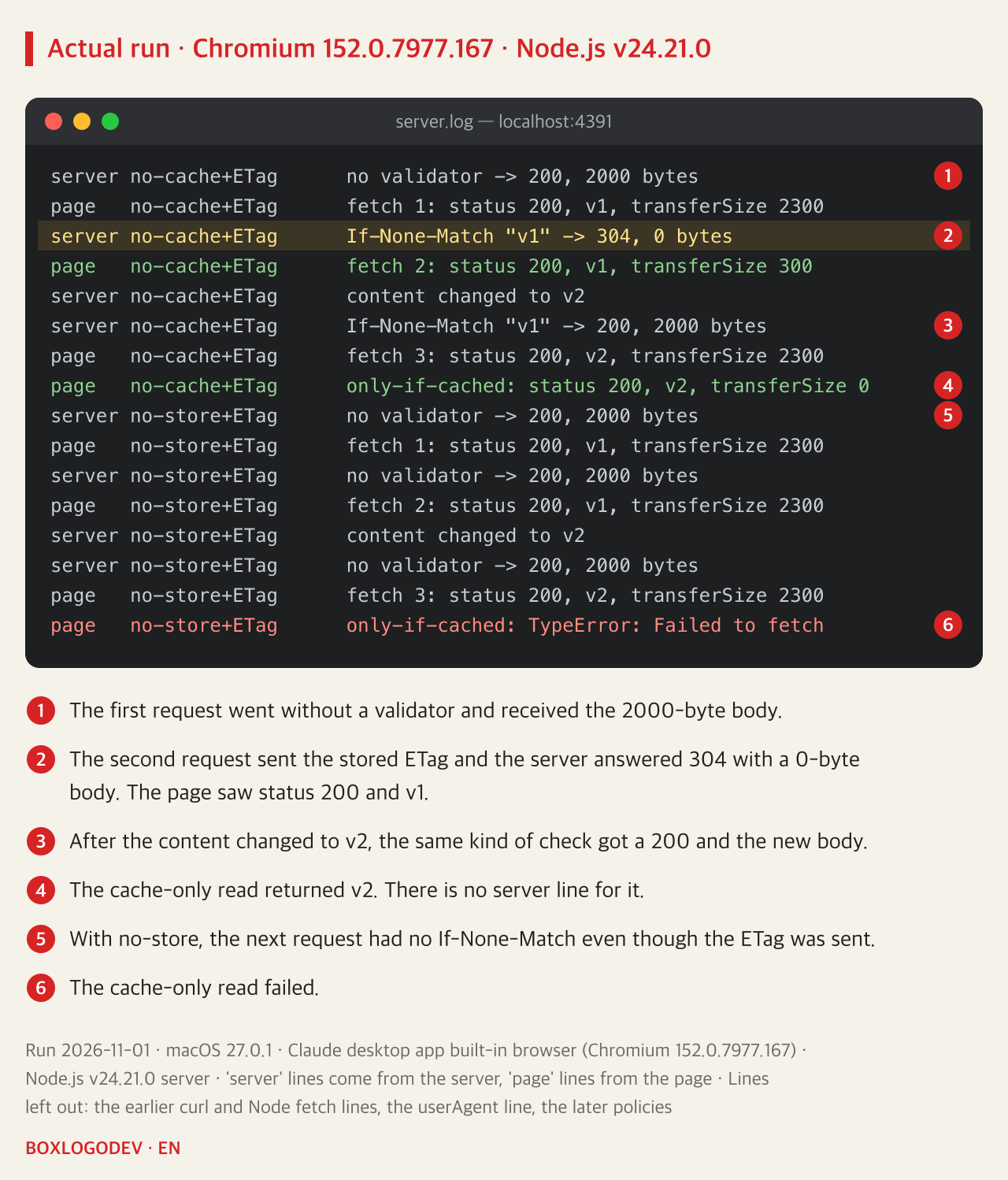
The second no-cache request gives the answer. The browser sent If-None-Match "v1" and the server answered 304 with a 0-byte body. Yet the page's res.status was 200 and the content was v1. The server did not send the body, so the browser must have kept the first response. The Fetch Standard also says that when revalidation gets a 304, the stored response is returned in its place. So the code never saw a 304 in the 2026-11-01 run. Only transferSize dropped, from 2300 to 300. According to MDN this value is the body size plus a fixed 300 standing in for the headers, and exactly 300 after a revalidation, so 300 here marks a body that was not downloaded again rather than a measured byte count.
By the third request the content had changed to v2, and the server answered 200 with the new body. That is what no-cache is good for: no body is downloaded again while nothing changes, and new content arrives as soon as it does.
no-store leaves nothing to check with
With no-store, the next request had no If-None-Match even though an ETag was sent, and all three requests received 2000 bytes. The cache-only read ended in TypeError: Failed to fetch. For a missing entry the Fetch Standard says a network error is returned, while MDN's Request.cache page says a 504 response. The result here matched the standard.
In RFC 9111, no-store means not intentionally writing to non-volatile storage and making a best effort to remove the data from volatile storage as soon as possible. The same section adds that this directive is not a reliable or sufficient means of ensuring privacy, on the grounds that malicious or compromised caches might not obey it and that networks might be open to eavesdropping. This test only saw an HTTP cache lookup fail. It did not open the disk to look.
Without a validator, a server log cannot tell them apart
The response that is easy to misread is no-cache with neither ETag nor Last-Modified.
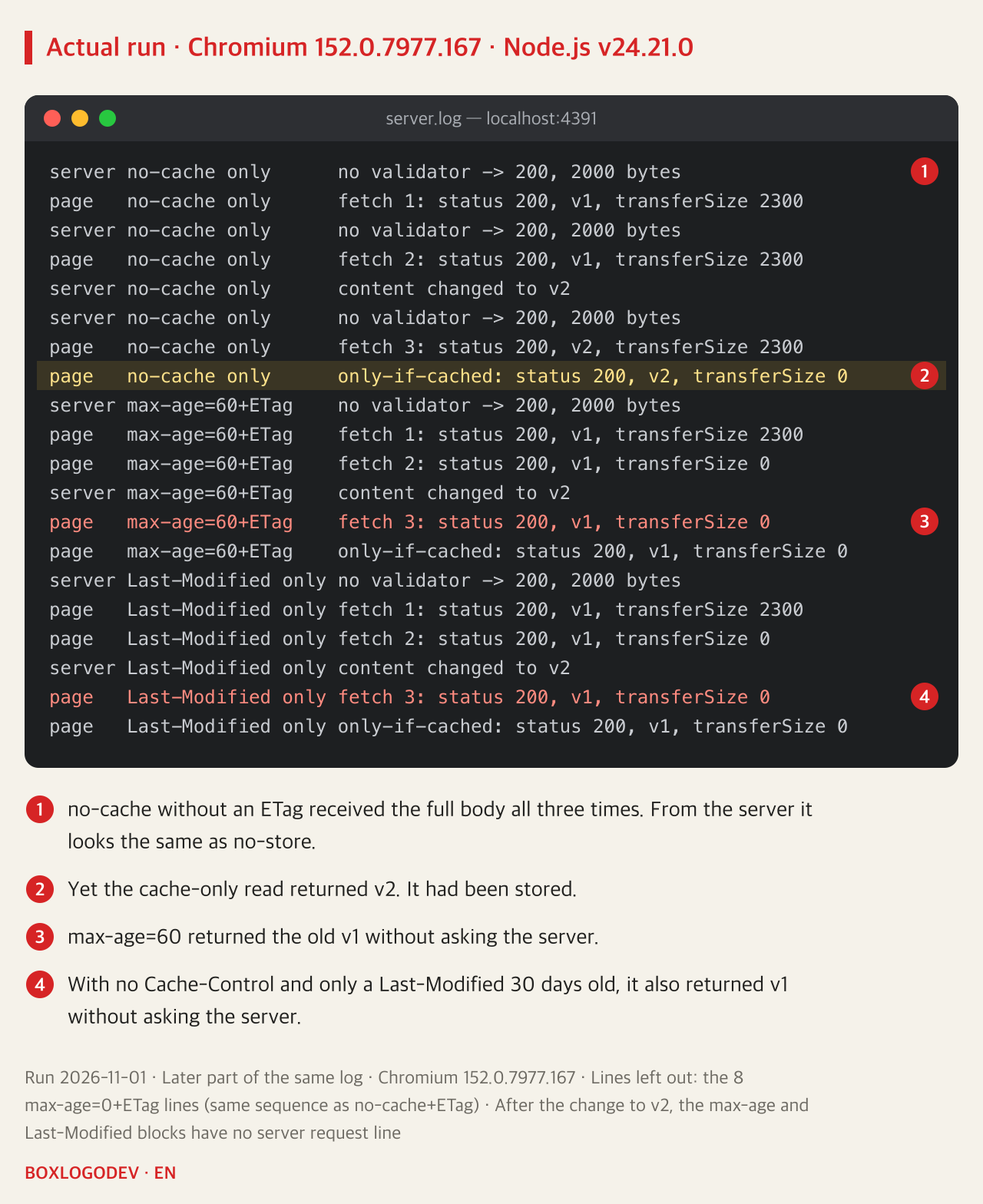
The browser has no validator to send, so all three requests show no validator, 200 and 2000 bytes. From the server it looks exactly like no-store. Yet only-if-cached returned v2, which means it had been stored. So do not conclude "the full body comes every time, so it is not stored." For responses that should not linger, such as tokens or personal data, use no-store, and keep the limits above in mind even then.
Even with no directive, the browser may not ask the server
max-age=60 did what you would expect. The server's content changed to v2, yet the third read returned v1 with no server line. The easier one to miss is the response with no Cache-Control and only a Last-Modified 30 days old. It too returned v1 after the change to v2, without asking the server. RFC 9111 says that without an explicit expiry time a cache may (MAY) estimate how long a response stays fresh, encourages a value of no more than some fraction of the time since Last-Modified, and says a typical fraction might be 10%. It also says it does not provide specific algorithms, so these results cannot tell how many days this browser uses, and that was not measured.
The response with max-age=0 and an ETag came out in the same order as no-cache: a 304, then a 200 after the change. The documents do draw a difference, though. In RFC 9111 no-cache prohibits serving a stale response, while a response without such a prohibition leaves room for a cache to serve it stale when it is disconnected from the server. The disconnected case was not run.
fetch's cache option uses the same words for a different target
A header directive sits on the response, while fetch(url, { cache }) sets the behaviour of that one request. The shared names make them easy to mix up.
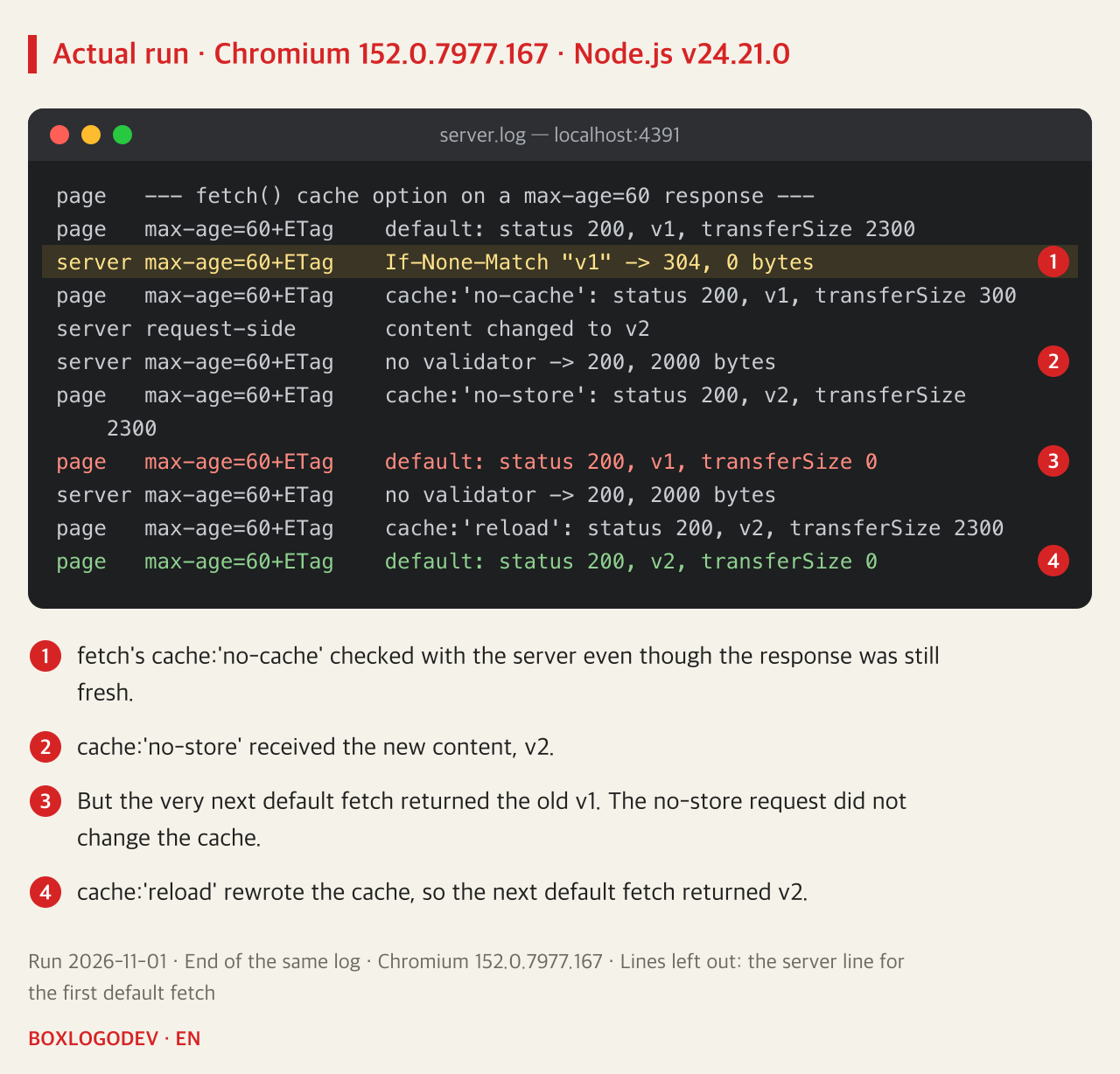
cache: 'no-cache' checked with the server even for a max-age=60 response that was still fresh. The part to notice comes next. cache: 'no-store' received the new content, v2, but the default fetch right after it returned the old v1. As MDN describes, this mode does not update the cache with the response it receives. To change the cache as well, use cache: 'reload'. After that, the next default fetch returned v2.
Check from both the browser and the server
This difference did not show with curl or Node.js here. Calling the same no-cache URL with plain curl 8.7.1 gave 200 2000 bytes, and 304 0 bytes appeared only after adding -H 'If-None-Match: "v1"' by hand. fetch on Node.js v24.21.0 got 200 both times, and the requests that reached the server carried no validator. Use curl to see whether the server produces a 304, and use the server log together with PerformanceResourceTiming.transferSize to see what the browser reused. According to MDN, a value of 0 with a non-zero body size means the resource came from a local cache, and cross-origin resources must pass both the Timing-Allow-Origin and CORS checks for this to work.
DEV NOTES
Start from what you want to prevent
Three directives run against the same local server
Prevent storing
Cache-Control: no-store- The cache-only read failed
- The full body came every time
- RFC 9111 still says this is not sufficient for privacy
Prevent reusing old content
Cache-Control: no-cache- Storing is allowed; it was stored in the 2026-11-01 run
- With an ETag, unchanged content got a 304 and 0 body bytes
- Changed content came back at once
Reduce requests
Cache-Control: max-age=60- Within the set time it did not ask the server
- Changes in that time did not show
The author's summary of runs on Chromium 152.0.7977.167 on 2026-11-01 and RFC 9111. Other browsers, page navigation and CDNs were not run.
Before changing the header, first settle whether you want to prevent storing or prevent stale content. If stale content is the problem, send no-cache together with an ETag. If storing itself is the problem, send no-store, then, from a page on the same origin as that URL, send one only-if-cached request with mode: 'same-origin' and check the result. For a URL on another origin this request fails whether or not the response is stored: in a separate run in the same browser, from a page on localhost:4396, a stored response on 127.0.0.1:4396 and a URL never requested there both ended in TypeError: Failed to fetch. A failure there tells you nothing.
Add your perspective.
Share a question, another approach, or something you have tried.
Checking sign-in…
Loading comments…