If you run two apps, one on localhost:4371 and one on localhost:4372, and logging in to one ends the login on the other, the cause is that cookies do not care about ports. The browser treats the two addresses as different origins, but it ignores the port when it stores and sends cookies. After reading this, you will be able to confirm the behaviour yourself from the Cookie header in a server log, and decide whether to separate two apps by cookie name or by host name.
The experiment was run on 2026-10-27 on macOS 27.0.1. Two servers built with node:http in Node.js v24.21.0 listened on ports 4371 and 4372 (on 127.0.0.1 and ::1 only) and were opened in the built-in browser of the Claude desktop app (Chromium 152.0.7977.167). For each request, each server logs the Host header and the lab's own cookies from the Cookie header (names starting with lab1130_ or __Host-lab1130_), and each page reports its own localStorage value back to the server so that it lands in the same log. The cookie name lab1130_sid and its values exist only for the experiment. Google Chrome itself, Safari and Firefox were not tested, and no HTTPS address was tried.
A cookie from 4371 goes to 4372
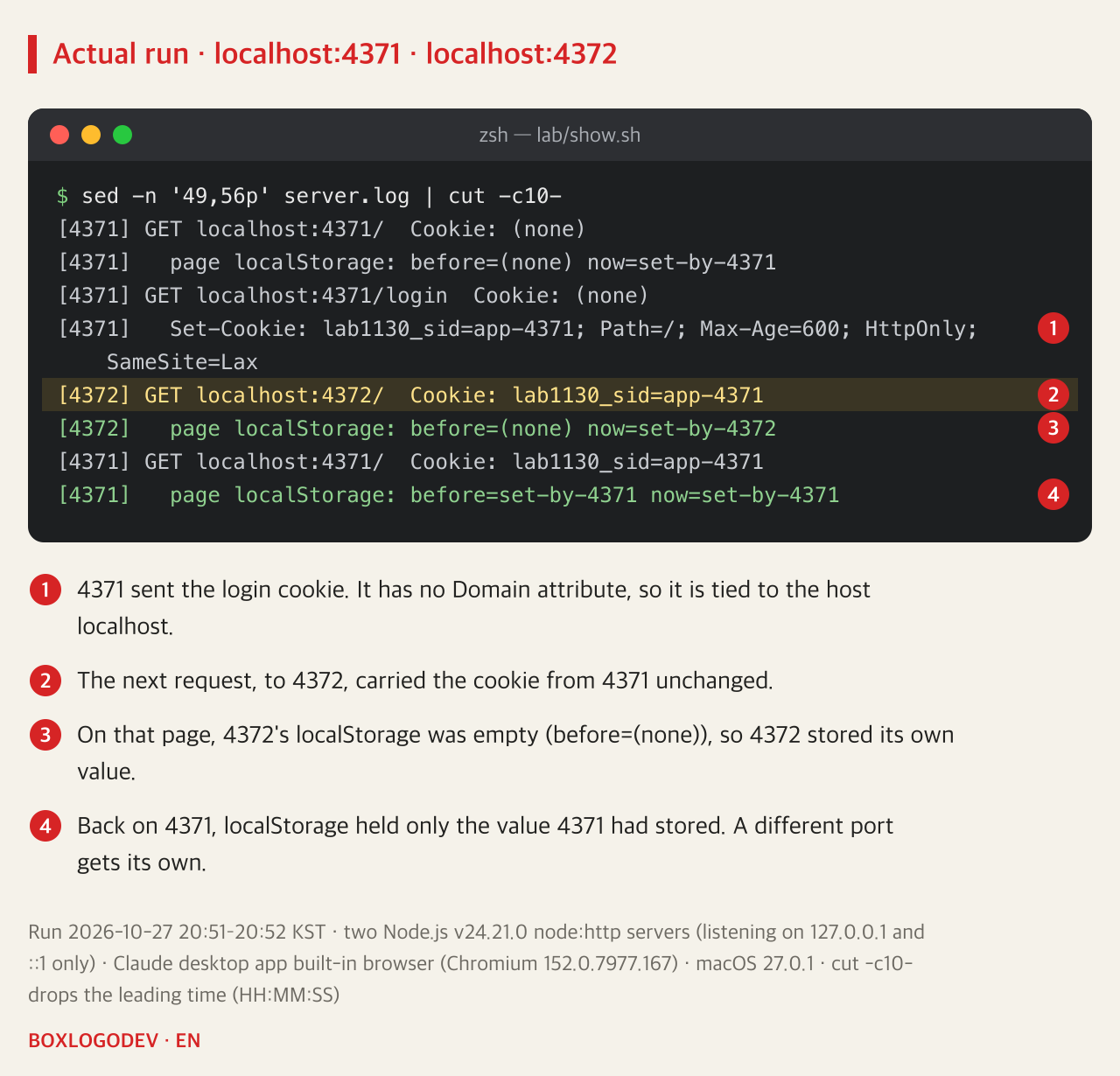
First, localhost:4371/login was opened. The server sent the header below, with no Domain attribute.
Set-Cookie: lab1130_sid=app-4371; Path=/; Max-Age=600; HttpOnly; SameSite=LaxNext, localhost:4372/ was opened, and the 4372 server logged Cookie: lab1130_sid=app-4371. The 4372 app never created that cookie. The same page's localStorage, on the other hand, was empty, and the value 4372 stored there did not show up when 4371 was opened again. The browser does treat the two addresses as different origins. Only the cookie followed a different rule.
The port is not part of how cookies are matched
An origin is defined by three things: scheme, host and port. Web Storage and IndexedDB are kept separately for each origin, which is why localStorage was split by port. Cookies define origins differently.
Under RFC 6265 (2011), which defines how cookies work, a cookie received without a Domain attribute becomes a host-only cookie. Its domain field holds the host name of the address the request was sent to, without the port. The conditions checked when a cookie is attached to a request (host name, path, whether it is Secure) do not include the port either. So a cookie received from localhost:4371 becomes a cookie of the host localhost, and it goes to any port on that host.
RFC 6265 itself treats this as a weakness. Its introduction already states that the cookies of a host are shared by all the ports on that host, and section 8.5 of its security considerations begins with "Cookies do not provide isolation by port." The same section recommends (SHOULD NOT) against running mutually distrusting services on different ports of the same host while keeping sensitive information in cookies. The revision that will replace RFC 6265 (rfc6265bis) is, as of 2026-10-27, still an Internet-Draft (revision 22) without an RFC number, and it keeps these sentences as they are.
Same name: one overwrites the other, and one logout ends both
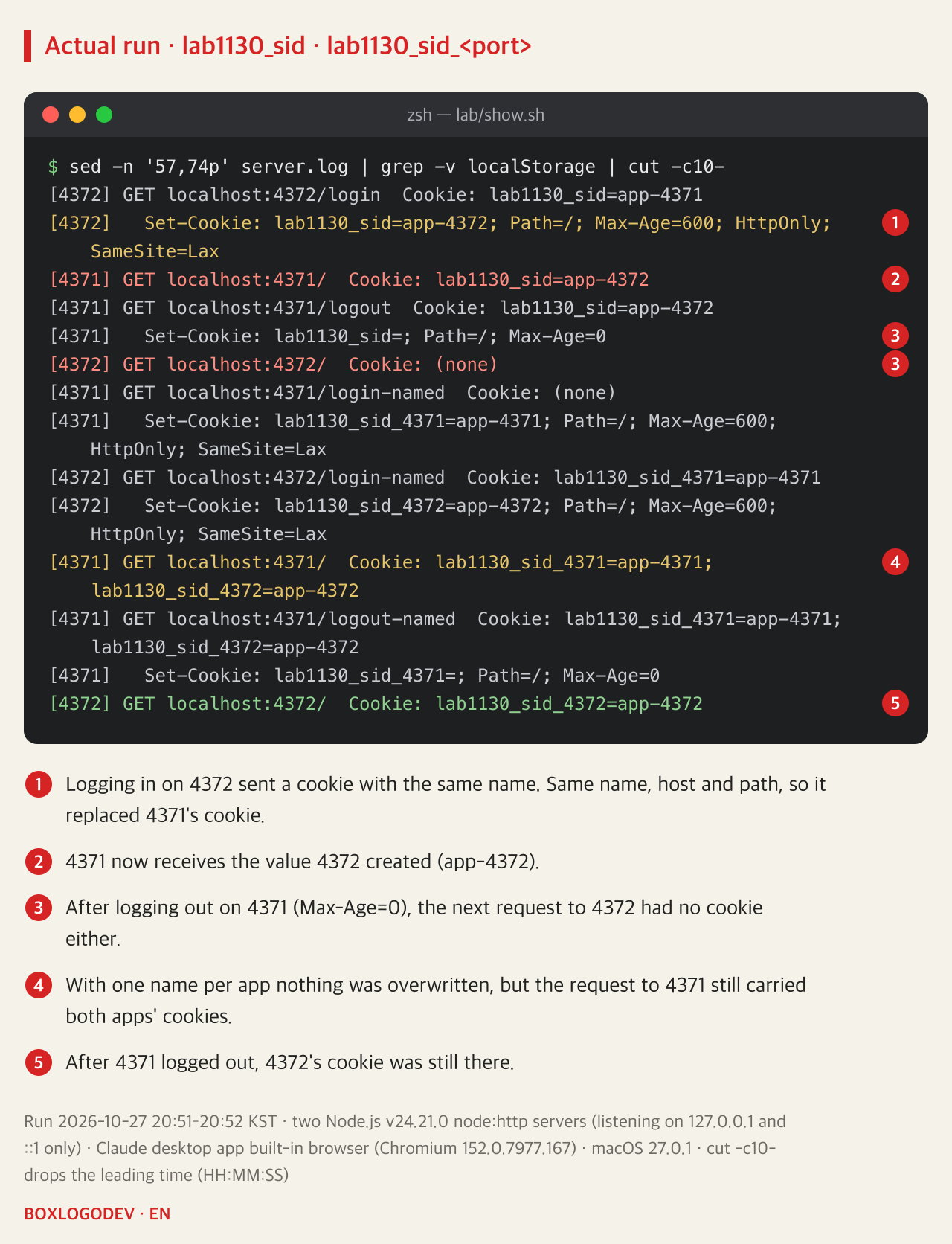
Next, the experiment logged in on 4372. When 4372 sent lab1130_sid=app-4372 under the same name, the existing cookie with the same name, domain and path was removed and replaced by the new one. From then on, requests to 4371 carried app-4372. In apps that store sessions separately on each server, 4371 receives a session ID it never issued, and if it cannot find that ID the user looks logged out. In the other direction, logging out on 4371 deleted the cookie with Max-Age=0, and the next request to 4372 had no cookie either.
This is what happens when two apps keep the same session middleware's default cookie name and run side by side. For example, in express-session, the session middleware for Express, the default cookie name is connect.sid. The package's README says that apps running on the same host name need a different name each, and adds that a different scheme or port does not make a different host name. This experiment did not use express-session; it recreated the same situation with node:http.
So the experiment was repeated with the cookie names lab1130_sid_4371 and lab1130_sid_4372. The overwriting and the shared logout went away. But requests to 4371 carried the cookies of both apps. The names no longer collide, yet each app still receives the other app's session cookie.
SameSite and __Host- do not split ports either
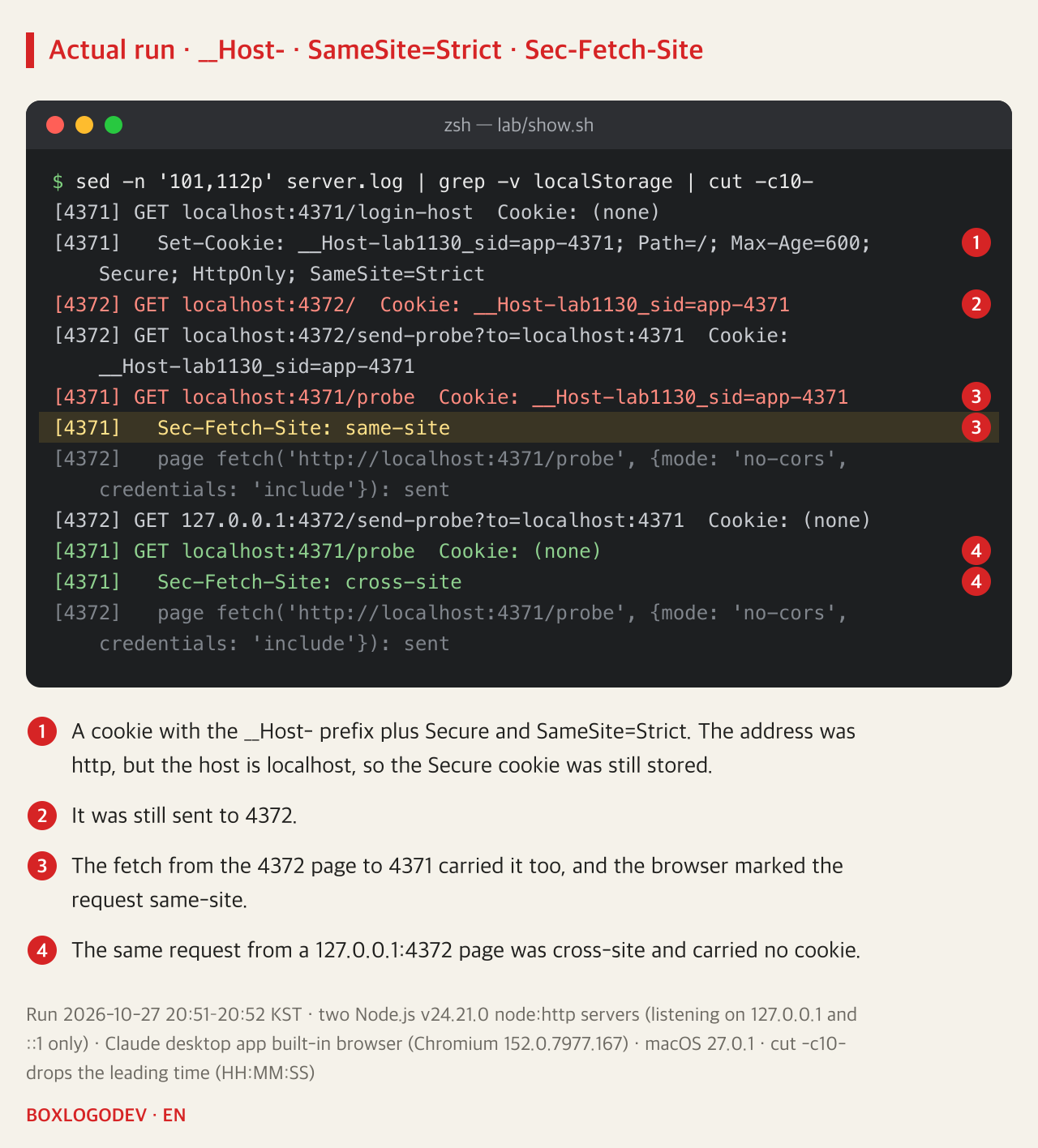
Would stricter cookie attributes keep them apart? 4371 sent a cookie with the __Host- prefix, Secure and SameSite=Strict.
Set-Cookie: __Host-lab1130_sid=app-4371; Path=/; Max-Age=600; Secure; HttpOnly; SameSite=StrictA __Host- cookie is stored only when it has Secure and Path=/ and no Domain attribute, which ties it to one host. The address was http, but this browser did not apply the https requirement to a cookie set by localhost, so the cookie was stored. And this cookie was also sent to 4372. The port is the one part of the origin that even __Host- cookies still ignore (rfc6265bis, revision 22).
SameSite=Strict sends a cookie only with requests that start from the same site as the one that set it. But the HTML Standard decides "same site" by comparing only the scheme and the registrable domain (or the host, when there is none), and it ignores the port. A fetch('http://localhost:4371/probe', {mode: 'no-cors', credentials: 'include'}) from a localhost:4372 page carried the Strict cookie, and the request's Sec-Fetch-Site header was same-site. The same request from a 127.0.0.1:4372 page was cross-site and carried no cookie. The conditions under which fetch sends cookies to another origin are covered in Why a CORS error can mean the server never saw the POST.
Separate host names keep cookies apart
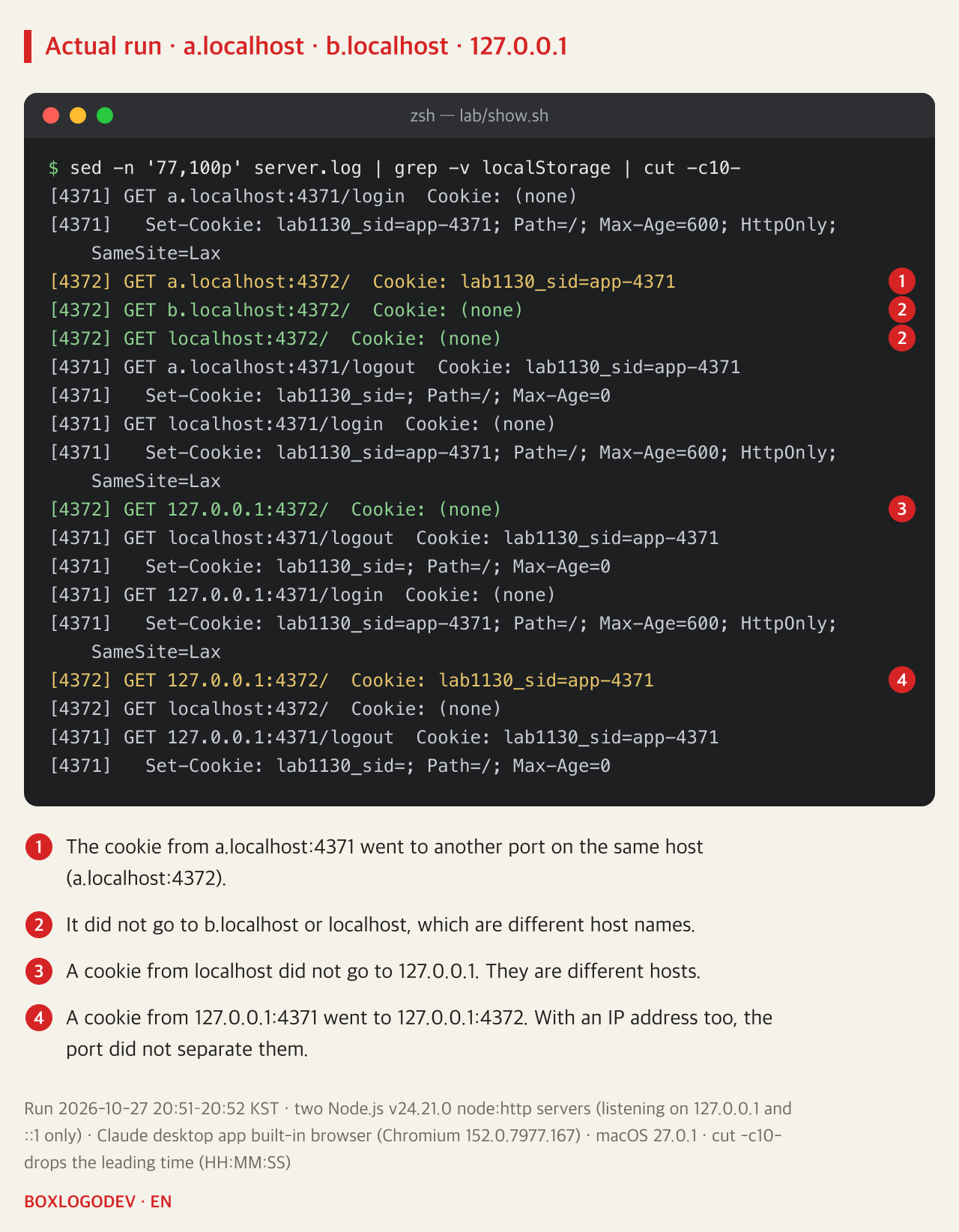
Since cookies follow the host name, give each app its own host name. After logging in on a.localhost:4371, requests to b.localhost:4372 and localhost:4372 carried no cookie. a.localhost:4372, which differs only by port, did get the cookie. localhost and 127.0.0.1 are different hosts too, so no cookie passed between them. A cookie received from 127.0.0.1:4371, however, went to 127.0.0.1:4372. Opening apps by IP address does not split cookies by port either.
localhost and the names under it may be assumed to resolve to the loopback address (RFC 6761). This Chromium-based browser opened a.localhost and b.localhost without any entry in /etc/hosts. How Safari, Firefox and tools outside the browser resolve these names was not checked.
This behaviour may change. Chrome Platform Status has an entry called "Origin-Bound cookies (by default)" that would bind each cookie to the origin that set it, port included, and as of 2026-10-27 its status is Proposed. The results above come from a Chromium 152-based browser; a browser with that feature turned on may behave differently.
Choosing between a cookie name and a host name
DEV NOTES
Cookies split by host name, localStorage by origin
On the same localhost, a different port still means the same cookie jar
Cookies: per host name
localhost:4372 Cookie: lab1130_sid=app-4371- A cookie from 4371 rode along to 4372
- Same name: one overwrites the other, one logout ends both
localStorage: per origin
localhost:4372 before=(none)- An origin is scheme, host and port
- The 4372 page did not have 4371's value
Fix 1: one cookie name per app
lab1130_sid_4371 · lab1130_sid_4372- No more overwriting or shared logout
- Each app still receives the other app's cookie
Fix 2: separate host names
b.localhost:4372 Cookie: (none)- a.localhost cookies did not go to b.localhost
- localhost cookies did not go to 127.0.0.1
Run on 2026-10-27 in a Chromium 152.0.7977.167-based browser against two Node.js v24.21.0 servers. Cookies with SameSite=Strict and the __Host- prefix also crossed to the other port.
If all you need is to stop one app's login from overwriting or ending the other's, give each app its own cookie name. If the two apps must not receive each other's cookies, give them separate host names, such as a.localhost and b.localhost; this works for cookies set without a Domain attribute. When in doubt, log Host and Cookie together on the server. A cookie follows the host name the request goes to, not the app that created it.
Add your perspective.
Share a question, another approach, or something you have tried.
Checking sign-in…
Loading comments…