Say you take the Docker image built for staging, put it on the production server unchanged, and restart next start with only NEXT_PUBLIC_API_BASE switched to the production URL. The server comes up with the new value, yet the page still calls the staging API. The setting is not wrong: the value was already written into the code as plain text when next build ran. After this note you will be able to tell, for every place your code reads an environment variable, whether that value is frozen at build or read fresh on each request, and decide where a value that must differ per environment should be read.
The example was run on 2026-10-25 on macOS 27.0.1 with Node.js v24.21.0 and Next.js 16.4.3 installed from npm. A plain next build built with Turbopack; for comparison the same steps were also run with a --webpack build. The .test top-level domain is reserved for testing (RFC 2606), and build.example.test and runtime.example.test are fictional hosts.
Build with value A, start with value B
The App Router app has three files: an empty layout (app/layout.js), a page rendered on each request, and a Client Component inside that page. The page reads two variables, and the Client Component reads the one with the NEXT_PUBLIC_ prefix.
// app/page.js
import { connection } from 'next/server';
import ClientBase from './client-base';

export default async function Page() {
  await connection(); // render this page on each request
  return (
    <main>
      <p>{`server NEXT_PUBLIC_API_BASE=${process.env.NEXT_PUBLIC_API_BASE}`}</p>
      <p>{`server API_BASE=${process.env.API_BASE}`}</p>
      <ClientBase />
    </main>
  );
}

// app/client-base.js
'use client';
export default function ClientBase() {
  return <p>{`client NEXT_PUBLIC_API_BASE=${process.env.NEXT_PUBLIC_API_BASE}`}</p>;
}
Both variables were set to https://build.example.test for the build, and the same build output was then started with both set to https://runtime.example.test. To compare with a page made ahead of time at build, a /static page reads only API_BASE, without connection().
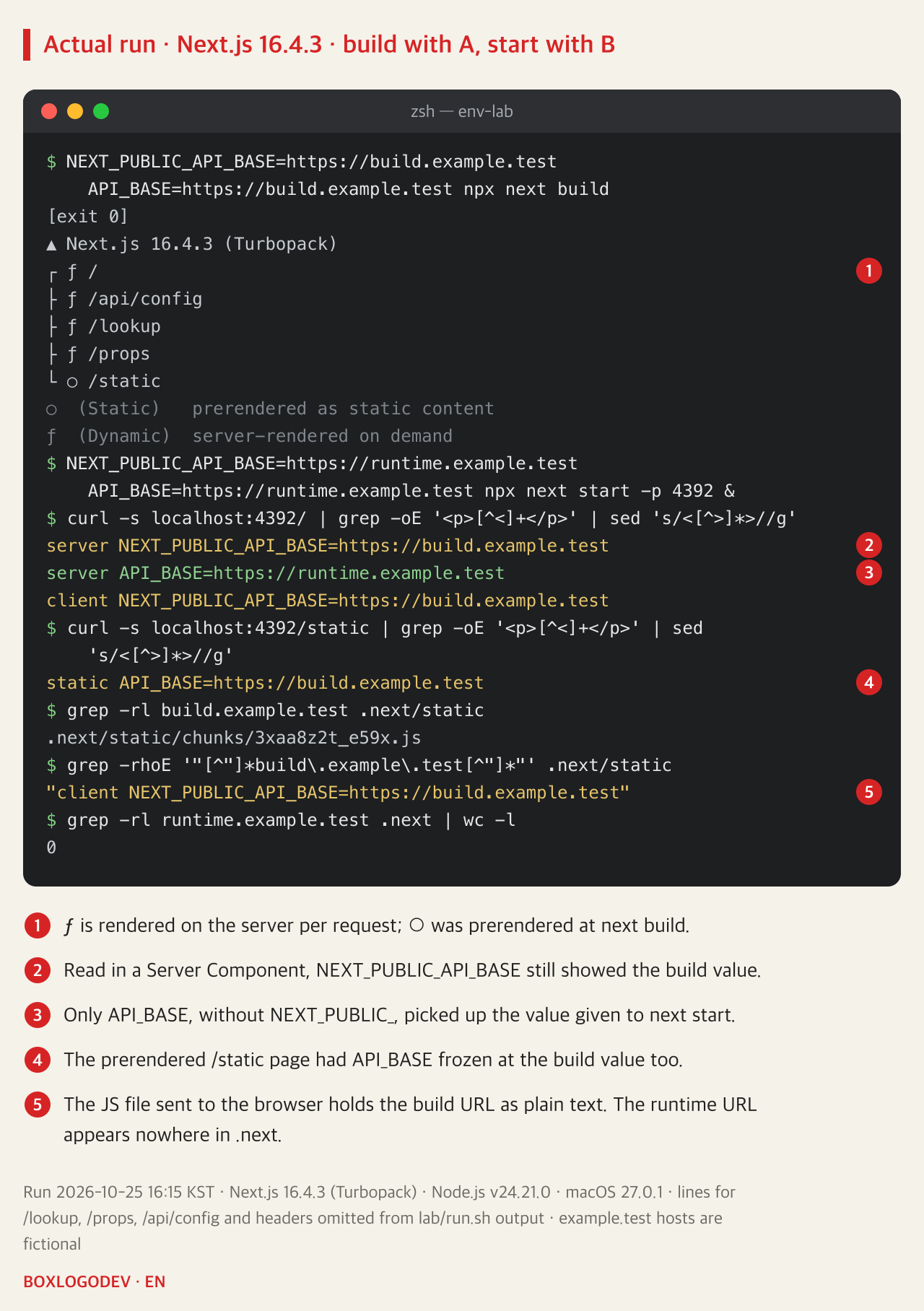
Even on the page rendered per request, NEXT_PUBLIC_API_BASE showed the build URL on both the server side and the client side. Only API_BASE, the name without NEXT_PUBLIC_, read the URL given at start. Opening the same page in a Chromium-based browser (Chrome 152) and reading it after hydration gave the same three lines, with no console warning. The build folder shows why: the JS file sent to the browser contains the build URL as a string, and the URL given at start appears nowhere in .next.
next build writes NEXT_PUBLIC_ values into the code
The Next.js environment variables guide calls this inlining. For variables whose names start with NEXT_PUBLIC_, it replaces every process.env.NEXT_PUBLIC_… reference with the value from the environment where next build ran. That covers code on the Node.js side as well as JavaScript sent to the browser, which is why the Server Component also showed the build value. The guide states that once built, "your app will no longer respond to changes to these environment variables", and warns that if one Docker image is deployed to several environments, every NEXT_PUBLIC_ variable is frozen at its build-time value.
DEV NOTES
What next build freezes, and what is read per request
Built with value A, started with value B: what each read showed
Code sent to the browser
client … = build.example.test- process.env.NEXT_PUBLIC_* becomes the build value
- The URL stays in the JS file as plain text
NEXT_PUBLIC_ in server code
server NEXT_PUBLIC_… = build- The same reference is replaced on the server
- The value given to next start is not used
Pages prerendered at build
static API_BASE = build- No request-time API such as connection()
- The HTML made at build is served as is
Server variables read per request
server API_BASE = runtime- A name without NEXT_PUBLIC_
- Read after await connection()
Next.js 16.4.3 on 2026-10-25, the same with Turbopack and webpack builds. build/runtime.example.test are fictional hosts.
The guide also gives examples of lookups that go through a variable, process.env[varName] and const env = process.env, and says these are not inlined. A /lookup page with exactly those two forms was added to the same app. The results did not match the guide. With the Turbopack build both forms showed the build URL; with the webpack build only process.env[varName] read the URL given at start. Opening the compiled server code showed the build URL written as a string wherever the build value appeared. Only a name joined together at run time (['NEXT_PUBLIC', 'API_BASE'].join('_')) read the start value under both builds.
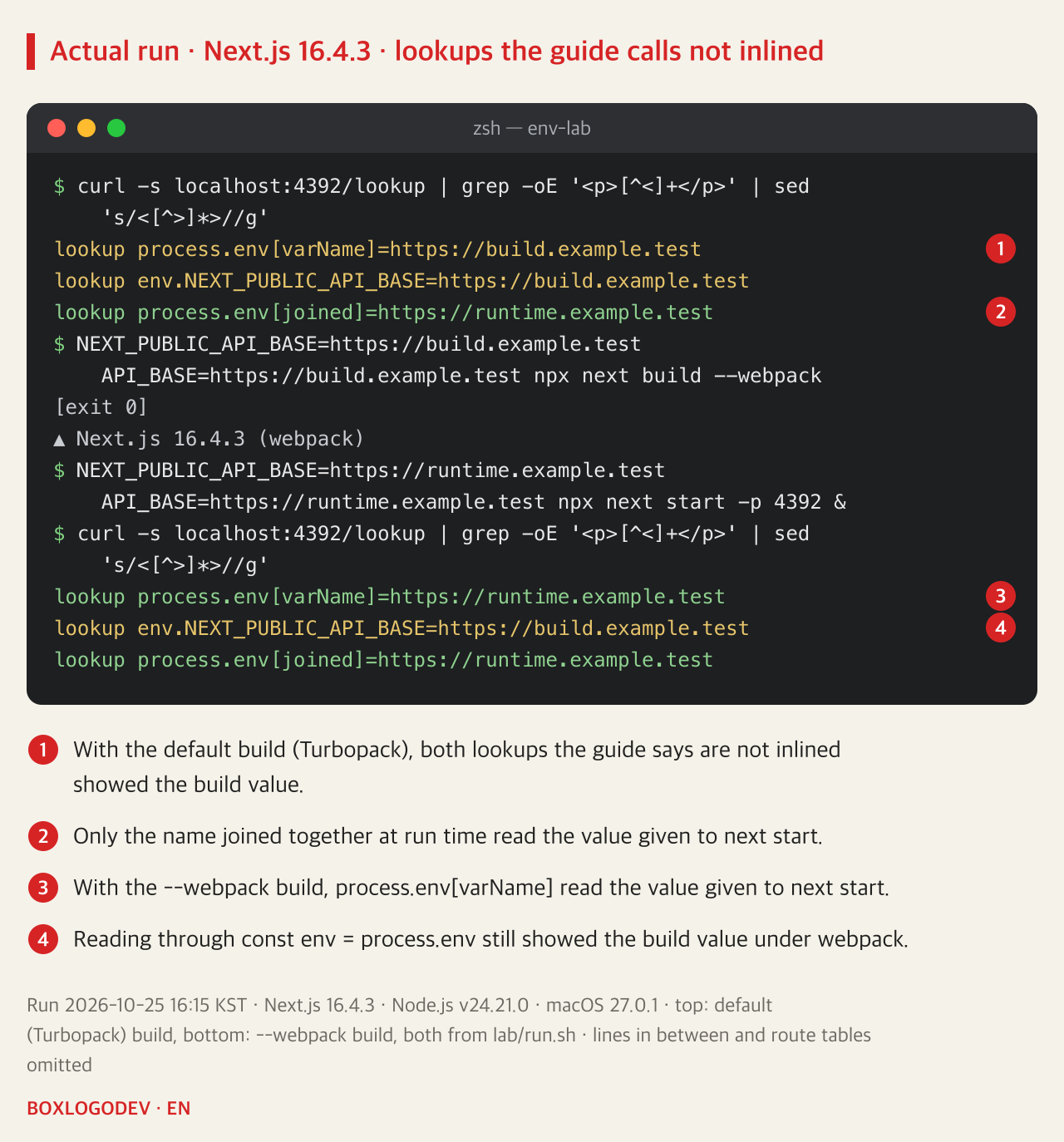
So do not rely on changing the lookup form to avoid inlining: even on the same 16.4.3, the outcome differed between bundlers. If a value must be read at request time, the path the guide gives is to drop NEXT_PUBLIC_ from its name.
What is read per request: server variables in a dynamic render
The guide explains that environment variables are only available on the server by default, and that you can safely read them on the server during dynamic rendering, showing process.env read after await connection(). connection() makes rendering wait for an incoming request, so the code after it runs at request time. According to the guide, this is what lets one Docker image move through several environments with different values. As the Node.js docs describe, process.env is an object containing the user environment of that process, so a value given to next start is used when server code reads this object at request time.
Dropping NEXT_PUBLIC_ is not enough on its own, though. The /static page read API_BASE and still showed the build URL, because next build renders a page that calls no request-time API, such as connection(), cookies() or headers(), to HTML in advance. In the build output table /static was marked ○ (prerendered) and / was marked ƒ (rendered per request). The response headers differed too: /static returned x-nextjs-cache: HIT and Cache-Control: s-maxage=31536000, while / returned private, no-cache, no-store. To have a variable read at request time, first check that its page shows as ƒ in the build table.
Decide per variable: build time or request time
For each value there is one question to settle first: can it be fixed once per build, or must it differ per environment? The answer leads to one of three paths.
DEV NOTES
Three ways to handle each value
First decide: is it a build-time or a request-time value?
1 · Rebuild for each environment
NEXT_PUBLIC_API_BASE=… next build- Keeps NEXT_PUBLIC_ as it is
- A new value means a new next build
2 · Read on the server, pass it down
apiBase={process.env.API_BASE}- A Server Component reads it after connection()
- It goes to the Client Component as a prop
3 · Your own endpoint
GET /api/config- A Route Handler returns it per request
- The browser fetches it when it starts
Secrets go down none of these paths
API_KEY: server only- NEXT_PUBLIC_ values sit in the JS files
- Values sent by 2 or 3 are visible too
Ways 2 and 3 were run on Next.js 16.4.3 on 2026-10-25 and showed the value given to next start.
First, if one value per build is fine, keep NEXT_PUBLIC_ and rebuild for each environment with its value. The guide says these values need to be set appropriately when the project is built. Second, if the value must differ per environment, rename it, for example to API_BASE, read it in a Server Component after connection(), and pass it to the Client Component as a prop. Third, if the browser has to fetch it separately, build your own API that returns it, as the guide suggests. Below is the actual output of calling the second and third ways after starting the same build with the runtime URL. Turbopack and webpack builds gave the same result.
$ curl -s localhost:4392/props | grep -oE '<p>[^<]+</p>' | sed 's/<[^>]*>//g'
client apiBase prop=https://runtime.example.test
$ curl -s localhost:4392/api/config
{"apiBase":"https://runtime.example.test"}
When the endpoint is a Route Handler, calling await connection() in it first is the safer choice. The Next.js Route Handlers docs say they are not cached by default, but with Cache Components enabled a GET handler that uses no request data can be prerendered at build, and calling connection() stops that prerendering. The example app did not enable Cache Components.
Secrets go to the browser by none of these paths. As shown above, a NEXT_PUBLIC_ value sits as plain text in JS files that anyone can download. A value sent through props or an endpoint is public too, the moment it reaches the browser. Send only values that may be seen, such as an API URL, and use keys and tokens only inside server code.
The one line to remember: a NEXT_PUBLIC_ value is whatever was set at the moment next build ran. If production shows an old URL, run grep -rl <old URL> .next/static on the build output once. If a file comes back, restarting will not change it; rebuild, or move that value to a server read at request time.
Add your perspective.
Share a question, another approach, or something you have tried.
Checking sign-in…
Loading comments…