Here is a one-liner that counts lines with n=0; cat lines.txt | while read -r line; do n=$((n + 1)); done and prints the value with echo "count: $n". lines.txt has three lines. Run with zsh, the one-liner prints 3; put the same commands in a script, count.sh, that starts with #!/bin/bash and run it as ./count.sh, and it prints 0. After reading this you will be able to say where bash loses the variable the loop changed, and you will have fixed forms that print 3 in both shells.
The examples were run on 2026-11-09 with /bin/bash 3.2.57 and /bin/zsh 5.9 as shipped with macOS 27.0.1. The three lines of lines.txt are alpha, beta and gamma, and a runner script written in zsh started a fresh shell for each case.
The same script prints 0 in bash and 3 in zsh
Here is the script, count.sh.
#!/bin/bash
n=0
cat lines.txt | while read -r line; do
  n=$((n + 1))
done
echo "count: $n"
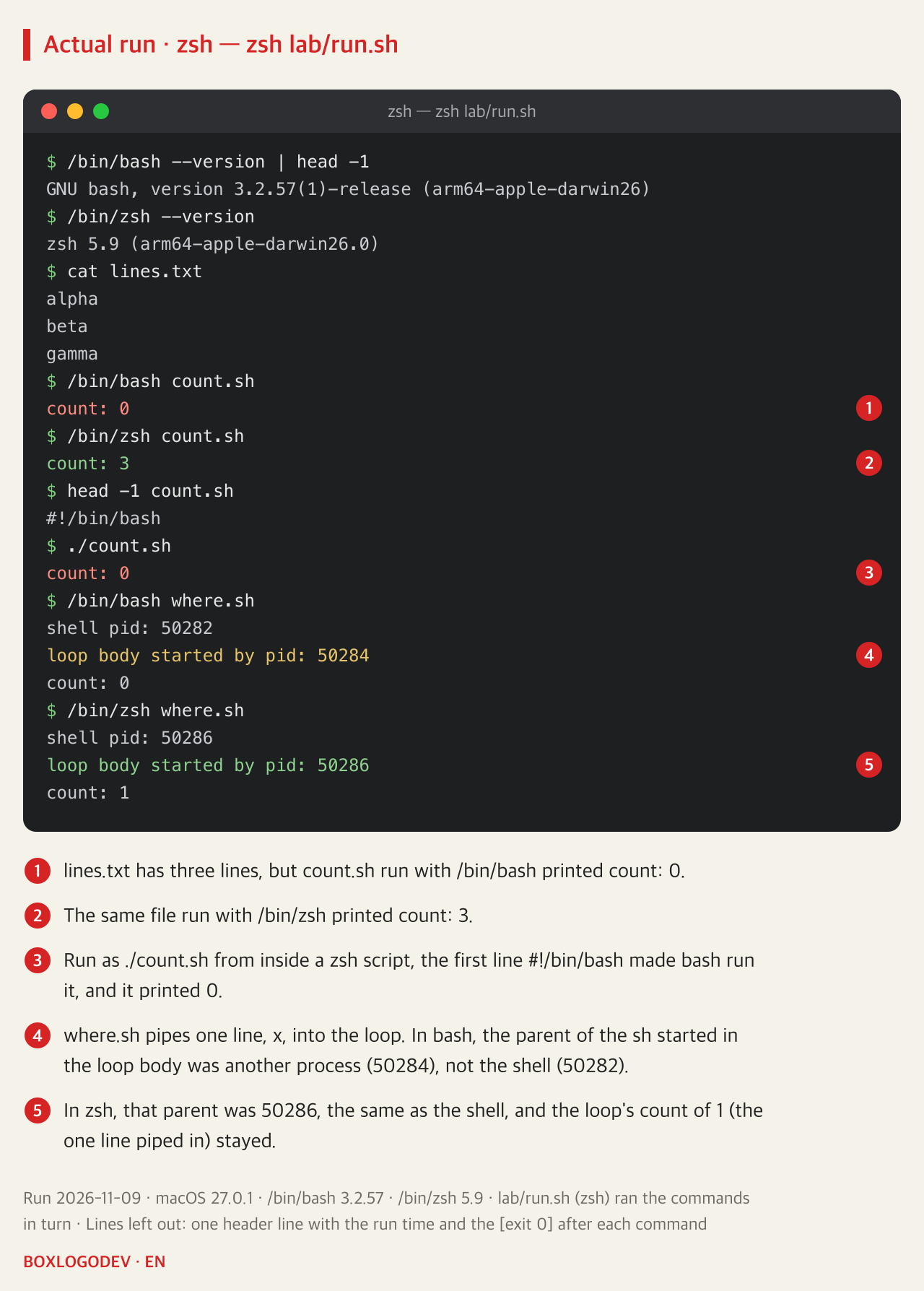
/bin/bash count.sh printed count: 0 and /bin/zsh count.sh printed count: 3. Inside the loop, n reached 3 in both shells (for bash, the brace grouping further down shows it); what differed was the n left once the pipeline ended.
The shell you type in is not necessarily the shell that runs the script. The login shell of this Mac account is /bin/zsh, yet running ./count.sh from inside a zsh script still gave 0: called as a program, the file was run by the bash named on its first line, #!/bin/bash. The other way round, typing the same one-liner into an interactive zsh started without config files (zsh -f) gave 3, and into an interactive bash started without config files (bash --norc) gave 0. So a line that printed 3 when tried in a zsh terminal can print 0 inside a bash script.
In bash, each command of a pipeline runs in a subshell
The Pipelines section of the GNU Bash manual (edition 5.3) says that each command in a multi-command pipeline runs in its own subshell, which is a separate process. In bash, apart from the lastpipe exception covered below (the option set and job control not active), both cat and the while loop on the right of cat lines.txt | while … run in new processes, not in the original shell. A subshell starts as a copy of the shell environment, so inside the loop n starts at 0 and climbs to 3. But as the POSIX.1-2024 shell command language puts it (2.13 Shell Execution Environment), changes made in a subshell environment do not affect the shell environment. When the pipeline ends, that process ends and the 3 goes with it. The original shell's n was 0 from start to finish.
To see whether the loop really ran in another process, a second script, where.sh, was run. It pipes a single line with echo x | while read -r _ and runs sh -c 'echo "loop body started by pid: $PPID"' in the loop body, so the sh started inside the loop prints the number of the process that started it. In bash the shell's number was 50282, but the loop's was 50284, so the loop was not run by the shell itself (the numbers change on every run). With only one line piped in, the count printed after the loop was 0 in bash and 1 in zsh.
Numbers are not the only thing lost. A script whose piped loop calls exit 1 when it reaches the beta line, run with bash, went on to print the next line, after the loop: still running, and ended with status 0. The exit ended the subshell running the loop. Run with zsh 5.9, the same script did not print that line and ended with status 1.
zsh runs the loop on the right of the pipe in the shell
Running where.sh with zsh 5.9 gave the same number, 50286, for the shell and for the loop. In that run on 2026-11-09, zsh 5.9 ran the while loop on the right of the pipe inside the shell process, so the value the loop changed stayed.
POSIX says each command of a multi-command pipeline is in a subshell environment, but as an extension it allows any or all of them to run in the current environment. Both bash's default and what zsh 5.9 did fall within that. The user guide on the official zsh site (A User's Guide to the Z-Shell, 3.8.4) lists the right hand side of a pipeline among the things run in the current shell, and adds that this is guaranteed in zsh but should not be relied on in other shells. That guide, however, was written in 2003, around zsh 4.0, and the reference manual has no such sentence, so the behaviour of 5.9 was confirmed by running it. Since the answer can differ between shells, a script that must give the same result everywhere is safer if it does not rely on it.
DEV NOTES
Which process ran the loop on the right of the pipe?
count.sh counts the three lines of lines.txt with cat | while read; where.sh pipes one line (echo x) and prints the loop's pid. Run on 2026-11-09
bash 3.2.57: the loop runs in a copy
count: 0- cat and while each run in a subshell
- where.sh: loop pid 50284, shell 50282
- count.sh: n=3 lives only in the copy
- The copy exits, so count: 0
zsh 5.9: the loop runs in the shell
- where.sh: loop and shell both 50286
- count.sh: n stays, so count: 3
- POSIX allows this as an extension
- zsh's 2003 guide calls this guaranteed
The fix: loop outside the pipe
- done < lines.txt: file goes straight in
- done < <(cat lines.txt): only cat runs separately
- Both print 3 in bash 3.2.57 and zsh 5.9
- Under this Mac's sh (bash 3.2.57, POSIX mode), the < <( ) line is a syntax error
The shell's pid is $$ from where.sh; the loop's is $PPID printed by sh in the loop body. Both change on every run. macOS 27.0.1, /bin/bash 3.2.57, /bin/zsh 5.9.
lastpipe is missing from macOS bash 3.2
bash does have an option that runs the last command of a pipeline in the shell. With lastpipe, added in bash 4.2, turned on and job control not active, the shell process may run the last command of a pipeline. With job control enabled it has no effect.
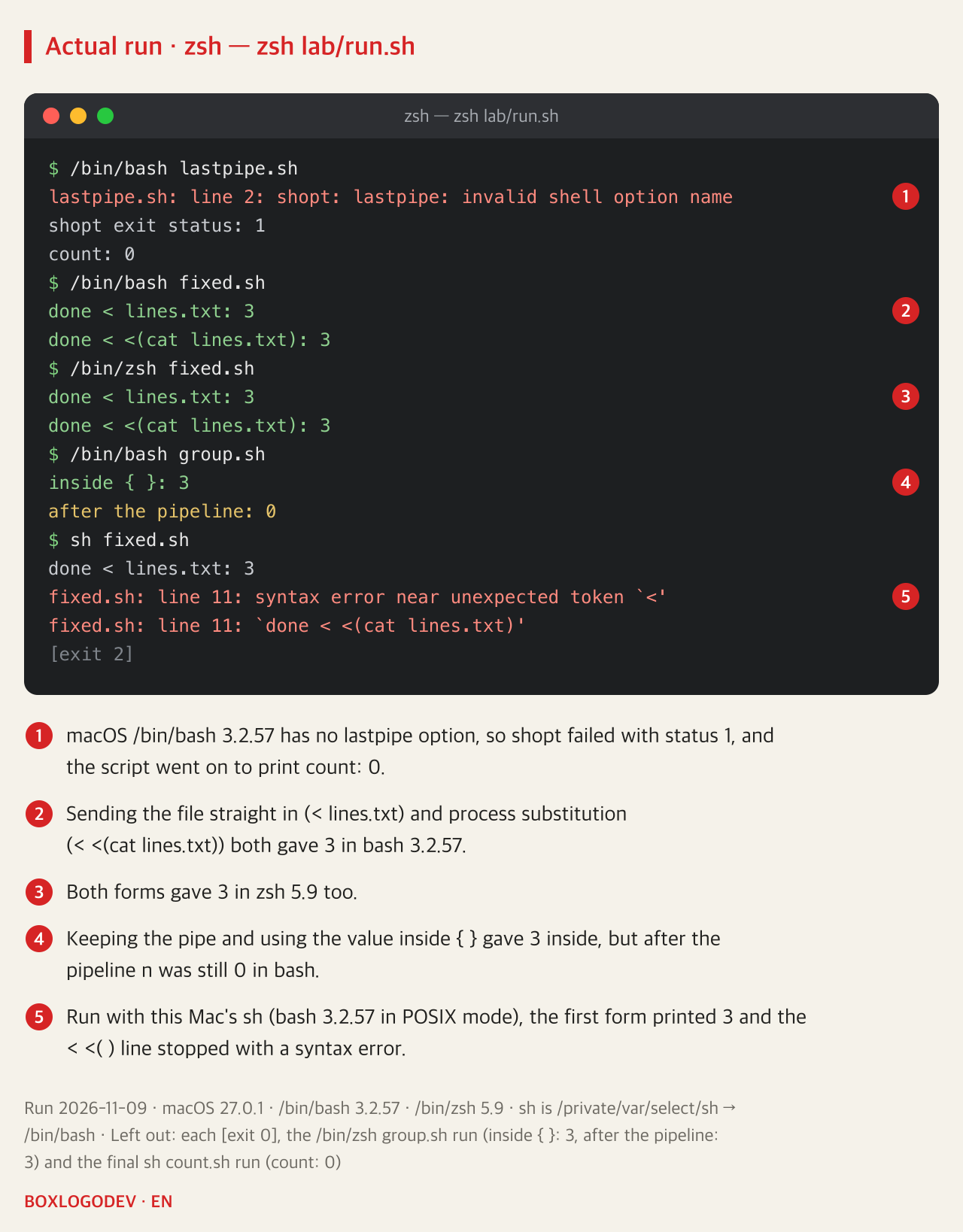
The /bin/bash on this Mac, however, is 3.2.57. Putting shopt -s lastpipe at the top of the script printed shopt: lastpipe: invalid shell option name and failed with status 1. With no set -e in the script, it moved on, and the result was still 0. There is no bash 4.2 or later on this Mac, so bash with lastpipe on was not run here, and this note does not show whether it prints 3.
Replace the pipe with a redirection
Take the loop out of the pipe and even bash 3.2.57 runs it inside the shell. When reading a file, drop cat and connect the file to the end of the loop.
n=0
while read -r line; do
  n=$((n + 1))
done < lines.txt
echo "done < lines.txt: $n"
When the input is the output of a command such as grep or find rather than a file, use process substitution. Only the done < lines.txt line at the end of the loop changes, to done < <(cat lines.txt). The command in the parentheses runs separately and the loop stays in the shell. Both forms printed 3 in bash 3.2.57 and in zsh 5.9.
Two more things were checked. First, a script that uses < <( ) needs bash (or zsh), not sh. Calling fixed.sh, which holds the two forms one after the other, as sh fixed.sh (on this Mac, sh is bash 3.2.57 running in POSIX mode) printed 3 for the first form, then stopped with a syntax error on the second form's done < <(cat lines.txt) line (line 11) and exit status 2. The bash change log says that from bash 5.1 process substitution is also available in POSIX mode, but there is no such bash on this Mac, so that was not run. For a script that will be run with sh, use the done < file form. Second, if the pipe has to stay, then in bash the loop and the line that uses the value can be grouped in braces so they share one subshell. cat lines.txt | { while …; done; echo "inside { }: $n"; } printed 3 inside, but after the pipeline n was still 0 in bash.
Test a script with the shell on its first line
In bash, treat a variable changed by a loop on the right of a pipe as gone once the pipe ends, and when you need the loop's result afterwards, write done < file or done < <(command). To test, run the file with the shell on its first line, by its exact path as /bin/bash count.sh or as ./count.sh, instead of typing the line into the terminal. A plain bash count.sh may run a different bash, whichever comes first in PATH. A 3 from zsh is no evidence that the bash script prints 3.
Add your perspective.
Share a question, another approach, or something you have tried.
Checking sign-in…
Loading comments…