If a character limit built on length counts one family emoji (👨👩👧👦) as 11, or an ellipsis added with slice() ends in an encoding error on the server, the cause is the same. What length counts is not characters. After this note you can tell apart four units for counting one string and decide which to use for visible limits, storage limits and cutting.
The examples were run on 2026-11-01 on macOS 27.0.1 with Node.js v24.21.0 (ICU 78.3, Unicode 17.0) and Python 3.9.6 and 3.12.14. Behaviour was checked in MDN, the HTML, Infra and Encoding Standards and Unicode UAX #29. Nothing was run in a browser. All inputs are made-up values.
The same inputs, counted four ways
Nine inputs sit in samples.json, and Node.js and Python read that same file. The counting functions in Node.js are the three below; the fourth unit is s.length.
const segmenter = new Intl.Segmenter("en", { granularity: "grapheme" });
const encoder = new TextEncoder();

const graphemes = (s) => [...segmenter.segment(s)].length;
const codePoints = (s) => [...s].length;
const utf8Bytes = (s) => encoder.encode(s).length;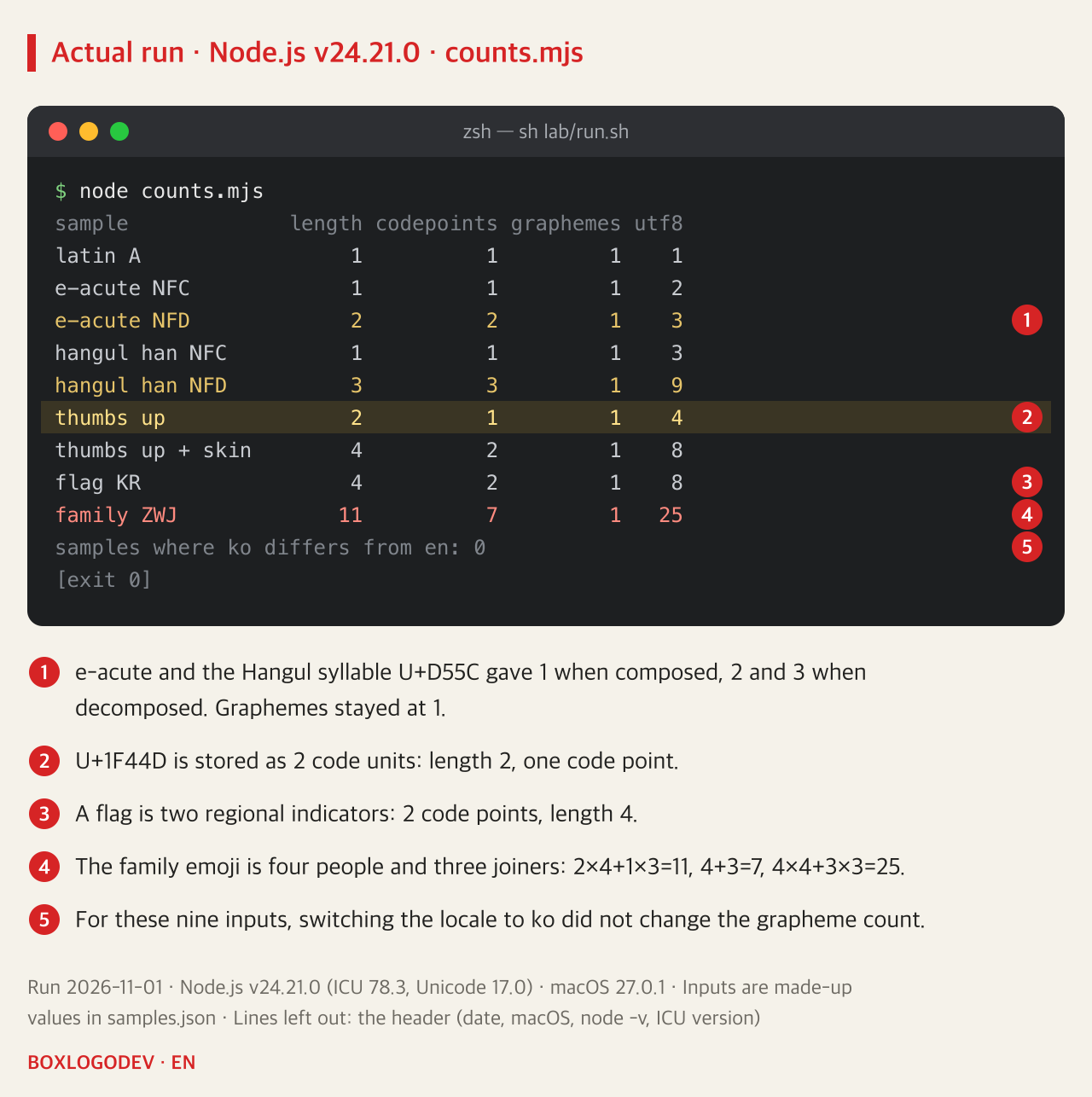
The family emoji is four people (U+1F468, U+1F469, U+1F467, U+1F466) joined by three U+200D joiners. Each person is 2 UTF-16 code units and each joiner is 1, so length is 2×4+1×3=11. Code points are 4+3=7. In UTF-8 each person takes 4 bytes and each joiner 3, so 4×4+3×3=25.
MDN also describes length as the number of UTF-16 code units and says it can differ from the actual number of characters. Counting code points still does not give what a person reads as one character. The closer unit is the grapheme cluster, whose boundary rules come from UAX #29. Counted with Intl.Segmenter, all nine inputs gave 1.
That 1 comes with two conditions. UAX #29 calls its rules a default that implementations can tailor, and MDN describes Intl.Segmenter as locale-sensitive. That ko and en agreed is only what these nine inputs did on this ICU version. And a grapheme count of 1 does not mean one picture. According to UTS #51, where this combination is not supported as a single picture, the joiners are ignored and the emoji may appear separately.
Cutting with slice() can break the string
Here are three ways to keep the first three characters. The input name is "ok", the family emoji and "!" joined together, and its length is 14.
const byUnit = name.slice(0, 3);
const byCodePoint = [...name].slice(0, 3).join("");
const byGrapheme = [...segmenter.segment(name)].slice(0, 3).map((x) => x.segment).join("");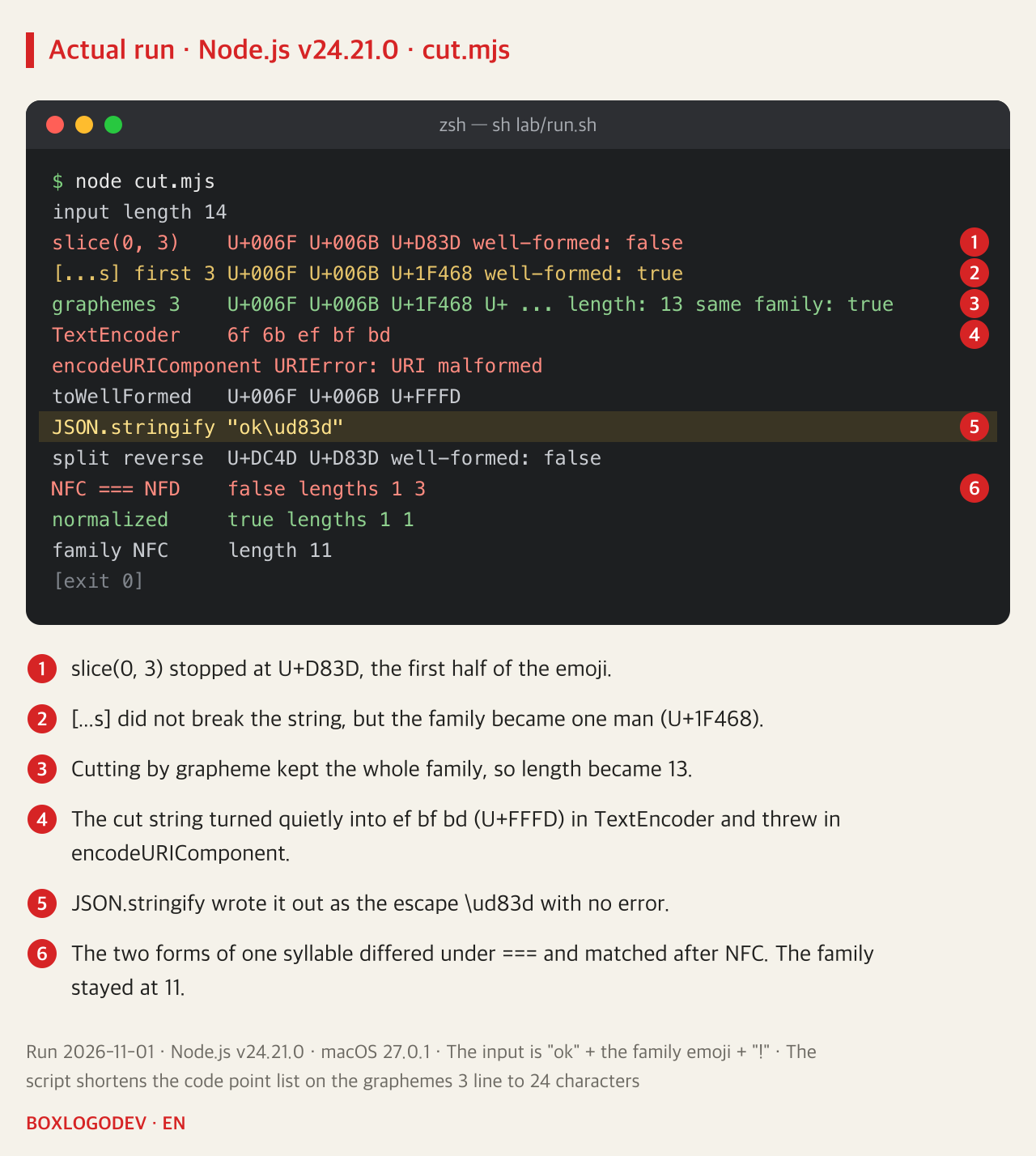
slice(0, 3) stopped at U+D83D. That is the front half of the surrogate pair for U+1F468, and as MDN explains, a code unit left alone like this represents no character. isWellFormed() also gave false. Cutting through an array did not break the string, but the family became one man (U+1F468) and no error appeared. Only the cut by grapheme kept the family whole, which is why its length is 13 and not 3.
The broken string showed up differently on each way out. TextEncoder replaced the broken position with ef bf bd, the UTF-8 for U+FFFD, and raised no error. That fits the Encoding Standard taking its input as a USVString and the Infra Standard replacing surrogates with U+FFFD in that conversion. encodeURIComponent() threw a URIError. JSON.stringify() wrote the escape \ud83d with no error. When Python read that JSON, json.loads() passed and encoding to UTF-8 raised UnicodeEncodeError. The program that cut the string and the program that failed were different ones.
toWellFormed() only replaces the broken position with U+FFFD and does not bring the lost character back. split("") also divides by code unit, so U+1F44D reversed with split("").reverse().join("") became U+DC4D U+D83D, which is broken.
Characters that look the same can differ in length
The numbers diverge even without emoji. The Hangul syllable U+D55C can be written decomposed as three jamo (U+1112, U+1161, U+11AB). In the first picture length was 1 and 3 and UTF-8 was 3 and 9 bytes, while graphemes were 1 for both. Yet === gives false. As MDN notes, string comparison does not treat different code points as equal. After normalize("NFC") it gave true and the length became 1.
Normalizing does not solve the character count for you. The family emoji still had a length of 11 after NFC, and in Python the flag stayed at 2 and the family at 7. Which input routes bring in decomposed text was not checked here.
Where browser and server numbers part ways
Python read the same samples.json, and the cut.json saved by the cutting script above.
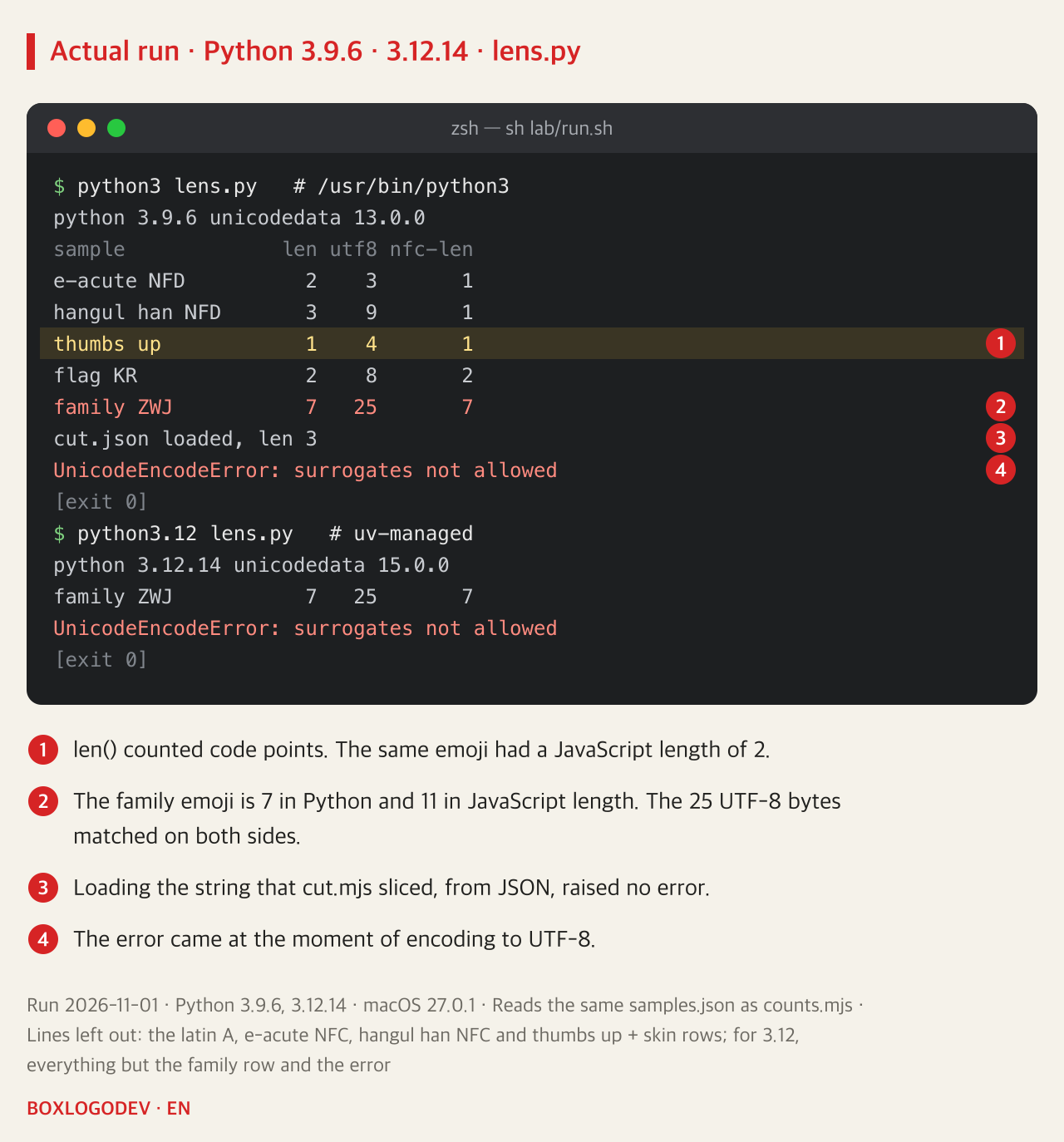
The Python documentation describes strings as sequences of Unicode code points, and in these runs len() matched the code point count. The family emoji is 11 by JavaScript length and 7 by Python len(). Working from the table, in a hypothetical app that builds a limit of 10 on both sides with these two methods, this emoji is rejected by the browser code and accepted by the server code. The value of 25 bytes matched on both sides.
HTML maxlength also measures code units. The HTML Standard measures with Infra's length, Infra defines a string as a sequence of code units, and MDN says UTF-16 code units. MDN explains that browsers generally prevent entering more than that, and the Standard's "too long" check applies only when the value was last changed by a user edit. It does not apply to a value set by script, so it cannot stand in for a server check. This paragraph was checked in documents only and not run in a browser.
To count graphemes in Python, the documentation lists unicodedata.iter_graphemes(), added in 3.15, and the external regex package has \X. Neither was run, and the 3.9.6 and 3.12.14 used here do not have the first.
First choose what to count
DEV NOTES
Before counting characters, choose what to count
The same family emoji gives a different number in each unit
Graphemes: 1
[...segmenter.segment(s)].length- Close to what a reader takes as one character
- Use for visible limits, ellipsis and cutting
Code points: 7
[...s].length- Matched Python's len()
- Cutting will not break the string, but can change the character
UTF-8 bytes: 25
encoder.encode(s).length- Node and Python gave the same value
- Use for storage or transfer limits set in bytes
Code units: 11
s.length- The unit of length, slice() positions and HTML maxlength
- Not a number to read as a character count
Numbers come from runs on 2026-11-01 with Node.js v24.21.0 (ICU 78.3) and Python 3.9.6 and 3.12.14. maxlength was checked in the HTML Standard and MDN, not run in a browser. The choice of use is the author's own.
Find the lines in your code that limit characters with length or cut with slice(), and first write down whether that number means visible characters or stored bytes. Using graphemes for visible limits and cutting, TextEncoder for limits set in bytes, and normalization before comparing strings avoids the mismatches seen in the runs above. This division is the author's own reading of those results and not a rule from a standard. The speed of Intl.Segmenter on very long strings was not measured.
Add your perspective.
Share a question, another approach, or something you have tried.
Checking sign-in…
Loading comments…