Your package.json says "some-lib": "^0.2.3", and the registry already has 0.3.0. You learned that ^ means "take newer compatible versions", so npm update ought to bring in 0.3.0. What you get is 0.2.9. After reading this note you will be able to say which digit of a version ^ holds still, and, when a 0.x package has to move to its next minor, tell apart what each npm command changes.
The examples were run on 2026-10-05 on macOS 27.0.1 with Node.js v24.21.0 and npm 11.19.0 (and the semver 7.8.5 bundled in npm). Instead of the public registry, a small fake npm registry ran on my own machine (127.0.0.1) and served nine versions of a made-up package, boxlab-fmt: 0.0.3, 0.0.4, 0.2.3, 0.2.9, 0.3.0, 1.2.3, 1.9.0, 1.10.0-beta.1 and 2.0.0. The package name and versions exist only for this explanation.
^ holds the left-most non-zero digit, not "the same major"
^1.2.3 is usually learned as "the newest 1.x". That is right for 1.x, but the rule itself is a little different. node-semver, which npm uses to read version ranges, defines a caret range as allowing changes that do not modify the left-most non-zero element of [major, minor, patch].
So ^1.2.3 holds the leading 1 and becomes >=1.2.3 <2.0.0-0. In ^0.2.3 the first digit is 0, so the next one, 2, is held: >=0.2.3 <0.3.0-0. 0.3.0 is outside the range from the start. ^0.0.3 holds the patch as well, >=0.0.3 <0.0.4-0, which in practice allows 0.0.3 alone. The -0 at the end of the upper bound keeps out prereleases of that bound too, such as 2.0.0-beta.
DEV NOTES
Which digit does ^ hold still?
The left-most non-zero digit is the one that cannot change
^1.2.3 · major held
>=1.2.3 <2.0.0-0- The first digit, 1, is non-zero
- Minor and patch may move within 1.x.x
^0.2.3 · minor held
>=0.2.3 <0.3.0-0- Major is 0, so the 2 is held
- Only patch moves · 0.3.0 is out
^0.0.3 · patch held
>=0.0.3 <0.0.4-0- Matches 0.0.3 only
- Not even 0.0.4
The expansions are printed by node-semver 7.8.5, the library npm uses. The trailing -0 also keeps out prereleases of the upper bound.
It also helps to know that on 0.x the tilde ~ gives the same result. ~0.2.3 also expanded to >=0.2.3 <0.3.0-0. From 1.x upward they differ: ~1.2.3 stops below 1.3.0-0 and picked only 1.2.3 from this registry, while ^1.2.3 picked 1.9.0.
What actually gets installed
This was not only a calculation on range strings. For each range a fresh project was pointed at the fake registry, a real npm install was run, and the version that landed in node_modules was read back. "^1.2.3" gave 1.9.0, "^0.2.3" gave 0.2.9 and "^0.0.3" gave 0.0.3. 0.3.0 was installed only when the range was widened by hand, as in ">=0.2.3 <1.0.0", or when the range was written as "^0.3.0".
DEV NOTES
One registry, what each range installed
What npm install chose from nine versions of a made-up package, boxlab-fmt
"^1.2.3"
-> 1.9.0- Highest release in 1.x
- Skips 2.0.0 and 1.10.0-beta.1
"^0.2.3"
-> 0.2.9- Stays on 0.2.x though 0.3.0 exists
"~0.2.3"
-> 0.2.9- Same result as ^ on 0.x
">=0.2.3 <1.0.0"
-> 0.3.0- Opens up every 0.x minor
- Breaking changes come in too
Published: 0.0.3 0.0.4 0.2.3 0.2.9 0.3.0 1.2.3 1.9.0 1.10.0-beta.1 2.0.0. Installed with npm 11.19.0 from a local registry, 2026-10-05.
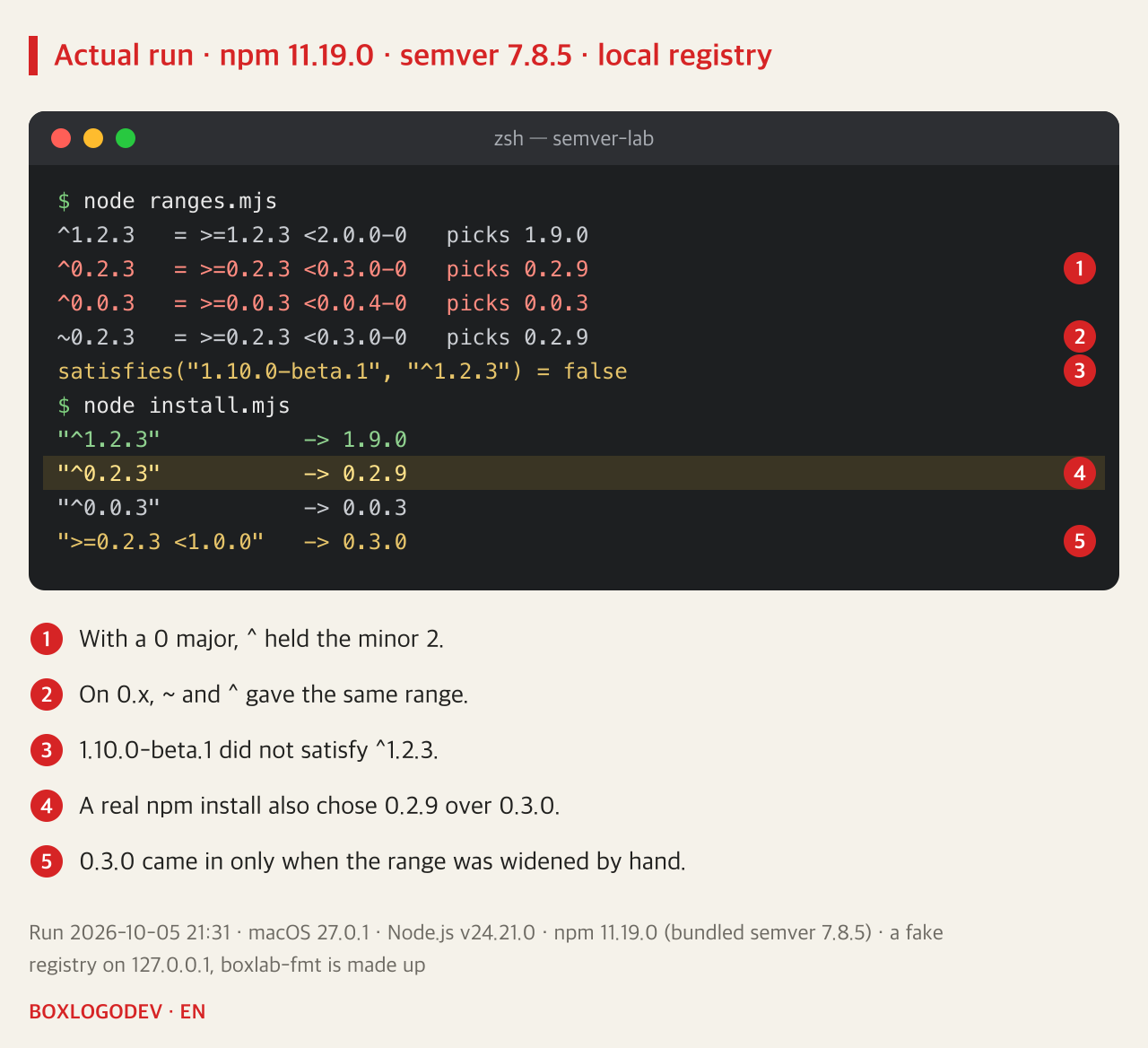
The same output contains a prerelease. 1.10.0-beta.1 is numerically above 1.9.0, yet it did not satisfy ^1.2.3. node-semver accepts a prerelease version only when the range has a comparator with the same [major, minor, patch] that also carries a prerelease tag. To try the beta, write it into the range, as in ^1.10.0-beta.1. When calling semver.satisfies() in your own code, the includePrerelease option switches this behaviour off, and in the run it then returned true.
Why 0.x holds the minor too
Item 4 of the Semantic Versioning 2.0.0 specification treats major version zero, 0.y.z, as initial development: anything may change at any time, and the public API should not be considered stable. The specification's FAQ offers the simplest approach for that phase: start at 0.1.0 and increment the minor version for each release.
So in a 0.x package a minor step from 0.2 to 0.3 can carry the weight that a major step carries in 1.x. npm's caret follows that convention: on 0.x it opens only the patch, and on 0.0.x not even that. "Why won't 0.3.0 come in?" is not a bug; it is the range keeping possibly breaking changes from arriving on their own.
With a lockfile, widening the range changes nothing yet
Looking only at the range is half the story. Real projects have a package-lock.json, and the npm install documentation says that when a lockfile exists the installation is driven by it. The project was first installed with the exact "0.2.3", then the range was changed to "^0.2.3" and npm install run again. Because the locked 0.2.3 sits inside the new range, the lockfile and node_modules stayed at 0.2.3.
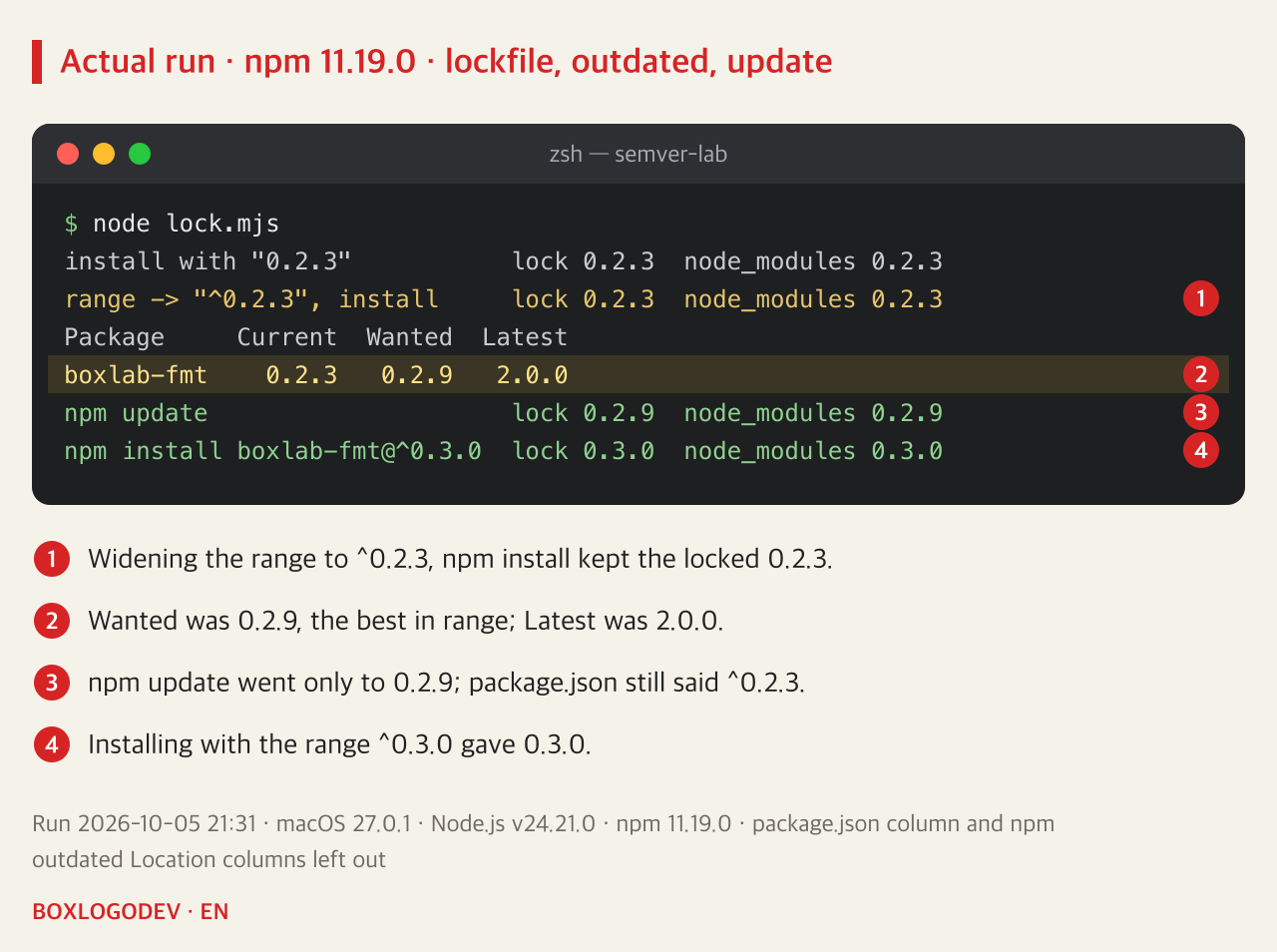
npm outdated shows the situation best. Current was 0.2.3, Wanted 0.2.9 and Latest 2.0.0. Wanted is the highest version that satisfies the range in package.json; Latest is the version tagged latest in the registry. When those two columns differ, the range is what is holding you back. Running npm update went only as far as 0.2.9, and the ^0.2.3 in package.json did not change. The npm update documentation likewise says that by default it does not modify the range values in package.json.
Moving a 0.x dependency to its next minor
Getting to 0.3.0 does not happen by itself with one command. It takes a decision to change the range. With a real package, first read its changelog for what breaks in 0.3.0 (the made-up package here has none). Then install with the new range: npm install boxlab-fmt@^0.3.0 left package.json at ^0.3.0 and the lockfile and node_modules at 0.3.0. From then on npm update again moves only within 0.3.x.
DEV NOTES
How to move a 0.x dependency forward
What the lockfile, the range and each command change
npm install
lock 0.2.3 -> 0.2.3- If the locked 0.2.3 fits the range,
- it is installed as is
npm outdated
0.2.3 | 0.2.9 | 2.0.0- Current | Wanted | Latest
- Wanted = best inside the range
npm update
lock 0.2.9- Moves only inside the range
- package.json unchanged
Install a new range
npm install boxlab-fmt@^0.3.0- After reading the changelog,
- a deliberate move to 0.3
After step 4 package.json read ^0.3.0 and the lockfile and node_modules held 0.3.0. npm 11.19.0, run 2026-10-05.
The opposite choice, opening all of 0.x with something like ">=0.2.3 <1.0.0", looks convenient, but it lets the breaking changes of initial development slip into your next npm update. In the run, this was the only range that pulled in 0.3.0.
The one line to keep: ^ holds the left-most non-zero digit. When a 0.x dependency will not move, compare Wanted and Latest in npm outdated, and if you need the next minor, read the changelog and change the range yourself.
Add your perspective.
Share a question, another approach, or something you have tried.
Checking sign-in…
Loading comments…