You want one blank between a first and last name, so you write CONCATENATE lv_first ' ' lv_last INTO lv_full., and the result is ANNABERG instead of ANNA BERG. It looks like a typo, but ABAP is following its rules. After reading this you will be able to explain why a blank written in single quotes disappears, pick one of three ways to keep it, and check in advance for the traps that remain after the fix: RESPECTING BLANKS, empty fields and short target fields.
In the example, lv_first and lv_last are TYPE c LENGTH 10 holding 'ANNA' and 'BERG'. The target lv_full is a string. The names and the program are fictional, and the code was not run on a real system. The results given here follow from the rules on the CONCATENATE, concatenation operator && and character literals pages of the ABAP Keyword Documentation (7.58, with CONCATENATE also compared against 7.50).
' ' is a type c field holding one blank
Start with the type of the literal. '...' in single quotes is a text field literal, and its type is c with the length of the enclosed characters. So ' ' is the same as a c field of length 1 containing one blank. The documentation also states that there is no empty text field literal: '' means the same as ' ' with one blank.
Next, the rule of CONCATENATE. In character string processing, trailing blanks of fixed-length operands, that is data objects with a set length such as c, are ignored by default. lv_first is ANNA padded with 6 blanks, so those 6 are dropped; ' ' consists entirely of a trailing blank, so nothing of it is left. With the blanks of all three operands gone, the result is ANNABERG. The target is long enough, so sy-subrc is 0, and there is no error or warning.
SAP NOTES
You put in ' ' and get ANNABERG
Fictional example: lv_first and lv_last are TYPE c LENGTH 10, holding 'ANNA' and 'BERG'
Three operands
CONCATENATE lv_first ' ' lv_last INTO lv_full.- lv_first: ANNA + 6 blanks
- ' ': type c of length 1, one blank
- lv_last: BERG + 6 blanks
Trailing blanks of fixed length are ignored
c, n, d, t: trailing blanks ignored- 6 blanks after ANNA: ignored
- ' ' is all trailing blank: nothing left
- 6 blanks after BERG: ignored
Result
sy-subrc = 0- lv_full = ANNABERG
- The same happens with &&
- lv_first && ' ' && lv_last
Names and variables are fictional. The result follows from the CONCATENATE and && rules in the ABAP Keyword Documentation (7.58 and 7.50); it is not a run result.
Switching to the concatenation operator, lv_full = lv_first && ' ' && lv_last., gives the same result. The && documentation also says that trailing blanks of character-like operands with a fixed length are ignored. Changing the statement is not enough; you have to change how the blank is supplied.
Three ways to keep the blank
First, supply the blank as a separator, not as an operand. CONCATENATE lv_first lv_last INTO lv_full SEPARATED BY space. produces ANNA BERG. The documentation states that trailing blanks are respected for a separator sep of fixed length. By the same rule, SEPARATED BY ' ' gives the same result. The same ' ' is treated differently in an operand position and in the separator position.
Second, use a backquote literal. `...` is a text string literal of type string. Trailing blanks in a string always count, so lv_full = lv_first && ` ` && lv_last. keeps the blank. One character, a single quote versus a backquote, decides the result.
Third, use a string template. In lv_full = |{ lv_first } { lv_last }|., characters written directly inside | | are literal text, and blanks in a template are always significant. The c values in the curly brackets are passed without their trailing blanks, so the result is exactly ANNA BERG. Which of the three to use is a matter for your team's coding rules, but for new code the template is a safe choice because a reader can see the blank.
SAP NOTES
Three ways to keep the blank
The same lv_first and lv_last, producing ANNA BERG
SEPARATED BY space
CONCATENATE lv_first lv_last INTO lv_full SEPARATED BY space.- Trailing blanks of sep are respected
- Inserted between each pair of operands
- ' ' as the separator works the same
Backquotes ` `
lv_full = lv_first && ` ` && lv_last.- ` ` is a literal of type string
- Blanks in a string always count
- Use it together with &&
String template
lv_full = |{ lv_first } { lv_last }|.- Literal blanks inside | | stay
- c values in { } lose trailing blanks
- Result: ANNA BERG
&& and string templates are available from ABAP 7.0 EhP2. The example is fictional and was not run.
Three traps that remain after the fix
Adding RESPECTING BLANKS does bring the blank back, but not the way you want. This addition respects the trailing blanks of every operand, not only the one you inserted. CONCATENATE lv_first ' ' lv_last INTO lv_full RESPECTING BLANKS. gives ANNA, 7 blanks (the 6 padding the field plus the 1 inserted), BERG and 6 blanks. Use it when blanks are real data, for example when building a fixed-width record that must keep each field's full length.
SEPARATED BY inserts the separator between each pair of consecutive operands. So if lv_first is empty, the rules give ' BERG' with a leading blank. If either name can be missing, filter out empty values first or deal with the leading blank in the result.
If the target is a fixed-length field rather than a string, check its length too. A shorter result is padded on the right with blanks; a longer one is truncated on the right. Putting ANNA BERG into lv_short TYPE c LENGTH 6 leaves only ANNA B, and sy-subrc becomes 4. Truncation is not a runtime error, so it goes unnoticed unless you check sy-subrc. A string target adjusts its length to the result and is never truncated.
SAP NOTES
Three traps that remain after the fix
RESPECTING BLANKS, an empty field, a short target field
RESPECTING BLANKS
CONCATENATE lv_first ' ' lv_last INTO lv_full RESPECTING BLANKS.- Keeps trailing blanks of all operands
- lv_first's 6 blanks go in too
- ANNA + 7 blanks + BERG + 6 blanks
When lv_first is empty
SEPARATED BY space- The separator goes between operands
- Even if the first one is empty
- Result ' BERG' with a leading blank
When the target is too short
IF sy-subrc = 4.- lv_short TYPE c LENGTH 6
- Truncated on the right: 'ANNA B'
- sy-subrc = 4 tells you
Results follow the documented rules; they are not run results. A target of type string adjusts its length and is never truncated.
Where to look in the editor, and release differences
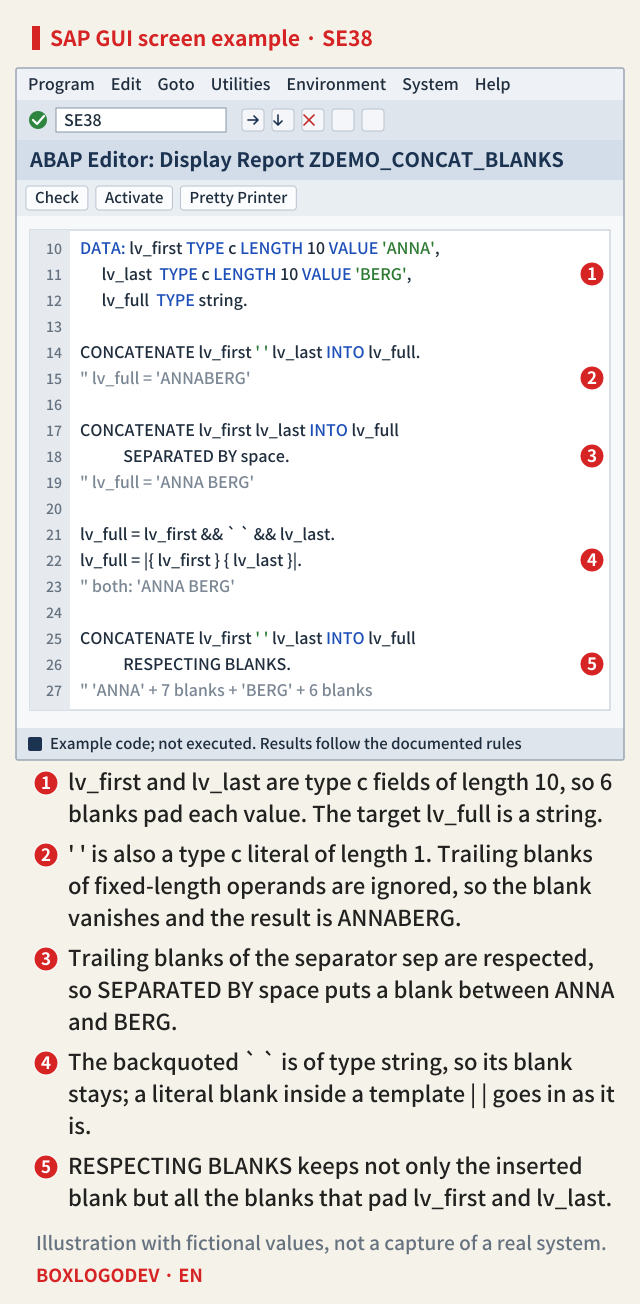
The editor example below collects all of this on one screen: ① the declarations, ② the form that loses the blank, ③ and ④ the three ways to keep it, and ⑤ RESPECTING BLANKS. In existing code, a ' ' in an operand position of CONCATENATE or && is very likely dropping a blank that was meant to be there.
The trailing blank rule of CONCATENATE, SEPARATED BY and RESPECTING BLANKS read the same in the 7.50 and 7.58 documentation. && and string templates arrived in ABAP 7.0 EhP2, so on older systems SEPARATED BY is the option available. When you need a blank, remember one thing: do not put ' ' in an operand position; supply it as a separator or as a string.
Add your perspective.
Share a question, another approach, or something you have tried.
Checking sign-in…
Loading comments…