You split 7 boxes across 2 pallets with integer variables, and the result per pallet is 4, not 3. In many other languages an integer 7 / 2 drops the fraction and gives 3, so it is easy to assume ABAP does the same. After reading this you will be able to explain which type rules decide the result of an ABAP arithmetic expression, know what to use instead of / when you need truncation, and spot inline declarations where decimal places disappear.
The example uses integer variables lv_boxes (value 7) and lv_pallets (value 2), and a two-decimal variable lv_amount holding the amount 100.00. Variable names, values and the program are invented, and the code was not run on a real system. The results given here are worked out by applying the rules on the pages Calculation Type and Calculation Rules and Arithmetic Operators in the ABAP Keyword Documentation (7.58 and 7.50 editions).
The calculation type is fixed before calculating
Every ABAP arithmetic expression has a calculation type. It is one of i, int8, p, f or decfloat34, and it is the highest-priority data type among those involved: decfloat34 if any decfloat is involved, otherwise f if there is an f or the power operator **, then p, int8 and i.
What sets ABAP apart from other languages is that the types involved include the result field that receives the value. In lv_per = lv_boxes / lv_pallets. with lv_per of TYPE i, all three types are i, so the calculation type is i and integer arithmetic is used. Assign the same expression to lv_avg of TYPE p LENGTH 8 DECIMALS 2 and the result field makes the calculation type p, giving 3.50. Not a character of the right-hand side changed; the receiving variable changed the result.
SAP NOTES
The same 7 / 2, different values by target
Fictional example: lv_boxes = 7, lv_pallets = 2 (both TYPE i)
Result field TYPE i
lv_per = 7 / 2 → 4- All types involved are i → calculation type i
- 3.5 is not an integer, so it is rounded
- 4, not truncated to 3
Result field p DECIMALS 2
lv_avg = 7 / 2 → 3.50- The result field also sets the type → p
- p calculates with 31 places of precision
- 3.5 kept to two decimals → 3.50
Inline declaration DATA(...)
DATA(lv_x) = 7 / 2 → 4- Only the right-hand operands decide
- i and i → the variable is declared as i
- Same 4 as a TYPE i result field
Variable names and values are fictional. The results follow from the calculation type rules in the ABAP Keyword Documentation (7.58 and 7.50); they are not run results.
Integer arithmetic rounds after every division
With calculation type i or int8, every interim result that is not an integer after a division is rounded straight away to the nearest integer. The documentation calls this commercial rounding: a value exactly halfway goes away from zero. So 3.5 becomes 4 and -3.5 becomes -4. The documentation itself points out that this sets ABAP apart from most languages, which cut off the decimal places, and that results differ especially in divisions with calculation type i.
The bigger trap is that rounding happens for each interim result. With everything of type i, 7 / 2 * 2 is evaluated from left to right: 7 / 2 becomes 4 first, and multiplying by 2 gives 8. Written with the multiplication first, 7 * 2 / 2 gives 7. As in the example in the 7.58 documentation, 1 / 3 + 1 / 3 + 1 / 3 in integer arithmetic turns each of the three divisions into 0, so the sum is 0. Wrap the same expression in CONV decfloat34( ... ) to make the calculation type decfloat34, and the interim values 0.333… are kept, giving 0.999….
SAP NOTES
Integer arithmetic rounds after every division
Calculation type i: a non-integer interim result is rounded at once (0.5 away from zero)
7 / 2 * 2
8- Left to right: 7 / 2 = 3.5 → 4
- 4 * 2 = 8
- Multiplying first: 7 * 2 / 2 = 7
1 / 3 + 1 / 3 + 1 / 3
0- Each of the three divisions 0.333… → 0
- 0 + 0 + 0
- Same result as the example in the 7.58 docs
-7 / 2
-4- -3.5 lies exactly halfway
- Rounded away from zero
- -4, not -3
All cases assume operands and result field of TYPE i. Values follow the documented rules; they are not run results.
With calculation type p, the calculation uses an internal precision of 31 places and is repeated with 63 places on overflow. Surplus decimal places are rounded without an exception. When the calculation is done, the result is converted to the type of the result field, and for a two-decimal field commercial rounding happens again at that point. Moving a p result into an i field also rounds rather than truncates.
An inline declaration has no receiving type
With an inline declaration such as DATA(lv_x) = lv_boxes / lv_pallets., there is no result field type yet, so the calculation type comes from the right-hand side alone and becomes the type of the new variable. For a division of two integers, lv_x is declared as i and holds 4.
Calculation type p is riskier. The declared variable is then always a p of length 8 with no decimal places. Divide the two-decimal amount lv_amount (100.00) by 3 into DATA(lv_share) = lv_amount / 3. and 33.333… lands in a field without decimals as 33. The documentation warns that this can produce unexpected results and raise exceptions, and advises avoiding inline declarations with calculation type p or setting the type with CONV. Written as DATA(lv_exact) = CONV ty_amount( lv_amount / 3 )., the constructor type ty_amount takes part in the calculation type like the left side of an assignment, and the result is 33.33.
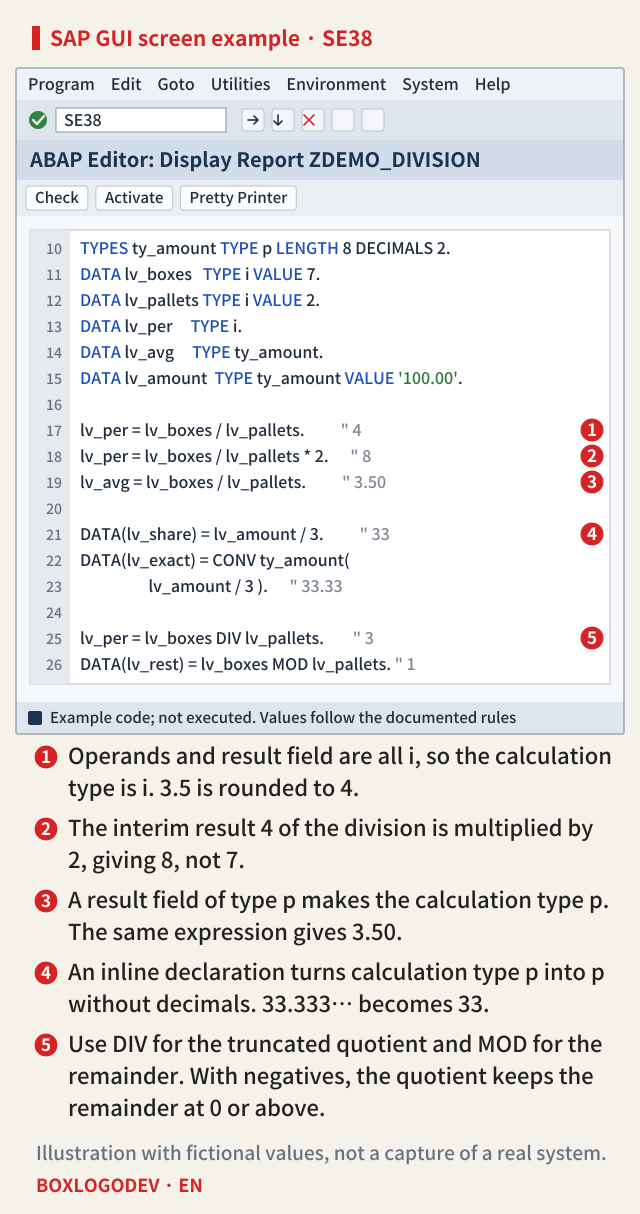
Read the markers on the screen above as a review checklist. Marker 1 is where everything is i and 3.5 is rounded to 4. Marker 2 is where the interim result 4 of the division is multiplied by 2 to give 8. Marker 3 is where a p result field makes the same expression give 3.50. Marker 4 is the inline declaration that loses the decimal places, with CONV ty_amount right below it as the alternative. Marker 5 is DIV and MOD, which give the truncated quotient and the remainder separately.
DIV for truncation, MOD for the remainder
When you want the integer quotient truncated, use DIV rather than /. 7 DIV 2 is 3 and 7 MOD 2 is 1. However, DIV is defined as the quotient that leaves a remainder of 0 or more, so with a negative operand it can differ from a quotient cut toward zero. According to the table in the documentation, -7 DIV 3 is -3 and -7 MOD 3 is 2, 7 DIV -3 is -2 and 7 MOD -3 is 1, and -7 DIV -3 is 3 and -7 MOD -3 is 2. The result of DIV times the right operand plus the result of MOD always gives the left operand. ABAP SQL DIV and MOD treat signs differently, so do not compare values calculated in the database with values calculated in ABAP as if they were the same.
SAP NOTES
/, DIV and MOD answer different questions
DIV × right + MOD = left, and MOD is never negative
Both positive: 7 and 3
2 · 2 · 1- 7 / 3 = 2.333… → 2 in type i
- 7 DIV 3 = 2, 7 MOD 3 = 1
- 7 / 2 is 4 but 7 DIV 2 is 3
With a negative operand
-3 × 3 + 2 = -7- -7 DIV 3 = -3, -7 MOD 3 = 2
- 7 DIV -3 = -2, 7 MOD -3 = 1
- -7 DIV -3 = 3, -7 MOD -3 = 2
Dividing by zero
0 / 0 → 0- Raises a catchable exception
- Only 0 / 0 gives 0 without one
- Check the divisor for 0 first
The negative rows match the table on the arithmetic operators page of the ABAP Keyword Documentation. SQL DIV and MOD handle signs differently, so do not carry this table over.
Division by zero needs its own check. Dividing by zero raises a catchable exception. The one exception is when the dividend is also 0; then the result is 0 and no exception is raised. Check the divisor first in any division where a quantity or amount can be 0. If you need rounding in a specific direction, the round function accepts a ROUND_... constant of CL_ABAP_MATH. For example, round( val = CONV decfloat34( lv_boxes / lv_pallets ) dec = 0 mode = cl_abap_math=>round_down ) rounds 3.5 down to 3. The CONV decfloat34 sets the calculation type so that the division in the argument is not rounded first by integer arithmetic. Without a mode, the function rounds commercially.
Releases and old programs
The rules in this note read the same in the 7.50 and 7.58 editions: the priority of calculation types, the result field taking part in the calculation type, rounding in integer and p arithmetic, the length 8 and zero decimals of an inline p declaration, and the sign table for DIV and MOD. The 7.58 edition adds the 1 / 3 + 1 / 3 + 1 / 3 example and covers FINAL(...) alongside DATA(...) as inline declarations; the same section of the 7.50 edition mentions only DATA(...).
In a very old program, also check the program attribute "Fixed point arithmetic". It is set by default in new programs, and switching it off is an obsolete option kept only for compatibility. In a program without it, the decimal point position of type p is respected only for output on a classic dynpro, for assignments to character fields and for WRITE formatting, and is ignored in calculations. If the same expression gives different values in two programs, check this attribute first.
What to check in your code
For each line with a division, check three things. Are all operands, including the result field, integers, so that integer arithmetic is used? Does the interim result of that division feed a later multiplication or addition? Is the result received by an inline declaration while the calculation type is p? If you need the truncated quotient, use DIV; if you need decimals, make the type explicit with the result field or with CONV.
If you remember only one thing, make it this: in ABAP, / rounds rather than truncates, and the type that decides the rounding includes the result field on the left.
Add your perspective.
Share a question, another approach, or something you have tried.
Checking sign-in…
Loading comments…