An order number shows as 123 on a display screen, so you write WHERE order_no = '123' in a program and get nothing back. The same lookup with numbers uploaded from a spreadsheet fails in the same way. There is no dump and no syntax error; the result is simply empty. After reading this you will be able to tell why the value on the screen differs from the stored value, when code has to convert it itself, and which values the conversion does not touch.
All examples are fictional. Assume a data element ZDEMO_ORDER_NO based on the domain ZDEMO_ORDNO (CHAR 10, conversion routine ALPHA), and a table ZDEMO_ORDERS whose field ORDER_NO uses it. The code was not run on a real system. The behaviour comes from Conversion Exits, the string template formatting options and the assignment rules for type c in the 7.58 and 7.50 editions of the ABAP Keyword Documentation.
123 on the screen, 0000000123 in storage
When a domain has a conversion routine (conversion exit), one value has two shapes: the display format that people see and type, and the internal format used by ABAP data objects and the database. A conversion routine consists of two function modules, CONVERSION_EXIT_ALPHA_INPUT and CONVERSION_EXIT_ALPHA_OUTPUT, where ALPHA is the routine's name. INPUT turns the display format into the internal format, and OUTPUT does the reverse.
ALPHA's INPUT right-aligns a value made only of digits and fills the front with zeros. So when 123 is typed on a screen, the program and the table receive 0000000123. On output, OUTPUT removes the leading zeros and shows 123 again. People always see 123, but the stored value has been 0000000123 all along.
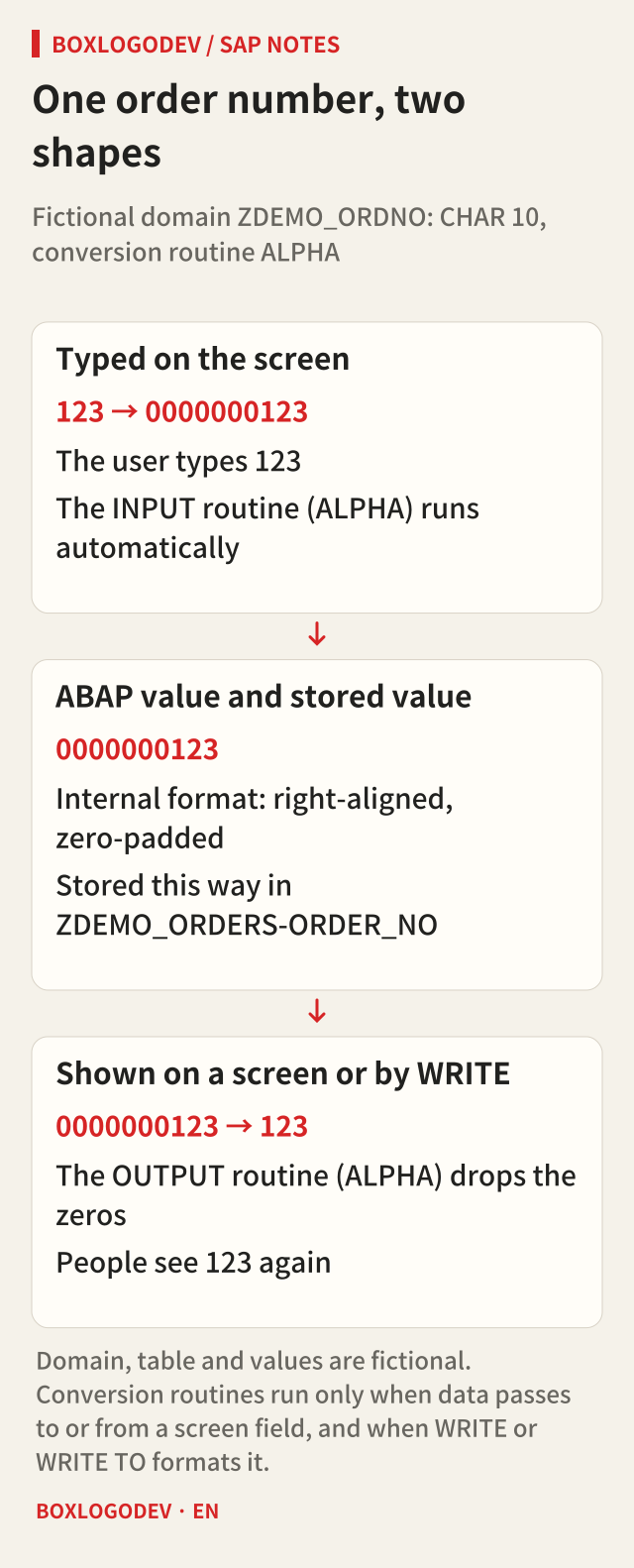
The key is when the conversion happens. The documentation names only two places. One is when values pass between a screen (dynpro) field and an ABAP data object: INPUT runs automatically when input goes to ABAP, and OUTPUT when an ABAP value goes to the screen field. The other is formatting a variable declared with reference to the domain using WRITE or WRITE TO, where OUTPUT runs by default. Assignments, comparisons and ABAP SQL are not on that list.
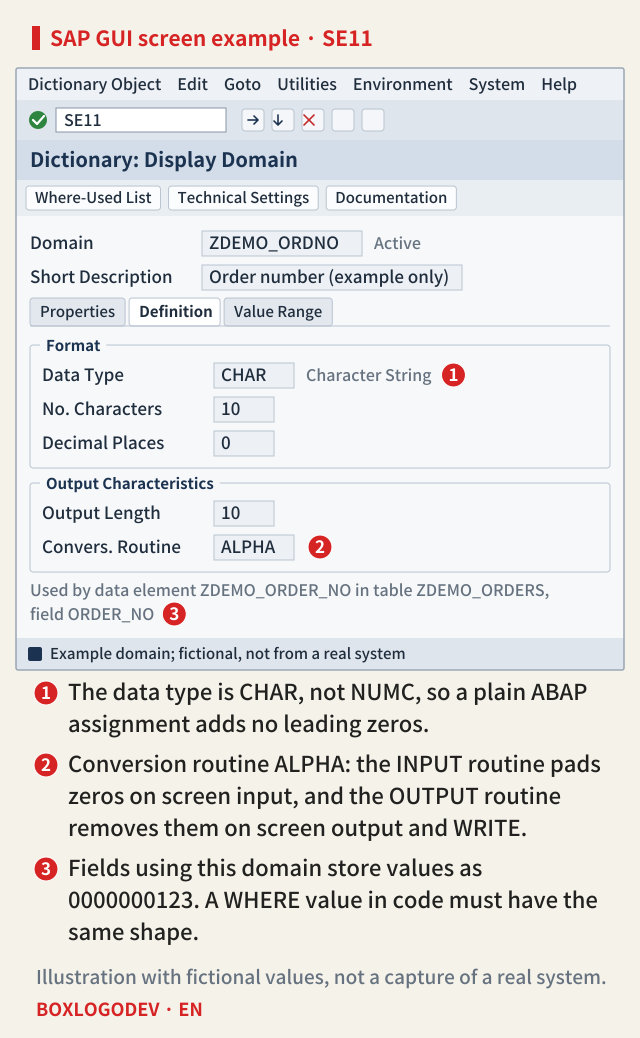
As marker 1 in the example screen shows, this domain's data type is CHAR, not NUMC. It looks numeric, but it is a character field, so an assignment alone adds no zeros. Marker 2, the conversion routine ALPHA, adds and removes the zeros at screen input and output, and as marker 3 says, table fields using this domain store the value as 0000000123.
A '123' written in code is not converted
Writing lv_order = '123'. in a program applies only the assignment rule for type c. The characters are placed from the left and the remaining seven positions are blanks. When SELECT ... WHERE order_no = @lv_order runs with this value, the database compares 123 followed by blanks with the stored 0000000123, and no row matches. When the result set is empty, SELECT sets sy-subrc to 4. Values from a file upload, from RFC or API calls, or copied from another system never passed through a screen either, so they are in the same position.
The normal path is to convert to the internal format yourself before comparing. With the string template formatting option ALPHA = IN you can write lv_order = |{ lv_input ALPHA = IN }|., and the documentation says this option has the same function as CONVERSION_EXIT_ALPHA_INPUT and _OUTPUT. In the other direction, use ALPHA = OUT to build a string for people to read. The option can be used only with types string, c and n, and cannot be combined with other formatting options except WIDTH and CASE.
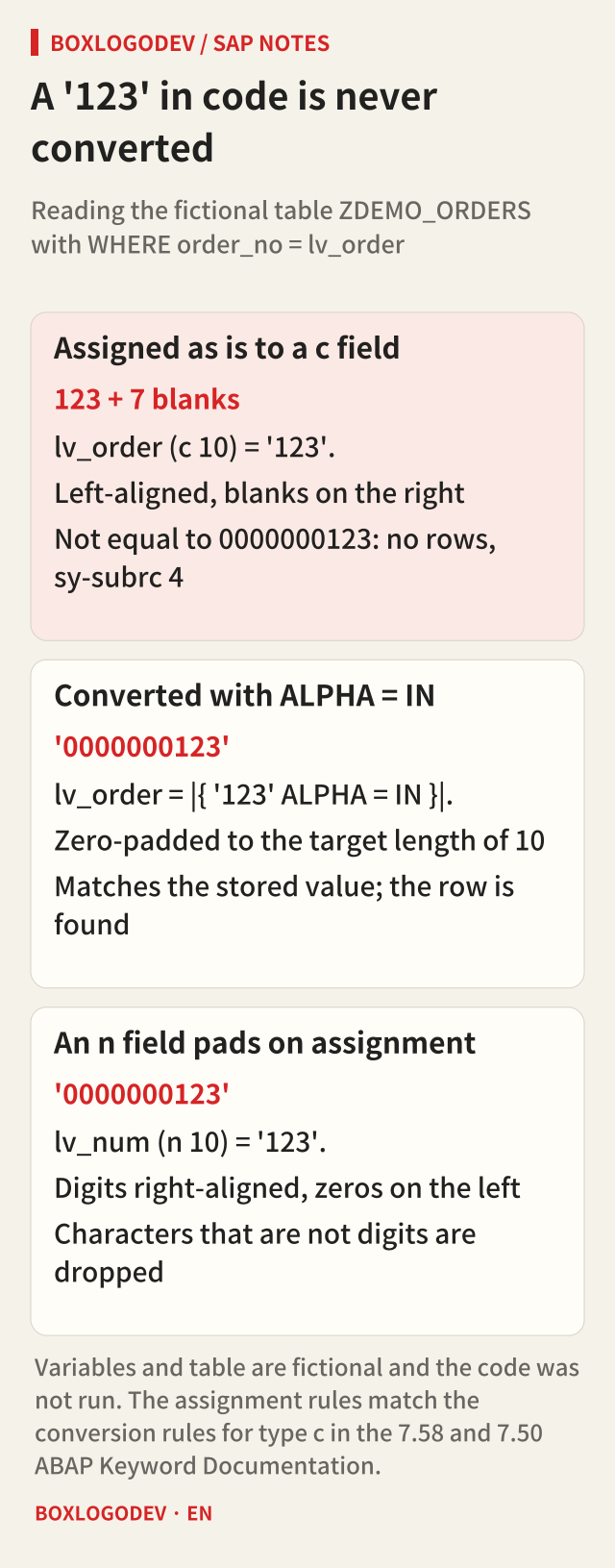
If the field type is n (numeric text), things are different. Assigning c to n moves only the digit characters to the right and pads the front with zeros, so '123' becomes 0000000123 by assignment alone. Characters that are not digits are silently dropped. The same kind of "numeric number" needs different code depending on whether the domain is CHAR with ALPHA or NUMC, so the first step is to check the data type in SE11.
Selection screens follow the same principle. With PARAMETERS p_order TYPE zdemo_order_no., which refers to a dictionary type, the input field takes the domain's screen properties and its conversion routine can run, so when a user types 123 the program receives 0000000123. Declared as TYPE c LENGTH 10, that link does not exist and the code must convert. If the same program works from the screen but not in a batch job or test code, start by checking which path the value came in by.
Values ALPHA does not pad
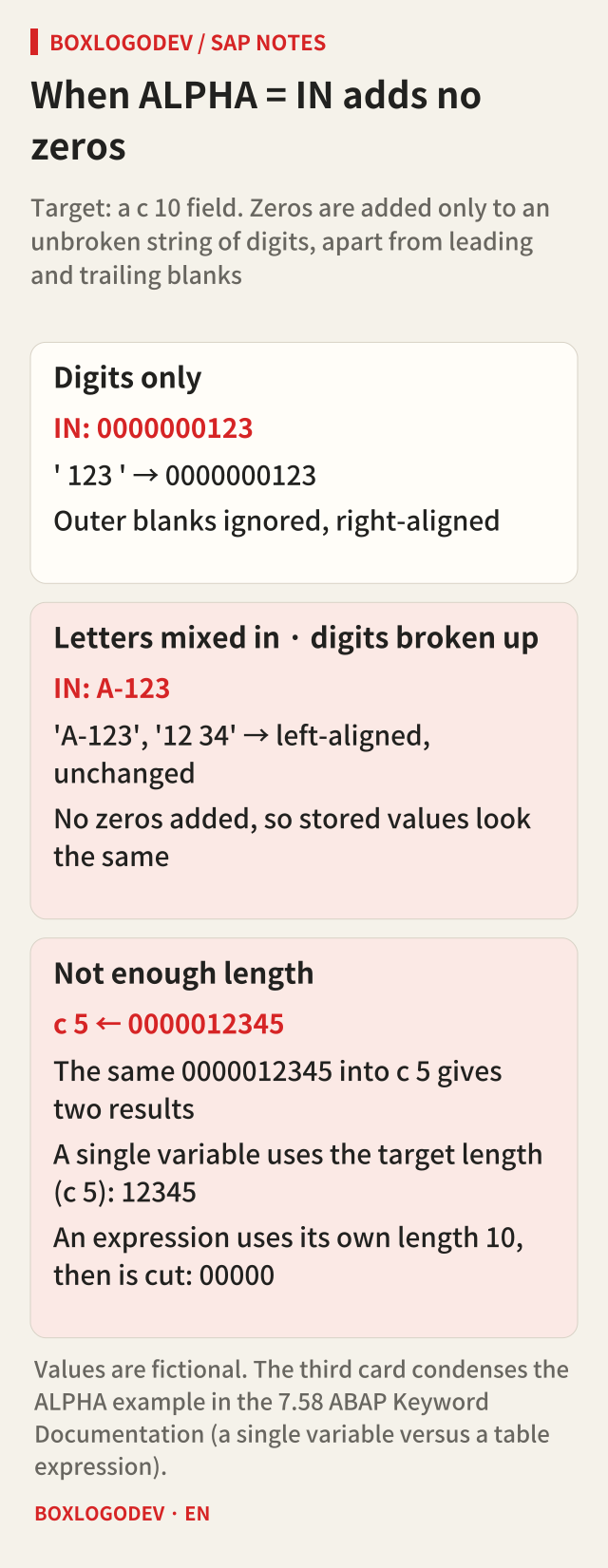
ALPHA = IN adds zeros only to an unbroken string of digits, apart from leading and trailing blanks. A value with letters, such as A-123, or with a blank between digits, such as 12 34, gets nothing added and stays left-aligned as it is. If one domain holds both purely numeric numbers and numbers with letters, the stored shapes split in two: numeric ones carry zeros, the others are stored as entered.
Check the result length as well. Without the formatting option WIDTH, a template holding a single variable that is assigned to a fixed-length field of type c, n, d or t uses the target field's length; an expression or function call uses the length of the original field. In the example in the 7.58 documentation, putting the c 10 value 0000012345 into a c 5 field gives 12345 when the variable is used directly, but 00000 with a table expression, because the template first builds 0000012345 at length 10 and the assignment then cuts it. When converting between fields of different lengths, keep a single variable in the template or specify WIDTH.
There is a trap in the other direction too. If some program stored '123' as is, without converting, that row may be stored without zeros, and now a lookup with 0000000123 from screen input of 123 does not find it. This follows from the assignment rules; it is not a case reproduced on a real system. When a lookup comes back empty, check the actual shape of the stored value as well as the value in your code.
Releases and scope
The string template option ALPHA and its rules (what counts as a string of digits, adding and removing leading zeros, how the result length is determined) read the same in the 7.50 and 7.58 documentation. The 7.58 edition includes the c 5 assignment example above in the text; the 7.50 edition points to a separate executable example. Releases older than 7.50 were not checked, so on such a system confirm in your release's documentation that the option exists, and if it does not, call the function module with the same function. Both editions also agree that conversion routines run automatically only at screen input and output and in WRITE. WRITE ... USING NO EDIT MASK switches off that automatic OUTPUT conversion.
What to check when a lookup is empty
When a value is clearly there but SELECT returns nothing, check three things. Does the field's domain have a conversion routine? Did the value you compare come through a screen, or from code or a file? Is the data type CHAR or NUMC? If you remember one thing, make it this: what the screen shows is the display format, while code and the database compare the internal format. Outside screens and WRITE, the conversion between them only happens when you call it.
Add your perspective.
Share a question, another approach, or something you have tried.
Checking sign-in…
Loading comments…