You want to set one shipment's status to 'S', so you fill a work area with the key and STATUS and run UPDATE zship_status FROM @ls_ship. sy-subrc is 0, yet the row's carrier, planned date and changed-by columns are now empty. After reading this note you will be able to say how much of a row an UPDATE … FROM work area changes, and to rewrite a statement that was meant to change a few columns with SET, INDICATORS or read-then-write.
The example is a fictional Z table ZSHIP_STATUS (key MANDT and SHIP_ID; other columns STATUS, CARRIER, PLAN_DATE, CHANGED_BY) and a fictional program ZDEMO_SHIP_STATUS. Shipment 0000004711 starts as STATUS P, CARRIER C001, PLAN_DATE 20261120, CHANGED_BY USER_A. The code was not run on a real system. The behaviour is as described in the UPDATE source section of the ABAP Keyword Documentation 7.58 and related pages.
A FROM work area replaces the whole row
UPDATE changes a database table in one of two ways. You list the columns to change after SET, or you give a work area after FROM and overwrite whole rows. FROM @ls_ship looks for the row whose primary key equals the initial part of the work area and writes the work area's content to it. The values go in from left to right without conversion, and there is no notion of "only the columns I filled".
In the example, ls_ship is declared with reference to the table, so its structure fits. But only ship_id and status were given values. The other three columns hold the initial value of their type, blanks for the character columns and 00000000 for the date, and those values are written to the row too. A client ID in the work area is ignored; the row in the current client is changed. Targeting another client takes a separate addition such as USING CLIENT.
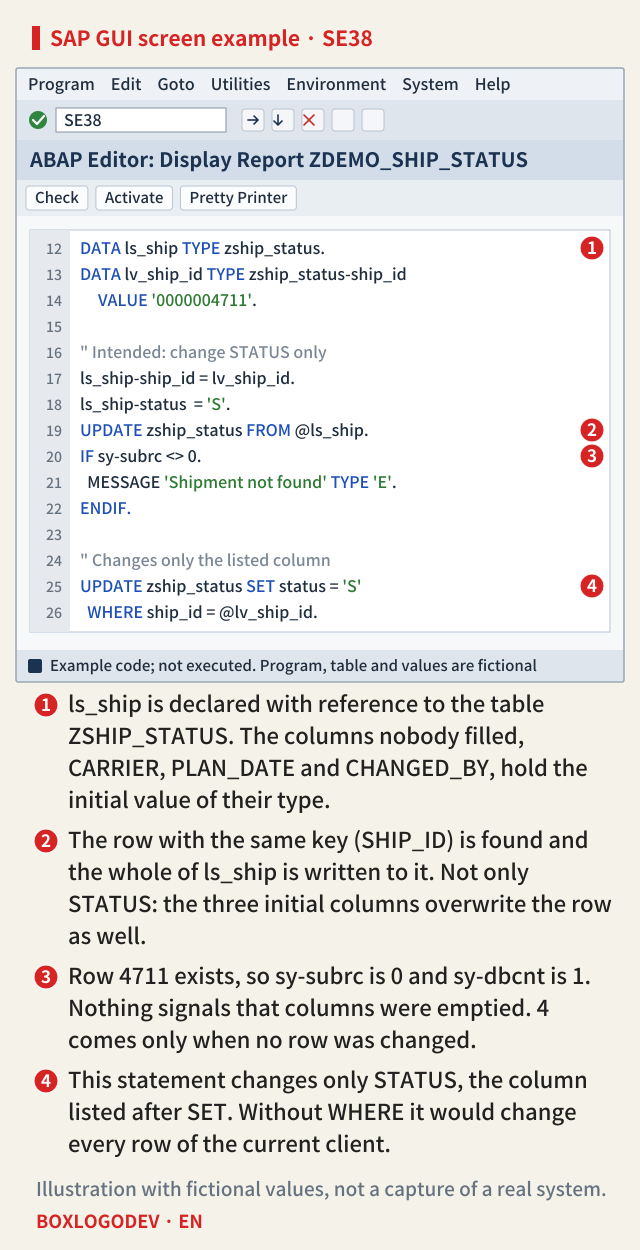
sy-subrc 0 only means "row found and changed"
The mistake survives because the result looks normal. With a work area, UPDATE sets sy-subrc to 0 when the specified row was changed, and sy-dbcnt, the number of changed rows, to 1. You get 4 only when no row was changed: no row has that key, or the change would create a duplicate in the primary key or a unique secondary index. When the row is missing, UPDATE does not insert one.
So the check IF sy-subrc <> 0. only tells you whether the shipment existed. No system field tells you which columns changed to what. If a test only confirms that STATUS became S, a row with an empty carrier and planned date goes into production unnoticed.
SAP NOTES
Three UPDATEs on the same row
Fictional table ZSHIP_STATUS: trying to set only STATUS to 'S' for key SHIP_ID 0000004711
The row before UPDATE
- STATUS P
- CARRIER C001
- PLAN_DATE 20261120
- CHANGED_BY USER_A
UPDATE … FROM @ls_ship
sy-subrc 0 · sy-dbcnt 1- STATUS S
- CARRIER blank (initial)
- PLAN_DATE 00000000 (initial)
- CHANGED_BY blank (initial)
UPDATE … SET status = 'S'
WHERE ship_id = @lv_ship_id- STATUS S
- CARRIER C001
- PLAN_DATE 20261120
- CHANGED_BY USER_A
FROM … INDICATORS (7.55 and later)
SET STRUCTURE col_ind- 'X' only in col_ind-status
- Only STATUS becomes S
- The other three columns stay
- Marks have no effect on key columns
All three statements end with sy-subrc 0. It does not tell you what happened to the row. Table, key and values are fictional.
To change a few columns, use SET
If STATUS is all you mean to change, write UPDATE zship_status SET status = 'S' WHERE ship_id = @lv_ship_id. from the start. After SET you list the columns separated by commas, and a form such as col = col + f adds to the current value. Each column may appear only once. Columns you do not list are left alone by the statement.
SET has a risk of its own. Leave out WHERE and every row of the target changes, which for a client-dependent table means every row of the current client. Because a statement with SET returns sy-subrc 0 when at least one row changed, a statement meant for one key is safer with a check that sy-dbcnt is 1.
If you must pass a structure: INDICATORS (7.55 and later)
Code that changes many rows from an internal table at once, or that passes values around as structures, is hard to move to SET. From ABAP 7.55, a set indicator structure after UPDATE … FROM selects the columns to change. The 7.55 release notes add both the INDICATORS addition of TYPES and set indicators after UPDATE FROM.
First declare a type such as TYPES ty_ship_ind TYPE zship_status WITH INDICATORS col_ind TYPE abap_bool., which appends a substructure col_ind with a one-character mark per column to the table structure. Put the key and the new STATUS into a work area of that type, set only col_ind-status to 'X', and run UPDATE zship_status FROM @ls_ship_ind INDICATORS SET STRUCTURE col_ind.: only STATUS changes. Columns whose mark is not 'X' are not updated, and NOT SET turns it round, updating every column except the 'X' ones. Key columns must be in the indicator structure, but their marks have no effect. Releases before 7.55 do not have this syntax, so use SET or the read-first approach below.
Read first, then write; and MODIFY
Sometimes writing the whole row is right. Then read the current row in full with SELECT SINGLE * FROM zship_status WHERE ship_id = @lv_ship_id INTO @ls_ship., change only what you need, and write it with FROM @ls_ship. The other columns are written back with the values you read, so nothing is emptied. But if another program changed CARRIER between your read and your write, that change is overwritten with the old value you read. If the same row can be changed from several places, an SAP lock before the read is a precondition.
MODIFY zship_status FROM @ls_ship. follows the same rules. If a row with the key exists, it is overwritten under the UPDATE rules; if not, a new row is inserted under the INSERT rules. Run MODIFY with a work area that holds only the key and STATUS, and an existing row loses its columns as above, while a missing row is created with every other column initial. The MODIFY work area section of the 7.58 documentation checked here does not mention INDICATORS.
SAP NOTES
What to write instead
Four statements, chosen by what you mean to change, on the fictional table ZSHIP_STATUS
Change a few columns
SET status = 'S'- UPDATE … SET col = … WHERE key
- Only the columns after SET change
- No WHERE: every row of the client
- Rows changed: sy-dbcnt
Pass a structure, change part (7.55+)
INDICATORS SET STRUCTURE- TYPES … WITH INDICATORS col_ind
- 'X' in the mark of each column to change
- NOT SET: all except the 'X' columns
- Not available in earlier releases
Writing the whole row is right
UPDATE … FROM @ls_ship- Read the whole row first (SELECT SINGLE *)
- Change what you need, then write with FROM
- Overwrites changes made after your read
- Lock before reading
MODIFY … FROM is the same
MODIFY zship_status FROM @ls_ship- Row with the key exists: overwritten as by UPDATE
- No such row: inserted as by INSERT
- If the work area was only partly filled,
- the new row's other columns are initial
Checked against the ABAP Keyword Documentation 7.58. INDICATORS appears as an addition in the 7.55 release notes. Table and values are fictional.
Where to look in your code first
Search the program for lines where UPDATE or MODIFY is followed by a FROM work area, and trace back where that work area was filled. If it was freshly declared or cleared with CLEAR and then given a few columns, it is the case in this note. If it was filled by reading the same row with SELECT SINGLE *, the columns will not be emptied, so check for the lock instead.
Each time you see a FROM work area, ask: is every column of this work area a value that should be in the database now? If the answer is no for even one column, that statement should become SET or INDICATORS.
Add your perspective.
Share a question, another approach, or something you have tried.
Checking sign-in…
Loading comments…