When you clean up an old program and turn READ TABLE ... INTO and the IF sy-subrc below it into the single line ls_price = lt_prices[ item = lv_item ]., the program can end in a dump the moment it looks for an item that is not there. Leaving the IF sy-subrc <> 0. check below it in place does not help. After reading this note you will be able to tell how READ TABLE and a table expression each report "not found", and at every place you convert, pick one of four ways (catching the exception, a default value, an existence check or ASSIGN) so that the shorter code adds no new dumps.
The example uses the fictional standard table lt_prices (columns item and price) and the fictional program ZDEMO_ITAB_EXPR. The table holds three items, A-100, A-200 and A-300, and we look for the missing item A-250. The code was not run on a real system. The behaviour described is what the ABAP Keyword Documentation, release 7.58, says about table expressions and the pages linked from it.
READ TABLE ends normally even when nothing is found
READ TABLE reads one line and sets the system fields sy-subrc and sy-tabix. When the line is found, sy-subrc is 0 and sy-tabix is that line's number in the table index used; with a hash key, sy-tabix is 0. When it is not found, sy-subrc is 4. If a binary search reached the end of the table, it is 8, and sy-tabix is the number of lines plus 1. After a miss without a binary search, sy-tabix is undefined. The value 2, which appears only with COMPARING, is a variant of "found".
The point is that the statement ends normally even on a miss. The work area ls_price stays unchanged or initial, and the program moves on to the next line. That is why old code puts IF sy-subrc <> 0. right after READ TABLE and handles "not found" inside it. The pattern of changing the found line and writing it back with MODIFY ... INDEX sy-tabix relies on the same system fields; it also appears in the documentation's READ TABLE example.
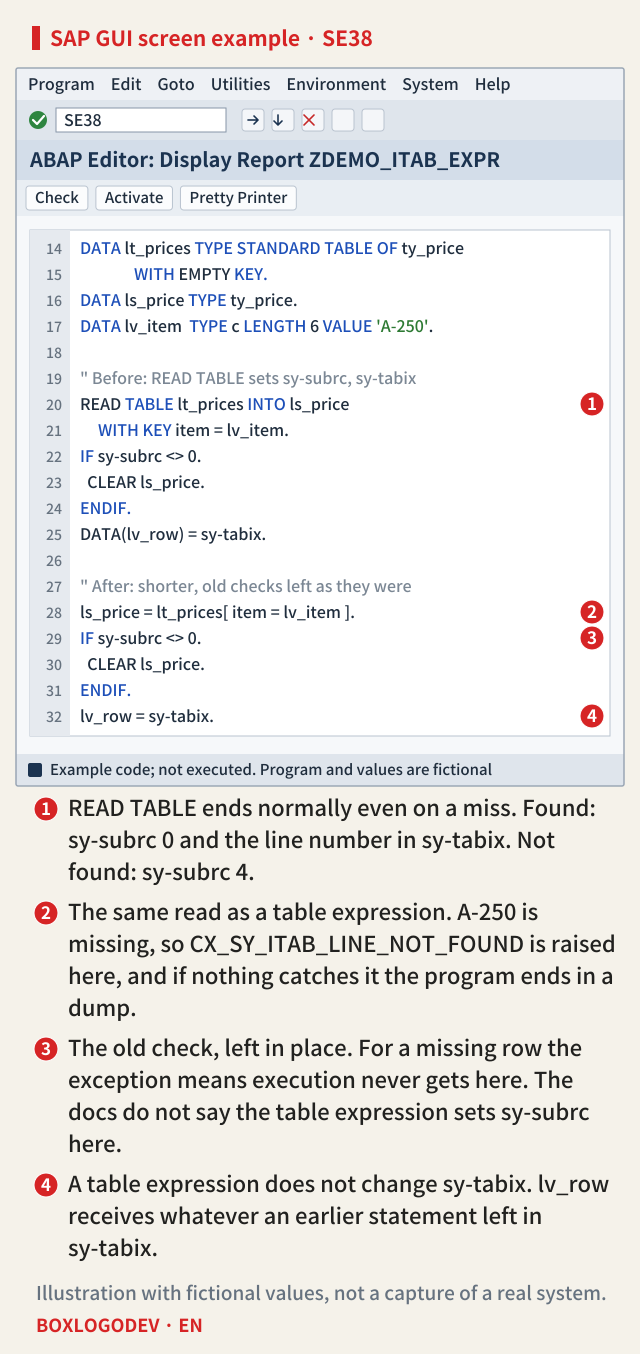
Read the numbers on the screen in order and you have the outline of this note. Number 1 is where READ TABLE leaves sy-subrc and sy-tabix, number 2 the same read written as a table expression, number 3 the old sy-subrc check left in place, and number 4 the line that copies sy-tabix.
A table expression raises an exception when nothing is found
A table expression itab[ ... ] finds one line by the condition in the square brackets and uses it as an operand on the spot. The documentation says each table expression can be viewed as a short form of a variant of READ TABLE, but the behaviour on a miss differs. If the specified line is not found, the catchable exception CX_SY_ITAB_LINE_NOT_FOUND is raised in all operand positions. That holds for a key condition such as item = lv_item and for a line number such as lt_prices[ 5 ]. If no TRY ... CATCH catches it, the program ends with runtime error ITAB_LINE_NOT_FOUND, the dump you see in ST22.
The documentation names four cases without the exception: a default value given while the result is defined with VALUE or REF; use in the ASSIGN statement (sy-subrc is 4); use inside the predicate function line_exists (false); and use inside the table function line_index (0). Outside these four places, itab[ ] reports "not found" only through the exception.
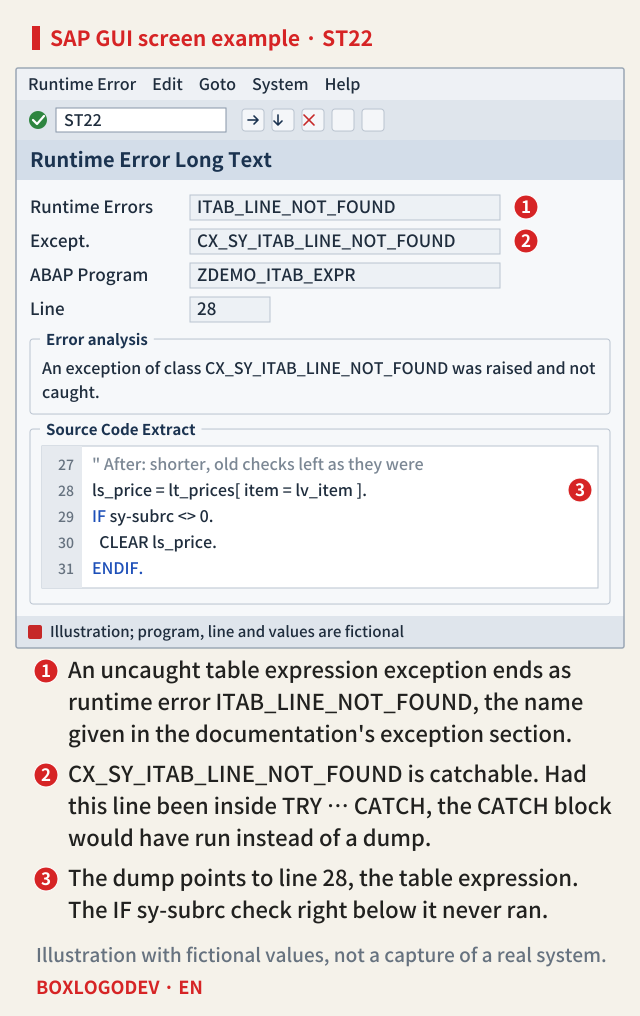
In the example screen, the line the dump points to (number 3) is line 28, the table expression, and the IF sy-subrc right below it never ran. The exception class has attributes that show the line number or key of the failed access. The documentation also notes that when a statement contains several table expressions that read by line number, you cannot tell which one failed.
What the old sy-subrc and sy-tabix checks now look at
If you convert READ TABLE to a table expression and keep the checks after it, those checks no longer mean what they did. Start with sy-tabix. The documentation says that, unlike READ TABLE, a table expression does not change sy-tabix, except when used in ASSIGN. So lv_row = sy-tabix. at number 4 receives the value from whichever earlier statement last changed sy-tabix. Inside LOOP AT, that may be the current line number the loop set. Using it in MODIFY lt_prices FROM ls_price INDEX sy-tabix changes the line with that number, which has nothing to do with the line just read.
Then sy-subrc. ASSIGN is the only place where the documentation defines sy-subrc for a table expression. In ordinary operand positions the exception comes first when the line is missing, so the IF sy-subrc <> 0. block at number 3 never gets a chance to handle "not found". When the line exists, nothing in the documentation says the value that IF reads was set by this table expression. The old check stays behind as a line that neither prevents the dump nor confirms the result.
SAP NOTES
Same read, different system fields
Looking up the missing item A-250 in the fictional standard table lt_prices
READ TABLE … INTO ls_price
sy-subrc = 4- Found: sy-subrc 0, sy-tabix = line number
- Not found: sy-subrc 4, no exception
- 8 when a binary search reaches the end
- ls_price stays unchanged or initial
ls_price = lt_prices[ … ]
CX_SY_ITAB_LINE_NOT_FOUND- Not found: this exception is raised
- The IF sy-subrc on the next line is never reached
- sy-tabix is not changed
- What remains is an earlier statement's value
ASSIGN lt_prices[ … ] TO <fs>
sy-subrc = 4- Not found: sy-subrc 4, no exception
- 8 when a binary search on a sorted table reaches the end
- sy-tabix is set as by READ TABLE
- <fs> keeps its previous state: test sy-subrc
ASSIGN is the only place where the docs define sy-subrc for a table expression. Inside a LOOP, the sy-tabix left over may be the loop's current line number. Names and values are fictional.
Choose by what "not found" means
The documentation offers four ways, and which one fits depends on what "not found" means in that piece of code.
- If the line should normally exist, use the table expression where you need it and catch the exception with
TRY ... CATCH cx_sy_itab_line_not_found. If a missing line is a data error, the CATCH block logs a message or stops processing. Theline_existsdocumentation suggests this approach when the line usually exists. - If an initial or default value is good enough, write
VALUE #( lt_prices[ item = lv_item ] OPTIONAL ). When the line is missing, the result is an initial line instead of an exception. WritingDEFAULT VALUE #( item = lv_item )in place ofOPTIONALmakes a value you choose the result. A default value can be added only when the result is defined withVALUEorREF. There is one more difference: READ TABLE could leave the work area as it was on a miss, while here the result is set every time. - If you only need to know whether the line exists, write
IF line_exists( lt_prices[ item = lv_item ] ).A miss gives false and no exception. If you need the line number,line_index( )returns the number of the line found, or 0.line_existsdoes not fillsy-tabix. The documentation says not to check withline_existsand then read the same line again, because that runs the same search twice. - To read and branch at once, write
ASSIGN lt_prices[ item = lv_item ] TO FIELD-SYMBOL(<ls_price>).followed byIF sy-subrc = 0.The documentation treats this as another form of READ TABLE ... ASSIGNING. On a miss there is no exception andsy-subrcis 4 (8 when a binary search on a sorted table reaches the end), andsy-tabixis set the same way as by READ TABLE. You can change the line directly through the field symbol, soMODIFY ... INDEX sy-tabixis not needed. On a miss the field symbol keeps its previous state, so testsy-subrc, notIS ASSIGNED.
SAP NOTES
What should 'not found' mean here?
Four documented ways, shown on the fictional table lt_prices
The line should exist
CATCH cx_sy_itab_line_not_found- Inside TRY, use lt_prices[ … ] directly
- Handle a miss in the CATCH block
- Uncaught, it ends in ITAB_LINE_NOT_FOUND
An initial or default value will do
VALUE #( lt_prices[ … ] OPTIONAL )- OPTIONAL: an initial line
- DEFAULT def: a value you choose
- Only with VALUE or REF
- Since 7.40 SP08
Only existence matters
line_exists( lt_prices[ … ] )- Not found: false, no exception
- Line number: line_index( ), 0 if missing
- Do not read the same line again afterwards
Read and branch at once
ASSIGN lt_prices[ … ] TO <fs>- Not found: sy-subrc 4, no exception
- sy-tabix is set as by READ TABLE
- Test sy-subrc, not IS ASSIGNED
Checking with line_exists and then reading the same line searches twice. From 7.57, ASSIGN with ELSE UNASSIGN can also be tested with IS ASSIGNED. The code is a fictional example.
Releases and BINARY SEARCH
According to the release notes, table expressions, line_exists and line_index arrived in 7.40 SP02, and the default values OPTIONAL and DEFAULT were added in 7.40 SP08. On a system with a support package in between, table expressions work but default values do not, so use TRY ... CATCH or ASSIGN. ELSE UNASSIGN, which leaves the field symbol unassigned on a miss, became available for ASSIGN with a table expression in 7.57; with it, testing IS ASSIGNED is also fine.
When converting a READ TABLE with BINARY SEARCH, check one more thing. A table expression with a free key has no way to force a binary search. If you need one, declare a sorted secondary key and name it with KEY in the table expression. According to the documentation, reads through a sorted key use a binary search.
What to decide before you shorten
Converting READ TABLE to a table expression is not a syntax cleanup; it changes how "not found" is handled. At every place you convert, find the sy-subrc and sy-tabix checks just below and answer one question first: if this line is missing, is it a bug (catch the exception), is a default fine (OPTIONAL/DEFAULT), or must the code branch right away (ASSIGN and sy-subrc)? Once the answer is clear, delete the old check or rewrite it for that way.
Add your perspective.
Share a question, another approach, or something you have tried.
Checking sign-in…
Loading comments…