You use DELETE ADJACENT DUPLICATES to clean up an internal table, and the same vendor still appears twice. Or the opposite happens: rows with different amounts disappear and a total shrinks. Neither is a syntax error or a runtime error; both are the documented behaviour. After reading this you will be able to check what this statement treats as a "duplicate" through three questions, which rows are compared, which columns are compared and which row is kept, and fix the code.
The example is a fictional structure ty_item with four columns: vendor lifnr, document number belnr, posting date budat and amount dmbtr (type p). Five rows for vendors V-0001 and V-0002 arrive in the order V-0002, V-0001, V-0001, V-0002, V-0001. The second and third V-0001 rows share document 5100000001 and posting date 2026-09-01 and differ only in amount, 300.00 and 200.00. The table, vendors and amounts are invented, and the code was not run on a real system. The behaviour comes from DELETE itab, duplicates in the ABAP Keyword Documentation and related entries (7.58 and 7.50 editions).
Each row is compared with its neighbour only
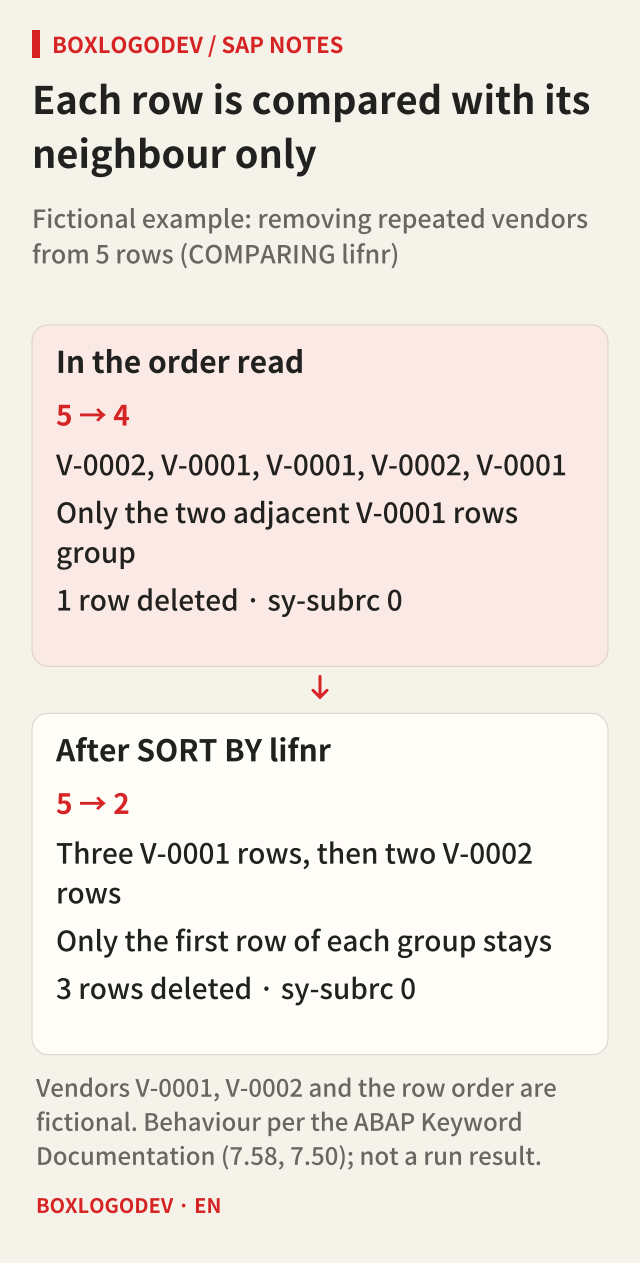
ADJACENT is the key word. The statement groups consecutive rows whose compared columns hold the same values, keeps the first row of each group and deletes the rest. It does not search the whole table for equal values. Equal values that are apart belong to different groups.
To build a vendor list, you delete from the five rows with only COMPARING lifnr. Just the two adjacent V-0001 rows form a group, so one row is deleted and four remain. V-0001 and V-0002 still appear twice each. Sort first with SORT ... BY lifnr, and the three V-0001 rows and the two V-0002 rows sit together: three rows are deleted and two remain. The documentation says as much: the statement usually requires a suitable sort by the compared components.
The return code does not show the difference. sy-subrc is 0 if at least one row was deleted and 4 if no adjacent duplicates were found. Both cases above give 0, so 0 means "at least one row was deleted", not "all duplicates are gone". sy-tabix is not set.
What is compared when COMPARING is left out?
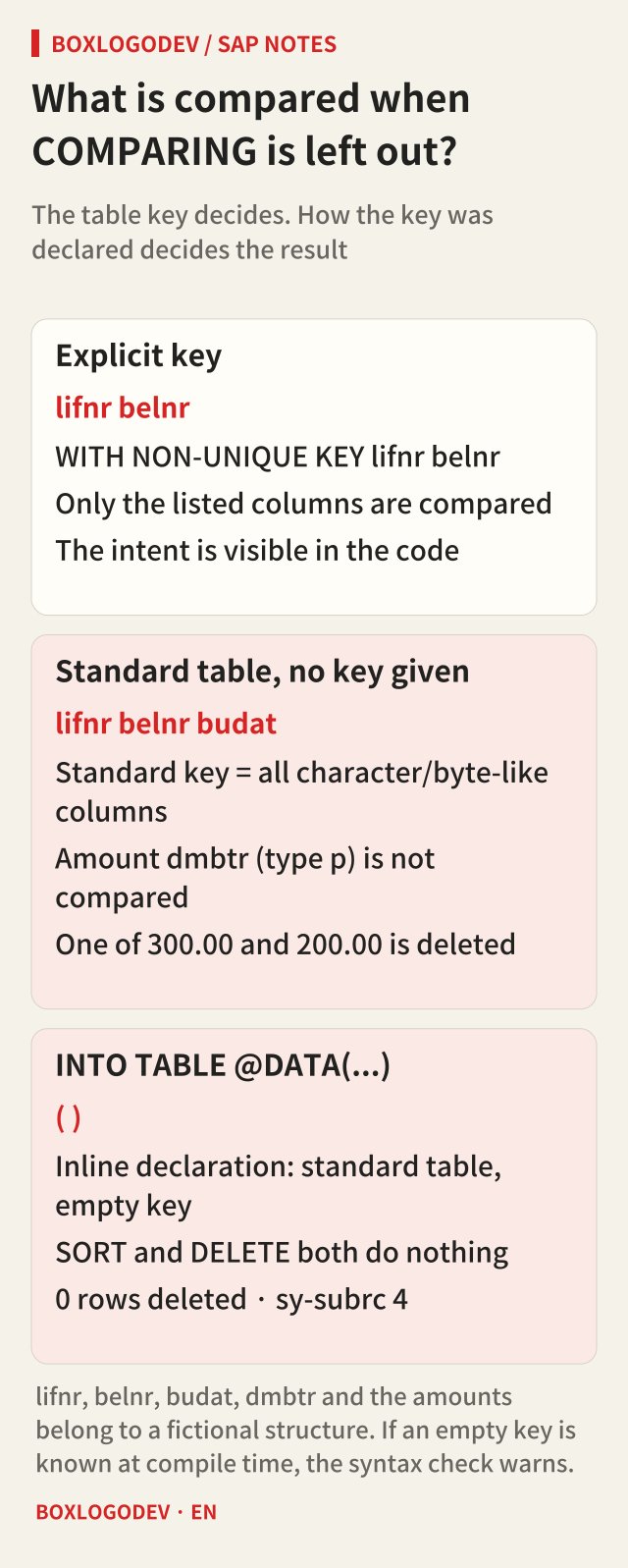
Without COMPARING, the groups are formed from the key fields of the table key used, and if no key is specified, the primary table key is used. So the table declaration decides the result. If the key is written out, as in WITH NON-UNIQUE KEY lifnr belnr, only those columns are compared and the intent is visible in the code.
The trouble is a standard table declared without a key, such as DATA lt_items TYPE STANDARD TABLE OF ty_item. Its primary key is then the standard key, and for a structured row type the standard key is every character-like and byte-like column. Date type d and time type t count as special character-like types, so lifnr, belnr and budat are in the key and the type p amount dmbtr is not. Sort and delete without COMPARING, and the two rows that differ only in amount, 300.00 and 200.00, are judged duplicates: one of them disappears. The V-0001 total of 620.00 drops to 420.00 or 320.00, and which one depends on the sort, as the next section shows. This is why the documentation warns that the standard key can have unexpected consequences.
The opposite trap exists too. A table declared inline with SELECT ... INTO TABLE @DATA(lt_raw) is a standard table with an empty key. With an empty key, a key-based SORT lt_raw. does not sort, and DELETE ADJACENT DUPLICATES without COMPARING deletes nothing. sy-subrc is 4. When the empty key is known at compile time, the syntax check warns on both statements; that warning is a signal, not noise.
The sort decides which row stays
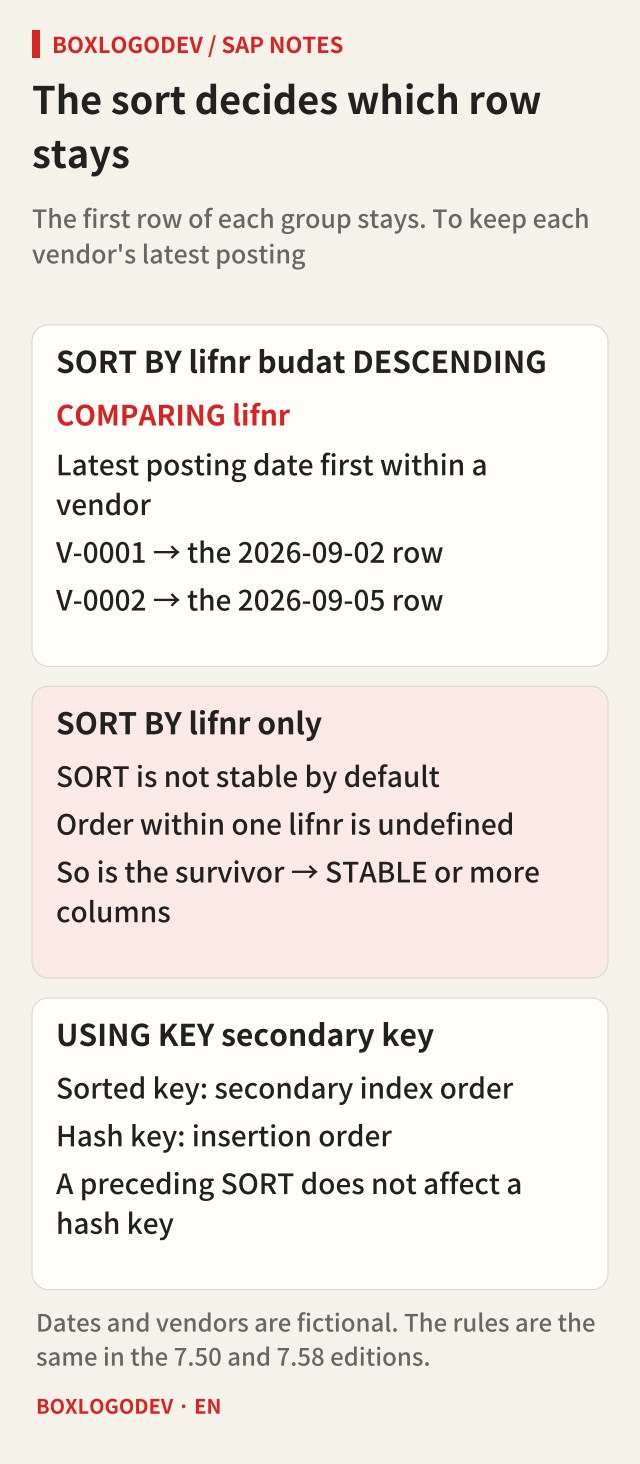
The row that stays is always the first of its group, so the preceding sort decides which row you keep. To keep one row per vendor with the latest posting date, use SORT lt_items BY lifnr ASCENDING budat DESCENDING. and then delete with COMPARING lifnr. In the fictional example, V-0001 keeps its 2026-09-02 row (document 5100000002, 120.00) and V-0002 keeps its 2026-09-05 row (80.00).
With SORT ... BY lifnr alone, the order of rows within one vendor is not defined. SORT is not stable by default: rows with equal sort keys do not keep their original order, and the documentation says the order can differ by platform or between repeated sorts. That is also why the previous section could not say whether 300.00 or 200.00 survives. Add STABLE to keep the order in which the rows were read, or add sort columns when a meaningful criterion exists.
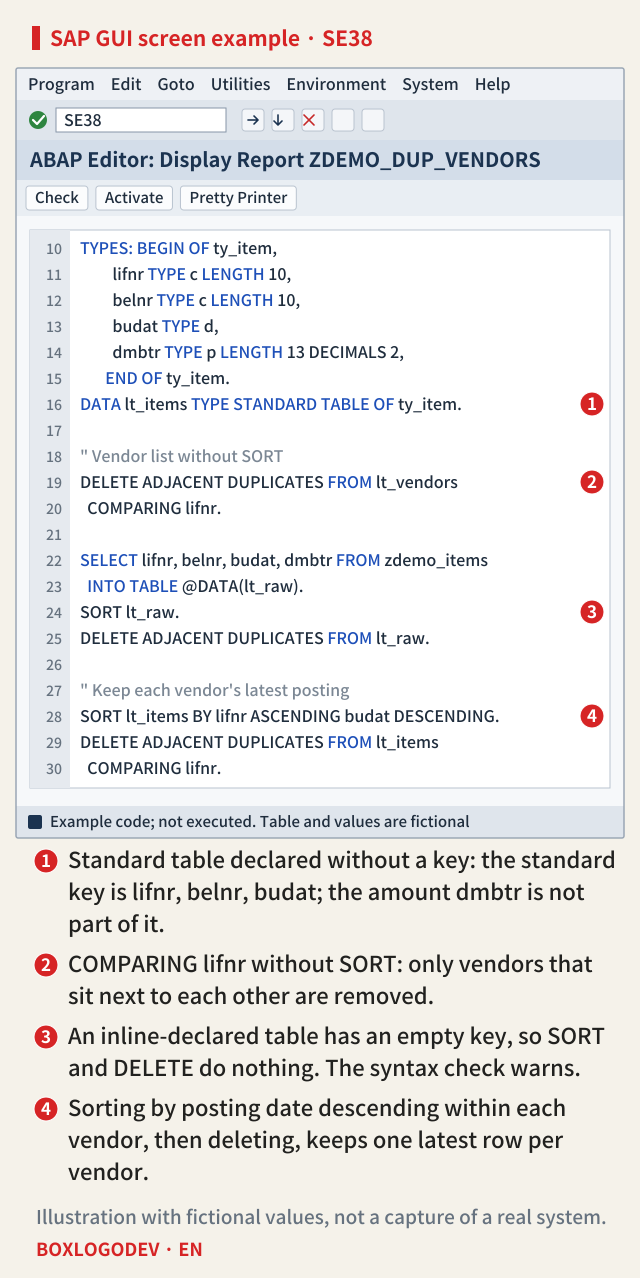
Read the markers on the screen above as a review checklist. Marker 1 is a standard table declared without a key, which leaves the amount out of the key. Marker 2 is COMPARING lifnr without a sort, which removes only neighbours. Marker 3 is an inline-declared table, where SORT and DELETE both do nothing. Marker 4 is the fixed code, where the sort sets both the compared column and the row to keep.
Secondary keys and releases
Specifying a secondary key with USING KEY changes the processing order. A sorted secondary key processes rows by ascending row number in the secondary table index, so duplicates by that key are adjacent without a separate SORT. A hash key processes rows in the order they were inserted, and a preceding SORT does not affect that order. This differs from processing a hashed table by its primary key, and the documentation points it out. A sorted table already sits in key order, so deleting without COMPARING removes rows with equal keys. Sorted and hashed tables cannot have an empty standard key.
The rules in this note, that only adjacent rows are compared, how the key is used without COMPARING, what the standard key contains, that nothing is deleted with an empty key, the processing order with USING KEY, the meaning of sy-subrc and the empty key of an inline-declared table, read the same in the 7.50 and 7.58 editions. The 7.58 edition adds a hint that the pseudo component table_line after COMPARING has the same effect as ALL FIELDS, and its example code changed. Check the edition for your own release once.
Three things to check in your code
For each DELETE ADJACENT DUPLICATES in an existing program, check three things. First, is there a SORT by the compared columns right before it, or a sorted key used through USING KEY that guarantees that order? Second, if COMPARING is missing, what is the table's key? For a standard table declared without a key, or an inline-declared table, list the columns in COMPARING yourself. Third, does the sort state which row of a group should stay?
If you remember only one thing, make it this: a duplicate for this statement is "a row next to another with the same compared columns". Write down in the code what should sit together and what should be compared.
Add your perspective.
Share a question, another approach, or something you have tried.
Checking sign-in…
Loading comments…