You want customer subtotals from a sales internal table, so you put AT NEW kunnr and AT END OF kunnr inside the LOOP. There are only two customers, yet you get one subtotal per row, and the customer name in the header comes out as ********. There is no dump and no syntax error. After reading this note you will be able to spot in the code what AT NEW treats as the group key and why the work area changes inside an AT block, and to choose one of three fixes.
The example is four fictional sales rows. Customer C-100 (ALPHA TRADING) has documents 9000000001 (100.00) and 9000000002 (250.00), and customer C-200 (BETA SUPPLY) has 9000000003 (80.00) and 9000000004 (120.00). The customers, document numbers, amounts and program name are all made up, and the code was not run on a real system. The behaviour comes from AT (group level processing) in the ABAP Keyword Documentation; the core rules below are the same in the 7.58 and 7.50 editions.
AT NEW kunnr also looks at the columns to its left
The first symptom comes from the column order of the line type. Say the line type is belnr (document number), kunnr (customer), name, amount. AT NEW kunnr does not see a new group only when kunnr changes. It sees one when kunnr or any column to its left changes. In the documentation's terms, the named column and the columns to its left make up the group key.
In this example the group key is therefore belnr + kunnr. The document number differs on every row, so the key changes on every row, and both AT NEW kunnr and AT END OF kunnr run four times. A SUM inside them adds up a one-row group, so each subtotal equals that row's amount. It looks like customer totals, but it only prints the rows again one by one.
SAP NOTES
The group key of AT NEW kunnr is not just kunnr
Four fictional sales rows: two for C-100, two for C-200 (by document)
Line type belnr · kunnr · name · amount
AT NEW × 4- Group key = belnr on the left + kunnr
- Document numbers differ, so the key changes every row
- AT NEW kunnr runs 4 times, 4 subtotals
- Each subtotal = that row's amount
kunnr first, then SORT BY kunnr belnr
AT NEW × 2- Group key = kunnr
- The key changes only at C-100 → C-200
- AT NEW kunnr runs 2 times
- Subtotals C-100 350.00 · C-200 200.00
Customers, document numbers and amounts are fictional. The rule is from AT (group level processing) in the 7.58 and 7.50 ABAP Keyword Documentation; the code was not run.
The first fix is to put the group column first in the line type and sort in that order. With the line type kunnr, belnr, name, amount and SORT lt_sales BY kunnr belnr, the group key is kunnr alone and the group changes only from C-100 to C-200. There are two subtotals: C-100 350.00 and C-200 200.00.
Do not skip the sort either. A group is a run of neighbouring rows, in reading order, with the same group key. If the table is in the order C-100, C-200, C-100, C-100 is split into two groups and gets two subtotals. AT does not collect rows with the same key; it only compares each row with the rows next to it.
Why the name turns into asterisks inside AT
The second symptom appears when you read into a work area, as in LOOP AT lt_sales INTO ls_sale. On entering an AT … ENDAT block, the work area ls_sale is temporarily changed. The columns of the current group key stay as they are. Flat character-like columns to the right of the key (fixed-length character-like types such as c, n, d and t) get * in every place, and the other columns, numeric ones for example, get their initial values. After ENDAT the work area is refilled from the current row.
SAP NOTES
Inside an AT block the work area is temporarily changed
LOOP AT lt_sales INTO ls_sale, line type kunnr · belnr · name · amount, at the first row
Before AT (current row)
- kunnr C-100
- belnr 9000000001
- name ALPHA TRADING
- amount 100.00
Inside AT NEW kunnr
- kunnr C-100 (key unchanged)
- belnr **********
- name all *
- amount 0.00 (initial value)
After ENDAT
- Refilled from the current row
- name ALPHA TRADING
- amount 100.00
Data is fictional. Flat character-like columns (c, n, d, t) right of the key get * in every place; the rest get initial values. With ASSIGNING or REFERENCE INTO the rows are not changed.
So if you write ls_sale-name as the customer header inside AT NEW kunnr, you get asterisks, and ls_sale-amount is 0. AT FIRST and AT LAST have no group key columns, so every character-like column becomes * and the rest get initial values.
There are two ways to use the name. If each customer has exactly one name, you can put name right after kunnr and switch to AT NEW name, so the name becomes part of the group key. Or, as in marker 2 on the screen below, copy it with lv_name = ls_sale-name before the AT. Statements before the AT run for every row, so inside AT END OF the variable holds the name from the last row of the group.
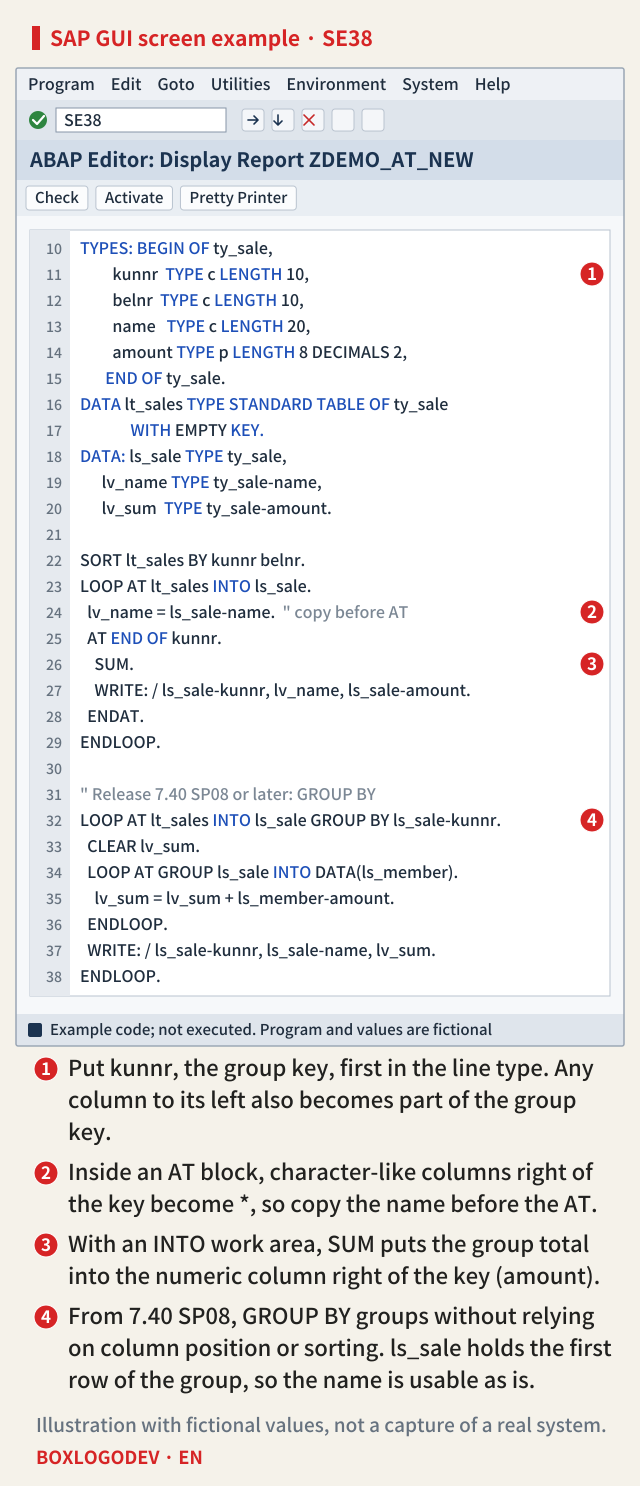
When you read with ASSIGNING or REFERENCE INTO, the table rows themselves are not changed on entering an AT block, so there are no asterisks. However, SUM requires an INTO work area; called in an ASSIGNING loop it raises the runtime error SUM_NO_ASSIGNING. As in marker 3 on the screen, SUM puts the totals of the numeric columns to the right of the key, over the rows of the current group, into the work area. Also, changing the INTO work area yourself inside the loop, or changing the table during the loop, breaks group processing; the documentation rules both out.
LOOP conditions and release differences
When LOOP … WHERE reads only some rows, the editions of the documentation go into different depth. The 7.50 edition only gives the rule that the condition must select a contiguous block of rows. The 7.58 edition is more specific: groups are determined from all rows of the table regardless of the condition; if the row where a group break happens is not read because of the condition, that AT block is not executed; and such code can produce extended program check messages.
In the sorted example, adding WHERE amount > 100 skips the first row of C-100 (100.00) and the first row of C-200 (80.00), so AT NEW kunnr runs for neither customer. Do not combine AT with a condition that skips rows in the middle of groups, such as an amount condition. It is safer to copy the rows you need into another table first and then do the group processing. Check the edition that matches your system's release.
SAP NOTES
When groups still go wrong after fixing the structure
Sorting, LOOP conditions, and GROUP BY from release 7.40 SP08
Not sorted
- Order C-100, C-200, C-100
- Groups are runs of consecutive rows
- C-100 gets two subtotals
WHERE skips a group's first row
- LOOP … WHERE amount > 100
- If the row with the group break is not read,
- that AT block is not executed
- Stated in 7.58; 7.50 gives only the rule
GROUP BY (from 7.40 SP08)
- LOOP AT … GROUP BY ls-kunnr
- All rows with the same key in one group
- Independent of column position and order
- AT blocks cannot be used
Values are fictional. AT cannot be used in a GROUP BY group loop or in LOOP AT GROUP, so the subtotal is added up in a LOOP AT GROUP over the members.
The third fix is LOOP AT … GROUP BY, available from release 7.40 SP08. It puts all rows with the same group key into one group, so it does not rely on column position or sort order. As in marker 4 on the screen, when you loop over the groups INTO ls_sale, ls_sale holds the first row of the group, so the name is usable without asterisks, and the amounts are added up in a LOOP AT GROUP over the rows. The documentation also recommends GROUP BY where possible. On the other hand, AT cannot be used in a GROUP BY loop or in LOOP AT GROUP. By default the groups come in the order in which their key first appears; with ASCENDING or DESCENDING they are sorted by key.
What to check in your code
For each AT NEW and AT END OF in an existing program, check three things. Is there a column unrelated to the grouping to the left of the named column? Is the table sorted by those columns, in that order, right before the loop? Does the AT block read columns to the right of the key? If any answer is yes, fix the column order, copy the value beforehand, or move to GROUP BY.
If you remember only one thing, make it this: AT NEW f does not mean "when f changes" but "when the line up to and including f changes", and inside that block the work area is not the current row.
Add your perspective.
Share a question, another approach, or something you have tried.
Checking sign-in…
Loading comments…