When you review the authorization checks in a Z report, you may find code with nothing but IF sy-subrc = 4. right after AUTHORITY-CHECK. That IF stops a user who holds some authorizations for the object, but lets a user who was never given the object at all walk straight through. After reading this note you will know what each sy-subrc value means, when a 0 does not mean this user is authorized for these values, and where you have to write AUTHORITY-CHECK yourself. From that you can build a review checklist for Z code.
The example is a fictional report, ZBOX_CARRIER_LIST. Before it shows the flights of the airline entered, it checks the authorization object S_CARRID for the airline (CARRID) and the activity (ACTVT, 03 = Display). S_CARRID is the object used in the examples of SAP's keyword documentation. The code was not run on a real system; the behaviour described follows the AUTHORITY-CHECK page of the ABAP Keyword Documentation 7.58 and related pages.
sy-subrc has five values, and 4 is only one of them
AUTHORITY-CHECK checks whether the current user's user master record holds an authorization for the object, and whether that authorization allows the values given. A failed check raises no exception; the result is only left in sy-subrc, so the IF that follows is what actually blocks anything.
- 0: the check succeeded, or no check was performed. Success means that at least one authorization for the object contains all the values given, for every field listed. If the airline is in one authorization and activity 03 in another, the check does not succeed.
- 4: authorizations for the object exist, but they do not contain the values given. A field name that is not part of the object, or too many fields, also gives 4.
- 12: the user master record has no authorization for the object at all.
- 24: this value is no longer set.
- 40: the user name given in
FOR USERis invalid. WithoutFOR USERit cannot occur.
These five values mean the same in the 7.40, 7.50, 7.58 and 8.16 documentation; only the wording differs slightly.
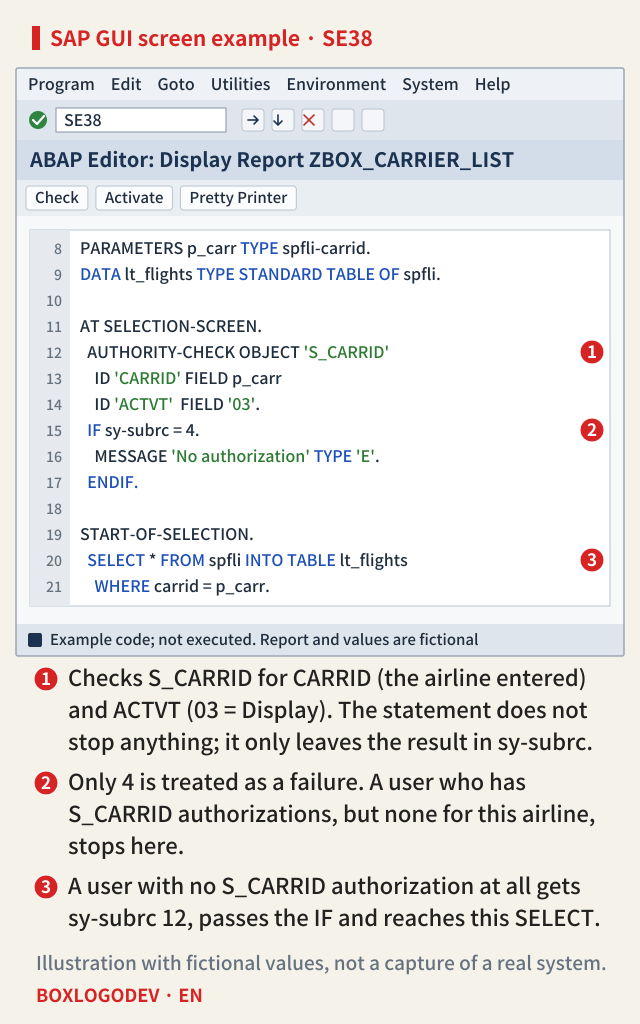
In the screen example, marker 1 is the check and marker 2 is the IF that treats only 4 as a failure. A user who has authorizations, but not for this airline, gets 4 and stops at marker 2. A user with no S_CARRID authorization at all gets 12, passes the IF and reaches the read at marker 3. The user with the least access to this object gets through most easily. If the denied case is only tested with a user who holds some of these authorizations, you only ever see 4 and the gap stays hidden.
The fix is to write IF sy-subrc <> 0. and treat every non-zero value as a failure. You can show a different message for 12 or 40, but 0 must be the only value that lets the user through.
SAP NOTES
= 4 lets 12 and 40 through
What each IF does with each sy-subrc after AUTHORITY-CHECK (ABAP Keyword Documentation 7.58)
0 · Success, or no check performed
sy-subrc = 0- One authorization holds every value given
- = 4: passes · <> 0: passes
4 · Authorizations exist, values do not
sy-subrc = 4- Or wrong fields, or too many fields
- = 4: stops · <> 0: stops
12 · No authorization for the object at all
sy-subrc = 12- The user with the least access to this object
- = 4: passes · <> 0: stops
40 · Invalid user name in FOR USER
sy-subrc = 40- Only possible with FOR USER
- = 4: passes · <> 0: stops
24 is no longer set. The table is the same in the 7.40, 7.50, 7.58 and 8.16 documentation. A 0 also covers 'no check performed'.
Four cases where a 0 does not mean this user is authorized for these values
Even with <> 0, a gap remains on the 0 side. A 0 also comes back when no check ran, when only some fields were checked, or when another user was checked.
The check indicator is set to 'no check'. A check indicator states whether an authorization object is checked in a given context, and transactions are the most important contexts. SAP sets them in SU22, customer systems in SU24. If the object is set to 'no check' in the current context, AUTHORITY-CHECK does not check anything and leaves 0, just as for a success. This is why the same statement can give different results depending on how the program was started. As a rule, check indicators should always be set to check, and objects of the AS ABAP (BC) and human resources (HR) areas cannot be set to 'no check' at all.
During an update. No authorization check is possible inside an update function module run by COMMIT WORK. There, AUTHORITY-CHECK checks nothing and always sets sy-subrc to 0. This applies to local updates as well as update sessions. So check the authorization in the dialog part, before the call is registered with CALL FUNCTION ... IN UPDATE TASK. When the update actually runs is covered in the note on the update task right after COMMIT WORK.
A field is given as DUMMY or left out. Fields that are not listed in the statement, and fields given as DUMMY, are not checked. With ID 'ACTVT' DUMMY, the activity is ignored and only the airline is checked. If every field is DUMMY, the result in 7.58 is either 0 or 12: any authorization for the object gives 0, whatever its values, so this 0 only says that the user has some authorization for the object.
FOR USER checks another user. With FOR USER, the authorizations of the named user are checked. Because someone can name a user with broad authorizations to get around the check, the documentation calls this addition a security risk. Never use a user name passed in from outside; if you must, check that name carefully. Without FOR USER, the check uses the actual user name rather than the content of the system field sy-uname. That makes FOR USER sy-uname redundant, and also risky, because sy-uname can be overwritten, for example in the debugger.
SAP NOTES
A 0 is not always a yes for this user
Four cases where a 0 does not mean this user is authorized for these values
Check indicator set to 'no check'
- No check, and 0 as if it succeeded
- Set per context
- Transactions matter most
- SU24 in customer systems
- 'No check' not allowed for BC and HR objects
During an update
CALL FUNCTION … IN UPDATE TASK- In an update function module run by COMMIT WORK
- No check, always 0
- Local updates too
DUMMY, or a field left out
ID 'ACTVT' DUMMY- That field is not checked
- All fields DUMMY: the result is 0 or 12
- Any authorization for the object gives 0
FOR USER
FOR USER lv_user- Checks another user's authorizations
- Never a name passed in from outside
- FOR USER sy-uname is redundant
- sy-uname can be overwritten
Without FOR USER, the check uses the actual user name, not the content of sy-uname. 'All DUMMY gives 0 or 12' was checked in the 7.58 documentation.
Where you have to write AUTHORITY-CHECK yourself
Some statements check by themselves, with fixed authorization objects.
CALL TRANSACTION ... WITH AUTHORITY-CHECKchecksS_TCODEand any authorization object entered in the transaction definition in SE93 before the call. If the authorization is missing, the catchable exceptionCX_SY_AUTHORIZATION_ERRORis raised; if nothing catches it, the program ends with the runtime errorCALL_TRANSACTION_NO_AUTH.LEAVE TO TRANSACTIONalways checks the same two things (S_TCODEand the object entered in SE93) and sends a termination message (type A) when the authorization is missing.SUBMITchecks the authorization group in the called program's attributes, if there is one, againstS_PROGRAM.OPEN DATASETandDELETE DATASETin the ABAP file interface checkS_DATASETwhenever a file is opened or deleted. Depending on table SPTH, anS_PATHcheck is added.
On the other side, typical places with no implicit check are CALL TRANSACTION without WITH AUTHORITY-CHECK (by default, when table TCDCOUPLES has no entry with OKFLAG X for the call either), SUBMIT of a program without an authorization group, and SQL reads on database tables. Guard any such place that a user can reach without the right authorizations with AUTHORITY-CHECK, and evaluate the result with care.
CALL TRANSACTION with neither WITH AUTHORITY-CHECK nor WITHOUT AUTHORITY-CHECK is obsolete. Both additions are listed as new in the changes for ABAP 7.40 SP02, and the CALL TRANSACTION syntax in the 7.31 documentation does not have them. The recommended form is WITH AUTHORITY-CHECK, which replaces a separate AUTHORITY-CHECK or AUTHORITY_CHECK_TCODE before the call and any check that relies on TCDCOUPLES. WITHOUT AUTHORITY-CHECK states openly that no check is needed. With it, the security test of the extended program check no longer reports the call as an error, and the content of TCDCOUPLES is ignored. In a review, it is the place to ask why no check is needed.
SAP NOTES
Where an implicit check exists, and where it does not
The statements that decide whether you must write AUTHORITY-CHECK yourself (7.58)
Examples: an implicit check runs
- CALL TRANSACTION … WITH AUTHORITY-CHECK: S_TCODE and the object entered in SE93
- LEAVE TO TRANSACTION: S_TCODE and the object entered in SE93
- SUBMIT of a program with an authorization group: S_PROGRAM
- OPEN DATASET, DELETE DATASET: S_DATASET and others
Examples: no implicit check
AUTHORITY-CHECK OBJECT …- CALL TRANSACTION without WITH (by default: no TCDCOUPLES entry with OKFLAG X either)
- SUBMIT of a program without an authorization group
- SQL reads on database tables
- Guard these places yourself and evaluate the result with care
Saying explicitly: no check
WITHOUT AUTHORITY-CHECK- The extended program check reports no security error
- The content of TCDCOUPLES is ignored
- CALL TRANSACTION with neither addition is obsolete
With WITH AUTHORITY-CHECK, a missing authorization raises CX_SY_AUTHORIZATION_ERROR, and if it is not caught the runtime error is CALL_TRANSACTION_NO_AUTH. The file interface can also check S_PATH, depending on table SPTH.
The order to follow in a review
- Look at the test right after each
AUTHORITY-CHECK. Change code that treats only one value as a failure, such as= 4or= 12, to<> 0. - Look for a branch after a failed check that compares
sy-unameand lets particular users through. The documentation gives this as an example of a back door and says to repair it by taking out the IF block that queriessy-uname. Only that condition goes; the failure handling (LEAVE PROGRAMor similar) stays. - Where there is
FOR USER, find out where the user name comes from. Fix it if the name comes from outside, and removeFOR USER sy-uname. - Look at
DUMMYand at fields left out. Without the activity (ACTVT), a user with display authorization only also passes a check meant to guard a change. - Move any
AUTHORITY-CHECKinside an update function module to the dialog part, before the call. - For
CALL TRANSACTIONwithoutWITH AUTHORITY-CHECK, see whether the system's release offers the addition; where it does not, check that there is a check in front of the call. Look for one as well in front of other places with no implicit check, such asSUBMITof programs without an authorization group andSELECTstatements that read sensitive tables. - In SU24, confirm that the object's check indicator is set to check for the transaction that starts the report.
- To confirm on a system, the ST01 system trace records each authorization object checked, with its fields and values. If the trace and the traced transaction run on the same application server, checks in other sessions are recorded too. SU53 shows the last failed authorization check and can be opened from any of your own sessions, not only the one where the error occurred.
The first line of the checklist is changing = 4 to <> 0. The second is asking, whenever a 0 comes back, whose authorizations were checked, for which fields, and whether a check really ran. A 0 that cannot answer those questions does not count as a yes.
Add your perspective.
Share a question, another approach, or something you have tried.
Checking sign-in…
Loading comments…