Picture a fictional ECC Z program that copies a material number into an 18-character variable, joins it with a plant to build a key, and puts it into a released interface structure before calling a function. SAP S/4HANA widened the material number field to 40 characters, but the functionality that lets you use 40-character numbers starts out switched off. So can the program stay as it is? After reading this note you will know what became 40 characters, what changes before and after the extension is switched on, and which three places in your Z code to fix first.
The program ZDEMO_MATNR_LEN and its structure and variables are made up, and the code was not run. The note is based on section 3.22, 'S4TWL - Material Number Field Length Extension', of the Simplification List for SAP S/4HANA 2023 (document version 1.35, 2025-02-25), the Conversion Guide for SAP S/4HANA 2023 (document version 7.0) and the ABAP keyword documentation 7.58. The list item was generated from SAP Note 2267140 as it stood at general availability, so the list says to read that note for the latest version. Note bodies that require a login were not read.
What became 40 characters, and what stayed the same
In SAP S/4HANA the material number field length grew from 18 to 40 characters. The change first arrived in SAP S/4HANA, on-premise edition 1511, and applies to later releases too.
SAP extended every domain that defines material number fields to 40 characters and adapted the data elements, structures, tables, interfaces and user interfaces to match. Code typed with data elements derived from those domains follows automatically when the domain changes. Other fields that can also hold a material number, such as characteristic values, were extended as well, and interfaces usually called only within one system, such as local function modules, class methods and BAdIs, simply had the material number in their parameters extended to 40 characters.
On the database, the MATNR field grew to 40 characters in every table that can store a material number, but the content is stored the same way as in SAP Business Suite, so these fields usually need no data conversion. Purely numeric material numbers are still limited to 18 characters with standard Customizing (the lexicographic flag not set, so leading zeros are not significant) and are padded with leading zeros only up to 18 in the database. One exception the list names is a field that stores the material number concatenated with other values. The list says concatenation in code uses the full technical length of the field, now 40 characters, and that this is reflected in the stored content, so such fields need a data conversion.
SAP NOTES
The field grew to 40; storage stayed the same
Material number field length extension since SAP S/4HANA 1511
What grew
MATNR 18 -> 40- Every material number domain now takes 40
- Data elements and table fields built on them
- Code typed with them follows the domain
What stayed
12345 -> 000000000000012345- How the content is stored did not change
- So usually no data conversion is needed
- Numeric-only numbers: 18 with standard settings
- Padded with leading zeros to 18 in the database
What needs conversion
- Content with the number concatenated in
- Concatenation uses the full technical length
- And that is reflected in the stored content
Per section 3.22 of the Simplification List for SAP S/4HANA 2023 (document version 1.35).
The extension starts out switched off
A 40-character field does not mean you can use 40-character numbers right away. BAPIs, RFCs and IDocs exchange data with a fixed length and sequence of fields, so simply widening the material number field would break compatibility with older versions. Released external interfaces therefore keep the existing field at its original length and add a new 40-character field at the end of the structure, or as a new parameter. On top of that, numbers longer than 18 characters are allowed only after the extended material number functionality is switched on explicitly.
The default is off, after a conversion and in a new installation alike. The switch is a client-dependent Customizing table, set in the IMG under Cross-Application Components > General Application Functions > Field length Extension > Activate extended fields, or in transaction FLETS. The material number format also has to allow more than 18 characters, which is changed in transaction OMSL. Once the switch is on, it cannot easily be turned off, because values that are only allowed with the extended length may then exist in various fields.
While it is off, the short fields in released interfaces are still filled and read, and the system keeps extended fields to the old length so that no data is created that the old interface cannot carry. The long field at the end is filled too, so communication partners can move to it ahead of time. Once it is on, the full 40 characters can be used, but when a value is longer than the old length, the short field is left empty (from 1511 FPS2, the short field is still filled on the way out and accepted on the way in when the value fits). The list points out that every SAP Business Suite system is a communication partner that has to adjust to the new fields, and because the switch affects how compatibly the system communicates within a landscape, a landscape of several systems has to decide whether and when to switch it on.
SAP NOTES
The extension starts out switched off
Before and after switching on the extended material number
Default: off
FLETS / OMSL- After a conversion and in a new installation
- The customer switches it on to use 40
- A client-dependent Customizing table
While it is off
- Limited to the old length of 18
- Short fields in released interfaces still work
- The long field added at the end is filled too
After switching on
- The full 40 characters can be used
- A longer value leaves the short field empty
- Partners have to adjust to the new fields
- It cannot easily be switched off again
From 1511 FPS2, the short field is still filled and accepted after switching on when the value fits. Per section 3.22 of the list.
Z code may need changes even with the switch off
The list says that in certain constellations this extension may require custom code to be adapted, and that the adaptations are needed even if you leave the functionality off and stay with 18 characters. SAP analysed the complete data flow in the system to find every place where a material number was moved into a field too short for 40 characters, handled each one, and says the same analysis has to be done in customer and partner code. This note picks three places from the list and the ABAP rules.
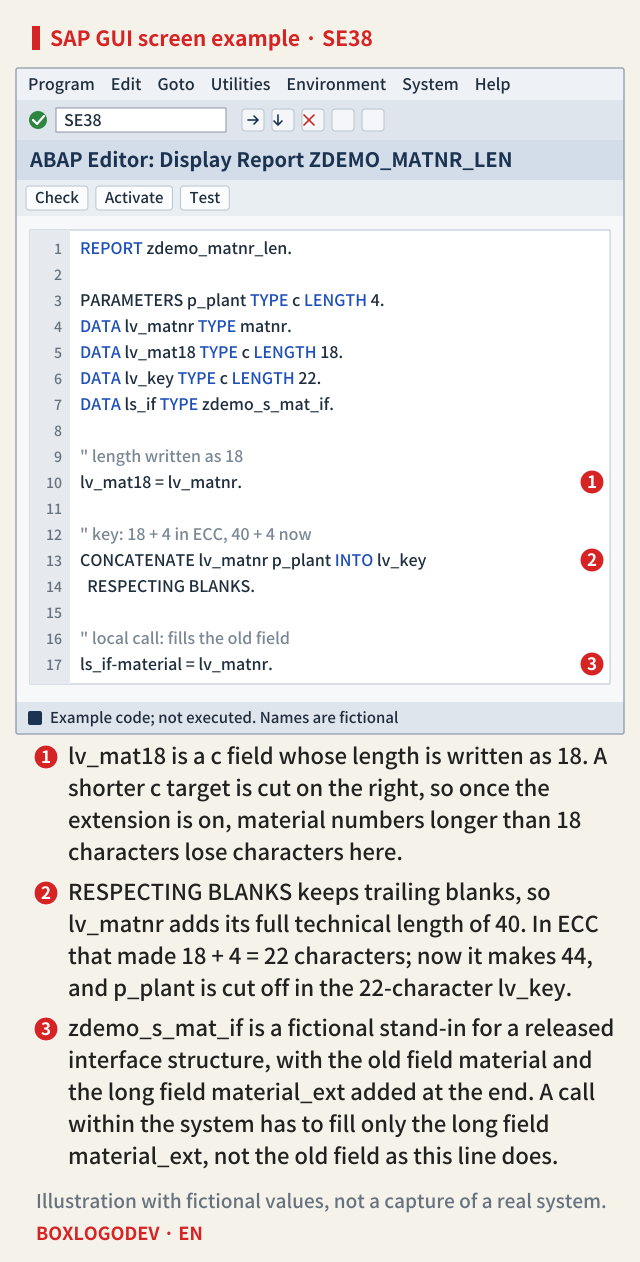
The first is a field with a hard-coded length. The list warns that cutting the material number back to its former 18 characters would lose data. A variable typed with the data element MATNR becomes 40 characters, but a variable declared TYPE c LENGTH 18, or a field defined separately as CHAR 18 in a Z structure, does not. In ABAP, moving a c field into a shorter c field cuts it on the right. While the extension is off, numbers do not go beyond 18 characters, so the line runs without trouble until, after the switch is on, a longer number arrives and loses characters.
The second is a key built by concatenation. One ABAP example of what the list calls concatenation that uses the full technical length is CONCATENATE with RESPECTING BLANKS. Plain CONCATENATE usually ignores trailing blanks of fixed-length fields (the rule covered in the CONCATENATE note), but with RESPECTING BLANKS it keeps them, and if the result is longer than the target field, it is cut on the right. A line that built a 22-character key in ECC from an 18-character material number and a 4-character plant now takes 40 characters for the material number field alone, trailing blanks included, so the 22-character target holds only the material number part and the plant is cut off. The technical length is 40 even with the switch off, so this difference appears right after the conversion. If keys built this way were stored in tables, the data conversion described above needs to be looked at too.
The third is a released interface called within the system. When a released external API is called locally, no compatibility is needed, so to be safe for the day the extension is switched on, the list says such internal calls must use only the newly added extended fields. The same goes for internal code that uses structures also used in released interfaces. Z code that calls a BAPI locally and fills only the old short field is this case.
SAP NOTES
Where to look first in Z code
Three lines of the fictional ZDEMO_MATNR_LEN
Fields with a hard-coded length
lv_mat18 = lv_matnr.- c LENGTH 18 variables, 18-character Z fields
- A shorter c target is cut on the right
- Once switched on, longer numbers are cut
Keys built by concatenation
CONCATENATE ... RESPECTING BLANKS- RESPECTING BLANKS keeps trailing blanks
- A MATNR field adds all 40 characters
- A short target is cut on the right
- The difference shows even with it off
Released interfaces called locally
ls_if-material = lv_matnr.- The old field keeps its length; a long one is added
- Local calls must use only the long field
- So does internal code using those structures
Names and code are fictional and were not run. Derived from section 3.22 of the list and ABAP keyword documentation 7.58.
The editor example below shows these three lines on one screen, numbered ① to ③.
What the check tools find, and what is left to you
The list recommends running the conversion pre-check (SAP Note 2216958), and points to SAP Notes 2215424 and 2215852 for custom code information. The conversion guide's table of application-specific preparations also gives SAP Note 2216958 as the reference for the material number extension check program task.
The conversion guide describes custom code checks in two steps. Before the conversion, the Custom Code Migration tool checks custom code against the SAP S/4HANA simplifications; after SUM has converted the system, a local ABAP Test Cockpit (ATC) run with the check variant S4HANA_READINESS finds the issues. The guide also says the custom code checks do not yet identify every place where custom code does not comply, and that custom code has to be tested within SAP S/4HANA as well. How far these checks catch material number length issues could not be confirmed from the documents behind this note. It is safer, then, to look for the three places above yourself, whatever the checks report.
One thing to do today: in your Z code, list the variables and structure fields that receive a material number but are defined with a written length instead of the data element MATNR. That list is where the fixing starts in a conversion project.
Add your perspective.
Share a question, another approach, or something you have tried.
Checking sign-in…
Loading comments…