In a vendor list program you skip test vendors with IF lv_name CS 'TEST'. CONTINUE. ENDIF. Then the real vendor Contest Media GmbH disappears from the list. There is no uppercase TEST anywhere in that name, yet the condition is true. After reading this you will know that CS and CP ignore case and why, which comparison operators and search statements for character data do respect case, and how to choose a way of writing exactly the condition you meant.
In the example, lv_name is TYPE c LENGTH 30. The vendor names TEST VENDOR 01, Contest Media GmbH and Northwind Paper and the program ZDEMO_CS_CASE are fictional. The code was not run on a real system. The results given here follow from the rules on the ABAP Keyword Documentation pages for comparison operators for character-like data types (7.50, compared with 7.54 and 7.58), the additions of FIND and the contains functions.
CS does not distinguish case
CS (Contains String) is true if the content of the right operand is contained in the left operand. The 7.50 and 7.54 documentation states that this comparison is not case-sensitive and that trailing blanks in the left operand are respected. So the lowercase test starting at the fourth character of Contest Media GmbH counts as 'TEST'. The result is true, and the system field sy-fdpos holds the offset of the match, 3 (the first character is 0).
Two problems overlap here: case and position. CS does not care where the sequence occurs, even in the middle of a word. On a system that stores names in uppercase only, CONTEST MEDIA GMBH matches for the same reason. When the comparison is false, sy-fdpos holds the length of the left operand instead of an offset, so do not read sy-fdpos as a position after a false result.
SAP NOTES
CS 'TEST' against three names
Fictional example: lv_name is TYPE c LENGTH 30, the condition is IF lv_name CS 'TEST'
TEST VENDOR 01
'TEST VENDOR 01' CS 'TEST'- TEST is at the very start
- Result: true
- sy-fdpos = 0
Contest Media GmbH
'Contest Media GmbH' CS 'TEST'- Lowercase test sits inside a word
- CS does not distinguish case
- Result: true, sy-fdpos = 3
Northwind Paper
'Northwind Paper' CS 'TEST'- No test sequence at all
- Result: false
- sy-fdpos = length of the left operand
Names and variables are fictional. The results follow from the CS rule in the ABAP Keyword Documentation (7.50 and 7.54); they are not run results.
Trying to imitate a word boundary with a blank in the right operand does not work either. The documentation says that, unless stated otherwise, trailing blanks of operands of type c, d, n and t are not respected, and for CS only the left operand's trailing blanks count. By that rule the single-quoted literal 'TEST ' behaves exactly like 'TEST'. The documentation names one more case: if the left operand is a c field containing only blanks or an initial string, the result is false, but if the right operand is empty in the same way, the result is always true. When a search variable sits on the right of CS, filter out the case where both are empty first.
CO and CA respect case, even among the same operators
The eight comparison operators for character data do not all follow the same rule. CO (contains only these characters) and CA (contains any of these characters) respect case, and they respect trailing blanks of both operands. CN and NA are the negations of CO and CA. By contrast, CS and its negation NS, and the pattern comparison CP and its negation NP, ignore case. For the same 'abc', 'abc' CS 'B' is true while 'abc' CA 'B' is false.
CP has a way to make case count. In the pattern, * stands for any character string including an empty one and + for any single character, and a character preceded by the escape character # is compared directly, respecting case. The documentation also notes that + never stands for an empty string, and that CP means "conforms to pattern", not "contains pattern", so the whole string has to fit the pattern. That is why the documentation's example uses '*<*>*', not '<*>', to find a tag.
The search statements have the opposite default. Without RESPECTING CASE or IGNORING CASE, FIND works as RESPECTING CASE and distinguishes case. The built-in functions contains( ) and find( ) are case-sensitive by default too, and ignore case only when you pass case = abap_false. The intention is the same, checking whether something is contained, yet CS ignores case while FIND and contains( ) respect it.
SAP NOTES
What respects case and what does not
Default behaviour of character comparison operators and search syntax
Ignores case
'abc' CS 'B' → true- CS · NS: contains a string
- CP · NP: matches a pattern (* +)
- Only characters marked with # respect case
Respects case
'abc' CA 'B' → false- CO · CN: consists only of these characters
- CA · NA: contains any of these characters
- Trailing blanks of both operands count too
Respects case by default
FIND 'B' IN 'abc' → sy-subrc 4- FIND: RESPECTING CASE is the default
- contains( ), find( ): case-sensitive by default
- Turn off with IGNORING CASE or case = abap_false
Based on the ABAP Keyword Documentation pages for comparison operators, FIND, contains and string_func - case. Results in the code samples follow from the rules.
Write the condition you actually mean
The fix starts with deciding what a test vendor is. Say that in this example it means a name that starts with TEST followed by a blank. Then you can compare three ways of writing it on the same three names.
First, with FIND 'TEST' IN lv_name. the name Contest Media GmbH no longer matches, and since nothing is found sy-subrc is 4. The position problem remains, though, so an uppercase CONTEST is still found. Only the case problem is solved. The documentation also says that FIND and the search functions can be faster than CS by some magnitude, which is one more reason to switch inside a long loop.
Second, contains( val = lv_name start = `TEST` ) looks only at a match at the beginning and respects case. It does not reject a name like TESTA, where a letter follows directly. Third, lv_name CP '#T#E#S#T *' marks all four letters with #, so it accepts only an uppercase TEST, and it requires the blank after it. By the rules, only TEST VENDOR 01 of the three names is true.
SAP NOTES
To pick only names that start with TEST
Three ways of writing it, applied to the same three fictional names
Switch to FIND
FIND 'TEST' IN lv_name.- Contest Media GmbH: not found
- An uppercase CONTEST would still match
- Fixes case only
contains( start = )
contains( val = lv_name start = `TEST` )- Looks only at TEST at the start
- Case-sensitive by default
- Does not reject TESTA-style names
Mark characters with # in CP
lv_name CP '#T#E#S#T *'- #T#E#S#T: uppercase TEST only
- Requires the blank after it
- Only TEST VENDOR 01 is true
Names are fictional and the code was not run. Results follow from the documented FIND, contains and CP rules. contains( ) exists from ABAP 7.0 EhP2.
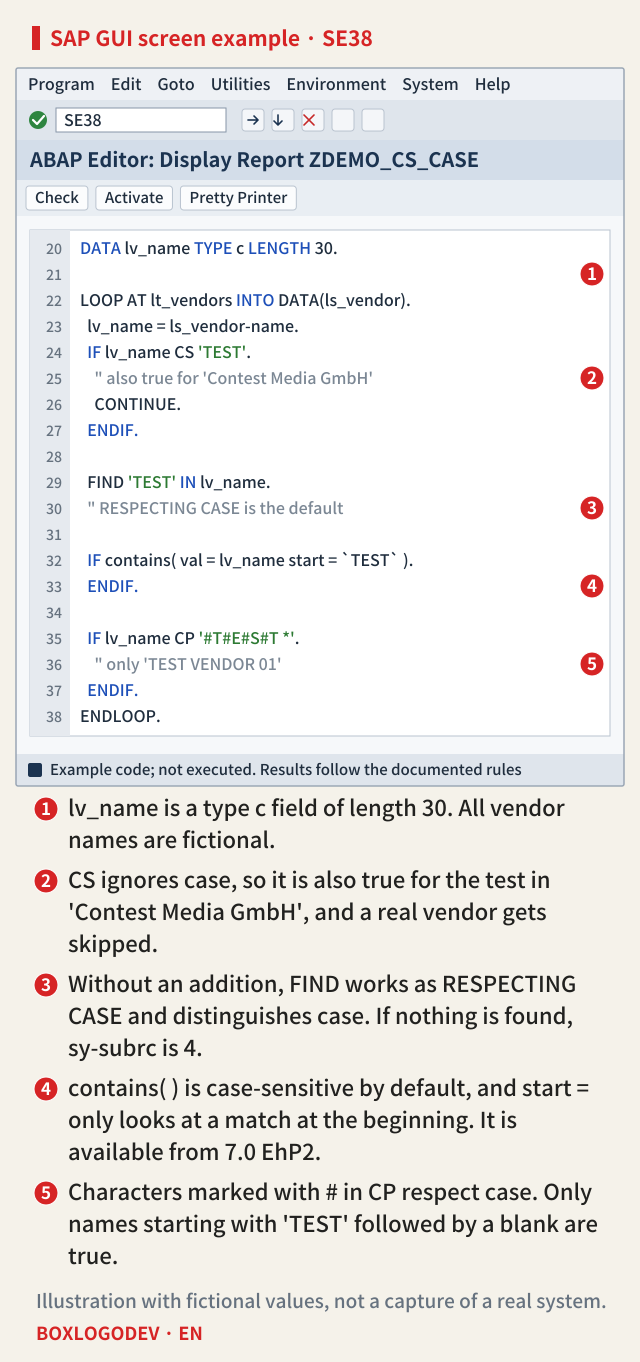
The editor example below collects this on one screen: ① the declaration, ② the CS line that skips a real vendor, ③ the case-sensitive FIND, ④ contains( ) looking only at the start, and ⑤ CP with #. In existing code, an uppercase literal after CS or CP is worth a second look: did the author expect case to count?
The documentation wording differs between releases
The release difference shows up in the documentation before it shows up in behaviour. The 7.50 and 7.54 English documentation states plainly that CS is not case-sensitive, and the 7.54 German documentation likewise says that case is not respected while trailing blanks of the left operand are. In the 7.57 and 7.58 English documentation, however, the CS sentence now reads as "uppercase and lowercase characters and trailing blanks in the left operand are respected". On the same 7.58 page, the CP entry still says it is not case-sensitive, and the CS example is described as showing the position of 'H' in a lowercase alphabet string, which only makes sense if case is ignored.
The wording alone does not settle which reading is right, and this note was not checked on a real system. So the safe step is to test it yourself with one line on your system: IF 'abc' CS 'B'. If it is true, your system behaves as described here, and sy-fdpos is 1. Character functions such as contains( ) and find( ) arrived in ABAP 7.0 EhP2, so on older systems FIND or CP with # are the options available.
Remember one thing. Checking "contains" with CS ignores both case and word boundaries. If case must count or the position matters, write that condition directly in the code with FIND, contains( ) or CP with #.
Add your perspective.
Share a question, another approach, or something you have tried.
Checking sign-in…
Loading comments…