The fictional method post_items receives items to post, first loops over them to check whether any row has an amount of 0 or less, and, if all is well, posts them with post_document. Inside the check loop sits IF ls_item-amount <= 0. EXIT. ENDIF. The author meant "if any row is invalid, stop here". Yet on a day when a row with amount 0 comes in, the posting is still called. Replacing EXIT with CHECK ls_item-amount > 0. changes nothing. After reading this you will be able to tell what CHECK and EXIT end depending on where they stand, which statement to use where the method must end, and what else differs in reporting event blocks.
The class ZCL_DEMO_POSTING, its methods, fields and row numbers are fictional, and the code was not run on a real system. The flow here follows from the rules on the ABAP Keyword Documentation pages for CHECK (loop), EXIT (loop), RETURN and the guideline on exiting procedures (7.58, with CHECK and EXIT compared against 7.50).
CHECK and EXIT are two statements each, depending on position
The keyword documentation lists CHECK and EXIT twice each: once as statements that exit loops, once as statements that exit processing blocks. A loop here means not only LOOP ... ENDLOOP but also DO, WHILE and SELECT ... ENDSELECT.
Inside a loop, if the condition of CHECK is false, only the current pass ends and the next pass begins. The documentation says this is the same as IF NOT condition. CONTINUE. ENDIF. EXIT inside a loop ends the whole loop, and the program continues after that loop's closing statement. Neither ends the method. Placed outside a loop, however, both end the current processing block. Inside a procedure such as a method, function module or subroutine, the effect is the same as RETURN. RETURN, by contrast, ends the processing block whatever control structure it is in.
SAP NOTES
Same statement, different exit by position
Loop = LOOP, DO, WHILE, SELECT ... ENDSELECT
CHECK inside a loop
CHECK ls_item-amount > 0.- If false, ends only this pass
- Goes on with the next pass
- Same as IF NOT ... CONTINUE
EXIT inside a loop
EXIT. " -> after ENDLOOP- Ends that whole loop
- Resumes after its closing statement
- The method does not end
CHECK or EXIT outside a loop
RETURN.- Ends the current processing block
- In a method: same effect as RETURN
- RETURN ends the block anywhere
Based on the ABAP Keyword Documentation pages for CHECK and EXIT (loop, processing_block), CONTINUE and RETURN, 7.58 and 7.50.
The programming guidelines name this difference as a problem. Depending on context, EXIT and CHECK end either a loop or a procedure, which hurts readability, and only RETURN can exit a procedure from within a loop. So the guidelines recommend EXIT and CHECK only for exiting loops and RETURN only for exiting procedures. The CHECK and EXIT pages describe the behaviour inside and outside loops the same way in 7.50 and 7.58, so this is not a recent change.
Following one row with amount 0
Say the fictional it_items holds rows 10, 20 and 30, and row 20 has amount 0. Written with IF ... EXIT, the loop passes row 10 and leaves at row 20. Row 30 is never checked, execution continues after ENDLOOP, and post_document( it_items ) is called. What was exited was the loop, not the method.
Written with CHECK ls_item-amount > 0., it goes wrong in a slightly different way. At row 20 only the rest of that pass is skipped, and row 30 is still checked. Unless the results were collected somewhere, the posting after the loop is again called. In both cases everything runs normally, with no error or warning, which is what makes the mistake hard to spot.
SAP NOTES
When a row with amount 0 comes up
Fictional: rows 10, 20, 30; row 20 has amount = 0; post_document( it_items ) after the loop
IF ... EXIT
10 -> 20 -> ENDLOOP -> post- Leaves the loop at row 20
- Row 30 is never checked
- post_document is still called
CHECK amount > 0
10 -> 20 skip -> 30 -> post- Skips only the rest of row 20
- Row 30 is checked
- post_document is still called
IF ... RETURN
10 -> 20 -> end of method- Ends the method at row 20
- Nothing after the loop runs
- post_document is not called
The method, table and row numbers are fictional and the code was not run. The flow follows from the documented CHECK, EXIT and RETURN rules.
To do what was intended, the method has to end at row 20, and the statement for that is RETURN. It ends the method even when executed inside the loop, so post_document is not called. In real code, raising an exception or leaving a message may be kinder to the caller than ending silently. Whichever you choose, the starting point is deciding whether you mean to end the loop or the method.
Nested loops follow the same principle. EXIT in the inner loop goes only to the line after the inner loop's closing statement, which is still inside the outer loop, so the outer loop carries on with its next pass. To end both, decide again in the outer loop, or use RETURN if you mean to end the whole method.
CHECK outside a loop: allowed at the very start
So should CHECK never appear outside a loop? The guidelines make one exception. A CHECK at the very beginning of a procedure that checks the prerequisites for running it does not hurt readability and is allowed. A first line such as CHECK it_items IS NOT INITIAL. reads directly as "nothing to do if no items came in". The exception covers only the start, though, not a CHECK outside a loop in the middle of a procedure. As in the guidelines' bad example, CHECK is_finished = abap_false. in the middle makes the reader undo a double negation, so IF is_finished = abap_true. RETURN. ENDIF. is better.
Ending a procedure with CHECK, EXIT or RETURN is always a proper end. Output parameters defined for pass by value are passed to the caller's actual parameters too. Only when the procedure ends because an exception is raised or a message is sent are pass-by-value parameters not passed. That is why you cannot assume "it left early, so no result went back".
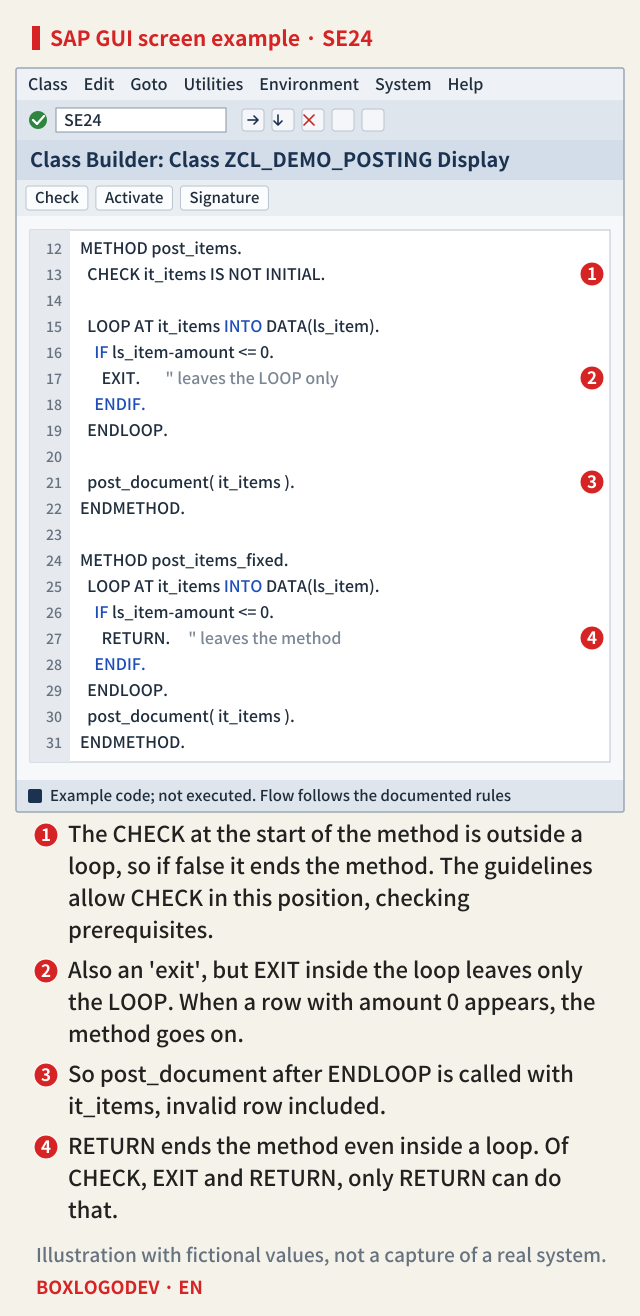
The editor example below gathers all of this on one screen: ① the allowed CHECK at the start, ② the EXIT that leaves only the loop, ③ the post_document call that therefore still runs, and ④ the same position fixed with RETURN.
In reporting event blocks the outcomes differ
When ending event blocks of an executable program (a report), what follows depends on the statement. According to the documentation, if START-OF-SELECTION is ended with EXIT or RETURN, the runtime raises no further reporting events and calls the list processor directly to show the basic list. So a following END-OF-SELECTION block does not run. The processing-block page for CHECK, on the other hand, names only LOAD-OF-PROGRAM and GET as cases that differ from a regular exit. By that rule, ending START-OF-SELECTION with CHECK is followed by END-OF-SELECTION, as after a regular exit. STOP is the statement that explicitly sends processing to END-OF-SELECTION.
LOAD-OF-PROGRAM cannot be exited with CHECK, EXIT or RETURN. STOP is forbidden in methods and raises an uncatchable exception during LOAD-OF-PROGRAM or in programs not called with SUBMIT. The 7.58 documentation classifies END-OF-SELECTION as an obsolete statement for logical databases and says that a program without a logical database does not need to implement it. That is why this difference tends to show up when fixing older reports.
SAP NOTES
Outside a loop, the block type matters
What happens after CHECK, EXIT or RETURN ends a processing block
Method, function module, subroutine
CHECK / EXIT / RETURN- Counts as a proper end
- Output parameters reach actual parameters
- Ended by exception or message: no pass by value
START-OF-SELECTION
END-OF-SELECTION- EXIT, RETURN: no further reporting events
- The basic list is shown directly
- CHECK, STOP: END-OF-SELECTION still runs
LOAD-OF-PROGRAM
STOP: uncatchable exception- Cannot be exited by CHECK, EXIT, RETURN
- STOP raises an uncatchable exception
- STOP is forbidden in methods
Based on the ABAP Keyword Documentation 7.58 (Exiting Processing Blocks, RETURN, STOP, END-OF-SELECTION) and the 7.50 CHECK and EXIT pages. GET events are not covered.
Remember one thing. Inside a loop, EXIT and CHECK act on the loop only. When you mean "stop the method here", write RETURN, inside a loop or not, and keep CHECK for loops and for prerequisite checks at the start of a method.
Add your perspective.
Share a question, another approach, or something you have tried.
Checking sign-in…
Loading comments…