Suppose an ATC check of a fictional Z program leaves one warning that cannot be fixed right away. There are two ways forward. You can put a mark starting with ## or "#EC into the source and hide the warning right there, or you can apply for an exemption and get a quality manager's approval. After reading this note you can tell how Code Inspector and ATC fit together, which warnings pragmas, pseudo comments and exemptions each cover, where they live and who decides, and so pick the right one for each warning.
The program ZDEMO_ATC_MASKS, the Z tables and the check names (ZDEMO_...) in the examples are invented, and the code was not run on a real system. Pragmas and pseudo comments follow the ABAP Keyword Documentation, release 7.58; the ATC and Code Inspector procedures follow the SAP NetWeaver 7.5 help. Menu names and screens can differ by release.
Code Inspector ties together what to check and which checks to run
Code Inspector (transaction SCI) checks repository objects statically for performance, security, syntax and naming conventions. A check is built from three parts. First, an object set decides what is checked: programs, function groups, classes or DDIC objects, picked by criteria such as package, application component or person responsible. If you save only the selection criteria, the object list is rebuilt every time an inspection runs, which suits packages where objects are often created or deleted.
Next, a check variant decides which checks run: you switch individual checks on and set their attributes. Every system has a global check variant named DEFAULT, which is used when Code Inspector is called from SE11, SE24, SE37, SE38 or SE80. If a user creates a local check variant named DEFAULT, that one is used instead of the global variant. A global check variant can be marked transportable and moved to other systems. Finally, an inspection joins the two and runs them. A reusable inspection keeps its definition and results, so you can run it again or schedule it as a background job, and inspecting more than 50 objects requires one.
SAP NOTES
A Code Inspector check has three parts
Transaction SCI · per the SAP NetWeaver 7.5 help
Object set
Package ZDEMO_*- Groups what to check
- Picked by package, component or owner
- Saving only the criteria rebuilds the list at run time
Check variant
ZDEMO_VARIANT / DEFAULT- Chooses which checks run
- Turn checks on and set their attributes
- A global variant can be transported
Inspection
ZDEMO_INSP- Runs a target set with a variant
- A reusable one keeps its definition and results
- More than 50 objects need a reusable one
The ZDEMO_ names are fictional. Screen names and menus can differ by release.
ATC can run checks at three gates of the development flow
The ABAP Test Cockpit (ATC) is a framework for running and evaluating checks on repository objects, integrated into the ABAP Workbench, ABAP Development Tools and the Change and Transport System (CTS). In one line, the link between the two is this: each ATC run uses a global Code Inspector check variant. Which checks run is still decided by a Code Inspector check variant; ATC decides when and where the checks run and who deals with the results. The ATC-relevant checks of the extended program check (SLIN) also run as part of ATC's program checks.
ATC can run its checks in three places. During development, developers run it from the editor, and those findings are for their own use. Where transport checking is switched on, releasing a transport request makes the system check every object in it automatically in the background, and the findings may stop the release, so running the check yourself before releasing is the recommended step. The check is allowed in SE03, where it can be set to always run (Globally activated) or to run only if the user permits (Set by User). Whether developers may override findings and release anyway, whether the transport is blocked until findings are corrected or exempted, or whether ATC checking is turned off is set in Configure ATC in transaction ATC. Third, the quality manager runs central checks, usually in the integration or consolidation system, and these are the "official" results. Each finding has a priority; priority 1 and 2 usually mean a serious problem that needs a quick fix. Central results can be replicated to the development systems so that developers see them there. If transport requests and their release are new to you, the note on transport requests and tasks covers them first.
SAP NOTES
ATC can run checks at three gates
Each ATC run uses a global Code Inspector check variant
During development
ATC check (local)- Developers check from the editor
- Findings are for their own use
- Fix, then recheck
Transport release
Release -> ATC- Objects in the request are checked automatically
- Findings may stop the release
- Running it first is recommended
Central run in QA
Priority 1, 2- The quality manager runs mass checks
- Results can be replicated to development
- Priority 1 and 2 usually need a quick fix
Per the SAP NetWeaver 7.5 ATC help. Setup decides whether the release check is on, whether it always runs or only if the user permits, and whether it blocks.
Hiding a warning in the source: pragmas and pseudo comments
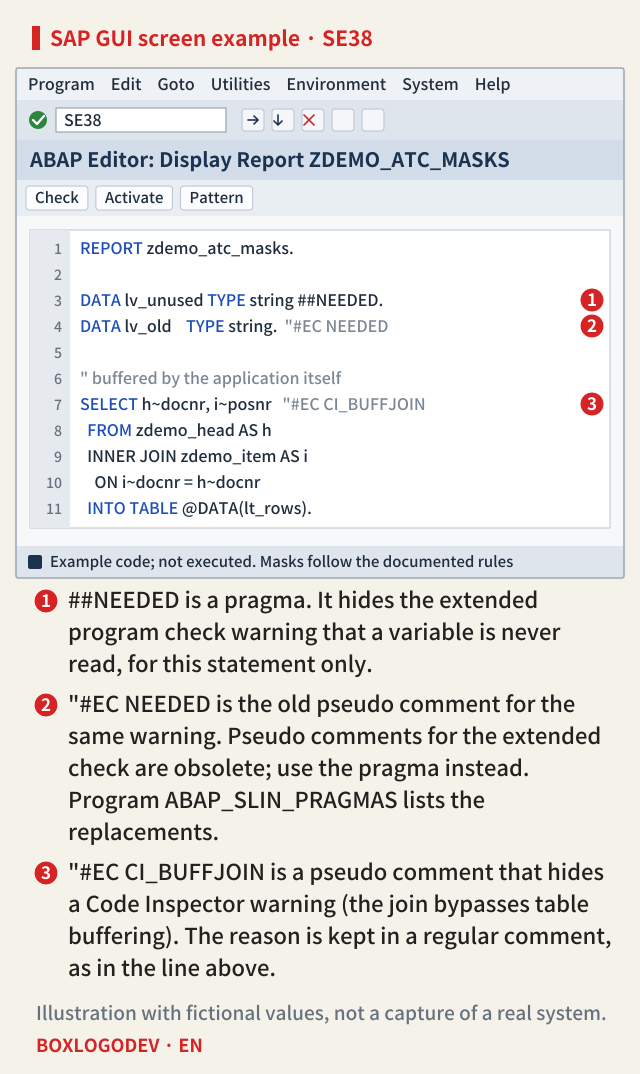
When a finding cannot be fixed, or there is no reason to fix it, the nearest option is a mark in the source code. Which mark depends on the check that raised the warning. Warnings from the syntax check and the extended program check are hidden with pragmas. A pragma is a program directive starting with ##, such as ##NEEDED, and it applies only to the current statement, the one that ends at the next period or comma. The description of the message tells you which pragma to use.
Extended program check warnings used to be hidden with pseudo comments such as "#EC NEEDED. When pragmas were introduced, each of these pseudo comments got a matching pragma, and the pseudo comments for the extended check became obsolete. Program ABAP_SLIN_PRAGMAS lists the replacements. In a program that uses pragmas to switch off warnings, the pseudo comment "#EC * and the statement SET EXTENDED CHECK can no longer be used; they raise an extended check warning that cannot be switched off.
Code Inspector warnings, on the other hand, are still hidden with pseudo comments. Put an abbreviation starting with CI_ after a statement, as in "#EC CI_BUFFJOIN, and that warning disappears for that statement. These pseudo comments have not been replaced by pragmas yet. Only one pseudo comment fits on a program line, so hiding several warnings of one statement means splitting it over several lines. The ABAP programming guidelines treat a pseudo comment as a sign to the reader that the author checked the warning and hid it on purpose, for a good reason. That reason can be written next to it in a regular comment.
Masking outside the source: an exemption needs approval
Some warnings cannot be hidden by a mark in the source, and sometimes an approval record is better than a mark. The examples the documentation gives are a problem planned for correction in an upcoming development cycle, or one that affects only a test program. In ATC you then apply for an exemption. The request sets the scope of the exemption and names an approver and a reason. Once a quality manager approves it, the exemption masks that error or warning, and the finding no longer shows up as open in new ATC results. An exemption can mask a problem temporarily or permanently.
The scope has a lower limit. Even the narrowest exemption covers all instances of that check message in one subobject, such as one include or one method of a class. That is wider than a pragma or pseudo comment, which covers one statement. An exemption also has to be requested against the active result of a central run to count in later central runs; requesting one for a result you produced yourself during development makes no sense. Code Inspector has the same structure: for a warning that no pseudo comment can hide, you request an exception, and a quality manager approves it. A message without an exceptions icon in the results cannot be masked at all.
SAP NOTES
Where it is masked, and who decides
Two inside the source, one outside it
Pragma ##...
DATA lv_x TYPE string ##NEEDED.- Syntax check and extended check warnings
- Applies to that statement only
- The message text names the pragma
Pseudo comment "#EC CI_...
"#EC CI_BUFFJOIN- Code Inspector warnings
- That statement only, one per line
- Not yet replaced by pragmas
Exemption (exception)
approver + reason- Requested outside the source
- Takes effect only once a quality manager approves
- Smallest scope: that message in one subobject
- Can mask temporarily or permanently
Per the ABAP Keyword Documentation 7.58 (Pragmas, Pseudo Comments) and the NW 7.5 ATC and Code Inspector help.
Choosing, one warning at a time
Side by side, the difference is the place and the person who decides. Pragmas and pseudo comments are written into the source by the developer and stay with the code for the next reader. An exemption leaves no trace in the source but goes through a quality manager's approval and covers a wider scope, a whole subobject. So first see whether the problem can be fixed. If not, ask whether the warning is justified for this one statement. If it is, use the pragma or pseudo comment named in the message description; if not, consider an exemption with approval.
Hiding has limits too. The extended program check guideline says a warning that points to a real problem should be fixed rather than hidden with a pragma, and that unspecific pseudo comments or pragmas can undo the benefit of the check. It also says SET EXTENDED CHECK OFF, which switches off extended check messages for a whole section of source code, should never be used.
One thing to do today: before you hide a warning, try writing its reason as a one-line comment right next to it. If one line is not enough, look again at whether the problem can be fixed; if it cannot, the warning probably belongs in an exemption request, decided together with the quality manager, rather than in the source.
Add your perspective.
Share a question, another approach, or something you have tried.
Checking sign-in…
Loading comments…