“I released the task, but the production screen still looks the same.” When you hear this, the first thing to check is exactly what was released. Completing a task, releasing its parent transport request, and importing that request into a target system are separate stages in SAP. A status indicating that your work is finished does not, by itself, mean the change has reached another system.
This article uses a transportable Workbench request in the traditional Change and Transport System (CTS) of SAP NetWeaver AS ABAP as its example. Do not assume that other transport mechanisms in the cloud, or local requests, follow the same flow. The symbols R, A, and B below, along with the development, quality assurance, and production statuses, form a hypothetical example for explaining the concepts. They are not results from an actual company system.
1. A request groups changes to move together; tasks record the work within it
Imagine a change to the wording and output fields of a report program. If developers A and B each work toward the same change objective, you can think of their work as two tasks under a single parent request, R. Each task records the objects changed by its owner, while the request is the parent unit that manages the changes to be transported together.
The vertical connections in the diagram show containment, not a sequence in time. The request number and the task numbers beneath it are different identifiers. If you share the number of task A and ask, “Has this request reached production?”, also identify its parent request, R. That makes it clear which transport result to look for in the target system.
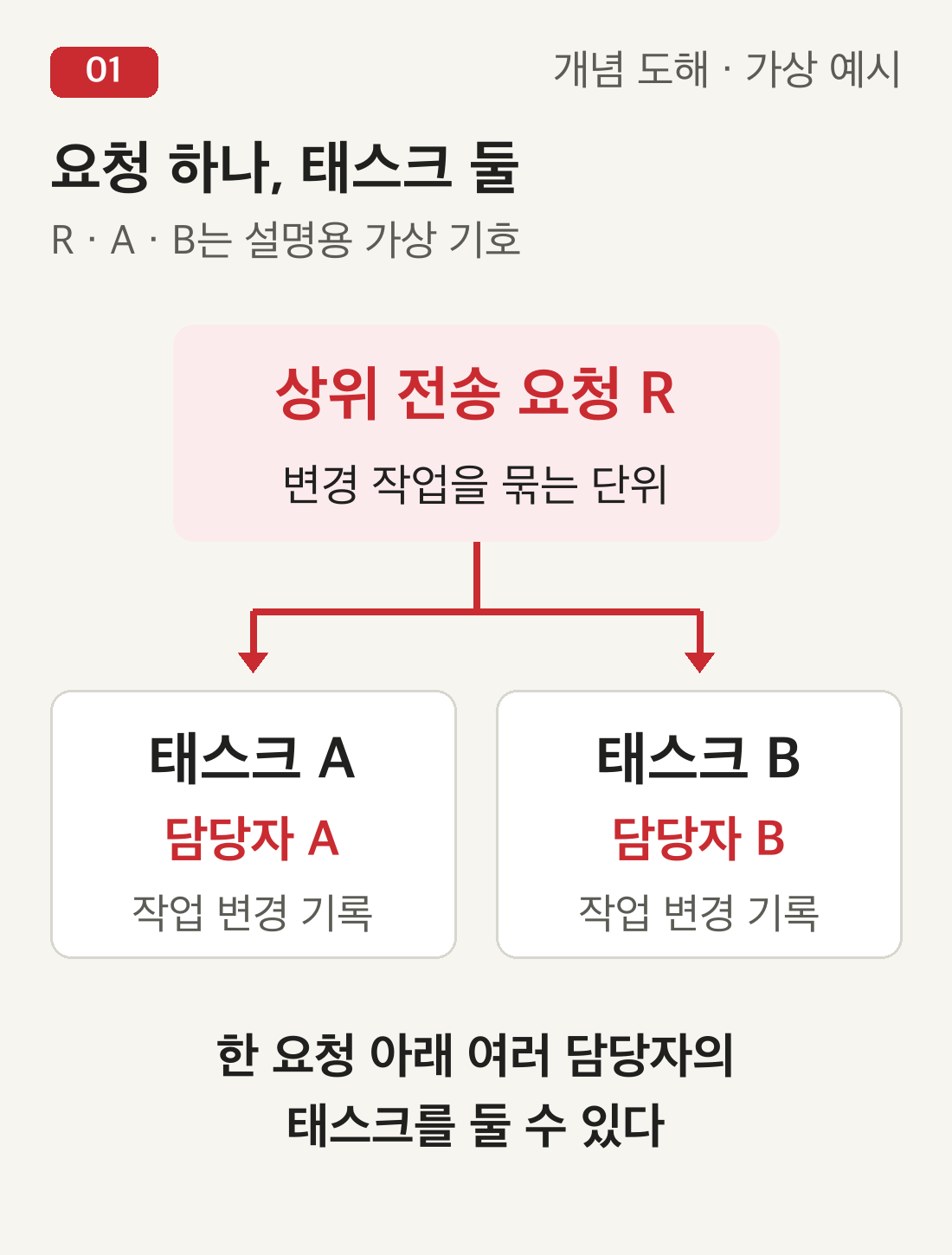
Having two tasks does not mean the request contains only two programs. The number of people, tasks, and changed objects does not have a one-to-one relationship. Even if a request is described as “Update report wording,” its actual object list may contain a broader set of changes than expected. This is why you should compare the object list with the purpose of the change instead of inferring its scope from the description alone.
Workbench requests and Customizing requests are also different concepts. Changes to development objects and configuration differ in their request types and target-client considerations. Do not apply this program-change example unchanged to every configuration transport. First check the type of request you are looking at and its transport destination.
2. Releasing a task does not send the change to another system
When developer A releases a task, its object entries are collected in the parent request's object list. Think of this as handing A's work over to the parent group of changes. The object locks are not immediately removed at this stage, and releasing the task alone does not import the changes into the target system.
In our hypothetical example, suppose A has finished but B's task is still modifiable. When A says “Release complete,” that statement describes A's task. It must not be interpreted as a report that the entire request R has been exported. All tasks within a parent request must be released before the parent request can be released.
Conversely, do not assume that releasing every task automatically releases the parent request as well. Check each task's status in the task list, then read the parent request's status separately. The first useful habit is to avoid deciding that everything is complete after looking at just one child row on the screen.

3. Check the export result as well as the request release
Releasing a transportable request starts an export that prepares its changes for transfer to another system. However, the export may still be running immediately after the release action. It is more accurate to treat “I clicked the button,” “The request status changed,” and “I checked the export log” as different kinds of evidence.
For example, suppose all tasks in request R are finished and the request has been released, but you have not yet read the export result. The supported status report at that point is “Request release performed; export result not yet checked.” If the log contains messages indicating a problem, inspect them. Do not fill in an unchecked result as a success.
Even after export has finished, whether the change has reached production remains a separate question. The transport route and your organization's approval process can affect which target imports the request and when. Export prepares the changes for transfer on the source side; import applies them on the target side. Combining both actions into a single word such as “deployed” can easily lead to misunderstandings.
4. The same request can have different statuses in quality assurance and production
Suppose request R was exported from development and imported into the quality assurance system, but you have not yet checked whether it was imported into production. Seeing the new wording on the quality assurance screen is evidence about the quality assurance environment. It does not automatically support the conclusion that the same wording should be visible in production. When you move to another environment, check that environment's transport result separately.

Start by confirming that you have the right request R and the right target system, distinguishing the target client where necessary. Then read that target's import history and logs to see what was processed and when. A request appearing in the target's import queue is different from a record showing that an import was actually performed.
Starting an import on your own just because the request is in the queue is not the solution proposed here. Check who is responsible for execution, what approval is required, and whether other changes must come before or after it. Before repeatedly importing the same request because a screen still looks unchanged, separate the evidence you already have from the stages you have not yet checked.
After checking the import logs, also compare the application's behavior with the intended change. In this hypothetical example, do not stop at “The program exists.” Check whether the new wording and output fields appear on the intended screen. The technical transport result and the desired functionality are related, but they are different things to verify.
5. Name the stage instead of saying “Release complete”
Make your status reports to colleagues a little more specific. “Task A released; task B still in progress” makes it clear that the parent request is not yet ready for transport. “Export result checked for request R; quality assurance import checked; production import not yet checked” helps prevent the mistaken impression that the production change has already been verified.
In actual records, include the target environment and the time at which you reviewed each piece of evidence. “Not yet checked” does not mean “failed.” It marks a result that has not been read. When the responsible person checks the result, update the record with the time and findings. If a problem is found, identify the specific stage and message involved.
Returning to the opening question, the order of checks becomes clear: Was I looking at a task or its parent request? Have I checked the export result? Which target's import have I checked? Have I verified the intended behavior there? Answering these four questions separately turns “I released it, but I cannot see it” from a vague status into a concrete issue with a clear next place to look.