Suppose you run the SI-Check for the first time on a fictional ECC system that is to be converted to SAP S/4HANA 2025. The result list shows several red lines. Must you fix all of them before you can convert? Not necessarily. Red covers two kinds of message, and one of them is something to read and confirm rather than fix. After reading this note you will be able to sort SI-Check messages into those to fix, those to exempt and those to read and turn into tasks, and say when the Software Update Manager (SUM) stops, and why.
The basis is sections 2.4 and 3.6 of the Conversion Guide for SAP S/4HANA 2025 (document version 3.0, 2026-10-07); section 3.6 of the 2023 guide (document version 7.0) has the same wording. The item names and values in the screen example are made up and are not output from a real system. The SAP Notes mentioned here require a login, so only their numbers are given; their content was not read.
How to run the SI-Check
The SI-Check (Simplification Item-Check) identifies all simplification items relevant for the current system. During the conversion, SUM calls it to make sure the system is in a consistent state. The check report comes with SAP Note 2399707 and the check classes with SAP Note 2502552. Because 2502552 delivers the check classes as TCI (transport-based correction instructions), the system first has to be enabled for TCI as described in SAP Note 2187425. If 2502552 is implemented without that, the TCI part is left out and you get missing check class errors. From a set support package per release (for example 740 SP16 or 750 SP05), TCI is already enabled.
The steps are:
- Start the report
/SDF/RC_START_CHECKin transaction SA38. - In the section Simplification Item Check Options, choose the target SAP S/4HANA version.
- Choose how to run it. Online mode shows the results as soon as the check finishes; a background job is recommended when the check will run for a long time.
- Run the checks to see all relevant items, then check the system consistency with Check Consistency for All.
Run it early in the project to see the scope of the conversion first. The Getting Started guide for SAP S/4HANA 2025 makes the same recommendation for the Maintenance Planner, the SI-Check and the custom code migration worklists. The result list also names the SAP Notes you need to read in detail. If you follow the process in 2502552 exactly, you need not read its prerequisite notes separately: they contain no manual tasks and are independent of business functionality.
Read the return code, not the colour
The result list shows relevant and irrelevant simplification items, and each relevant item is worth checking for its impact on the conversion. Some items have a consistency check. It finds inconsistencies that would be a problem during the SUM process and also says how to solve them. Other relevant items have no consistency check. Technically the conversion is possible without any action, but there will be an impact, so look into it.
Consistency check messages come in green, yellow and red, and each colour carries a return code.
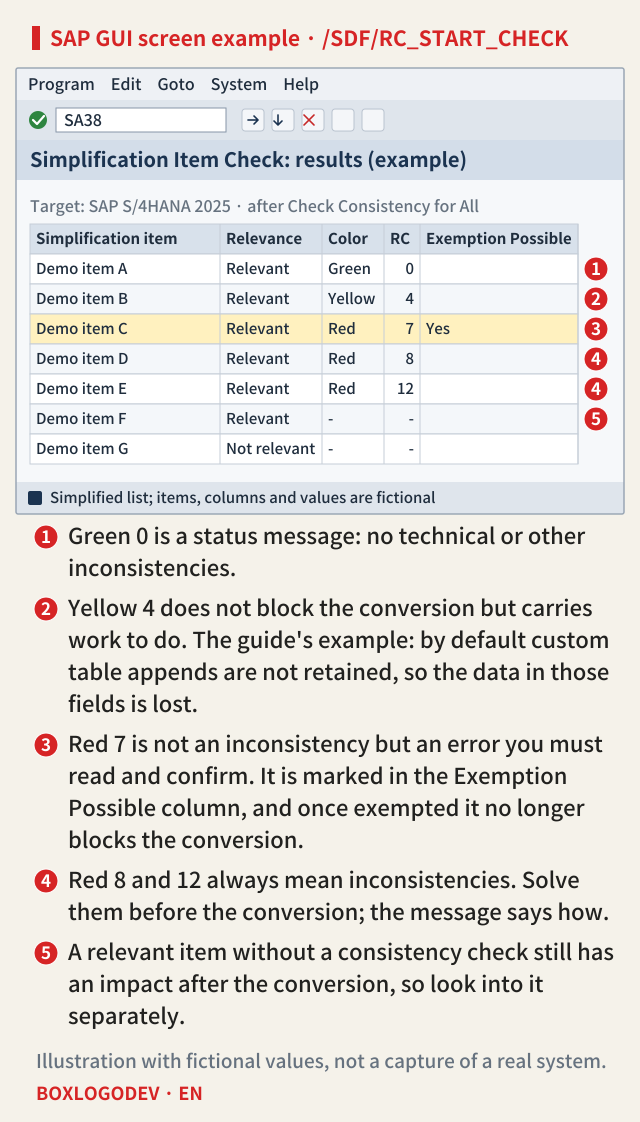
- Green 0: no technical or other inconsistencies. These also serve as status messages that the conversion can go ahead.
- Yellow 4: important information or warnings. The conversion itself has no technical problem, but the message may describe adaptations that must be done before or after the conversion to keep the business running. Some yellow messages point to data changes, changed functionality or tasks after the conversion. A typical example is custom table appends: by default they are not retained during the conversion, and the data in those fields is simply lost. That is why yellow messages should not be underestimated.
- Red 7: skippable errors. They are not inconsistencies, but important changes you must confirm you have read and understood. Usually they point to imminent data loss, deprecation or activities required after the conversion. Once you have confirmed them, that is, exempted them, they no longer block the conversion.
- Red 8 and 12: always inconsistencies in the system. Left alone, they block later SUM phases, so solve them before the conversion; the message says how.
Errors such as return code 7 can only be processed by creating an exception, and that exception is logged in the system. Which errors need an exemption is marked in the Exemption Possible column of the result. Both are red, but 7 means "read and exempt", while 8 and 12 mean "fix".
The screen example below puts this on one result list. ① is green 0, ② yellow 4, ③ red 7 marked under Exemption Possible, ④ red 8 and 12, and ⑤ a relevant item without a consistency check.
SUM checks twice
SUM runs the SI-Check twice: once at the beginning of the SUM process and again just before the downtime. At the beginning it stops if a message with return code 12 is found; just before the downtime it stops if any message has return code 8 or higher. To get through SUM, every inconsistency with return code 8 or higher has to be solved.
The first check is where to be careful. For the beginning, the guide names only 12 as a stopping point; the rule "8 or higher" belongs to the check just before the downtime. Getting past the first check does not mean there are no return code 8 messages. To avoid stopping at the latest possible moment, clear the 8s and 12s before the downtime.
A return code 7 no longer blocks once it is exempted. At which of the two checks an unexempted 7 stops SUM is not stated in the guide. The SI-Check user guide is in SAP Note 2399707, which requires a login and was not checked. Reading and exempting every 7 before the check just before the downtime avoids the question.
SAP NOTES
SUM runs the SI-Check twice
Each run stops on a different return code
Start of SUM: first check
RC 12 → stop- Stops if a return code 12 is found
- The guide names only 12 for this point
Up to the downtime: cleanup
- Solve 8 and 12; read and exempt 7
- Re-run the check for the items you fixed
Just before downtime: final check
RC ≥ 8 → stop- Stops on return code 8 or higher
- An exempted 7 no longer blocks the conversion
Per section 3.6 of the Conversion Guide for SAP S/4HANA 2025 (document version 3.0). The guide does not say at which check an unexempted 7 stops SUM.
SAP Readiness Check exists, so why run the SI-Check too?
Both tools can show simplification item relevance and consistency, but they do different jobs. In short:
- Form: Readiness Check is a customer self-service from SAP Digital Business Services, included in standard support, viewed in a cloud web interface. The SI-Check is a standalone report in SAP GUI. Neither needs SAP Solution Manager.
- Scope: besides simplification item relevance and the consistency check before conversion, Readiness Check covers custom code, recommended SAP Fiori apps, add-on compatibility, SAP Custom Development projects, SAP S/4HANA sizing, business functions and integration analysis. The SI-Check covers simplification item relevance and the consistency check only.
- Relation to SUM: the SI-Check is the one SUM calls and the one that is mandatory. Both are used for conversions to SAP S/4HANA and upgrades to a higher SAP S/4HANA release.
They are not alternatives; both are required. Readiness Check is a planning tool you run early in a conversion project to see the overall activities, and it also helps track them, for example with a burndown chart of consistency errors. It opens in SAP for Me or SAP Cloud ALM, selects relevant items mainly from table contents and used transactions, and shows each item's effort ranking and related activities (mandatory, conditional or optional). The SI-Check is the operational tool for clearing consistency errors up to the downtime. Instead of running every check again, you can re-run the check for the one item you just fixed, which can cut the runtime considerably, and it offers the option to exempt certain types of errors.
SAP NOTES
SAP Readiness Check and the SI-Check do different jobs
From the comparison table in the 2025 conversion guide
SAP Readiness Check
- Customer self-service in a cloud web interface
- Not called by SUM, not mandatory
- Beyond SI relevance and consistency: custom code, add-ons, sizing, Fiori apps, integration
- For early planning and tracking progress
SI-Check
/SDF/RC_START_CHECK- A standalone report in SAP GUI
- Called by SUM, mandatory
- Checks SI relevance and system consistency
- Re-check single items; exempt certain errors
What both share
- No SAP Solution Manager needed
- Used for conversion and for upgrades to a higher S/4HANA release
- The guide says both are required
Per section 2.4 of the Conversion Guide for SAP S/4HANA 2025 (document version 3.0).
A work order for the day the result list arrives
Turned into a work order, the rules above look like this. The order and the owner record are this note's suggestion, not a procedure the guide prescribes.
- Start with return codes 8 and 12. A 12 stops SUM at the check at the start, an 8 at the check just before the downtime. Fix each as its message describes, then re-run the check for that item only to see that the error is gone.
- Read each return code 7, decide what its data loss, deprecation or follow-up work means for the business, then exempt it. The exemption is logged in the system, but also record in the project documents who confirmed it and on what basis, with an owner.
- Read every return code 4 and turn it into tasks before or after the conversion. Where data is lost during the conversion, as with append fields, decide on a measure before the conversion.
- Do not drop relevant items without a consistency check from the list; check their impact too.
Red in the result list is two categories. Read the return code, not the colour: read and exempt a 7, fix an 8 or 12, and treat a yellow 4 as a task list, not a pass.
Add your perspective.
Share a question, another approach, or something you have tried.
Checking sign-in…
Loading comments…