Someone says the period has been opened at month end, you enter a document, and it still fails because the period is not open. You open OB52 again and get stuck at "but it is open". The OB52 period table is not one on/off switch. It is a combination of rows per account type and several intervals. After reading this note you can follow which row stopped a document at which step, and tell when the answer lies outside OB52.
The sources are the SAP Help Portal documentation for SAP S/4HANA 2025 FPS02 and the public SAP Learning course "Customizing Core Settings in Financial Accounting in SAP S/4HANA". The company code, variant, account numbers and authorization group below are all invented. Nothing here was run on an SAP system: the documented rules are simply applied to a fictional table. Error message numbers do not appear in these sources, so they are not given.
Opening a period means putting it inside a range
A posting period variant is the table that says which periods are open, and it is assigned to company codes. Company codes that share a variant open and close together. Each row has interval 1 and interval 2, and each interval has a lower period, an upper period and a fiscal year. You close a period by moving the range so the period no longer falls inside it.
The Manage Posting Periods app (F2293), available since S/4HANA 1809, fills the same table as OB52, so what you change in the app is what OB52 shows. However, the Help procedure for the app says that opening a new period with Open Periods automatically closes the previous one. If you meant to leave last month open during closing, check the table after using the app. Recurring jobs can be scheduled only from the next period, not for the current one.
A document is checked at two points
The Help documentation separates the moments of the check. At the header, once the posting date is in, row + (the minimum entry) decides whether that period can take a posting at all. The account check comes later: as soon as an account number is entered, that account's permitted periods apply. SAP Learning explains that the line item check uses the account type of the posting key.
SAP NOTES
Period checks on one document
The OB52 table is read at the header and again when an account is entered
Posting date gives the period
- The fiscal year variant sets period and year
- Special periods are not derived, so enter them in the header
Header: row +
- Is the period inside interval 1 or interval 2?
- If only in interval 1 with a group entered, the group must match too
Line item: account type row
- Once an account is entered, its permitted periods apply
- G/L uses the account interval, customers and vendors the reconciliation account
Based on SAP Help Portal, S/4HANA 2025 FPS02. Not the result of a run on an SAP system.
Two common mistakes follow from this. First, row + is not optional. Any period you open for another account type must also be open on row +, so correcting only the vendor row does not get you past the header. Second, an open row + is not the end of it. Separating account types, such as allowing customers while restricting vendors, is what the extra rows are for. SAP Learning says that when all account types are handled the same way, row + is enough.
What a row contains also depends on its type. Account intervals apply to G/L accounts only and cannot be entered on row +. Customers and vendors are entered through their reconciliation account number and account type, not their own numbers. That is why you will not find a customer number in the table and should read the reconciliation account in the customer master first. The Help example starts with an interval holding all G/L accounts and then enters the exceptions. The documentation does not say what happens to an account that falls in no interval, but in a table split into intervals, this note's judgement is that checking for missing numbers is a good first step.
Fictional example: two people during October closing
In variant Z100 of company code 1000 (the fiscal year is assumed to match the calendar year), November has started and October should stay open for the closing team only. Customers and vendors have confirmed balances, so October is closed for them first. The Help example also describes closing customers and vendors first once balances are confirmed.
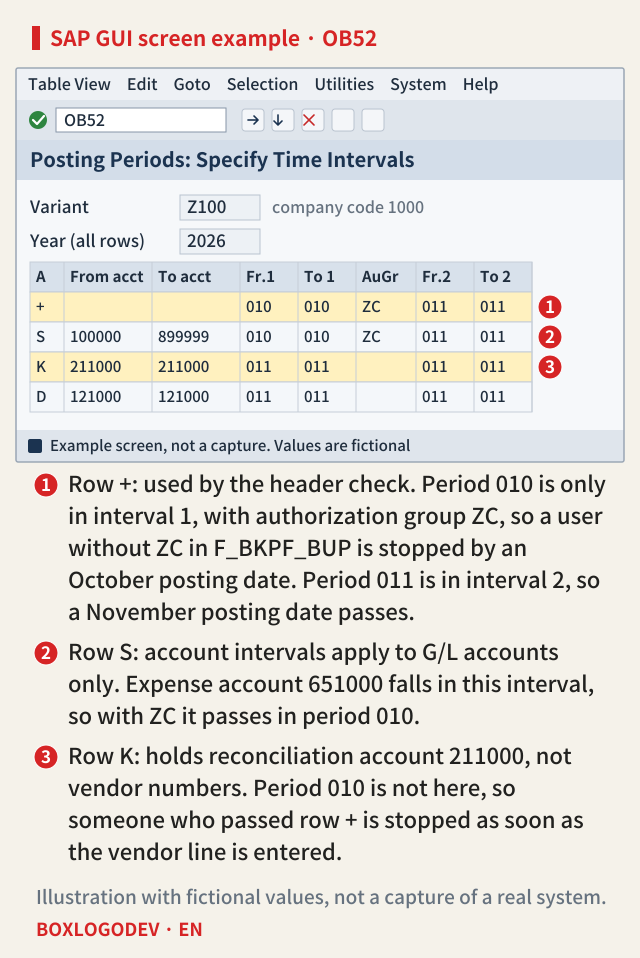
The first case is a clerk without ZC. Posting date October 30 gives period 010. On row + (marker 1), 010 is only in interval 1. The authorization group has an effect only in interval 1, and a user without F_BKPF_BUP authorization cannot post in periods open only in interval 1, so the header check stops the document. Change the posting date to November 2 and it becomes period 011, which passes through interval 2. If results differ from user to user, suspect this case first.
The second case is a closing accountant with ZC. The same October 30 passes row +, and expense account 651000 passes on the row at marker 2. But entering a vendor line with reconciliation account 211000 stops the document, because the K row at marker 3 does not have 010. Reading row + will not explain this. This stop may also be no fault at all, but a limit set on purpose after the balance confirmation, so find out why the row is closed before opening it.
One more point. The authorization wording speaks of periods open only in interval 1. So if 010 is also inside interval 2, this note's reading is that the group would no longer restrict anyone. SAP Learning recommends interval 1 for special periods and interval 2 for regular periods because authorizations can be managed only in interval 1. This note's example departs from that recommendation by placing regular period 010 in interval 1. Both the Help documentation and SAP Learning name month-end or year-end closing as a time to open some periods for specific users only.
Interval 3 does not open an FI clerk's document
The S/4HANA documentation has a separate interval for postings from CO to FI. SAP Learning calls it interval 3 and says that if it is empty, intervals 1 and 2 also apply to these postings. The Help documentation says this interval is not valid for other postings and can be entered only on row +. So 010 in interval 3 must not be read as opening an ordinary G/L document.
When the stop is outside OB52
If the table is right and the document still stops, look elsewhere.
- CO period lock. SAP Learning says CO-relevant FI postings and FI-relevant CO postings need both open periods in OB52 (or the app) and the CO period lock OKP1. OKP1 locks by transaction and period. Systems that activate the business function FINS_PERIOD_CTRL_BY_BTTYPE, available since S/4HANA on-premise 2020, can use the Manage Posting Periods – Cost Accounting app (F4684), whose table is separate from the OKP1 table. Which one takes precedence when both exist could not be confirmed, so on such a system check that app's status as well.
- The period the posting date produces. A non-calendar fiscal year is defined by period end dates. The Help documentation warns that if the February day limit is 28, a posting on February 29 goes to the next period, and if that period is closed an error is issued. For special periods, the posting date must fall in the last regular period, and the period must be entered by hand.
- A new fiscal year. Besides open periods, year-specific variants need that year's variant and assignment, and year-dependent number ranges need the new year's ranges.
- Ledger group postings. For a posting to a ledger group, the system usually checks the period with the representative ledger. If that is open, it posts to the other assigned ledgers even if their periods are closed. With the Manage Posting Period indicator set in the company code global parameters and the per-ledger settings made, the posting goes through only if the period is open for all ledgers in the group.
SAP NOTES
Where to look, by where it stops
From symptom to setting. Confirm with the message text
Everyone stops at the posting date
- Does row + hold that period and year in either interval?
- Did the posting date give the period you expected?
Only some users stop
- Is the period open only in interval 1?
- Does the group value in F_BKPF_BUP match the table?
It stops after an account is entered
- The row for that account type: S, D, K and so on
- For customers and vendors, is the reconciliation account in the interval?
CO-related postings stop
- CO period lock OKP1 as well as the FI periods
- Interval 3 for postings from CO to FI
A checking order put together by this note from SAP Help Portal, S/4HANA 2025 FPS02, and SAP Learning.
When a period you thought was closed is open
There is a trap in the other direction too. A note in the app documentation says that if a normal period range crosses calendar years, the adjustment periods of that fiscal year stay open for manual posting. Its example uses fiscal year variant K4 with 2016012 to 2017001, which also includes 2016013 to 2016016. Even if you believe you opened only December and January, documents can land in the adjustment periods, so keep this in mind before widening a range at year end.
When a document stops because of the period, do not scan the table from the top: start from where it stopped. Right after the posting date, read row + first. After the account, read the row for that type. If the result differs by person, check the authorization group in interval 1 of that row. If the table is right and the document still stops, look outside OB52. This distinction usually narrows your first look to a single row.
Add your perspective.
Share a question, another approach, or something you have tried.
Checking sign-in…
Loading comments…