Picture two fictional ECC Z programs. One is a report that reads BSIS; the other updates a field in the same BSIS. After the conversion to S/4HANA, the report still returns results without any code change, while the second program ends up on the list of things to fix. Why are two lines that name the same table treated so differently? After reading this note you will know what old finance tables like BSIS became behind the universal journal, why reads and writes part ways, and which lines to look for first in your own code.
The program ZDEMO_BSIS_ACCESS and its variables are invented, and the code was not run. The content follows section 8.2, "S4TWL - Data Model Changes in FIN", of the Simplification List for SAP S/4HANA 2023 (document version 1.35, 2025-02-25), the page "DDIC - Replacement Objects" of the ABAP Keyword Documentation, release 7.58, and the Conversion Guide for SAP S/4HANA 2023 (document version 7.0). SAP Note 1976487, which the list refers to, needs a login; it was not read and its content is not covered here.
The tables that disappeared behind the universal journal
The Simplification List explains that the universal journal changes the way transactional data is stored for financial reporting: internal and external reporting read from one document store, with the account as the unifying element. As a result, the totals records by period in General Ledger, Controlling, Material Ledger, Asset Accounting, Accounts Payable and Accounts Receivable were removed, and so were the index tables designed to speed up certain selections. The benefit the list names is that reporting is no longer limited by the number of fields in the totals records.
The changes came in two groups. The totals tables and application index tables went first, with the installation of SAP Simple Finance; in SAP Simple Finance 2.0 and S/4HANA 1511, more tables were partially replaced by the universal journal (ACDOCA). BSIS belongs to the first group.
BSIS became a compatibility view with the same name
Installing SAP Simple Finance (on-premise) removes the totals and application index tables and puts DDL SQL views with identical names in their place. The list calls them compatibility views. They are generated from DDL sources, the replacement happens during the add-on installation with the Software Update Manager (SUM), and the existing data is secured into backup tables. For BSIS, the view in the DDIC is still called BSIS, its DDL source is BSIS_DDL and the backup table is BSIS_BCK. BSAS, BSID, BSAD, BSIK, BSAK, GLT0, KNC1, LFC1 and others follow the same pattern.
According to the list, the compatibility views ensure that database SELECTs work as before. So SELECT ... FROM bsis in a Z program still finds something with that name and returns results without changes. Which tables the view reads internally, and how, is not stated in the list, so this note does not cover it.
SAP NOTES
The name BSIS stays; the table became a view
Identically named compatibility view (from SAP Simple Finance)
Original table BSIS
BSIS (table)- One of the totals and index tables
- Removed with the universal journal
- BSAS, BSID, BSAD, BSIK, BSAK, GLT0 too
Compatibility view, same name
BSIS <- BSIS_DDL- A DDL SQL view generated from a DDL source
- Sits in the DDIC under the name BSIS
- Keeps database SELECTs working as before
Backup table
BSIS_BCK- Receives the original table content
- Filled while SUM installs the add-on
Per section 8.2 of the Simplification List for SAP S/4HANA 2023 (document version 1.35). Which tables the view reads is not covered.
Other tables have their reads redirected to a differently named view
The tables changed in SAP Simple Finance 2.0 and S/4HANA 1511 are handled differently. Their compatibility views do not share the table's name; instead, the database interface (DBI) redirects all SELECTs on the table to the compatibility view, which retrieves the same data from the new data model, ACDOCA and others. For example, COEP is redirected to V_COEP, FAGLFLEXA to FGLV_FAGLFLEXA and ANEP to FAAV_ANEP. To read the content of the original table without the redirect, a separate view such as V_COEP_ORI is used.
Not every table survived this way. Access to the Material Ledger tables (CKMI1, MLCD, MLCR, MLHD, MLIT, MLPP) was supported only up to S/4HANA 1809; from 1909 these tables and views are obsolete and neither read nor write access is allowed. The list adds that MLHD, MLIT, MLPP and MLCR are still used for Material Ledger documents created by specific processes, but their views have been deleted. Old DDIC database views (BKPF_BSAD, VF_BSID and others) were replaced too, by an identically named DDL view, by a redirect, or by code; custom code that used a view replaced by code has to be adapted.
SAP NOTES
Three ways old finance tables were handled
Examples picked from the tables in section 8.2 of the 2023 list
Same-name compatibility view
BSIS -> view BSIS- A view with the table's own name
- BSIS, BSAS, BSID, BSIK, GLT0, FAGLFLEXT
- Original content in a _BCK backup table
Redirect to a differently named view
COEP -> V_COEP- The database interface redirects SELECTs
- The view reads the same data from ACDOCA and others
- An _ORI view reads the table itself
No longer usable
MLCD -> obsolete- Material Ledger tables CKMI1, MLCD and others
- Supported up to S/4HANA 1809
- From 1909, no read or write access
Only part of the tables is shown. See the original tables for the full list and exceptions (such as remaining uses of MLHD).
Reads stay, writes have to change
Both approaches end in the same rule. Reads are served by the compatibility views, but write access (INSERT, UPDATE, DELETE, MODIFY) was removed or adapted in SAP standard and has to be removed or adapted in custom code as well. The list points to SAP Note 1976487 for this work, and as the required action it says to adapt access to the new simplified finance data model in customer-specific programs. Customer-owned DDIC views that reference the affected tables or views also have to be replaced by equivalent code.
The same line between reads and writes appears in the replacement object rules of the ABAP Keyword Documentation 7.58. When a CDS view is assigned as the replacement object of a DDIC database table, access is redirected to it when the table is the data source of an ABAP SQL SELECT (including subqueries, OPEN CURSOR and FETCH) and when a foreign key relationship is checked in dynpros or Web Dynpros. ABAP SQL writes, including SELECT with SINGLE FOR UPDATE, still run on the original table and produce a syntax check warning. Native SQL (EXEC SQL, ADBC), AMDP, views defined on the database and IMPORT or EXPORT TO DATABASE are not redirected either. The documentation also notes that the content of replaced objects is usually no longer updated. Whether the S/4HANA compatibility views and redirects behave exactly like these rules could not be confirmed from the sources of this note, so code that reads these tables with Native SQL or AMDP is safer to test on its own.
SAP NOTES
Reads stay, writes change
The same rule for both approaches
SELECT
SELECT ... FROM bsis- Compatibility views answer as before
- Works unchanged; still test it
- For reporting, consider the Fiori apps
INSERT, UPDATE, DELETE, MODIFY
UPDATE bsis ...- Removed or adapted in SAP standard
- Custom code must remove or adapt them
- The list points to SAP Note 1976487
Customer DDIC views
Z view on BSIS- Customer views on these tables or views
- Must be replaced by equivalent code
Per section 8.2 of the 2023 Simplification List. SAP Note 1976487 needs a login and was not read.
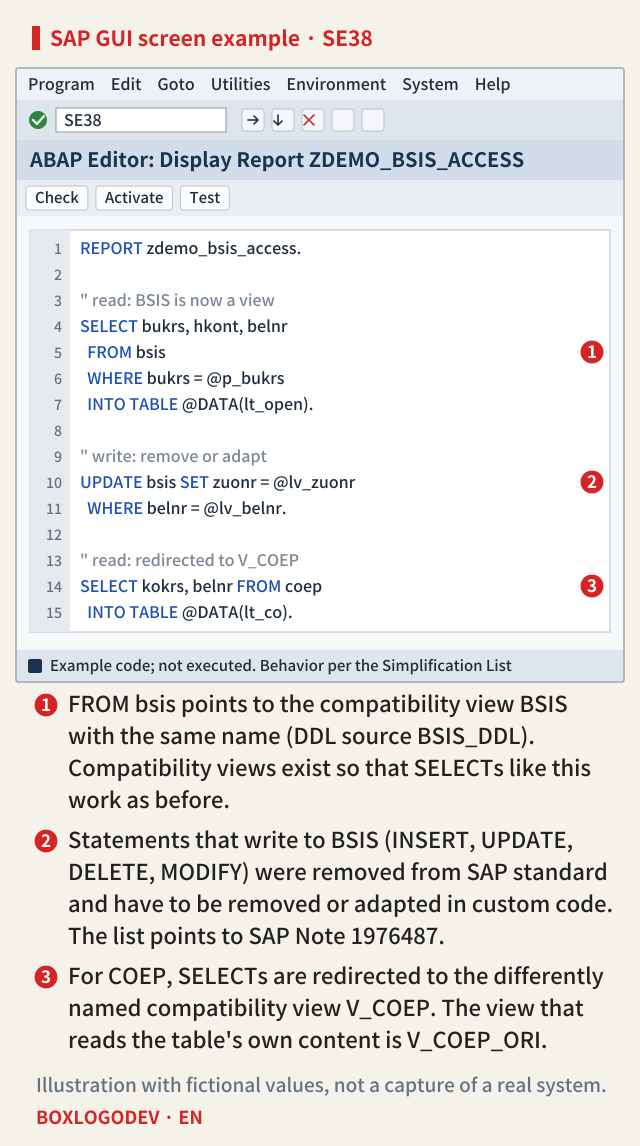
The editor example below puts the three cases on one screen. Marker 1 is the SELECT that reads the same-name compatibility view, marker 2 a write that has to be removed or adapted, and marker 3 a read of COEP that is redirected to V_COEP.
What to look for first in your code
If you need an order, start with what the compatibility views do not cover: INSERT, UPDATE, DELETE and MODIFY on names such as BSIS, BSAS, BSID, BSAD, BSIK, BSAK, GLT0, COEP and FAGLFLEXA, and Z DDIC views that reference these tables. SELECTs that do return results still need testing in S/4HANA, as the conversion guide says. For reporting, the list also suggests considering the Fiori reports built for the many fields of the universal journal instead of classic reports that aggregate on the fly by the fields of the old totals tables.
One thing to do today: search your custom code for lines where one of these table names is the target of a write statement, and keep the result as a list. That list is the starting point to check against when you read SAP Note 1976487.
Add your perspective.
Share a question, another approach, or something you have tried.
Checking sign-in…
Loading comments…