“Why does a document entered in September appear in August's figures?” When this question comes up in SAP FI, it helps to compare the document's date fields side by side. Document Date records the date of the original supporting document, Posting Date is the basis for determining the accounting period, and Entry Date records when the accounting document was entered in the system. Different dates alone do not prove that something is wrong.
This article describes ordinary FI accounting documents in SAP S/4HANA 2025 FPS01. Korean screen labels and available selection fields can vary with the app, language, and authorizations, so check the English field names as well. Do not assume that special procedures, such as parked documents or migrated data, handle dates in exactly the same way.
The question each date answers
Document Date is the date on which the original supporting document was issued. It is the starting point when comparing the date printed on an invoice with the document date recorded in the system. A supporting document may be issued several days before it is entered, so Document Date and Entry Date do not have to match. If they differ, first identify which fact each date records.
Posting Date is the basis for checking the accounting period to which a posting belongs. The system determines the posting period for each ledger from the entered posting date and the fiscal-year configuration. The required posting period must be open for posting. Because fiscal years are not necessarily structured the same way in every company, do not automatically read the month number in a posting date as the accounting-period number.
Entry Date is the date on which the accounting document was entered. It helps trace when entry occurred in the system, but it does not replace the supporting document's issue date or the accounting period. To find out when a supporting document actually arrived at the company, check receipt records. To find the latest changes, check the change history. Entry Date alone cannot explain all of these facts.
Recording the technical field names makes comparison easier even when screen translations or column labels differ. In document header table BKPF, BLDAT is Document Date, BUDAT is Posting Date, and CPUDT is Entry Date. Including these English names or technical fields in an operations query helps avoid discussing different dates without realizing it.
A fictional example: an August document entered in September
The following example is for explanation and does not use real company data. Assume a company whose fiscal year matches the calendar year and that uses ordinary posting periods. A supporting document is issued on August 29, 2026. The accounting owner decides to recognize the transaction in August and sets the posting date to August 31. Assume that the required August posting period is open when the accounting document is entered.
The accounting document is actually entered in the system on September 3. The same document can therefore have Document Date 2026-08-29, Posting Date 2026-08-31, and Entry Date 2026-09-03. These three dates record different facts: issuance of the supporting document, accounting recognition, and entry in the system.
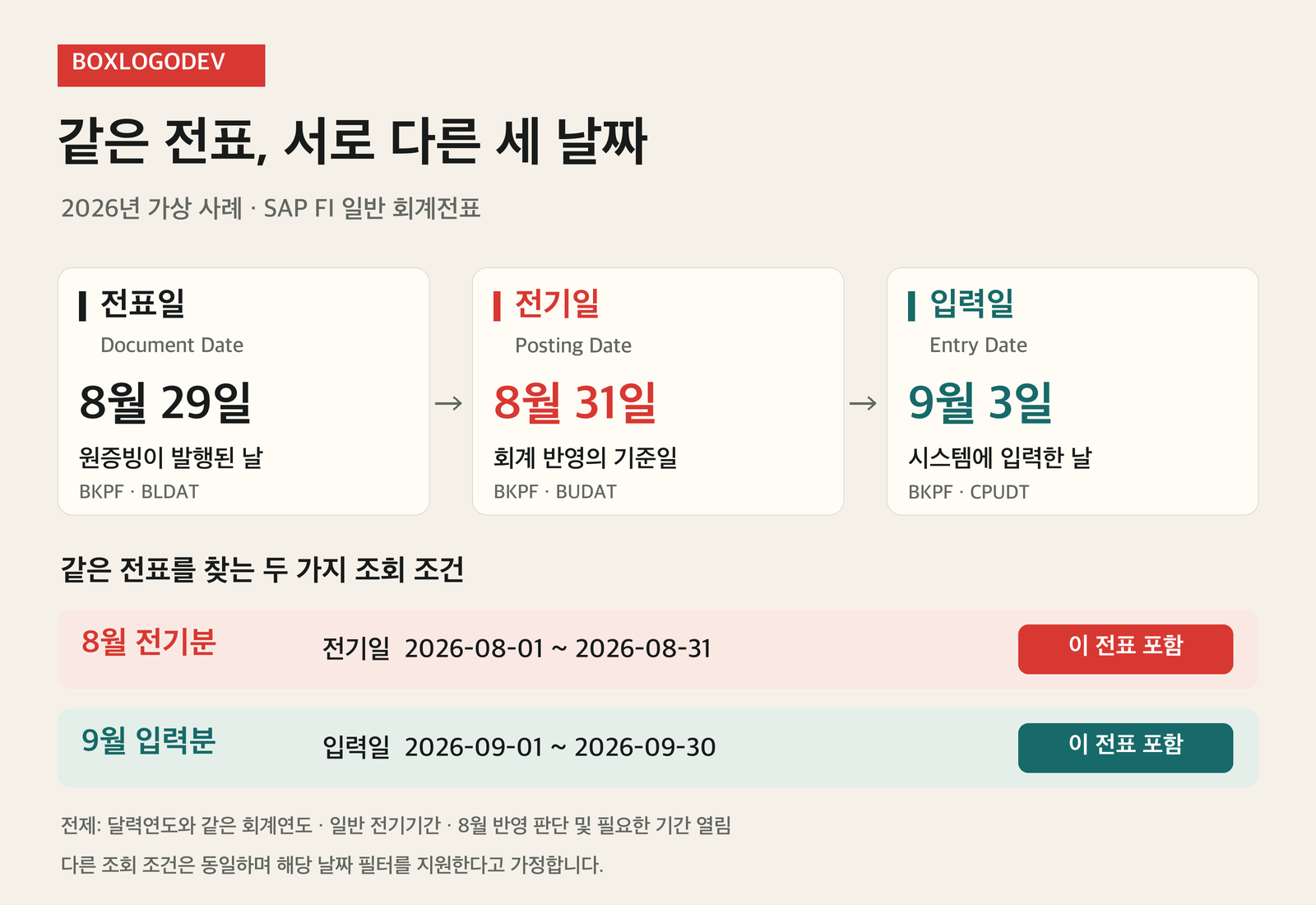
Recognition in August is a condition chosen in advance to explain the dates' roles. It does not mean that an August supporting document must always be posted in August, or that a posting date can be changed arbitrarily because entry occurred in September. Actual accounting recognition must be determined from the supporting document and the company's accounting policies. The operations owner can separately check whether that decision matches the values recorded in the system.
Why the same document can appear in August and September searches
To find “August postings,” use Posting Date 2026-08-01 through 2026-08-31. The example document matches because its posting date is August 31. To find “September entries,” use Entry Date 2026-09-01 through 2026-09-30. It also matches this search because its entry date is September 3. This assumes that the other conditions are the same and that the relevant search supports these filters.
By contrast, limiting Posting Date to September excludes this document from that date condition. Limiting Entry Date to August also excludes it. The document has not disappeared; the question has changed. “Entered in September” and “posted to September” may sound similar, but they are not the same set of documents. Different counts in the two lists therefore do not, by themselves, establish that records are missing.
If several filters are used together, compare each condition side by side. For example, a search that requires both an August Posting Date and a September Entry Date includes this example document. A search requiring both Posting Date and Entry Date to fall in September excludes it. Check the actual app or report to understand how its conditions are combined.
When comparing monthly accounting reports, align the selected ledger, fiscal year, and posting period as well as the dates. A simple document list and an accounting report may serve different purposes and use different filters. Writing down the exact conditions that determine which documents are included is more useful than saying “the same month.”
Write operations queries that someone else can reproduce
“A September document is missing” does not tell the reader whether September refers to the original supporting document, Posting Date, or Entry Date. First state what you want to check. Once you know whether you are comparing supporting documents, checking monthly accounting recognition, or tracing entries made on a particular day, the relevant date field becomes easier to choose.
For example: “The document is returned with Entry Date 2026-09-01–2026-09-30, but not with Posting Date 2026-09-01–2026-09-30. Its posting date is 2026-08-31, and all other conditions are the same in both searches.” Adding the app or report name, company code, fiscal year, and document number makes the same record easier to find again.
When comparing screens, record both the name of the displayed date column and the date field used in the selection conditions. Check them separately instead of assuming that the date shown in the list is the one used for selection. Other filters, such as account or document status, and display authorizations can also affect the results. If differences remain after the conditions have been aligned, record these as further items to investigate.
The misconception that different dates must be made to match
Making all three dates identical is not the goal of correct processing. Different dates can be natural when the issue date, the basis for accounting recognition, and the entry record differ. Before changing values, compare the supporting document with the document header, then check the accounting owner's recognition decision and the selection conditions. Changing a date simply because a period is closed can also change the facts you were trying to investigate.
When recording a finding, a sentence supported by evidence is more useful than the single word “normal.” For example: “Because Posting Date is August 31, the document is excluded by a September Posting Date condition. Because Entry Date is September 3, it is included by a September Entry Date condition.” Recording the role of each date alongside the actual filters helps distinguish an expected period difference from an entry error that needs further investigation.