An SAP operations handover document needs enough information for the next person to find the same situation and continue making decisions. If all you leave is “Please check the batch job,” they have to ask which run to look at. Connecting the business impact, the evidence reviewed, and the next action gives the next person a starting point.
This is a general documentation guide using an SAP GUI-based ABAP environment as an example. The seven items below are a suggested document structure; screens and authorizations vary by product, version, and company configuration. Daily aggregation job A, all times, and all counts used in the explanation are fictional. They do not describe incidents or operational experience at a real company.
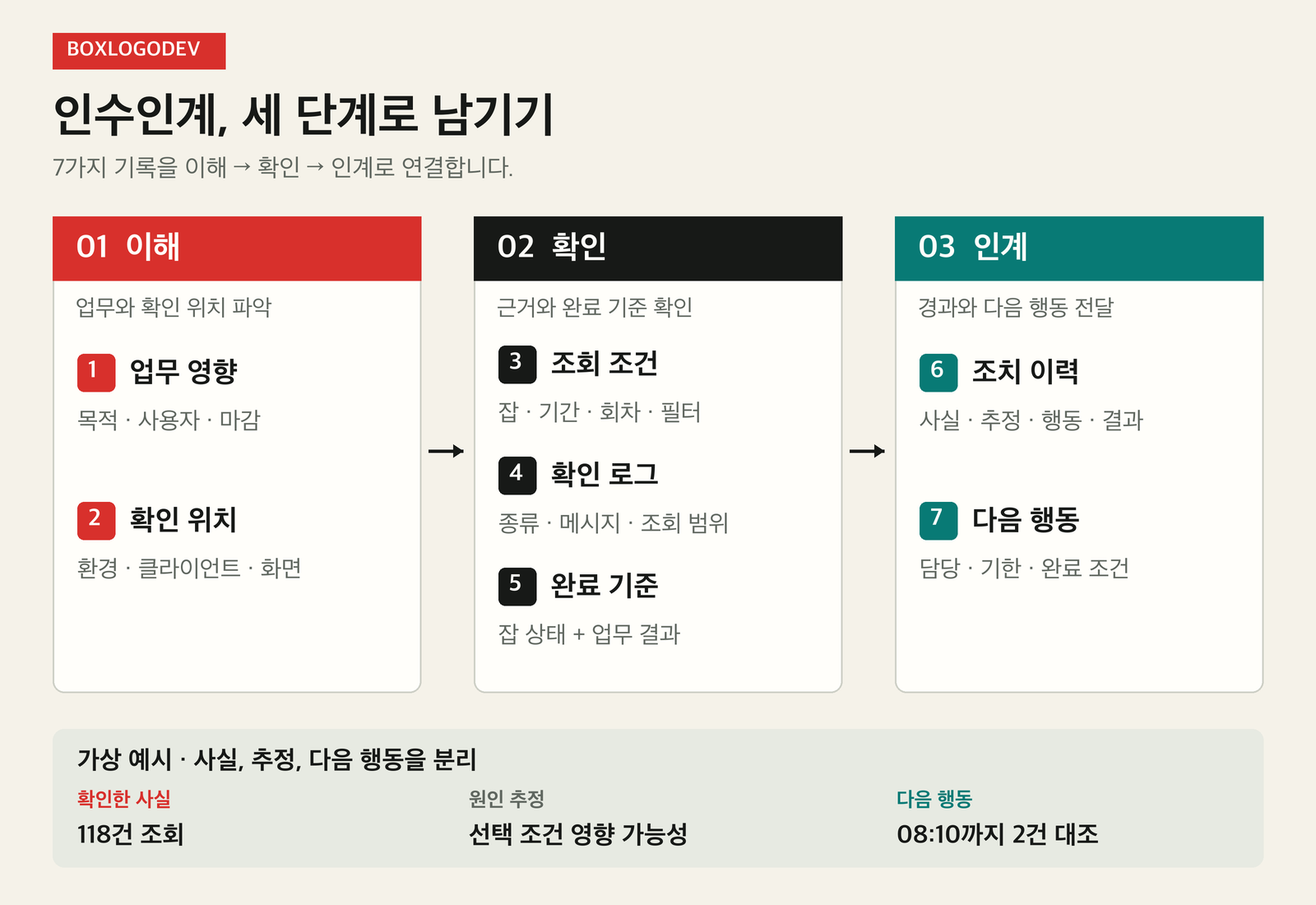
Grouping the seven records into three stages—understand, verify, and hand over—makes missing information easier to spot. First understand the business process and where to check it. Then verify the status through selection conditions, logs, and completion criteria before passing on the action history and next steps.
1. Which business process is affected?
Along with the program name, record its business purpose, the department that uses its output, and the processing deadline. Document both the execution schedule and any downstream work that must wait if the output is delayed. Even with the same error message, the order of investigation can depend on the time remaining before the deadline and the business impact.
In the fictional example, job A aggregates the previous day's processing records at 06:00 each day and supplies its output for a review at 08:30. A handover entry might say: “Daily aggregation job A collects the previous day's processing records. If the output has not been verified, the business owner must decide whether the 08:30 review can begin.” The aim is to avoid making the next person infer business impact from the program name alone.
2. Where should the next person check?
Record the target system and client, the display screen, and the route for requesting the required authorizations. Specify whether the observation was made in development, quality assurance, or production. If a document only names the screen, someone who cannot access it may struggle to distinguish a retrieval error from insufficient authorization.
For example: “Check the batch display screen in the designated production client. If display authorization is missing, follow the team's access request process. Cross-check the business output in the separate review screen.” In an internal document, replace “designated” and “separate” with exact locations. Link to the approved access procedure instead of writing passwords in the document.
3. Which selection conditions were used?
For a background job, record the job name, date range, execution time, and status. Jobs can be monitored in SM37, and the job details show the start time and processing duration. If a job runs repeatedly under the same name, include enough information to distinguish the run you checked.
“I selected the run that started at 06:00 on September 20 and confirmed its Finished status at 07:30” is more useful for the next person's search than “Checked job A.” State the time basis used by the relevant screen alongside the recorded times. Include the date range and status filters as well, so a result retrieved with different conditions is not mistaken for a change in the same run.
4. Which logs were read?
Record the messages in the job log and the time you checked them. If you also reviewed the application log, record the object, subobject, and date or time range. SLG1 allows application logs to be narrowed down using these conditions. To say that both kinds of log were checked, you need to have actually read a defined part of each.
A screenshot captures the screen at that moment, but may not show every condition needed to find the same information again. Make the scope explicit: “Reviewed the job log for the 06:00 run and recorded the messages needing further investigation and their timestamps. The application log has not yet been checked.” Keep the essential message content and selection conditions in text, and use screenshots as supporting material.
5. What counts as complete?
Document the job status and the business-output checks separately. Finished means that every job step completed successfully. The handover document should also record the business completion criteria agreed by the team, such as the output count, target period, and whether downstream work has been checked.
Suppose the fictional job is Finished, but the result contains 118 records while the business owner expected 120. Do not immediately conclude that the job failed. Compare the conditions defining the expected population with the scope of the output aggregation. “Job completion confirmed / reason for the two-record difference not yet checked / business completion decision pending” makes the verified technical state and the outstanding business decision clear.
6. What action has been taken so far?
Record when the issue was noticed, the facts observed, the actions performed, and the results after each action in time order. In particular, separate verified facts from possible causes. “The query returned 118 records” is an observed fact in this fictional case. “Some items may have been excluded by the selection conditions” is a hypothesis that needs further checking.
Describe actions and results together. Instead of “Check complete,” write: “At 07:35, I rechecked the output date range, and the same conditions returned 118 records. I did not rerun the job.” If a rerun is being considered, list the approving role, whether data has already been processed, and the possibility of duplicate processing as items to check first. Do not tell the next person to execute a job based only on a hypothesis.
7. Who owns the next action?
Give each remaining item an accountable role, a next checkpoint, and a completion condition. “Keep monitoring” leaves the first action unclear. In the fictional example, you might split the roles as follows: “The business owner will reconcile the two-record difference between the expected population and the output by 08:10. The operations owner will update the handover document with the findings.”
Also record whom to contact and what decision is needed if the matter remains unresolved by the deadline. Alongside individual names, include roles that can be covered by someone else and the contact route maintained by the team. Confirm that the next person has accepted the handover. To preserve the sequence of events, append newly verified facts with the time they were checked rather than deleting the original record.
A compact template for one case
Use the following structure to collect information about a single case. Mixing several jobs into one paragraph can break the connection between selection conditions and action history. Instead of filling gaps with guesses, mark them as “not yet checked” and identify who will check them.
- Business impact: business purpose / output users / deadline / decisions needed if delayed
- Where to check: environment / client / display screen / access procedure
- Selection conditions: job name / target date / specific run / applied filters
- Evidence reviewed: log type / messages and timestamps / checked and unchecked scope
- Completion criteria: job status / output reconciliation items / business-owner confirmation
- Action history: observed facts / possible causes / actions performed / subsequent results
- Next action: accountable role / check deadline / completion condition / escalation contact route
Before handing over, read the document from the next person's perspective: can they find the same run using this document alone, and are the unknowns and next action clear? Record where the document will be updated with later findings and when it was last updated. Public blog posts and externally shared copies should not contain internal information such as real system names, accounts, business partners, or accounting documents.