When you schedule an S/4HANA conversion, does Asset Accounting make you wait for year-end? Asset Accounting on its own does not require year-end. What it does require is that only one fiscal year is open in Asset Accounting at the time of the migration, and that the previous period has been closed completely right before installation. After reading this note you can work out how many fiscal years will be open on each candidate date, and point to what to finish in Asset Accounting before SUM (Software Update Manager) starts and which fields to watch on the depreciation posting screen (AFAB).
The example is a fictional company code, BX01. Its fiscal year matches the calendar year, and it is assumed to run classic Asset Accounting on SAP ERP 6.0 EHP8 (ECC) and to convert to SAP S/4HANA 2025. The candidates are three weekends: late November 2026, early January 2027 and March 2027. The sources are the Asset Accounting migration guide for S/4HANA 2025 FPS02 (October 2026 edition), the ECC 6.0 EHP8 Asset Accounting documentation, the Conversion Guide for SAP S/4HANA 2025 (version 3.0) and the SUM 2.0 SP27 documentation, checked on 27 October 2026. Nothing was run on an SAP system.
Year-end is not required, but two conditions are
If you are moving from classic Asset Accounting, S/4HANA does not have to be installed at the end of the year as far as Asset Accounting is concerned, and the preparation guide for that move uses a conversion during the current month as its example. For a system that already uses new Asset Accounting on EHP7 SPS02 or higher, the installation need not fall at the end of the year or at the end of a period. Either way, what limits the date is not the calendar but two conditions.
First, only one fiscal year may be open in Asset Accounting when the migration takes place. You can see which year has been closed in Customizing for Asset Accounting under Preparations for Going Live > Tools > Execute/Undo Year-End Closing. That path is how the S/4HANA 2025 documentation names it; the ECC 6.0 EHP8 documentation gives Periodic processing > Year-end closing > Reverse. Second, the previous period must be closed completely in Asset Accounting directly before S/4HANA is installed. Once the installation is done, nothing can be posted in Asset Accounting until the migration has been completed fully and successfully. So the stop for Asset Accounting lasts not just for the technical installation but until the Customizing and document migration are finished, and locking the users for that time is recommended.
Some work must be finished before installation, so plan it together with the date: activating Financials Extension (EA-FIN) for the new depreciation calculation, and, if Asset Accounting lacks currency areas that match the general ledger's parallel currencies, the separate project that creates them.
The stretch when two fiscal years are open
In ECC Asset Accounting, a new fiscal year opens only when the fiscal year change is run. The earliest you can run it is the last month of the old year, and you can run it at any point in the new year. Before the change nothing can be posted with dates in the new year; after it, postings to the old year remain possible. At most two fiscal years can be open at one time.
The old year is closed with the year-end closing program. The year you can close is always the one after the last closed year, and the current fiscal year cannot be closed. A year does not close while there are depreciation calculation errors, planned depreciation or periodic balances not yet fully posted to the general ledger, or acquired assets not yet capitalized. Putting the two documents together, two years are open from the fiscal year change until the old year's year-end closing, and in that state the migration condition is not met. That conclusion is this note's inference, not an SAP sentence.
Here is how BX01's candidates come out. If 2025 has already been closed, only 2026 is open in late November. Early January depends on the fiscal year change. If the change to 2027 has not been run yet, 2026 is still the only open year (this note's inference); the price is that nothing can be posted in Asset Accounting with 2027 dates until then. How the pre-conversion SI-Check (Simplification Item Check) judges this state could not be found in the public documentation, though, so check this candidate with the SI-Check in a test system first. If the change was already run in December, two years are open, so converting in early January means finishing the year-end closing for 2026 first. March also depends on whether 2026 has been closed.
Closing the old year in a hurry needs one more check. In ECC a year closed too soon can be reopened in Customizing, but after the migration no fiscal year before the migration should be reopened in Asset Accounting. So if you close 2026 in order to convert, it is safer to finish any corrections to that year's asset figures before the conversion.
SAP NOTES
How many fiscal years are open in BX01?
Fictional company code, fiscal year = calendar year, worked through the ECC 6.0 EHP8 Asset Accounting rules
Only 2026 is open
2026- 1 open year · condition met
- 2025 has already been closed
- The late-November 2026 candidate falls here
Fiscal year change to 2027
- December 2026 at the earliest, or any point in 2027
- No postings with 2027 dates before it runs
- Inference: if it has not run yet, early January 2027 is still the first state
2026 and 2027 are both open
2026 + 2027- 2 open years · no migration in this state
- Postings to the old year 2026 remain possible
- Inference: only one open year is allowed, so avoid this stretch
Year-end closing for 2026
- January 2027 at the earliest; the current fiscal year cannot be closed
- No depreciation errors, everything posted to the G/L, acquisitions capitalized, no incomplete assets
Only 2027 is open
2027- 1 open year · condition met
- If you close 2026 to convert, correct its asset figures before the conversion
- After the migration, no fiscal year before it is reopened
Two years are open from the fiscal year change until the old year's year-end closing. That no migration happens in this stretch is an inference from two documents, not an SAP sentence. Dates and states are a fictional example.
Closing the previous period: run AFAB to the end
The complete period-end closing right before installation has four parts: the depreciation posting run (RAPOST2000, transaction AFAB), reconciliation of the general ledger with the Asset Accounting subsidiary ledger for both the leading and parallel valuations, the periodic APC postings (RAPERB2000), and the depreciation recalculation (AFAR). APC stands for acquisition and production costs. RAPERB2000 must finish without errors with a current time stamp, and it is run one last time immediately before installation. After installation these postings cannot be caught up, and after the migration the program is no longer needed and no longer available.
If the conversion falls in the middle of a month, as with BX01's late-November candidate, the previous month, October, is closed first, and because APC-relevant postings may have happened in November in the meantime, the periodic APC postings are run again immediately before installation. If November's depreciation is posted before the migration, October's depreciation cannot be posted again after installation, and an adjustment that affects October and is posted to October after installation has its depreciation posted in the period that corresponds to November.
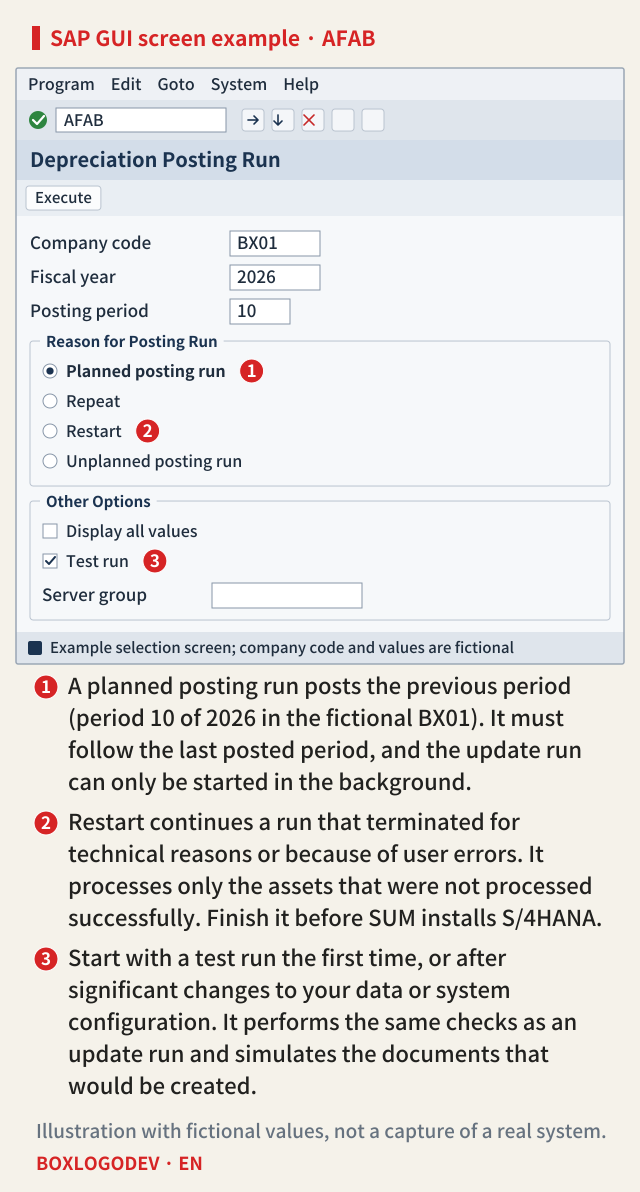
On the AFAB selection screen you choose the reason for the posting run (as documented for ECC 6.0 EHP8). A planned posting run posts the next period according to the posting cycle (1), and Repeat runs the last posted period again and posts only the differences. Restart is the mode that continues a run terminated for technical reasons or because of user errors, processing only the assets that were not processed successfully in the earlier run (2). The update run can only be started in the background. The first time, or after significant changes to your data or system configuration, start with a test run, which performs the same checks as an update run and simulates the documents that would be created (3).
Error handling follows the same ECC documentation and differs by stage. If the selection conditions fail at the start (for example, a planned run's period does not follow the last posted period), the run terminates. For this stage the documentation says to analyze the error and start the posting run again. Errors in the depreciation calculation exclude only the affected assets and the run continues; if no other errors occur, no restart is needed, and after correcting the asset values you post them with a repeat run or the next planned run. Right before a conversion, though, the next planned run would come after installation, so post the corrected assets with a repeat run before installation (this note's judgment). Errors while creating line items or updating a document (a missing account or cost center, for example) are corrected and then finished with Restart. So do not start SUM while any assets still wait for a restart or a repeat run.
No update terminations from direct postings may remain either. The SI-Check program /SDF/RC_START_CHECK can check this too, with ID SI2: FIN_AA. In update management, transaction SM13, an update with the status Error is not dealt with by fixing its cause alone; it has to be run again, or the change is never recorded in the database.
The order before SUM, and downtime-optimized conversion
Combining the preparation steps with the process flow for the migration gives this order: check the prerequisites, lock the users (leaving only the postings period-end closing needs), close the previous period completely, back up, and install S/4HANA with SUM. The two pages place the SI-Check at different points, but SUM runs the SI-Check, which includes the Asset Accounting pre-checks, again at the start and just before downtime. SUM stops at the start on a message with return code 12, and just before downtime on return code 8 or higher. This preparation is done in the Customizing system and again in each test or production system after it.
Downtime-optimized conversion runs part of the data conversion during uptime, so Asset Accounting stops in a different way (as described for SUM 2.0 SP27). In phase MAIN_SHDRUN/REQ_SMIG_APPL_LOCK a database freeze trigger locks the leading Asset Accounting tables, and during that lock you close the periodic asset postings with RAPERB2000 or ASKB and calculate the planned depreciation values with AFAR in the production system. Among the restrictions that apply after the lock ends (MAIN_SHDRUN/REQ_SMIG_APPL_UNLOCK) and until downtime: no Asset Accounting year-end activities with AJRW and AJAB and no reopening of closed fiscal years, while full regular depreciation posting runs for all assets are to be avoided. If T093D is a logical pool table in the source system, do not run depreciation calculation in AFAB while the triggers are active. So pick the date so that no Asset Accounting year-end activity falls between the lock and downtime (this note's judgment).
SAP NOTES
Asset Accounting work to finish before SUM starts
Preparation steps and process flow combined. Fictional BX01, late-November candidate
Check the prerequisites
- Only one fiscal year open in Asset Accounting
- Work due before installation, such as EA-FIN and parallel currency areas
Lock the users
- Leave only the postings that period-end closing needs
Close October
AFAB (RAPOST2000)- Leave no asset waiting for a restart or repeat run
- Reconcile the G/L with the asset subledger, for leading and parallel valuations
Periodic APC posting and recalculation
RAPERB2000 · AFAR- RAPERB2000 without errors, with a current time stamp
- Run it again just before installation, as November may have APC postings
No update terminations
SM13 · SI2: FIN_AA- No update terminations from direct postings
- An update in status Error reaches the database only when it is repeated
Back up, then SUM
- SI-Check runs again at the start and just before downtime
- No Asset Accounting postings from installation until the migration is complete
The same preparation is done in the Customizing system and in each test or production system. The company code and months are a fictional example.
When you compare candidate dates, the first thing to write down is not year-end but two other dates: the next fiscal year change and the old year's year-end closing. If the conversion falls between them, first decide whether the old year can be closed beforehand. Either way, put time in the plan, in the week right before installation, for AFAB to finish with no asset left out and for the last RAPERB2000 run.
Add your perspective.
Share a question, another approach, or something you have tried.
Checking sign-in…
Loading comments…