Suppose that, ahead of an S/4HANA conversion, you collect a few months of usage data in production to clean up your Z programs. Out comes a list of programs that were never called. Can you delete that list as it is? After reading this note you will know what SCMON and SUSG record and how the data is kept, why a short collection period makes a program that runs only at year-end look unused, and how to pick deletion candidates in the order SAP recommends, from usage data to deletion.
The program ZDEMO_FY_CARRY and the collection window (March to May) in the examples are invented, and they assume a fictional company whose fiscal year ends in December. Nothing was measured, and the code was not run. The content follows the SAP Learning lesson "Collecting Usage Data for Custom Code", the Conversion Guide for SAP S/4HANA 2023 (document version 7.0) and two presentations SAP has published (TechEd 2019 and an SAP Garage session in 2023). SAP Notes that need a login and the screen fields of SCMON and SUSG are not covered here.
Why look for unused code before a conversion
The Conversion Guide for SAP S/4HANA 2023 lists custom code migration as a step that is not mandatory but highly recommended. It suggests combining the conversion project with housekeeping of the existing custom code, says you need a consolidated view of the custom developments used productively, and says custom code that is no longer used should be removed. It also notes that the custom code checks help you decide on preparatory work such as decommissioning unused custom code.
The SAP Learning lesson gives the reason. S/4HANA uses redesigned applications with new data models and code, so some extensions built in the past may no longer be needed: standard functionality now covers them, or business processes have changed. Usage data is the first step in finding and removing that code systematically.
What SCMON records, what SUSG keeps
There are two tools for collecting usage data: Usage and Procedure Logging (UPL) and the ABAP Call Monitor (transaction SCMON). Both record the execution of ABAP code such as class methods and function modules, and show which code ran and in what context. SCMON is the newer tool and also records who called the code. Running both at the same time is discouraged because of possible performance issues, so you pick one. SAP's 2019 presentation marks SCMON with SUSG as the recommended option.
Where to run it is settled too. What counts is actual use by end users, so the chosen tool has to run in the production system; calls in a development or test system cannot answer the question. The same presentation lists switching on SCMON and SUSG as something you can already do today in an SAP Business Suite landscape.
One point to keep in mind: data collected by SCMON is deleted after a short time. That is why usage data is aggregated and managed with transaction SUSG. The flow in SAP's presentations is to collect with SCMON, aggregate with SUSG in the production system, and upload that data to the Custom Code Migration app to set the migration scope. This flow does not need SAP Solution Manager, and evaluating custom code with the CCLM and UPL tools of Solution Manager is still possible.
SAP NOTES
How usage data is collected and used
Collected and aggregated in production, then uploaded
SCMON (ABAP Call Monitor)
SCMON- Switched on in production
- Which ABAP code ran, in which context
- Also records the caller
Aggregate with SUSG
SUSG- SCMON data is deleted after a short time
- SUSG aggregates and manages it
- Aggregated in the production system
Custom Code Migration app
SAP Fiori app- Usage data is uploaded to set the scope
- Unused extensions are identified
- The scope can be adjusted by hand
Per an SAP Learning lesson and SAP presentations (2019, 2023). Screens and menus are not covered here.
A short window mixes "unused" with "not yet called"
The SAP Learning lesson recommends, as a general rule, running the chosen tool for 6 to 18 months, with at least one year-end closing inside that period. Why this condition matters becomes clear once you think about what usage data is: a list of code that was actually called during the period. Not being on the list means not called in that period. It does not mean never used.
Suppose the fictional ZDEMO_FY_CARRY is a batch program that runs once a year, in January after year-end closing. Data collected for only three months, March to May, cannot contain it. Daily reports have plenty of records while this program has none, so on the list alone it lands at the top of the deletion candidates. In a window past year-end closing, the same program has a call and its caller recorded, and the conclusion flips. SAP's period condition can be read as a safeguard against missing exactly this kind of program.
SAP NOTES
No record does not mean unused
Fictional: ZDEMO_FY_CARRY runs only after year-end closing
Three months, March to May
ZDEMO_FY_CARRY: -- A daily Z report has records
- ZDEMO_FY_CARRY has none
- Meaning: not called in this window
A window past year-end closing
ZDEMO_FY_CARRY: called- ZDEMO_FY_CARRY calls are recorded
- So is the caller
- Same program, different conclusion
The period SAP recommends
6-18 months- Run the chosen tool for 6 to 18 months
- Including at least one year-end closing
- Actual use in production decides
The program and windows are fictional, not measured. The fiscal year is assumed to end in December; the outcome follows from how the recording window works.
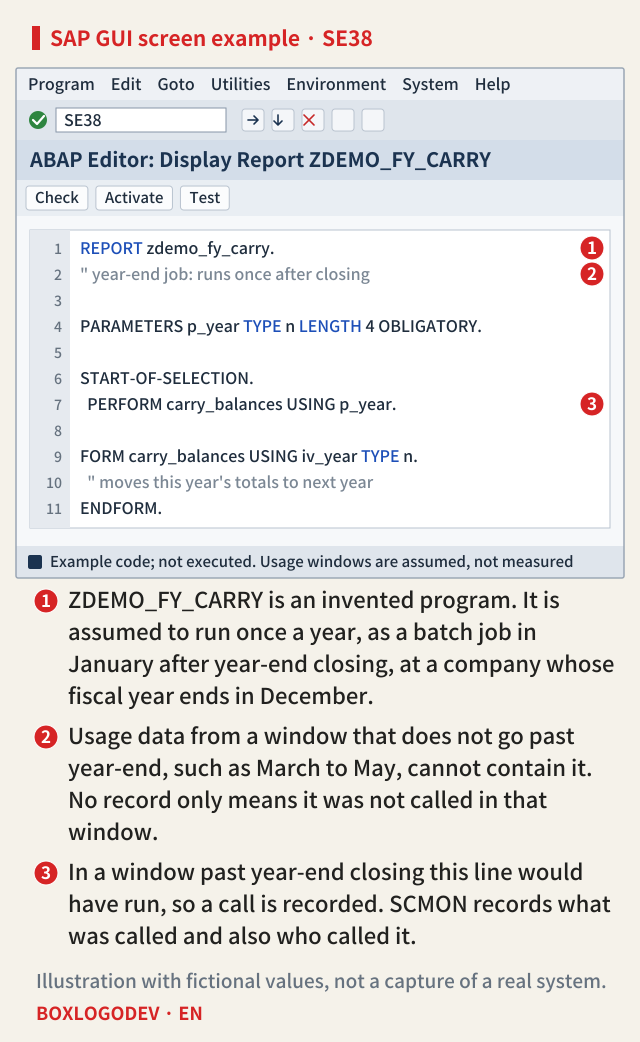
The editor screen below shows this fictional program. Marker 1 is the program name, marker 2 the comment saying it runs only after year-end closing, and marker 3 the line that calls the actual processing. If the recording window did not go past year-end, line 3 never ran in that window, so no record could exist.
From usage data to deletion, in the order SAP recommends
Usage data is only the starting point. The SAP Learning lesson recommends five steps. First, collect and aggregate the usage data as above. Second, use custom code analysis to find the extensions that can be removed. The SAP Fiori app Custom Code Migration identifies unused extensions from the usage statistics of UPL or SCMON. The app is available on a newly converted S/4HANA sandbox system; if there is no sandbox yet, it can be used from the SAP BTP ABAP environment against an SAP ERP system through RFC and the Cloud Connector. Analysis with the ABAP Test Cockpit in ADT is the other option. The 2023 presentation adds a separate step to adjust the scope set by the app by hand where needed.
Third, prepare a backup and restore procedure; this answers the concern that deleted code may be needed again. A separate backup ABAP system or a third-party product can do this, and SAP offers gCTS (Git-enabled Change and Transport System), which keeps unused code in an external Git repository. Whichever you choose, a restore goes through ATC checks and testing before being transported to production. Fourth, the quality assurance team tests that the application runs without technical issues with the extension removed. Fifth, delete during the conversion: the Custom Code Migration app creates a transport request with the extensions to delete, and during the conversion the Software Update Manager (SUM) asks for that request and deletes the development objects.
SAP NOTES
From usage data to deletion, SAP's order
Cleaning up custom code before a conversion
Collect and aggregate
SCMON -> SUSG- SCMON or UPL, one of them, in production
- 6 to 18 months, with a year-end closing
- Aggregated with SUSG
Find deletion candidates
Custom Code Migration- The app finds unused extensions from usage
- On an S/4HANA sandbox or BTP ABAP environment
- The scope is adjusted by hand
Backup and a way back
gCTS (Git)- A separate ABAP system, a third-party product or gCTS
- A restore goes through ATC checks and tests
- Test the app with the extension removed
Delete during conversion
SUM- The app creates a transport request with the extensions to delete
- SUM asks for it during conversion and deletes them
Per the SAP Learning lesson 'Collecting Usage Data for Custom Code' and an SAP Garage presentation (2023-11-08).
In this order, usage data is used in the first two steps. If the recording window missed year-end, the candidate list in step two is already shaky, so checking the window is something you can do before opening the app.
One thing to do today: if you already have SCMON and SUSG data, check whether its period covers a year-end closing before you look at deletion candidates. If it does not, read the list only as code that was not called in that period.
Add your perspective.
Share a question, another approach, or something you have tried.
Checking sign-in…
Loading comments…