Say you apply an upgrade or a Support Package to a system where someone has changed SAP standard programs or table structures. If SAP redelivers an object you changed, the update prompts you for a modification adjustment along the way, first in SPDD and then in SPAU. After reading this note you will know what a modification adjustment reconciles, which objects SPDD and SPAU handle and in what order, and how changes made with the Modification Assistant differ from those made without it when the adjustment comes. You will also be able to list what was changed, and why, before the next update.
The program RDEMO_STD_ORDER (assumed to be SAP standard), the customer include ZDEMO_STD_ORDER_EXT and the repair number DEMK900001 are invented, and the code was not run. The content follows the "Changing the SAP Standard" part of the SAP NetWeaver 7.5 documentation; screen names may differ in newer releases. SAP Notes that need a login are not covered.
An update overwrites what you modified
SAP uses the word update for installing an upgrade, a Support Package or an Enhancement Package. During an update, SAP objects are overwritten by the delivered objects, and every modification goes with them. The tools that help you put the modifications back are SPDD, for ABAP Dictionary objects, and SPAU, for the other repository objects.
An adjustment is needed for objects that you modified and that SAP delivers again in this update. If you only created your own domains, data elements or tables in the customer namespace, no SPDD adjustment is needed. So the more standard objects you have changed directly, the more objects can turn up on the adjustment list at an update.
For each object there are two main choices. To keep the modification, you adjust it, which merges SAP's changes with yours. If the modification is no longer needed, you reset the object to original and the modification is discarded; an object reset this way will not appear in SPAU again at the next update. If you do neither, the new SAP standard becomes active, your modification stays overwritten, and a later upgrade asks you to adjust it all over again. SAP's advice to adjust or reset is about keeping the work of future upgrades down.
SAP NOTES
When an update overwrites a modification
SAP redelivers an object you modified, so it needs adjusting
You modify a standard object
RDEMO_STD_ORDER- An object in the SAP namespace is changed
- The name above is a fictional SAP program
An update delivers the new standard
- Upgrade, Support Package, Enhancement Package
- SAP objects are overwritten by the delivered ones
- Your modifications are overwritten too
Decide in SPDD and SPAU
SPDD / SPAU- Adjust: merge SAP's changes with yours
- Reset to original: discard the modification
- Left alone, the new standard is active and a later upgrade asks again
Per the SAP NetWeaver 7.5 documentation. The program name is a fictional example, not a result of running anything.
SPDD comes first, SPAU second
SPDD handles domains, data elements, tables and structures in the ABAP Dictionary, including the technical settings and indexes of tables. These objects have to be adjusted before the update mass-activates the Dictionary objects, otherwise data and table fields can be lost. That is why the SPDD adjustment happens in the middle of the update, which only continues once every adjustment is complete. Adjusted objects are not activated by hand. The remaining Dictionary objects, such as views, search helps and lock objects, cannot lose data when they change, so they are adjusted in SPAU after the upgrade.
SPAU covers repository objects such as programs, function modules, screens, interfaces and documentation, and the update tool (SUM or SPAM/SAINT) asks you to start it. Its list is split into tabs such as SAP Notes, objects modified with the Modification Assistant (With Assistant) and objects modified without it (Without Assistant). Implementing an SAP Note also changes objects in the SAP namespace, and updates partly overwrite them, so a note whose correction is not part of the update is reimplemented, and one whose correction is included is confirmed as obsolete. SAP recommends adjusting SAP Notes first, to resolve conflicts with modifications. Enhancement implementations are checked separately in SPAU_ENH, because a change to an enhanced object can invalidate its implementation.
The adjustment is done in the development system first. The results go into a transport request with a task for each person involved, and the request is marked with Assign Transport in the toolbar. When the next system is updated, that request is proposed automatically, so the same adjustment does not have to be repeated. With SPAM or SAINT this registration is mandatory, and both tools check the component information of the adjustment transports against the target system. Some objects may still need manual adjustment, for example in a quality or test system. How requests and tasks relate is covered in the note on transport requests and tasks.
SAP NOTES
SPDD first, then SPAU
Adjusted in development, passed on by transport request
SPDD: ABAP Dictionary
SPDD- Domains, data elements, tables and structures
- Adjusted before mass activation, so no data or fields are lost
- Do not activate adjusted objects
SPAU: other repository objects
SPAU- Programs, function modules, screens, interfaces, documentation
- Also other Dictionary objects such as views and lock objects
- SAP Notes first, then modifications
SPAU_ENH: enhancement implementations
SPAU_ENH- When an enhanced object changes,
- its implementation can become invalid
A transport request with the adjustments, marked with Assign Transport, is proposed automatically when the next system is updated. Per the SAP NetWeaver 7.5 documentation.
Whether you used the Modification Assistant changes the adjustment
The Modification Assistant is a modification mode you enter when changing standard objects in an ABAP Workbench editor. Originals are protected and can only be changed with extra pushbuttons such as Insert, Replace and Delete, and every change is logged. In programs, each modification is assigned to its modularization unit, such as a module, subroutine or event, and at an update the source comparison works at that unit level rather than on the whole transport object.
A modification in a unit that SAP did not change this time can be adopted automatically (green light). If SAP changed the same unit, a person decides in the split-screen editor what to carry over, with the new SAP original on the left and your modified source on the right (yellow light). If you inserted one customer check into the fictional subroutine check_order, as in the screen below, how that same line is adjusted depends on whether SAP left check_order alone in the next update.
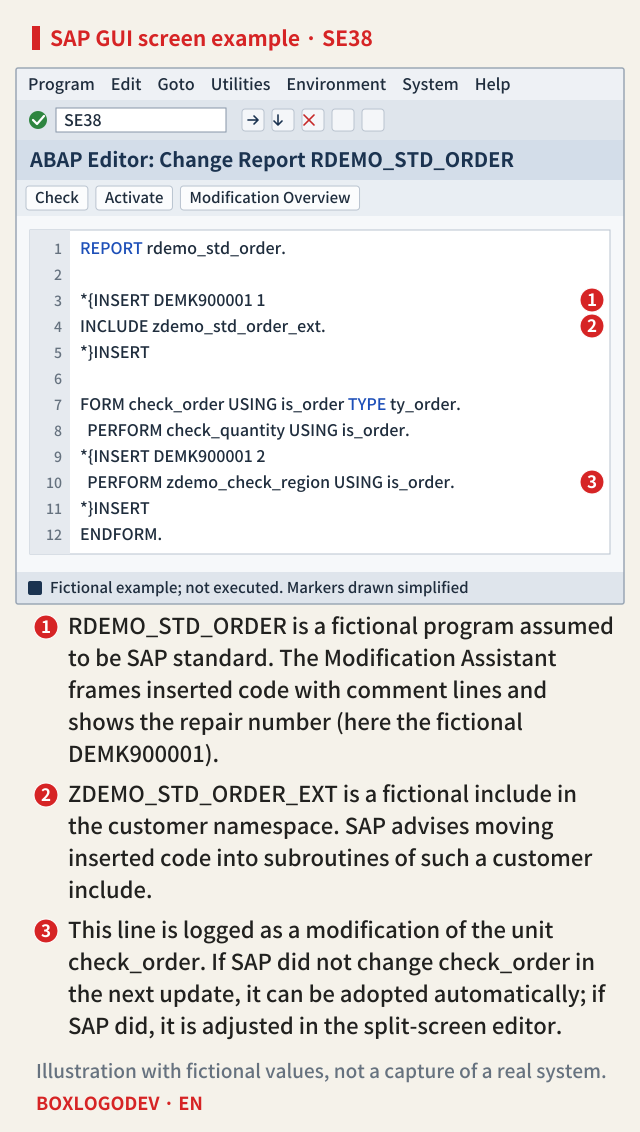
SAP advises moving inserted code into subroutines of an include in the customer namespace, with one customer include per SAP program, explaining that this reduces upgrade time and helps when resolving conflicts. What remains inside the standard program is then a short line, as in this example.
Objects changed without the Modification Assistant are collected on the Without Assistant tab. There you use version management wherever possible, and the Adjust action takes you to the matching Workbench tool to adjust by hand. Where version management cannot be used, SAP advises documenting every change carefully, noting that this documentation can be of great assistance the next time the object needs adjusting. Switching the Assistant off loses the record of differences from the original, and switching it back on does not restore it, so SAP recommends leaving it on.
In the Dictionary, if you added customer-namespace fields directly to an SAP structure, SPDD proposes moving them into an append structure and resetting the structure SAP delivered. When the version comparison suggests a modification is no longer needed, a person still has to decide whether that is intended. If SAP delivers a field with the same name as one you added, and your field came from a manual correction, you reset your modification; if you created it for your own purposes, you rename your field. What decides it is why the field was added, and SAP recommends a Z prefix for customer fields to avoid such clashes.
SAP NOTES
How you modified decides the adjustment
Is there a Modification Assistant log, and did SAP change the same unit?
Automatic · green light
With Assistant- Modified with the Modification Assistant
- SAP did not change that modularization unit
- Several objects can be adjusted in one step
Tool-supported · yellow light
With Assistant- Modified with the Modification Assistant
- SAP changed the same unit as well
- A person chooses in the split-screen editor
Modified without the Assistant
Without Assistant- Use version management wherever possible
- Adjust by hand in the matching Workbench tool
- Where versions can't help, your notes help next time
Light colors as in SPAU's With Assistant tab (NW 7.5 documentation). A summary of the documented rules, not a result of running anything.
What keeps the next adjustment small
SAP says to modify the standard only when Customizing, personalization, exits or Business Add-Ins cannot meet the requirement. If you do modify it, the advice is to wrap changes in subroutines, not to change the length of domains, and to avoid changing function modules, tables or messages that are used in more than one place.
There is also a way to shrink the modifications you already have. Objects left unadjusted before the current update have been running without their modifications all along, so SAP considers it likely that those modifications are no longer needed and that the objects should be reset to the standard. Before the update starts, SUM looks for such objects and asks whether to reset them. If you decided not to reset them then, you can add the column Not adjusted since to the SPDD and SPAU object list and filter for them. Before running an upgrade you can also run a preliminary analysis that shows whether, and in which phase, adjustments will be needed, with the affected objects visible in SPDD.
One thing to do today: open the Modification Browser (SE95) and, for each object listed under Without Modification Assistant, write one line on what was changed and why. For objects without a Modification Assistant log, that line can help you decide at the next adjustment whether to keep the modification or reset it.
Add your perspective.
Share a question, another approach, or something you have tried.
Checking sign-in…
Loading comments…