You were entering a G/L document, did not know the cost center, and saved it for now. The next day a colleague asks for the document number, and all you have is a temporary number you typed yourself. FB03 cannot find it. That is because you chose Hold. After reading this you will be able to tell what Hold and Park each leave behind, and where you get stuck when you continue or delete such a document.
All examples are fictional. In fictional company code 1000, bank charges of KRW 33,000 dated 30 September are to be posted to expense account 610000, and entry stops because the cost center is unknown. The behaviour follows the SAP Help Portal pages Holding Documents and Parking of Documents (S/4HANA 2025 FPS01); the same text appears in the SAP ERP 6.0 EHP8 documentation. Nothing was run on a real system.
Hold is for putting your work down for a moment
Hold is meant for interrupted entry. When a phone call comes in, or a value such as the bank charges or the cost center is still missing, you save what you have entered and continue later. The document does not have to be complete; the header and at least one line item are enough. On the document overview screen choose Document > Hold, enter a number in the Temporary document number field of the Hold Document dialog, and choose Hold document.
The system assigns no document number. Account balances do not change, and the held data is not available for evaluation. So there is no number to look up in FB03 or in a document list. In the screen below, number 1 is the single debit line entered without a cost center, number 2 the temporary number chosen by the user, and number 3 the button that saves it.
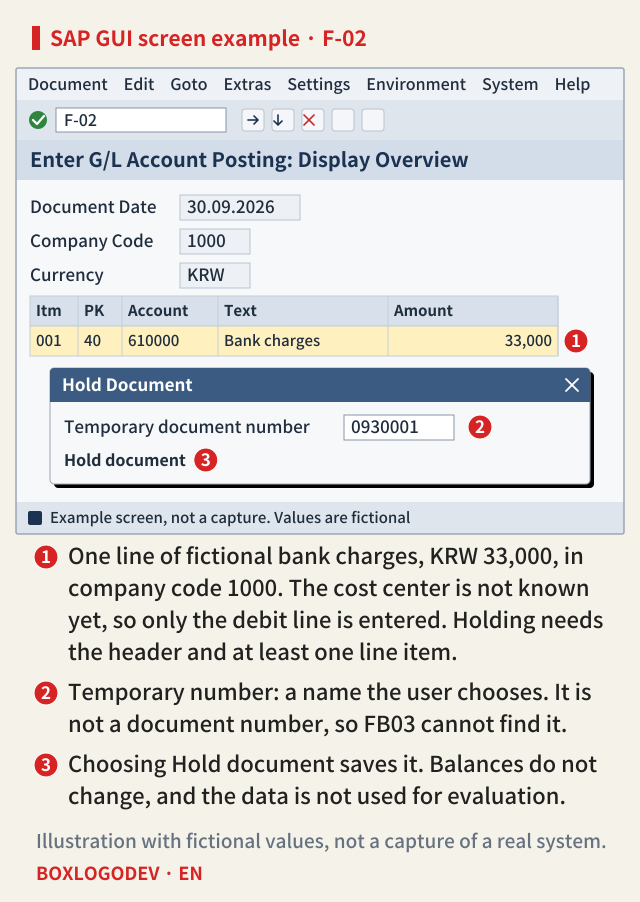
To continue a held document, choose Held document (or Document > Get held document) on the initial screen of the same posting transaction and enter the temporary number. If you do not remember it, use Document > Display list. That list shows the documents held under your user name, which is why looking for a colleague's held document in your own list often goes nowhere. A held document that is no longer needed is deleted from the same screen, called up by its temporary number.
Park gives the document a number and lets someone else take over
Parking also stores an incomplete document without extensive entry checks, and it also updates no data such as transaction figures (the exception is Cash Management). The difference comes next. When you park, the system assigns a document number in the same way as when creating a document, and the message "Document xxx was parked" appears. In the example, the document receives fictional number 100000077.
Because it has a number, other people can find it. You or another user can later complete, check and post the parked document. With separate authorizations you can distinguish users who may only park from those who may also post, which supports dual control between the person who enters and the person who approves. Balances do not change, but parked data is used for evaluation: parked documents appear in the document journal, the tax on parked invoices can be seen in advance with the Input Tax from Parked Documents report, and payment requests let you pay parked invoices on time without losing cash discount.
SAP NOTES
Hold and park: what is left after saving
Fictional example: company code 1000, a G/L document paused for a missing cost center
Hold
0930001- No document number, a temporary one
- No balances or totals updated
- Not available for evaluation
- Listed under the user who held it
Park
100000077- A document number is assigned
- No transaction figures updated
- Shown in journal and tax evaluation
- Another user can complete and post
Numbers and company code are fictional. Behaviour follows the SAP Help Portal (S/4HANA 2025 FPS01, ERP 6.0 EHP8); nothing was run.
Checks at parking are light. The system only checks that the data entered exists; whether the balance is zero and all required fields are filled is checked when the user runs the completeness check. No tolerance checks are made, but plausibility checks are, so you cannot enter an undefined business area, for example. You can display the balance on the overview screen. A cross-company-code transaction creates only one parked document in the initial company code, which is split into several documents when posted.
Post it and the number stays; delete it and the number is gone
When a parked document is posted, the parked data is deleted, a document is written to the document database, and only then are transaction figures updated. The number received at parking carries over to the posted document: a document parked as 100000077 is posted as 100000077. If you post several parked documents from a list, a result list shows which ones were posted, and documents that failed because of a missing account assignment such as a cost center can be processed further from that list.
If you delete a parked document instead, its number is never reused. In Parked Documents > Post/Delete (FBV0) you can pick one document by company code, document number and fiscal year, or several via Document List, but a deleted number stays as a gap in the sequence. When an auditor asks why document numbers skip, deleted parked documents are one place to look. Other reasons numbers skip are covered in When an SAP Number Skips, Was a Document Deleted?
SAP NOTES
Two ways out for a parked document
The number is fixed at parking: posting keeps it, deleting leaves a gap
Park
100000077- Number assigned as in document creation
- Only checks that data exists
- Completeness check is optional
If you post
100000077- Parked data is deleted
- Document created with the same number
- Transaction figures updated now
If you delete
- A deleted number is never reused
- A gap stays in the sequence
- Select several via Document List
Post and delete via Parked Documents > Post/Delete (FBV0). Numbers are fictional.
Where people get confused off the normal path
A few things behave differently from what people expect even with parking. First, substitution does not run at parking. It runs in the posting transaction when the accounting document is generated from the parked document, so a missing substitution result on the parking screen is not by itself a configuration error. Second, there are two parking transactions, the standard one and the single-screen one, and you cannot switch between them. Account assignment models can be used when parking, but reference documents cannot.
There are release differences too. In SAP ERP, documents parked in classic General Ledger Accounting can only be processed further and posted in classic G/L. In classic G/L you can also include parked documents in line item display by selecting the Parked Documents parameter. The S/4HANA Fiori apps follow a different flow: G/L journal entries are sent for verification instead of being parked, Accounts Payable and Accounts Receivable apps can still park, and parked documents are displayed, completed and posted in the Display Parked Journal Entries app (App ID FBV3). The SAP GUI descriptions of Hold and Park are unchanged in the S/4HANA 2025 FPS01 documentation.
SAP NOTES
Four things that confuse people off the normal path
What to check before you continue a held or parked document
Held document not found
- No number to look up in FB03
- Use Held document + temporary no.
- Display list: your own user
Substitution did not run
- Parking does not support it
- It runs when the document is posted
- No tolerance checks either
Cannot open in the other screen
- Standard and single-screen
- The two parking transactions do not switch
- Reference documents not allowed
S/4HANA Fiori G/L
- G/L entries go to verification
- AP and AR apps can park
- FBV3 app shows parked documents
Based on S/4HANA 2025 FPS01 and ERP 6.0 EHP8 help. In ERP, parked documents entered in classic G/L can only be processed in classic G/L.
The question to ask before you save
Neither touches balances, so they look alike. They part on one question: does anyone other than you need to find this document? If you will pick it up yourself later today, Hold is enough. If an approver has to see it, someone else will finish it, or its tax needs to be known in advance, park it and get a number. And before deleting a parked document, remember that its number will stay as a gap.
Add your perspective.
Share a question, another approach, or something you have tried.
Checking sign-in…
Loading comments…