When you reverse a wrong document with FB08, the account balance goes back to zero. Yet the period's debit and credit totals often both show the amount. That is not an error; it is how a standard reversal works. After reading this you will be able to tell when a negative posting, which also undoes the totals, is created, and what to do first when FB08 leaves the normal path and stops.
All examples are fictional. In fictional company code 1000, KRW 500,000 was posted twice to expense account 610000 from the same voucher, and the duplicate document 100000045 is reversed within period 9. Assume no other postings to that account in the period. The behaviour follows the SAP Help Portal pages Document Reversal (SAP ERP 6.0 EHP8) and Negative Postings (S/4HANA 2025 FPS01); nothing was run on a real system.
Two ways a reversal updates transaction figures
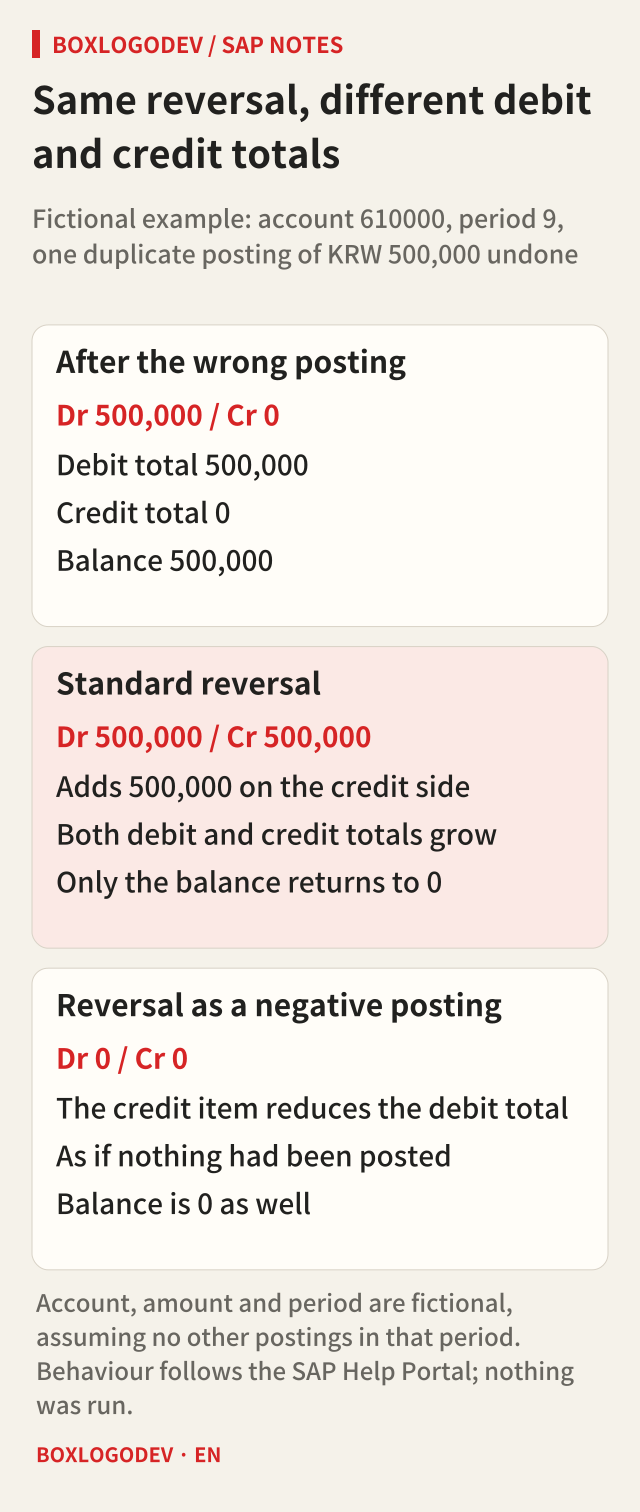
When an FI document is reversed, the account's transaction figures are updated in one of two ways. The first is the standard reversal. If the original document debited 500,000, the reversal document posts 500,000 on the opposite, credit side. The balance becomes zero, but the original and the reversal increase the account's debit and credit totals by the same amount. Period 9 is left with debit 500,000 and credit 500,000.
The second is the negative posting. A credit item marked as a negative posting reduces the debit total instead of increasing the credit total, and a debit item reduces the credit total. After the reversal, the transaction figures are what they would have been had neither the original nor the reversal been posted. In the example: debit 0, credit 0, balance 0.
To someone who only reads balances, the two results look the same. The difference shows in reports that use monthly debit and credit activity, or in analyses of gross sales or purchase totals. A month with many standard reversals can look busier than it really was. Because the reconciliation between documents and totals changes too, SAP notes that the standard reconciliation programs and some standard reports (for example SAPF070 and RFBELJ00) take negative postings into account.
A negative posting needs two settings to line up
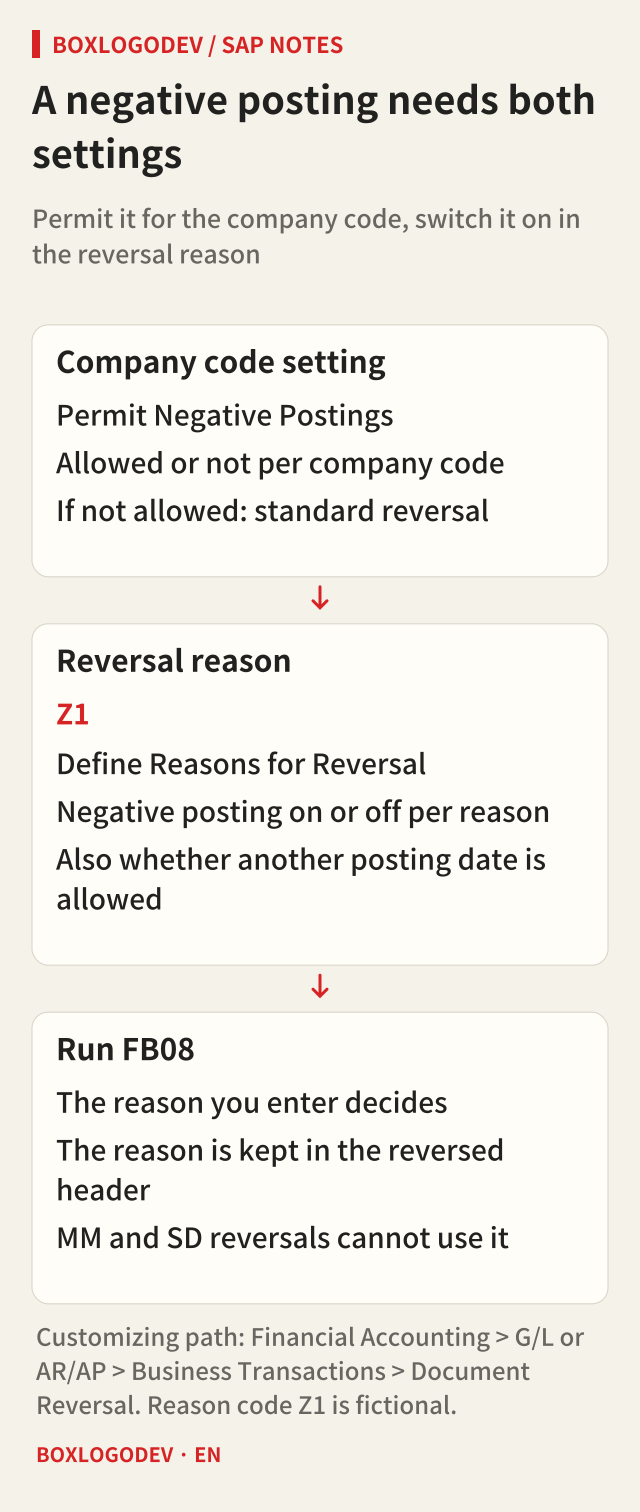
Running FB08 does not make a negative posting by itself. First, the company code must permit negative postings. This is switched on per company code in Financial Accounting Customizing under Document Reversal, Permit Negative Postings. Second, the reversal reason entered in FB08 must be defined to create negative postings. In Define Reasons for Reversal you decide, per reason, whether a negative posting is created and whether the reversal may have a posting date different from the original's.
This is where people often get confused. The same FB08 gives different results depending on the reason code the user enters. If someone habitually types the same code without knowing how it is set up, the totals may not end up as expected. The reason is recorded in the header of the reversed document, so you can later see why it was reversed. Reversals that come from invoice verification (MM) or billing (SD), however, cannot carry this reason.
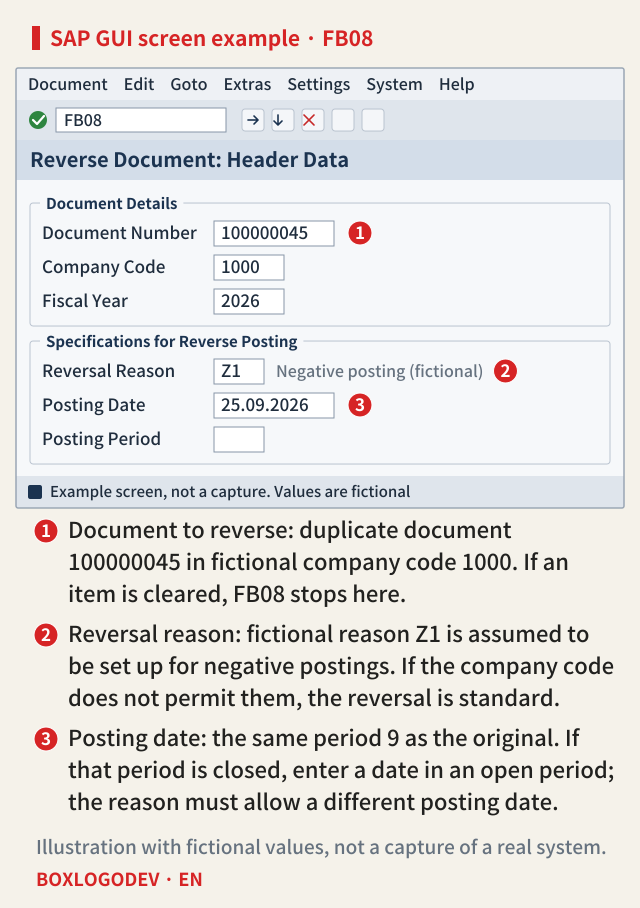
In the screen below, number 1 is the document to reverse, number 2 the reversal reason that decides the outcome, and number 3 the posting date of the reversal. Reason Z1 is a fictional code assumed to be set up for negative postings.
Some items become negative postings automatically. If the original document had already been revalued in foreign currency, the reversal generates extra items that reset the valuation, and the system marks them as negative postings. Conversely, if the original already contained negative postings, the matching items in the reversal document are not negative postings. Residual items created during clearing are also marked as negative postings so that the debit and credit totals do not grow just because of them.
When FB08 stops or you need another route
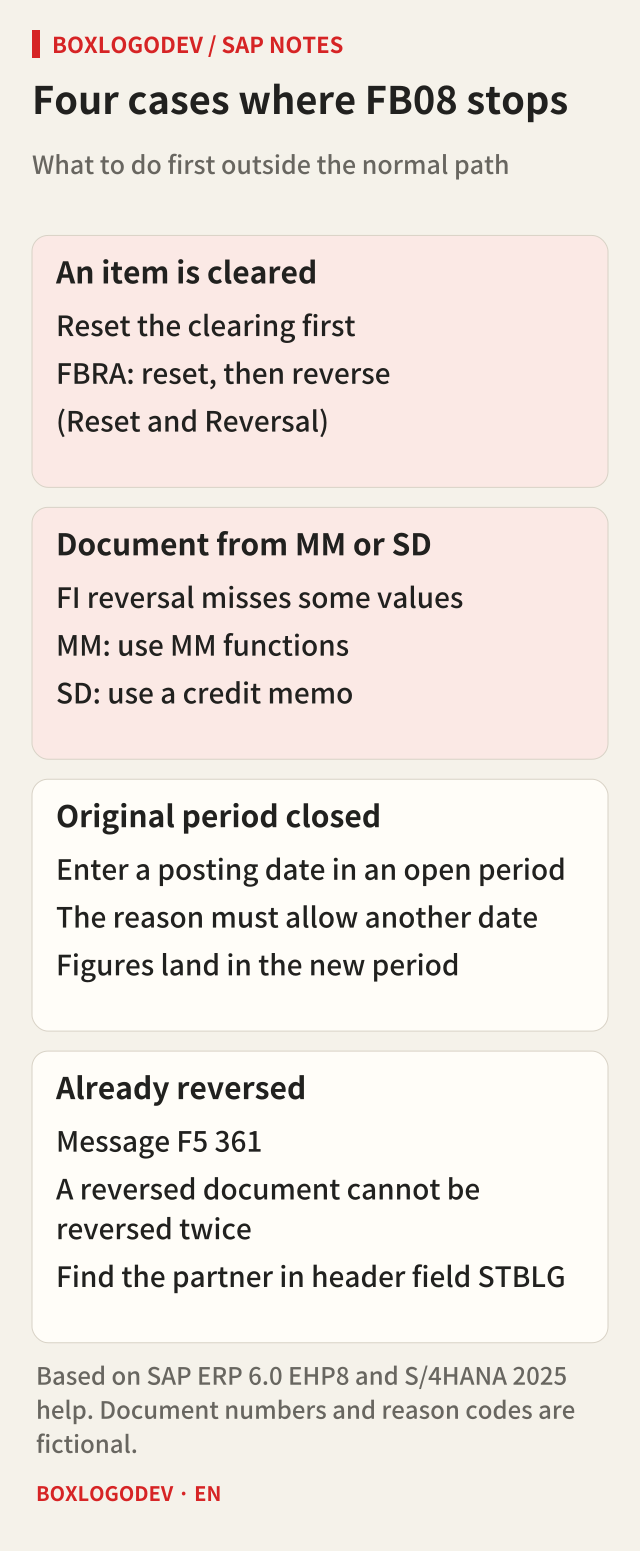
The normal path is to enter the document number, company code, fiscal year and reason, and reverse. Everything else should be recognised first. An FI document can be reversed only if four conditions hold: it contains no cleared items; it contains only customer, vendor and G/L account items; it was posted in Financial Accounting; and entered values such as business area, cost center and tax code are still valid.
If an item is cleared, the clearing has to be reset first. If FB03 shows clearing information for the document, use FBRA instead of FB08. Its Reset and Reversal option resets the clearing and then calls FB08 internally to reverse the document. For down payments that option is not offered, so only the reset is available. For a document from MM, FI reversal does not undo all required values, so reverse it with MM functions; reverse an SD document with a credit memo. If the original period is already closed, enter a date in an open period as the posting date, and the reason you enter must allow a different posting date. The reversal then lands in the new period's figures. Trying to reverse a document that was already reversed raises message F5 361 (Document was already reversed). The original and the reversal point to each other through header field STBLG, which is where to look for the partner document.
If the whole document does not need undoing, for example when one line went to the wrong account, you can enter an adjustment document with a document type defined for this purpose and mark individual items with Negative posting under More data. Check at the same time that automatically generated items such as tax are not marked as negative postings right away.
One thing to decide before you reverse
Release differences are small here. The conditions and the two update methods above read the same in the SAP ERP 6.0 EHP8 and S/4HANA 2025 documentation. What makes the difference is not the version but the company's settings and the reason code the user picks.
Before pressing FB08, decide one thing: may this reversal leave a trace in the month's activity, or should the totals look as if nothing had been posted? If it is the latter, check the company code setting and the reason code first.
Add your perspective.
Share a question, another approach, or something you have tried.
Checking sign-in…
Loading comments…