Say a shortfall in goods receipt put a payment block on a MIRO invoice, and a few days later the rest of the goods arrived. You would expect it to be paid now, but the block on the vendor line has not moved. A blocking reason going away and an invoice being released are two separate steps. After reading this note you can tell what kind of block is left and decide whether automatic release will lift it or someone has to do it by hand.
The sources are the SAP Help Portal documentation for SAP S/4HANA 2025 FPS02 and the public SAP Learning courses "Invoice Verification in SAP S/4HANA" and "Configuring Additional Settings in Financial Accounting in SAP S/4HANA". The SAP Learning pages carry no release number, and other releases were not compared. The company code, document numbers, amounts, limits and dates below are all invented. Nothing here was run on an SAP system: the documented rules are applied to a fictional example. All amounts are in Korean won (KRW) and tax is left out. Message numbers do not appear in these sources, so they are not given.
What is stopped is the payment, not the posting
When you enter a quantity or amount in MIRO that differs from the proposal, the system checks whether the difference is inside the tolerance limits. Inside them it accepts the entry with no message. Below a lower limit you get a message but no block. Above an upper limit you get a message, you can still confirm and post, and the Payment block field on the vendor line of the accounting document receives an R. The account postings are done; Financial Accounting just cannot pay this invoice.
There are two exceptions to this rule. If the limit of BD, the small-differences key, is exceeded, the invoice cannot be posted at all instead of being blocked. VP, the moving average price key, is documented as an exception to the block rule even above its upper limit. And because the R sits on the vendor line rather than on an item, a variance on one item stops the whole invoice.
Fictional example: one invoice, two reasons
Take company code 1000, purchase order 4500000123 and vendor 100200. Item 10 ordered 500 EA at KRW 1,000 each; only 400 EA have been received, and the invoice bills 500 EA for KRW 500,000. Item 20 ordered 200 EA at KRW 5,000 each, 200 EA have been received, and the invoice bills KRW 1,060,000. Assume the company code has an absolute upper limit of KRW 50,000 on DQ, and an absolute upper limit of KRW 50,000 and a percentage upper limit of 10% on PP.
The absolute limits for the quantity variance DQ are judged by amount, not by quantity. For an item with a posted goods receipt it is net order price × (quantity invoiced − (total delivered − total invoiced)), so 1,000 × (500 − (400 − 0)) = KRW 100,000, which is over KRW 50,000. DQ can also carry percentage limits, which compare against the expected quantity regardless of price, but this example assumes it has none. The price variance PP is 1,060,000 − 200 × 5,000 = KRW 60,000, which is 6% of the expected amount. 6% is inside 10%, but KRW 60,000 is over the absolute limit, so the rule that exceeding one upper limit is enough applies.
SAP NOTES
One fictional invoice, two reasons
Amounts in KRW, tax left out. The limits are assumed
Item 10: quantity variance (DQ)
- Ordered 500 EA, received 400 EA, invoiced 500 EA, price KRW 1,000
- 1,000 × (500 − (400 − 0)) = KRW 100,000
- Over the absolute upper limit of KRW 50,000: reason Q
Item 20: price variance (PP)
- Received 200 EA, invoiced KRW 1,060,000, price KRW 5,000
- 1,060,000 − 200 × 5,000 = KRW 60,000, 6% of the expected amount
- 6% is inside the 10% limit, but KRW 60,000 is over the KRW 50,000 limit: reason P
Vendor line: a single R
- Invoice total 500,000 + 1,060,000 = KRW 1,560,000
- Reasons sit on the items; payment block R sits once on the vendor line
Rules from SAP Help Portal, S/4HANA 2025 FPS02. Values are fictional and nothing was run on a system.
The result is reason Q on item 10, reason P on item 20 and one R on the vendor line. The whole invoice total of KRW 1,560,000 goes unpaid.
The R does not disappear when the reason does
Say the remaining 100 EA arrive on November 5. This is the same type of case as the quantity example in the Help documentation, and reason Q is no longer valid. Yet that same page says a blocked invoice stays blocked until you release it. Nothing in the documents checked for this note describes the R being removed at the moment of goods receipt.
Lifting the block happens in transaction MRBR, also available as the Fiori app Release Blocked Invoices. Choose Release automatically and Blocked due to variances and execute. The system rechecks whether each reason is still valid, deletes those that are not, and releases only invoices with no reason left. So "automatic" is better read as "the system checks the reasons for you when executed" than as "released as the goods arrive". That is this note's reading.
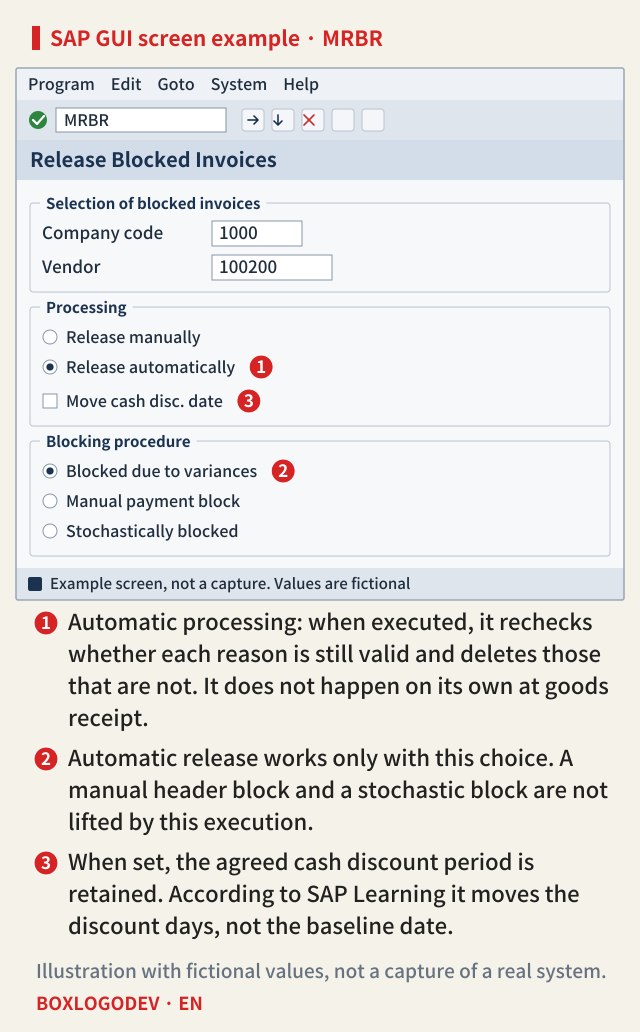
Background processing is possible with program RM08RELEASE, and the Help documentation tells you to ask your administrator for the variants and jobs. So when someone asks why automatic release did not work, first find out whether such a job exists and when it last ran.
In the fictional example, running automatic release on November 6 deletes only Q. P is still valid, so the R stays. If the buyer changes the order price to KRW 5,300 on November 9, P is no longer valid either, and the November 10 execution deletes P and removes the R. This does not mean a price change is the right answer. A subsequent credit can also make P invalid, and which to use is for the vendor and the buyer to settle.
SAP NOTES
The reason goes, the R stays
A fictional timeline. Here the R goes when the invoice is released
Nov 3: invoice posted
- Q on item 10, P on item 20, R on the vendor line
Nov 5: remaining 100 EA received
- Q is no longer valid
- Nobody has released anything, so the R stays
Nov 6: MRBR automatic release
- Q is deleted. P is still valid
- A reason remains, so the R stays
Nov 9: order price changed to KRW 5,300
- P is no longer valid either
- The R stays until the next execution
Nov 10: automatic release again
- P is deleted, no reason is left
- The R on the vendor line is removed
Rules from SAP Help Portal, S/4HANA 2025 FPS02, and SAP Learning applied to a fictional timeline. Not the result of a run.
SAP Learning lists when each reason stops being valid. A further delivery or a credit memo may end a quantity reason, and a purchase order price change or a subsequent credit may end a price reason. A positive usage decision ends a quality reason, and reaching the delivery date ends a date reason. There is one more condition. With goods-receipt-based invoice verification, the further receipt must be posted as a subsequent delivery against the material document of the first receipt for the invoice and receipt to be linked. This can be read to mean that otherwise the goods are in but the reason can stay valid.
Two different manual actions
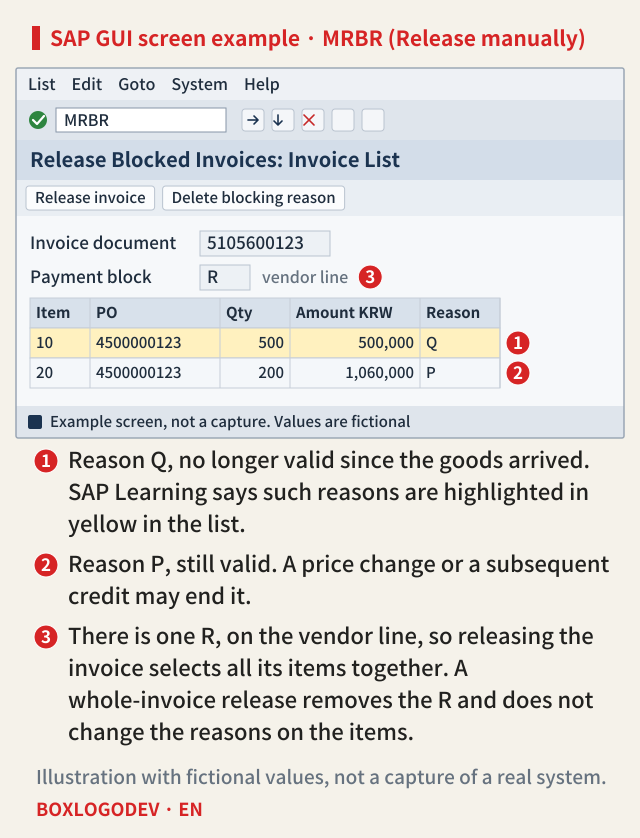
In the list you reach with Release manually you can do two things.
- Delete a blocking reason. Put the cursor on a reason and delete that one only. Deleting the last one and saving releases the invoice, unless there is a manual block in the header. SAP Learning says authorization object M_RECH_SPG can limit which reasons a user may delete, so reasons can be split between owners.
- Release the invoice. Selecting one line selects the other items too, and saving removes the R from the vendor line. SAP Learning says the reasons on the items are not changed by this. This note's judgement is therefore that a reason visible on an item does not by itself prove payment is blocked; read the vendor line as well. SAP Learning adds that M_RECH_EKG can be set to display only to prevent a whole-invoice release.
Blocks automatic release does not touch
If every reason is dealt with and the R is still there, suspect another kind of block. The most confusing one is an R entered manually in the header. With item reasons present, such an invoice appears not in the Manual payment block list but under Blocked due to variances. Automatic release does not lift a manual header block, so the invoice stays blocked even with all reasons gone. A manual release gives a message to the effect that invoices were released but some still hold a manual block, and you have to select them again under Manual payment block. According to SAP Learning, a block coming from the terms of payment is also selected in that list.
Stochastic blocks are handled under Stochastically blocked. Schedule and price variances on a blanket purchase order invoice are not released automatically either. For example, amount reason O and manual item reason M are not in the documented list for the automatic check, so this note reads them as handled by hand. Other paths can apply too. The MIRO app documentation says an approval process starts if a responsible person is determined, and SAP Learning mentions a flexible workflow scenario for price blocks, so on a system using these, check whether the invoice is waiting for approval. The Help documentation also keeps a limit for old invoices: those posted in conventional Invoice Verification (MR01) can be released only with MR02.
SAP NOTES
How each kind of block is released
Automatic release is only available for Blocked due to variances
Item variances: Q, P, D, I
- List: Blocked due to variances
- Automatic release works once the reason is no longer valid
- Not for schedule or price variances on a blanket purchase order
Manual R in the header
- List: Manual payment block
- With item reasons too, it appears under Blocked due to variances
- Automatic release does not lift it
Stochastic block
- List: Stochastically blocked
- Handled through the manual release list
Amount O, manual item M
- M appears under Blocked due to variances
- Reasons such as O and M are not among those documented for the automatic check, so this note reads them as manual
Arranged by this note from SAP Help Portal, S/4HANA 2025 FPS02, and SAP Learning. The last card is this note's reading.
The cash discount period runs during the block
The Help documentation warns that a long block can let the cash discount period expire. If you set Move cash disc. date when releasing, the agreed discount period is retained. SAP Learning says it moves the cash discount days and not the baseline date, and adds that the extra days show up only when you open the vendor line's details in the accounting document. So do not conclude nothing moved by reading the baseline date alone. How to recover after releasing without the indicator is not covered in these documents.
These documents do not describe removing the R by changing the FI document directly either. SAP Learning says this block can be configured so that it is removable only during invoice verification, so whether that is possible at all may differ by system.
When an R remains, do not stop at "has the reason gone?" Go on to "who releases it, and when?" If all reasons are invalid and the R is still there, first check whether automatic release has run yet and whether the header holds a manual block.
Add your perspective.
Share a question, another approach, or something you have tried.
Checking sign-in…
Loading comments…