A foreign currency invoice posts without an error. Later you notice that OB08 had no rate for that day and the document carries a rate from several days earlier. It looks like a system fault, but it is the behaviour written in SAP's documentation. After reading this note you can trace which date, which type and which row a document's rate came from, and explain why a document that posts does not prove the rate was right.
The sources are the SAP Help Portal documentation for SAP S/4HANA 2025 FPS02, a public SAP Learning course and Help Portal support content. The company code, amounts and rates below are all invented and are not market rates. Nothing was posted on an SAP system: these are calculations that apply the documented rules to fictional values. Local currency is KRW, rates are direct quotations per USD 1, the translation ratio is assumed to be 1:1, and no alternative exchange rate type is assigned to this currency pair.
The valid rate is the last rate up to that day
When you enter a currency key and a posting date in the header, the system takes the rate valid on the posting date. The easy mistake is in the word "valid". According to the Help topic on posting documents in foreign currency, the valid rate is the one entered on that date or at an earlier time. The example it gives: post on August 25 when the last rate is from August 22, and the system uses the August 22 rate.
So a missing row for today does not block the posting if an earlier row exists. The documented example is only three days apart, and no limit on how many days are accepted could be found in this documentation. This note reads the rule as one that saves entering rows on weekends and holidays and also hides a forgotten entry. The documents checked do not say which message appears when no earlier rate exists at all, so it is not stated here.
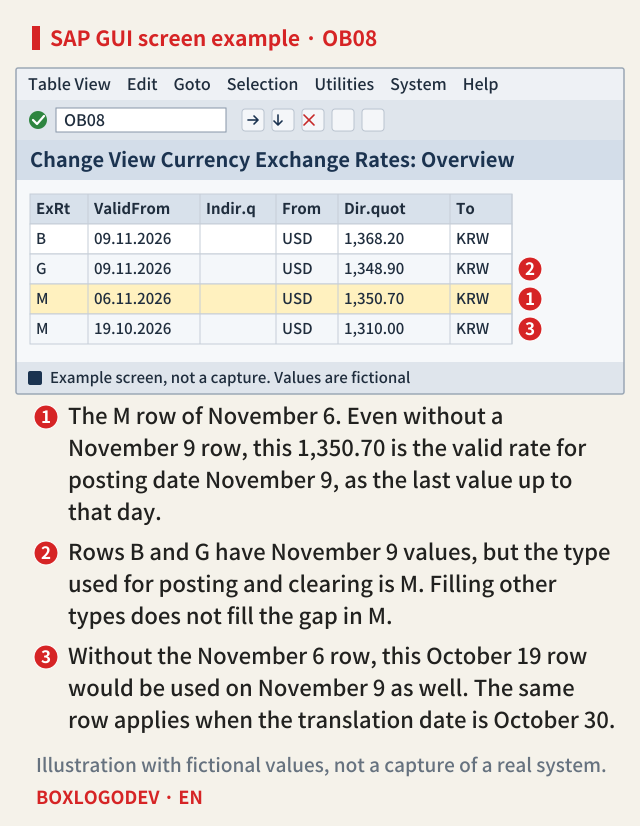
Marker 1 in the figure shows this rule. There is no November 9 row, so the type M value of November 6, 1,350.70, is used. Marker 2 is another common confusion. The Help documentation says posting and clearing use exchange rate type M (average rate), and that this type and its rates must be entered. In this example, having today's value on a row of another type, like B and G in the figure (the documentation names buying rate and bank selling rate among others), does not fill the gap in M.
Same invoice, one date, different amount
A USD 12,000.00 invoice posted on November 9 comes to 12,000.00 × 1,350.70 = KRW 16,208,400. Had someone entered 1,362.50 that day, it would be KRW 16,350,000, a difference of KRW 141,600. Marker 3 is the worse case. If the November 6 row were missing too, the rate falls back to 1,310.00 of October 19, giving KRW 15,720,000, which is KRW 488,400 less than the first calculation. In every case, the amount alone does not tell you the rate was old.
SAP NOTES
One date changes the amount
Fictional invoice of USD 12,000.00, type M, rate per USD 1
Posting date 11/9, last row 11/6
12,000.00 × 1,350.70- Rate 1,350.70
- Comes to KRW 16,208,400
If an 11/9 row of 1,362.50 existed
12,000.00 × 1,362.50- KRW 16,350,000
- KRW 141,600 more than the first case
If the 11/6 row were missing too
12,000.00 × 1,310.00- Falls back to 1,310.00 of 10/19: KRW 15,720,000
- KRW 488,400 less than the first case
If the translation date is 10/30
12,000.00 × 1,310.00- Uses 10/19, the last row up to 10/30
- KRW 15,720,000 even with the 11/6 row
All values are fictional. KRW is calculated without decimals. Not the result of a posting on a real system.
Finding the rate by a date other than the posting date
When you need another date's rate, use the Translation Date field in the header. The case the Help documentation gives is an invoice whose posting period is already closed. You post in the current period and enter the invoice date as translation date so the rate is found by the invoice date.
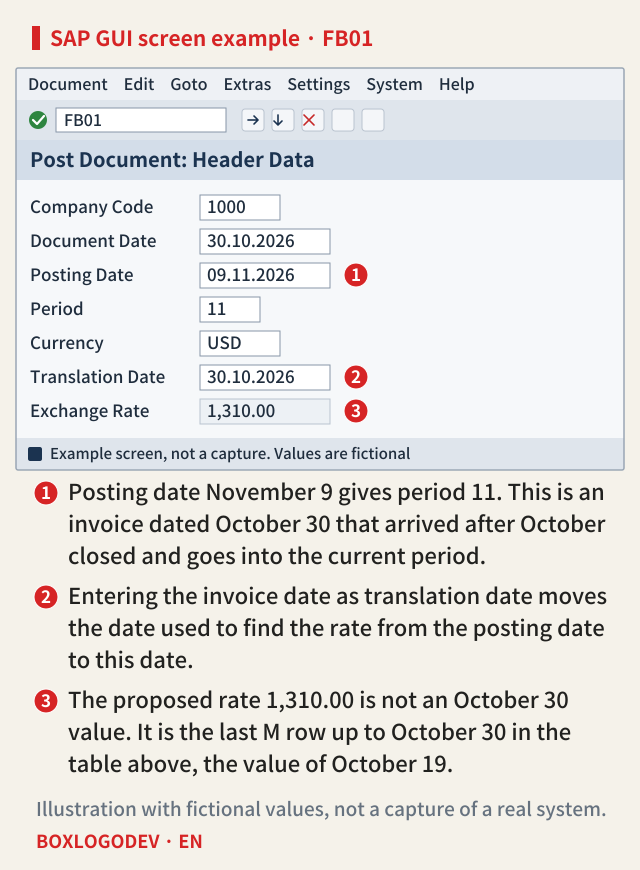
The same rule applies here. The 1,310.00 at marker 3 is not the rate of October 30 but the last row up to October 30. Entering a translation date does not guarantee a value for that day, so whether the table has that day's row is a separate check. In this example the amount is KRW 15,720,000 even though a November 6 row exists.
Parallel currencies have one more setting. In the Help topic on currency type settings, currency types you create (starting with Y or Z) get an exchange rate type and a translation basis: document date, posting date or translation date. Document currency (00) and company code currency (10) are standard types you cannot change there. The documentation says different settings per ledger produce different values for the same document in different ledgers, so check this setting when you compare parallel currency amounts.
When the number itself is misread
Even with the right date and type, the meaning changes with the quotation. A direct quotation says what one unit of foreign currency costs in local currency, an indirect quotation what one unit of local currency costs in foreign currency. This example's USD 1 = KRW 1,350.70 becomes about KRW 1 = USD 0.00074036 as an indirect quotation. According to SAP Learning, in the standard setting no prefix means direct and / means indirect. A company can also make * the direct prefix, so input without a prefix is rejected with an error, or accept indirect quotations without a prefix. A rate entered differently from the standard quotation is highlighted.
Translation ratios are maintained per exchange rate type and currency pair, by time period. For a pair that is not 1:1 as assumed here, the same number can give a different amount. Help Portal support content lists OB07 (reference currency, calculation with inverted rates), OBBS (translation ratios, alternative exchange rate type) and OB08 (rates) as the things to check. Another support page, Exchange rate used for FC posting, describes a document whose rate does not come from type M in OB08 because OBBS assigns an alternative exchange rate type to the currency pair. If you cannot find a document's rate on the M rows, and it was neither entered by hand nor carried over from an order, check OBBS.
Rates entered by hand, and rounding
You can enter a rate in the header instead of the proposal. The system compares it with the rate it determines and warns if the difference exceeds the percentage set per company code, or a separate tolerance set for currencies with large fluctuations. If you enter both foreign and local amounts in a line item, the rate calculated from them is compared with the header rate, also with a warning. Note that this is a warning and not an error. The check looks at the gap between the entry and the system value, so nothing in the documentation supports reading it as a check on whether the proposed rate itself is old.
SAP NOTES
Where did this document's rate come from?
Each path tells you something different
System proposal
- Last rate up to the posting or translation date
- The documents do not say it warns about an old value
Entered in the header
- Compared with the rate the system determines
- Warning above the tolerance
Both amounts in a line item
- Rate calculated from the amounts, compared with the header
- Warning above the tolerance
Carried over from PO or sales order
- The OB08 proposal can be changed there
- Support content says it takes priority over OB08
Based on SAP Help Portal, S/4HANA 2025 FPS02, and the Help Portal support content page Exchange Rate Determination.
Purchase orders and sales orders can change the OB08 proposal, and Help Portal support content says a value carried over this way takes priority over OB08. That is support content and not the product documentation, so open the document in your system to confirm. The 2025 FPS02 documentation also says document types can select market data exchange rates or classic translation. This note covers the classic rate table only.
Rounding is separate. According to the documentation, a document can post only if foreign and local currency each come to zero, and small differences from translation are handled automatically by adding them to the first line item with the corresponding +/- sign. Split USD 100.00 into three lines at rate 1,350.70. The amounts are USD 12.34, 12.34 and 75.32. Assuming each line is translated separately and rounded to whole won, the two 12.34 lines each go from 16,667.638 to KRW 16,668, and the 75.32 line goes from 101,734.724 to KRW 101,735, a total of KRW 135,071. The whole 100.00 is KRW 135,070, so one won is off. That one won does not mean the rate is wrong. But the wording alone does not settle which side "corresponding" points to, that is, whether the won is adjusted on the first debit line or the first credit line, so it is left open.
How to find stale rates
The Validate Exchange Rates function in the Help documentation addresses this directly. It calculates the difference and the gap in days between consecutive rates, and shows those above a maximum number of days or maximum variance. In its example, a table missing only the February 23 row, run with a maximum of 1 day, gives an exceeded message between February 24 and February 22. However, this function sits under the Multi Currency Accounting menu, a component for banks, and whether it is usable on other companies' systems could not be confirmed.
Even without it, you can apply the same logic by hand. Before closing, list the latest valid-from date per currency pair for type M and compare it with the posting date. For a pair with an alternative exchange rate type, or one translated through a reference currency, this list is not enough, so look at the rows the pair actually uses. A successful posting only means that an earlier rate existed, so when reading a foreign currency document, check the date of its rate row in OB08 before the amount.
Add your perspective.
Share a question, another approach, or something you have tried.
Checking sign-in…
Loading comments…