A customer payment was cleared against the wrong invoice, so you reset the clearing in FBRA. Yet the payment document is still on the customer account, and now it shows as an open item. Did the reset go wrong? No. Resetting a clearing and reversing a document are two different things, and depending on the option you choose, FBRA does only the first or both. After reading this you can decide, before running FBRA, whether to reset only or to reset and reverse, and work out in advance what the customer balance should look like afterwards.
The rules follow the SAP S/4HANA 2025 FPS02 (on-premise) Accounts Receivable and General Ledger documentation on the SAP Help Portal. Company code 1000, customer 100234, the document numbers and the amounts below are all invented. This is not the result of a run on an SAP system; it applies the documented rules to a fictional example.
Example: a payment cleared the wrong invoice
Customer 100234 has two invoices for KRW 1,100,000 each: invoice 1800000101 of October 5 and invoice 1800000102 of October 12. On November 3 the customer pays KRW 1,100,000 for invoice 101, but the clerk posting the payment (F-28) picks the line of invoice 102. The amounts match, so the clearing goes through, and payment document 1400000057 and invoice 102 are now cleared.
As a result, the overdue invoice 101 stays open, a dunning letter goes out, and the customer calls to say it was already paid. It is the same situation SAP uses to explain resetting a clearing. At this point the customer balance is KRW 1,100,000. On an account managed on an open item basis the balance always equals the sum of the open items, so the one open invoice 101 is the balance.
What FBRA removes is the clearing
The first FBRA screen (Reset Cleared Items) asks for the clearing document number, not an invoice number, plus the company code and, where needed, the fiscal year. In this example the clearing document is payment document 1400000057. If you do not know the number, first find the payment that cleared invoice 102 in the customer line item display (Manage Customer Line Items in SAP S/4HANA). Before resetting, Goto → Accompanying items shows the lines this document cleared.
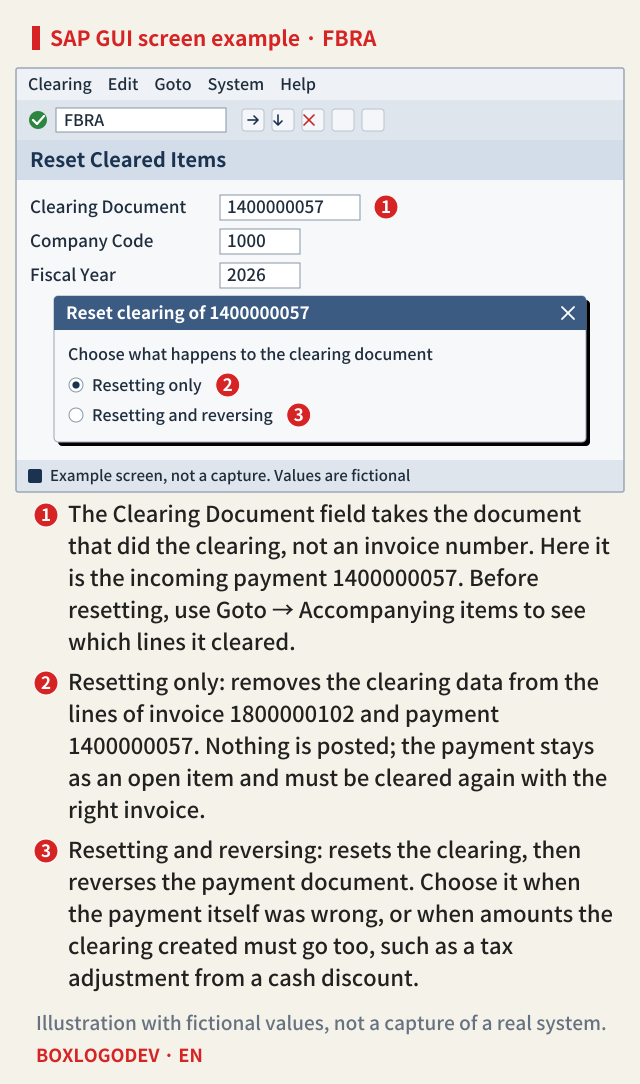
When you reset, the system removes the clearing data from the line items and logs the change in the change documents. With resetting only, the clearing document and every line it cleared become open again. Payment document 1400000057 is not deleted; it stays where it was, because a clearing document you do not reverse simply becomes one more open item, waiting to be cleared again along with the rest. That answers the question: after resetting only, the payment document is supposed to stay.
The customer account now has three open items: invoice 101, invoice 102 and the payment at minus KRW 1,100,000. Their sum is still KRW 1,100,000. Resetting only posts no new amount, so an unchanged balance is correct. What remains is to clear payment 1400000057 with invoice 101, in Clear Customer (F-32) in SAP GUI or the Clear Incoming Payments app in SAP S/4HANA. After that only invoice 102 is open, and the balance is still KRW 1,100,000.
SAP NOTES
One payment, three states
Open items and balance of the fictional customer 100234 (amounts in KRW)
Before: cleared against the wrong invoice
- Open: invoice 1800000101 +1,100,000
- Cleared: invoice 1800000102, payment 1400000057
- Balance 1,100,000
After resetting only
- Open: invoices 101 and 102, payment 057 -1,100,000
- Nothing posted. Balance stays 1,100,000
- Next: clear payment 057 with invoice 101
After resetting and reversing
- Open: invoices 101 and 102
- Payment 057 cleared by a new reversal document
- Balance 2,200,000
Fictional company code 1000. 101, 102 and 057 are the last digits of the document numbers. Based on SAP Help Portal, S/4HANA 2025 FPS02. Not the result of a run on an SAP system.
If correspondence requests were created from that clearing document, the system asks during the reset whether to flag them as completed. Flag them if no letter should later go out based on the clearing you just undid.
If the payment itself was wrong, reverse it too
Now change the case: suppose another customer's payment was posted to 100234 by mistake. Moving the match does not help here, so choose resetting and reversing. The clearing is reset, a new reversal document is created for the payment document, and the payment line is cleared with the reversal line. Customer 100234 then has two open items, invoices 101 and 102, and the balance rises to KRW 2,200,000. Whether the debit and credit totals of the account both grow after the reversal, or the payment looks as if it had never been posted, depends on whether negative postings are used. The balance is the same either way.
Resetting only and then reversing the payment document in FB08 ends in the same place. The order matters, though. Financial Accounting reverses a document only when none of its items are cleared, so FB08 on a payment document that still has cleared lines is refused. The same applies if you want to reverse invoice 102: reset the clearing first. A reversal normally goes into the posting period of the original document, but if that period is already closed you must enter a posting date in an open period.
Clearings you cannot just reset
When a clearing document created amounts of its own besides the clearing, those amounts must be undone too, so resetting only is not the end of it. The documentation names these cases:
- For a clearing with an exchange rate difference, a clearing in a third currency, or a clearing that involves documents posted with the net procedure, the system reverses the clearing document when it resets the cleared items. The Fiori app documentation also says the entry must always be reversed when there is an exchange rate difference.
- If a cash discount taken with the payment led to a tax adjustment, reset and reverse so that the tax adjustment is undone as well.
- For a payment made by check there is a Cancel check payment function. It resets the clearing, reverses the payment document and voids the check in the check register in one go.
SAP NOTES
Reset only, or reset and reverse?
Look at the clearing document before you run FBRA
Right payment, wrong match
- Resetting only
- Then clear it with the right invoice in F-32
The payment itself was wrong
- Resetting and reversing
- Or reset first, then reverse in FB08
- FB08 refuses a document with cleared items
Clearings you cannot just reset
- Exchange rate difference, third currency, net procedure: the system reverses the clearing document
- Cash discount with a tax adjustment: reset and reverse
A payment made by check
- Cancel check payment
- Resets, reverses the payment document and voids the check in the check register
Based on SAP Help Portal, S/4HANA 2025 FPS02 Accounts Receivable and General Ledger documentation. Not the result of a run on an SAP system.
The SAP S/4HANA app and FBRA
SAP S/4HANA has a Fiori app that does the same job, Reset Cleared Items (F2223). You can open it from Manage Customer Line Items through the context menu of the payment, and it has two buttons, Reset and Reset and Reverse. Reset and Reverse asks for a reversal reason. It works for customer and supplier accounts and for G/L accounts managed on an open item basis. In the 2025 FPS02 feature comparison the two tools differ on extended open item management, which only FBRA supports.
This note covers the 2025 FPS02 documentation only. Earlier releases and SAP S/4HANA Cloud Public Edition were not compared, and the exact wording of the FBRA popup could not be confirmed in public documentation, so the screen above is a simplified example.
One decision before you run it
A payment document that stays after the reset is not an error; it is what resetting only does. Before running FBRA, decide with one question. If the payment was right and only the match was wrong, reset only and clear it again with the right invoice straight away. If the payment itself was wrong, reset and reverse. Afterwards, check the customer balance: after resetting only it should be unchanged, and after resetting and reversing it should have grown by the payment amount.
Add your perspective.
Share a question, another approach, or something you have tried.
Checking sign-in…
Loading comments…