A document screen shows an amount of 1,000,000 won, yet a Z report that reads the same document can print 10,000.00. Neither the data nor the SELECT is wrong. A currency field stores only digits, the currency decides where the decimal point goes, and the program read the digits without looking at the currency. After reading this, you will be able to check TCURX, where each currency’s decimal places are kept, and find and fix the code that uses an amount without its currency key.
The basis is “DDIC - Currency Fields” in the ABAP Keyword Documentation, release 7.58, together with the same release’s descriptions of WRITE TO and string templates. The table, fields and values are made up, and the output results were not run on an SAP system; they are the expected values from applying the documented rules by hand.
A currency field holds only a string of digits
Take a fictional Z table ZDEMO_DOC with a document amount AMOUNT (CURR, 2 decimal places) and a currency key WAERS (CUKY). A CURR field must have a reference field of type CUKY, and that currency key decides the currency of the amount.
A currency amount is an integer counted in the smallest unit of the currency, built from all the digits of the field regardless of where the decimal separator sits. The field’s decimal point comes from the field definition. Type CURR must have a nonzero number of decimal places; because most currencies use two, the standard value is 2, and any other value is advised against.
So a currency used without decimal places, such as the Korean won, is also stored with two. 1,000,000 won is the integer 1000000 in whole won, and those digits in a field with 2 decimal places are 10000.00. The SAP Help Portal page for an insurance component has an example of the same kind: an external 1000 in won is 10.00 internally.
A currency’s decimal places live in TCURX
A currency has 2 decimal places by default, and a currency with any other number of places has to be entered in the database table TCURX. The currency key is in the column CURRKEY and the number of places in CURRDEC. A currency with no row in TCURX, such as EUR, is read with 2 places.
In Customizing, the places for a currency that should not be shown with two decimal places are entered in the activity Set Decimal Places for Currencies, under General Settings > Currencies. The top node is named differently from page to page: ABAP Platform in Defining Currencies (CO, S/4HANA 2025 FPS02), SAP NetWeaver in Handling Amounts with Increased Precision (the same release and 1610). The screen example below shows the won entered with 0 places.
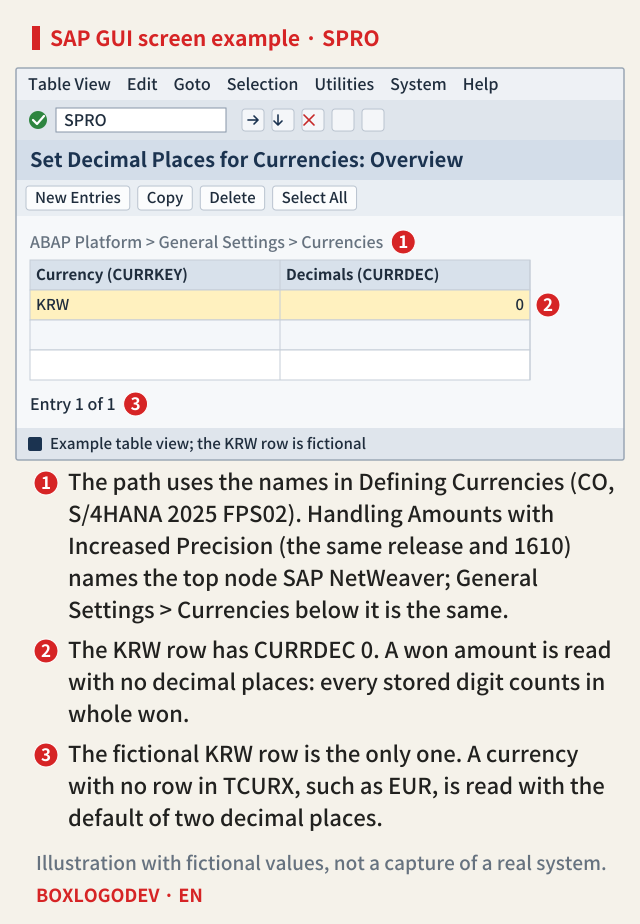
The real contents of TCURX differ from system to system, so first check the KRW row and its CURRDEC value in your own system. This table does not change the stored digits; it only decides how many places they are read with, so changing it after amounts have been recorded changes the meaning of every amount in that currency stored in CURR fields.
The screen says 1,000,000. Why does the Z program get 10,000.00?
When a screen (dynpro) displays a CURR field, it looks among the current program’s global data for the reference currency field, and if that currency is in TCURX, it places the decimal point using the places entered there. Without a reference field or a TCURX row, it uses 2. A screen only passes digits back and forth, so the 1000000 of a KRW document appears on screen as 1,000,000.
Inside an ABAP program it is different. Type CURR becomes the ABAP type p (packed number), keeps the decimal places defined in the dictionary, and every operation follows them. Nothing special happens either when ABAP SQL reads currency fields. The AMOUNT read by SELECT is 10000.00, and if you print it without the currency key or move it into another numeric field, it still looks like ten thousand.
SAP NOTES
How 1,000,000 won becomes 10000.00
Fictional field AMOUNT (CURR, 2 decimals), currency KRW
Amount entered on a screen
1,000,000 KRW- KRW has 0 decimals in TCURX
- Only the digits 1000000 pass on
Value stored in the CURR field
10000.00- Field defined with 2 decimals (DDIC default)
- Same digits, different decimal point
Value the Z program selects and uses as is
10,000.00- ABAP SQL does no special handling on read
- Without the currency key it looks like 10,000
The field, values and TCURX row are fictional. The documented rules were applied by hand; nothing was executed. Thousands separators follow the user's format settings.
The currency’s decimal places are separate from those of the field definition. The main place where the currency key reference applies by itself is the screen; ALV uses it when the field catalog has a currency reference, and a program uses it where the currency is passed directly, as with CURRENCY below. Nor can you change the field definition to 0 places.
Pass the currency key with the output
Below, amt is a variable typed like AMOUNT holding 10000.00, txt a character variable for the result, and ls_doc one row of ZDEMO_DOC, all fictional. Two places that read all the digits as an amount in the smallest unit for you are CURRENCY of WRITE … TO and CURRENCY = in a string template.
In WRITE amt TO txt CURRENCY 'KRW'., the decimal places defined for amt, a type p value, are ignored completely, and without rounding the decimal separator and thousands separators are inserted at the places the currency decides. KRW has 0 places, so the digits 1000000 come out as 1,000,000 (the shape of the separators follows the user’s settings). The currency ID must be an uppercase value from the WAERS column of TCURC, and if you pass ls_doc-waers instead of a literal, a list that mixes won and euros prints each line with the right places.
The string template |{ amt CURRENCY = 'KRW' }| places the digits by the same rule and gives 1000000. There is no thousands separator because of the default template format, which CURRENCY does not change.
There is one trap. If you give a type p value as an arithmetic expression or a numeric function instead of a data object, CURRENCY works like DECIMALS, so |{ amt * 1 CURRENCY = 'KRW' }| rounds 10000.00 to 0 places and gives 10000. If you need a calculation, put the result into a variable with the same type as the currency field first, and use that variable.
SAP NOTES
One value, 10000.00, five outputs
amt: fictional variable typed like AMOUNT (2 decimals); the amount is in KRW
|{ amt }|
10000.00- No currency: the type's 2 decimals
WRITE amt TO txt.
10,000.00- Without CURRENCY: still 2 decimals
WRITE amt TO txt CURRENCY 'KRW'.
1,000,000- Ignores the type's decimals; uses 0 from TCURX
|{ amt CURRENCY = 'KRW' }|
1000000- Right places; default format has no thousands separator
|{ amt * 1 CURRENCY = 'KRW' }|
10000- On an expression it acts like DECIMALS: rounds to 0
Documented example: a type i value 12345678 with CURRENCY 'EUR' (2 decimals) gives 123456,78 with WRITE … NO-GROUPING and 123456.78 in a string template. The five results above apply those rules to fictional values by hand; nothing was executed. WRITE separators follow the user's format settings. The documented example uses a comma as the decimal separator; the WRITE results above assume the 1,234,567.89 form.
In ALV, the field catalog decides the places. ALV Grid shows an amount column with its currency’s decimal places when the column is tied to a currency key column with CFIELDNAME or given one currency for the whole column with CURRENCY, and the currency key column named in CFIELDNAME needs its own entry in the field catalog. In ALV with IDA, when the dictionary’s currency reference is missing or wrong, you set it again with set_currency_reference_field or set_fixed_currency of IF_SALV_GUI_FIELD_CATALOG_IDA. When ALV shows 10,000.00, check that the currency reference is filled and, if you used CFIELDNAME, that the output table has that currency key field.
Putting numbers in or taking them out as they are
Assignments and calculations need more care than output. Comparing, adding, subtracting and dividing currency fields with the same number of decimal places is not critical, and neither is multiplying or dividing by a number that does not depend on the currency. Critical operations, such as multiplying two currency fields, operations that include assignments between fields with different currencies, and assigning a number that does not depend on the currency to a currency field, cannot be trusted when the program’s decimal places differ from the currency’s.
Here is the last case as a fictional example. If you assign the won amount 1000000 from an external file to AMOUNT as it is, the field holds 1000000.00, its digits are 100000000, and the screen shows 100,000,000 won. The other way round, if you write the 10000.00 in AMOUNT to a file as it is, the receiver reads ten thousand won.
When exchanging numbers with the outside, go through a conversion that also takes the currency key. CONVERT_CURR_TO_DECFLOAT and CONVERT_DECFLOAT_TO_CURR of CL_ABAP_DECFLOAT turn a currency amount into a decimal floating point number and back, based on a currency key. Following the rules, the real amount in a CURR field with 2 decimal places is the stored value × 10(2 − CURRDEC) (CURRDEC is 2 when the currency has no row in TCURX): for KRW, 10000.00 × 100 = 1,000,000.
Where the rules change
- Currency fields typed DECFLOAT16 or DECFLOAT34 appear in the ABAP Keyword Documentation from release 7.56 (ABAP Platform 2021); the 7.55 documentation still describes currency fields as type CURR only. Screens do not support such fields, and decfloat types are recommended over CURR for currency amounts. For a decfloat value, CURRENCY sets the places the way DECIMALS does and puts the sign after the number, a rule there from release 7.55 (ABAP Platform 2020).
- ABAP CDS handles amount fields in its own way. The conversion function CURRENCY_CONVERSION treats currency fields as having two decimal places, so when the field definition has a number of decimal places other than 2, it can behave unexpectedly.
- In a program whose property fixed point arithmetic is not set, the decimal places of type p are not respected in calculations.
Look for the four kinds of place where a CURR field is used after it is read: output, building strings, writing files and assigning to other numeric fields. If the currency key field does not travel with it on that line, the amount can go wrong for any currency whose TCURX places are not 2, and for the won the difference is a factor of 100.
Add your perspective.
Share a question, another approach, or something you have tried.
Checking sign-in…
Loading comments…