A development settings file, settings.local, was committed once by mistake. Its name was later added to .gitignore, yet every edit still shows up as “modified” in git status and slips into the next commit. Is the rule wrong? No. .gitignore was never meant to apply to a file like this. After reading this you will be able to tell with two commands why a file is not being ignored, and to prepare for the two surprises that follow when you stop tracking it: a teammate's copy being deleted, and a secret that stays in history.
The settings.local file, its DEBUG values, the logs folder and the repositories are a fictional example built for this note. Everything was run on 30 September 2026 in empty repositories with git 2.54.0 (Apple Git-157) on macOS 27.0, and the rules are taken from the official documentation on git-scm.com (gitignore, git-rm, git-check-ignore, git-update-index).
.gitignore only applies to files Git is not tracking yet
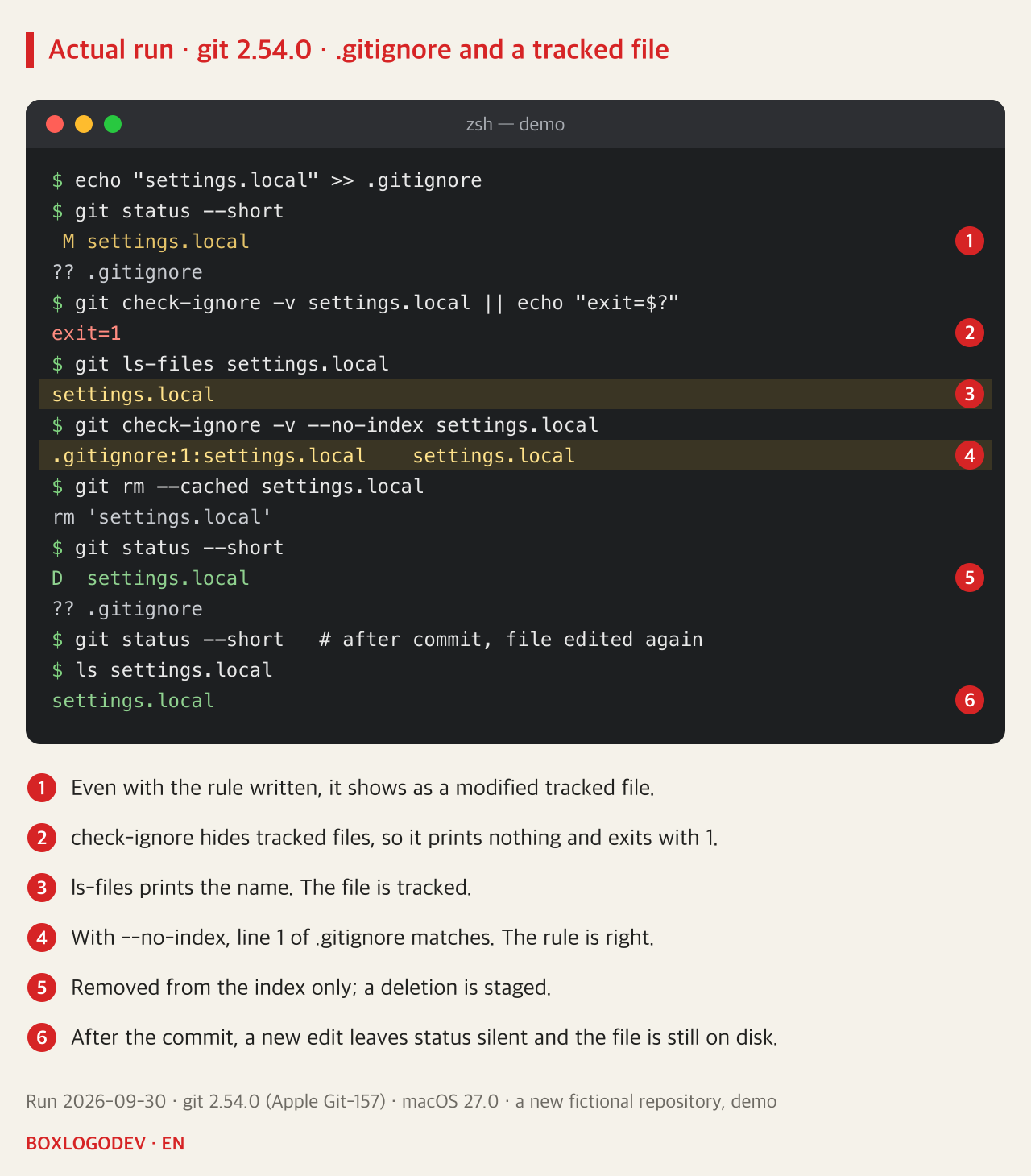
The experiment went like this. settings.local was created with DEBUG=true and committed. Then a line settings.local was appended to .gitignore and the file was changed to DEBUG=false. git status --short reports “ M settings.local”: a tracked file has been modified. The ignore rule seems to have no effect at all.
The answer is at the top of the official page. The gitignore documentation says files already tracked by Git are not affected, and describes the purpose of ignore rules as keeping untracked files untracked. Once a file is in the index (the list of what goes into the next commit), Git keeps comparing it. .gitignore is only a filter used when new files are picked up, for example by git add .; it does not take files off the list.
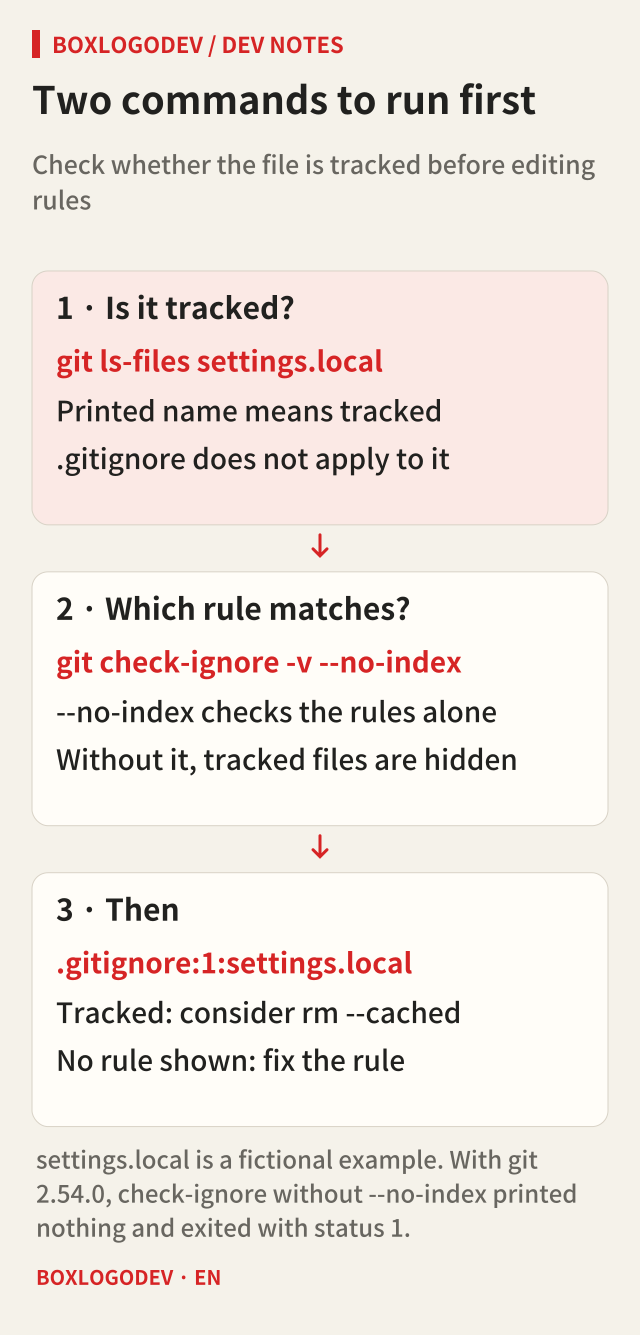
So when a file refuses to be ignored, check two things first. If git ls-files settings.local prints the name, the file is tracked. And git check-ignore -v shows which rule matched a path, with the file name and line number. By default, however, check-ignore does not show tracked files at all. In the experiment it printed nothing and exited with status 1 (not ignored). Only with --no-index, which skips the index and looks at the rules alone, did it answer “.gitignore:1:settings.local”. The rule was right; it simply does not apply to a file that is already tracked.
The command that only stops tracking: git rm --cached
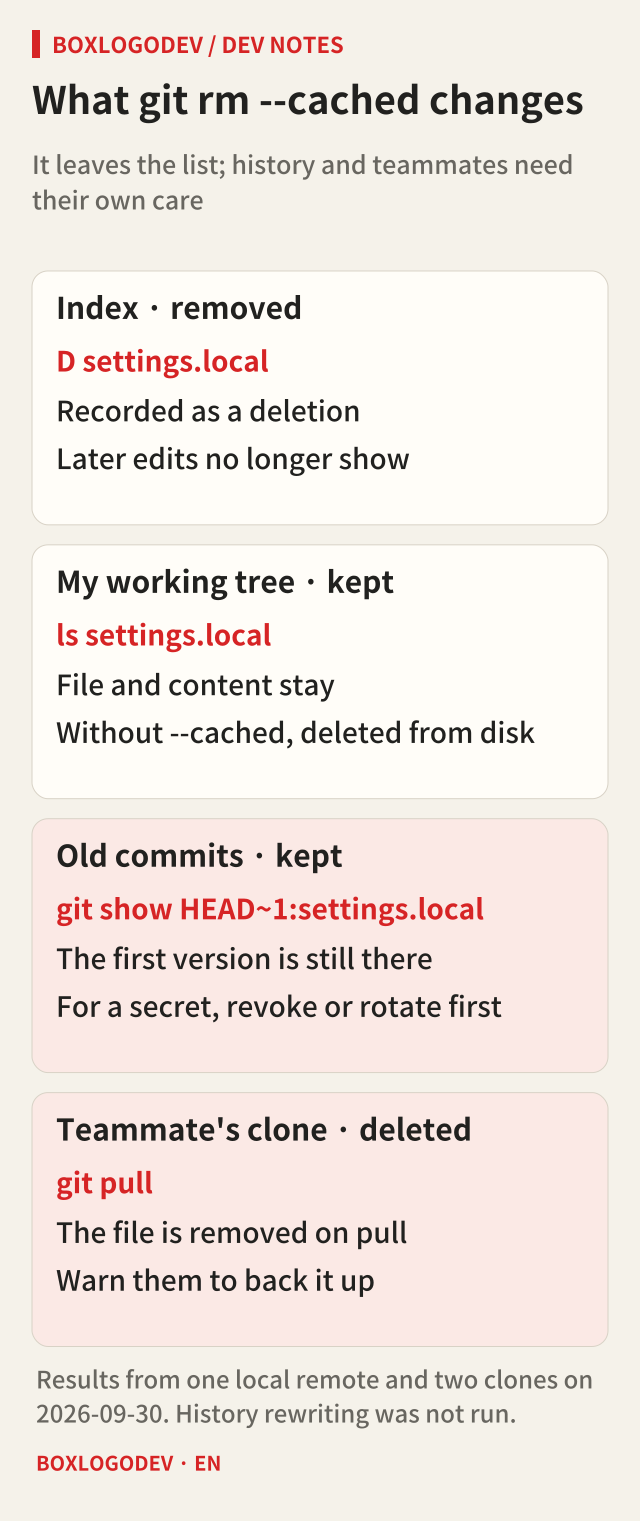
To keep the file on your disk and remove it only from Git's list, use git rm --cached settings.local. --cached removes the path from the index and leaves the working tree file alone, modified or not. Without --cached, git rm deletes the file from disk as well, so the option is the whole point.
Right after running it, git status shows “D settings.local”. A deletion is staged for the next commit, but ls shows the file is still there. After committing that together with .gitignore, the file was edited again to DEBUG=maybe, and git status printed nothing. Now .gitignore does its job. This is the order the official page recommends: remove the file from the index, then list its name in .gitignore so it is not reintroduced in later commits.
Two things that happen after you stop tracking
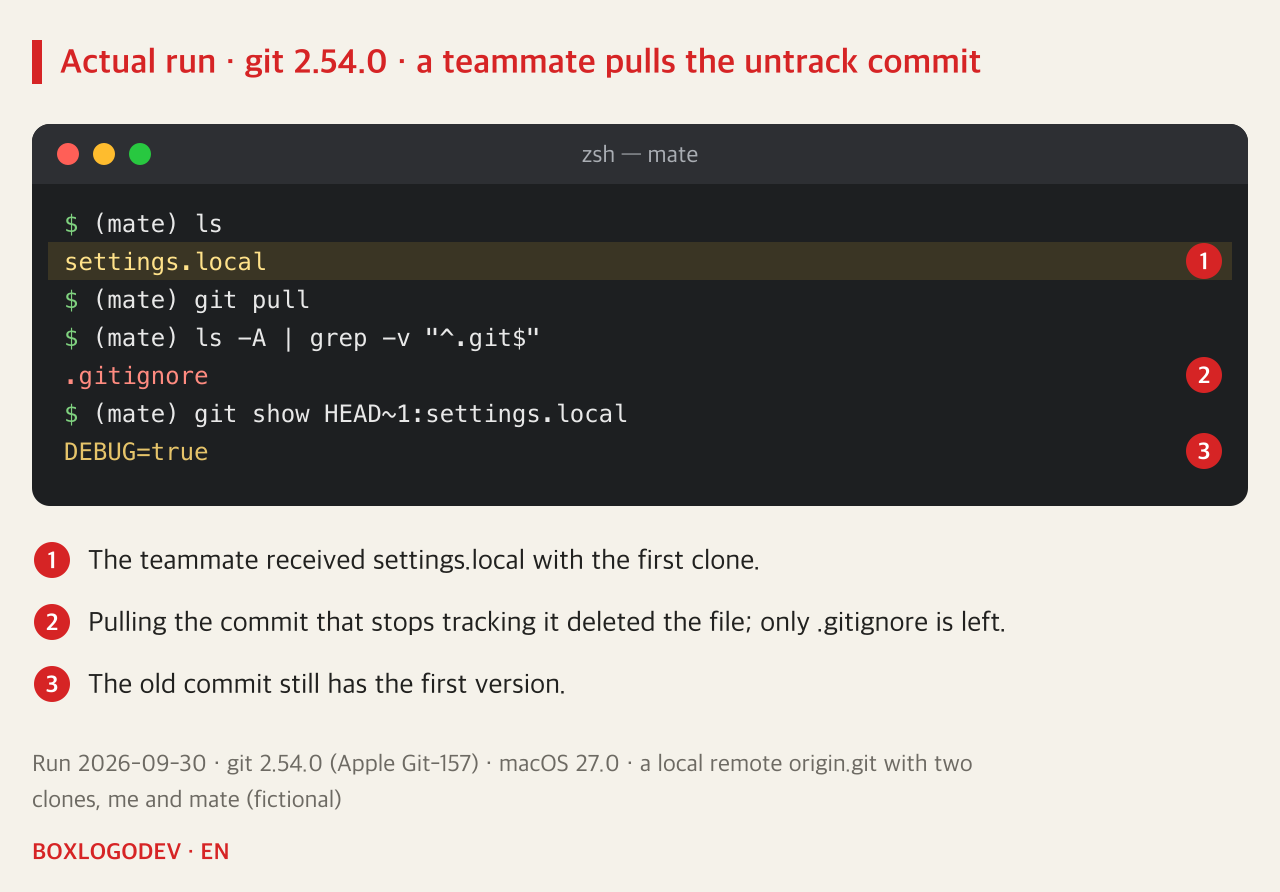
First, the old commits still contain the file. git log --format=%s -- settings.local lists two commits, “first commit” and “stop tracking settings.local”, and git show HEAD~1:settings.local prints the original DEBUG=true. rm --cached keeps the file out of future commits; it does not erase history.
Second, the file can disappear from other people's clones. This was checked with one local remote and two clones, “me” and “teammate”. The teammate received settings.local with the first clone. After “me” pushed the commit that stops tracking it, the teammate ran git pull, and settings.local was deleted from the teammate's folder, leaving only .gitignore. That commit records the file's deletion, and the teammate's file was still tracked, so Git applied it. The content can be recovered from the old commit, but the teammate loses their settings without knowing why.
Settings files like this are better set up differently from the start. The git-update-index documentation says Git offers no way to ignore changes to tracked files, and recommends keeping a sample file in the repository that each person copies to the ignored name and edits. For example, commit settings.local.example and write “copy this to settings.local” in the README. When you do push a commit that stops tracking a file, tell your teammates beforehand to back it up before pulling. The same page explains that the commonly suggested assume-unchanged and skip-worktree bits do not work as expected, because Git may still check those files.
If the file held a password or an API token, the order changes. GitHub's documentation says the first step for a committed secret is to revoke or rotate it. rm --cached leaves the old commits as they are; removing the value from history means rewriting it with a tool such as git-filter-repo, which requires every collaborator to fetch a fresh copy and a good deal of coordination. History rewriting was not run in this note's experiments.
Ignore a whole folder and ! cannot bring a file back
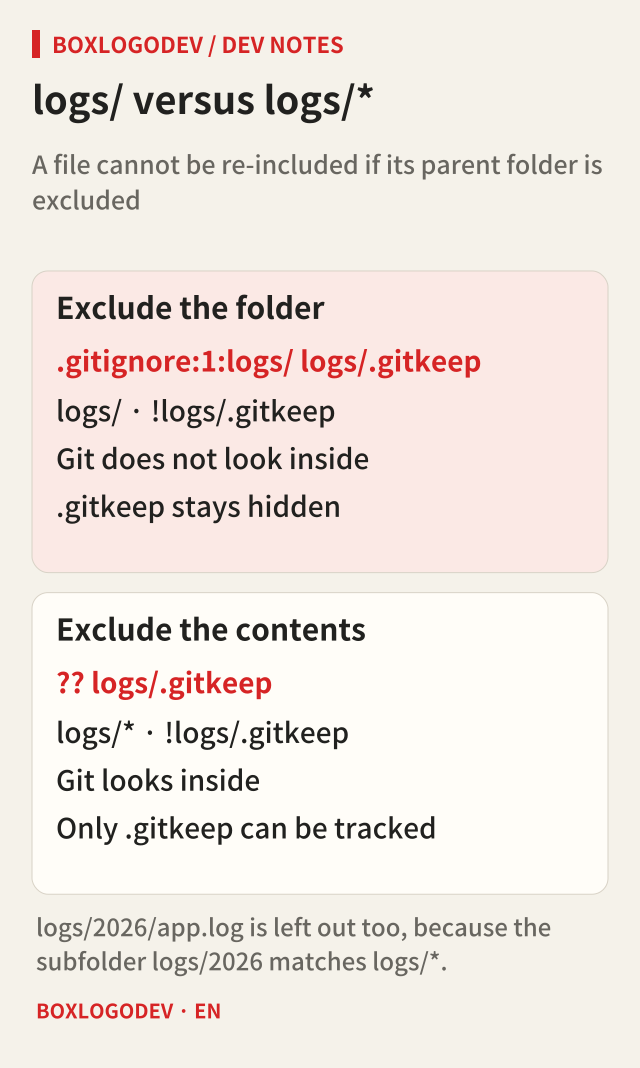
There is one more common case where a rule misbehaves even though nothing is tracked: keeping an empty logs folder in the repository with only .gitkeep as an exception. With the two lines logs/ and !logs/.gitkeep in .gitignore, git status --short --untracked-files=all lists only .gitignore; logs/.gitkeep does not appear. git check-ignore -v logs/.gitkeep answers “.gitignore:1:logs/”: the folder rule on the first line matched.
The gitignore page says it is not possible to re-include a file if a parent directory of that file is excluded. For performance, Git does not look inside excluded directories, so a ! rule for a file inside has no effect wherever it is written. Changing the first line to logs/*, which ignores the folder's contents rather than the folder, made logs/.gitkeep appear as a candidate to track. For logs/2026/app.log, one level deeper, check-ignore still reported the logs/* rule. The * does not cross a slash, but the subfolder logs/2026 itself matches logs/*, so everything inside it is left out.
Choose where each rule belongs
Files every developer should ignore (build output, dependency folders) go in a .gitignore committed to the repository. Files only you want ignored in this one repository, with no need to share the rule, go in .git/info/exclude. Things to ignore in every repository, such as editor backup files, go in a user-wide file set by core.excludesFile; by default that is $XDG_CONFIG_HOME/git/ignore, or ~/.config/git/ignore when that variable is not set. Wherever the rule lives, it still has no effect on a file that is already tracked.
The next time .gitignore seems not to work, run git ls-files <path> and git check-ignore -v --no-index <path> before touching the rules. If the first prints the name, decide whether to stop tracking the file. If the second shows no rule, that is when to fix the rule.
Add your perspective.
Share a question, another approach, or something you have tried.
Checking sign-in…
Loading comments…