Say you have a B-tree index on sku. WHERE sku = 'SKU-000120' uses it, but WHERE sku LIKE 'SKU-00012%' reads the whole table. The PostgreSQL documentation says that under a locale other than C or POSIX, ordinary indexes cannot be used for LIKE. After reading this you can tell from EXPLAIN whether an index cannot serve the pattern or the planner chose not to use it, and you can pick an index for PostgreSQL and for SQLite.
The examples were run on 2026-11-01 on macOS 27.0.1. PostgreSQL is not a server install: it is PGlite 0.5.10 on Node.js v24.21.0, a WebAssembly build, and version() reported 18.6. SQLite is the 3.54.0 shell that ships with macOS. The table is a made-up example with 100,000 rows. A server install, other versions and real data were not run, and a server may pick a different plan. Speed was not measured; the numbers below are row counts.
The same SELECT, a different plan
The sku values run from SKU-000001 to SKU-100000, and the 100 rows whose id ends in 123 start with lowercase sku-. Of the ids 120 to 129 that share the prefix, 123 is lowercase, so a case-sensitive LIKE should return 9 rows.
CREATE TABLE items (id integer PRIMARY KEY, sku text COLLATE "unicode" NOT NULL);
INSERT INTO items SELECT g, CASE WHEN g % 1000 = 123 THEN 'sku-' ELSE 'SKU-' END || lpad(g::text, 6, '0') FROM generate_series(1, 100000) g;
CREATE INDEX items_sku ON items (sku);
ANALYZE items;
SELECT id, sku FROM items WHERE sku LIKE 'SKU-00012%';
The database PGlite creates has the collation C, so the non-C case was made with COLLATE on the column. unicode is the collation PostgreSQL predefines from the Unicode Collation Algorithm, and it needs ICU support in the build. On that column a Seq Scan read and discarded 99,991 rows (100,000 minus 9). With the table rebuilt as COLLATE "C", the same SELECT became an Index Scan. Columns in POSIX, ucs_basic and pg_c_utf8 also gave an Index Scan with the default index, so on those this prefix search needed no extra index.
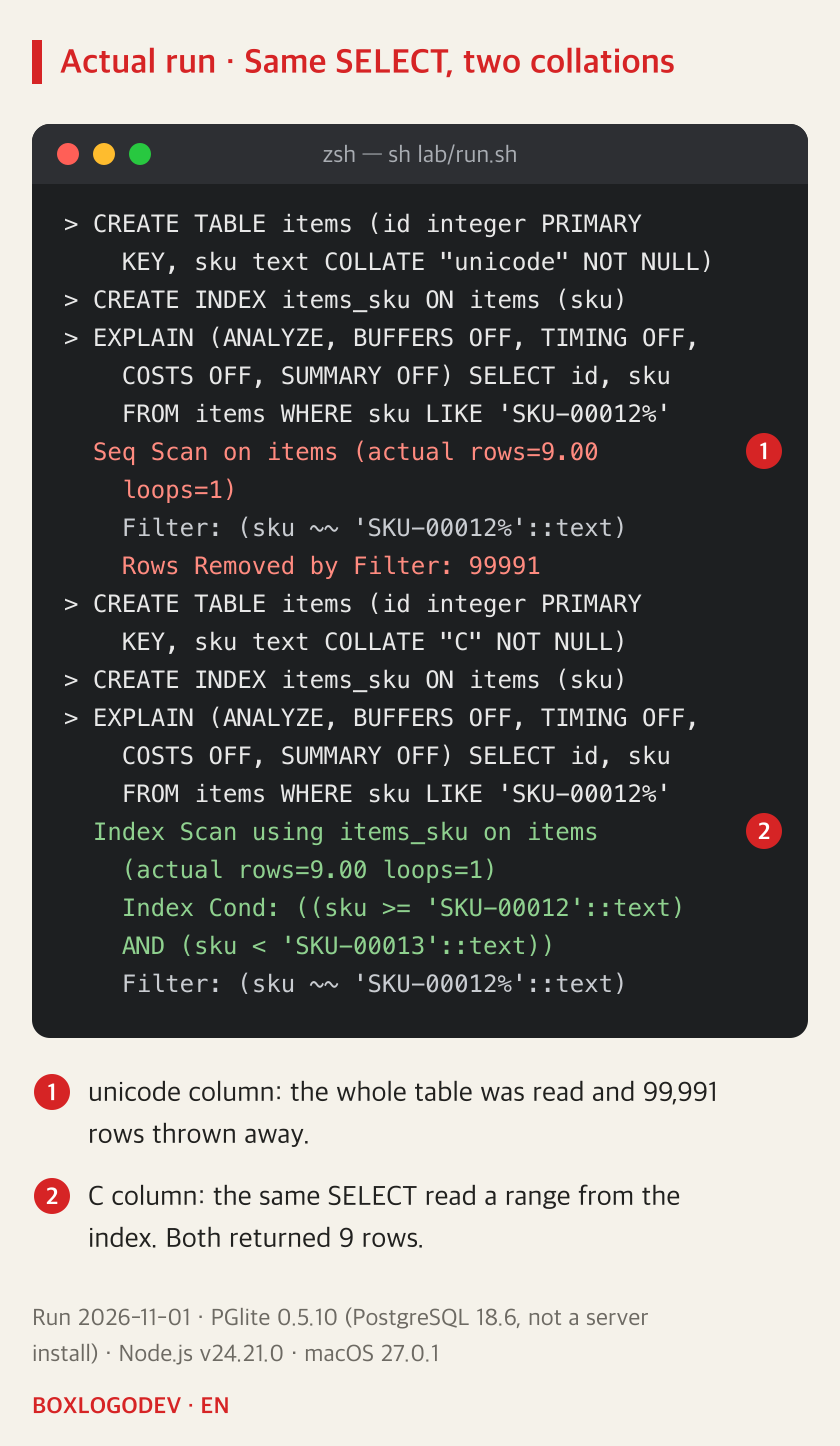
By the documentation, initdb takes its locale from the environment it runs in unless told otherwise, so a laptop and a server can differ. That pair was not run. The first statement below shows the database setting and the second shows a collation set on a column. In PGlite the first gave C|NULL|c; c means libc, and the name is then in datcollate. If it is i (ICU) or b (builtin), the name is in datlocale, and datcollate can still say C: a PGlite database created with ICU locale und showed C|und|i, and this LIKE was a Seq Scan.
SELECT datcollate, datlocale, datlocprovider FROM pg_database WHERE datname = current_database();
SELECT collation_name FROM information_schema.columns WHERE table_name = 'items' AND column_name = 'sku';Why an index in language order does not answer a prefix
The documentation describes the default operator class as following the locale's rules. In that order you cannot assume that values with the same prefix sit together. Sorting the same four values put sku-000123 last under C and between the uppercase rows under unicode. On the unicode column, sku >= 'SKU-00012' AND sku < 'SKU-00013' ran on the ordinary index and returned 10 rows while LIKE returned 9. On the C column the same range returned 9. That extra row alone would not stop the index, because the plan rechecks LIKE with a Filter: with LIKE added to that range, the ordinary index returned the right 9 rows. The danger is losing rows. For LIKE 'SKU-00019%' a C index searches up to 'SKU-0001:', one byte past 9. Under unicode the colon sorts before 9, so sku >= 'SKU-00019' AND sku < 'SKU-0001:' returned 0 rows where LIKE returned 10. In C order the same range returned 10. The documentation states the rule; these two are examples of it.
DEV NOTES
The same values sit in different places by collation
Does the prefix range pick the same rows as LIKE?
COLLATE "C": byte order
- SKU-000122
- SKU-000123
- SKU-000124
- sku-000123
- The lowercase row comes after the uppercase rows
- SKU-00012 range: 9 rows. LIKE: 9
- SKU-00019 range: 10 rows. LIKE: 10
COLLATE "unicode": language rules
- SKU-000122
- sku-000123
- SKU-000123
- SKU-000124
- The lowercase row falls between uppercase rows
- SKU-00012 range: 10 rows. LIKE: 9
- SKU-00019 range: 0 rows. LIKE: 10
The SKU-00012 range is sku >= 'SKU-00012' AND sku < 'SKU-00013'. The SKU-00019 range is sku >= 'SKU-00019' AND sku < 'SKU-0001:'. PGlite 0.5.10 (PostgreSQL 18.6), run 2026-11-01.
Two indexes that fix it
The documentation offers an operator class that compares character by character, and an index in the C collation. Both were run on the unicode column.
CREATE INDEX items_sku_like ON items (sku text_pattern_ops);
CREATE INDEX items_sku_c ON items (sku COLLATE "C");
With either one, LIKE became an Index Scan. = also used the text_pattern_ops index, but with only the C index sku = 'SKU-000120' stayed a Seq Scan; it used that index only when written sku COLLATE "C" = 'SKU-000120'. ORDER BY sku could use neither and stayed a Sort over a Seq Scan. The documentation also says to keep a default index for ordinary < and >. With both indexes on the table, each query used the one that fit. So do not drop the existing index until you have checked what else reads through it. More indexes also mean more to update on each write; that cost was not measured.
DEV NOTES
Which index served which query
COLLATE "unicode" column, 100,000 rows. First three boxes: that index alone
Default index (sku)
- LIKE 'SKU-00012%': Seq Scan
- sku = '…': Index Scan
(sku text_pattern_ops)
- LIKE 'SKU-00012%': Index Scan
- sku = '…': Index Scan
- ORDER BY sku: Sort over Seq Scan
(sku COLLATE "C")
- LIKE 'SKU-00012%': Index Scan
- sku = '…': Seq Scan
- ORDER BY sku: Sort over Seq Scan
Default + text_pattern_ops together
- LIKE used the text_pattern_ops index
- ORDER BY sku used the default index
From EXPLAIN. PGlite 0.5.10 (PostgreSQL 18.6), run 2026-11-01. A server install was not run.
On a live table, the documentation says a plain CREATE INDEX blocks writes until it finishes. CREATE INDEX CONCURRENTLY does not block them, takes longer, cannot run inside a transaction block (it returned an error when tried), and can leave an invalid index behind on failure, which you then drop and build again. It ran on PGlite with no other writers, so the locking behaviour was not tested.
Cannot, or chose not to?
A Seq Scan has two possible meanings, and one setting separates them. SET LOCAL applies within that transaction, and EXPLAIN without ANALYZE does not execute the query.
BEGIN;
SET LOCAL enable_seqscan = off;
EXPLAIN (COSTS OFF) SELECT id, sku FROM items WHERE sku LIKE 'SKU-00012%';
ROLLBACK;
With the ordinary index on the unicode column, the plan stayed a Seq Scan with Disabled: true. On a 5-row table with the text_pattern_ops index, it was Seq Scan with the setting on and Index Scan with it off. So a test table with a few rows can show a Seq Scan even when the index is right. A broad prefix does the same on a full-size table. On these 100,000 rows the title's LIKE 'SKU%' matches 99,900, and it stayed a Seq Scan both with text_pattern_ops on the unicode column and with the default index on a C column. With the setting off, the text_pattern_ops case became a Bitmap Index Scan. If most rows share the prefix, a new index may not change the plan. The documentation calls this kind of setting a temporary measure that discourages sequential scans without ruling them out, so use it for diagnosis only.
DEV NOTES
Seq Scan: cannot, or chose not to?
Turn enable_seqscan off in a transaction and read the same EXPLAIN
100,000 rows, ordinary index (unicode column)
- Setting on: Seq Scan
- Setting off: Seq Scan, Disabled: true
- This index cannot serve this LIKE
5 rows, text_pattern_ops index
- Setting on: Seq Scan
- Setting off: Index Scan
- The index works; the planner did not choose it
SET LOCAL ran between BEGIN and ROLLBACK. PGlite 0.5.10 (PostgreSQL 18.6), run 2026-11-01. The readings come from these two cases.
The pattern can do the same. The documentation allows the index when the pattern is a constant anchored at the start. In a prepared statement, LIKE $1 was an Index Scan under force_custom_plan and a Seq Scan under force_generic_plan. The default auto gave an Index Scan after six executions, but by the documentation it can change with estimated cost, so check it through your driver. With a wildcard in front, LIKE '%000123%' was a Seq Scan even with text_pattern_ops, and a GIN index from pg_trgm turned it into a Bitmap Index Scan.
SQLite has a different reason
On the same rows (their SHA-256 hash matched the PGlite table), the same SELECT also skipped the ordinary index in SQLite. The reason is case. SQLite's LIKE ignores ASCII case by default, so it returned 10 rows. The documentation allows this optimization for LIKE ignoring case with a NOCASE index, or case-sensitive LIKE with a BINARY index.
CREATE INDEX items_sku_nocase ON items (sku COLLATE NOCASE);With that index LIKE became a SEARCH. Keep the ordinary index beside it: once items_sku was dropped, sku = 'SKU-000120' became a SCAN. GLOB 'SKU-00012*' used the ordinary index but is case-sensitive and returned 9 rows, so the meaning changes too.
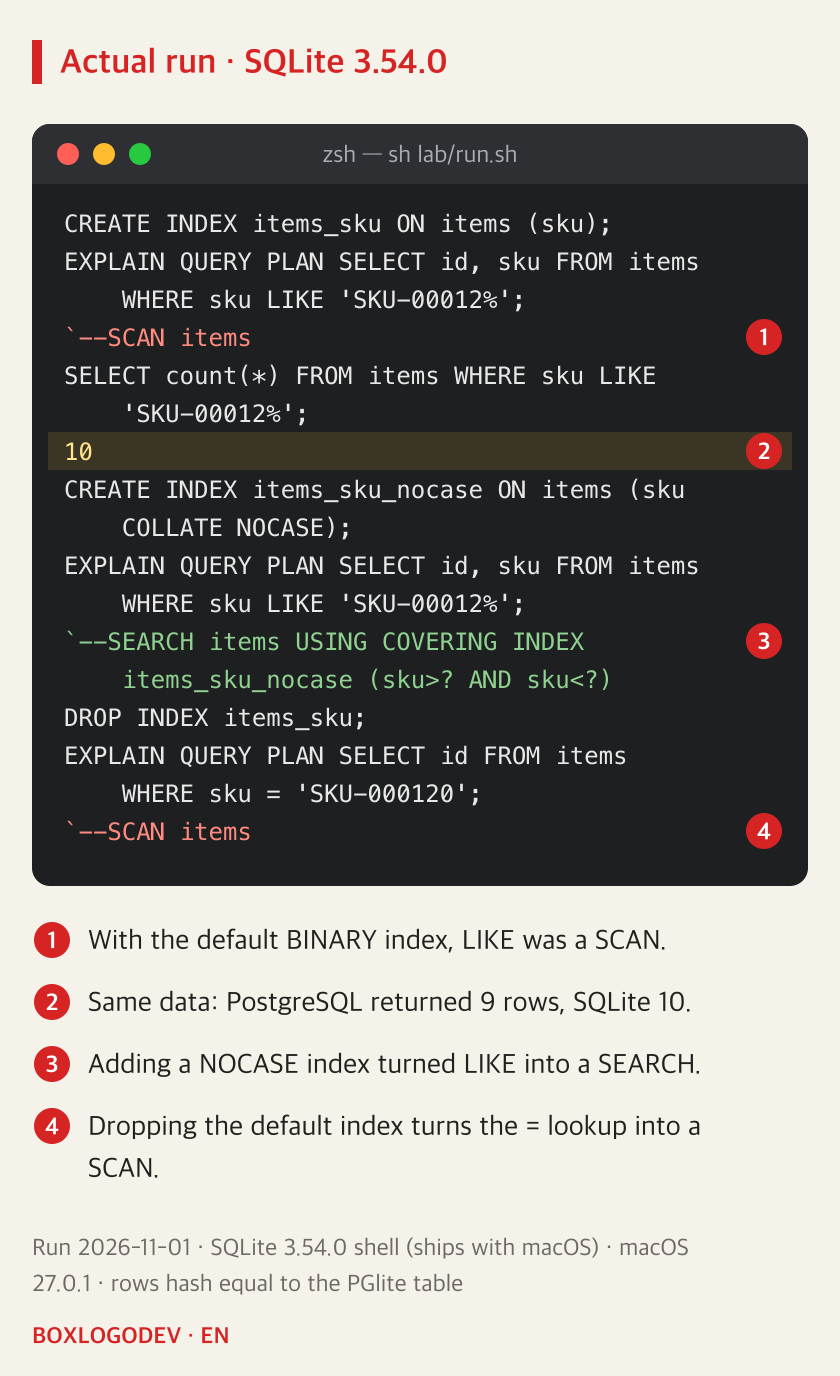
The one thing to do next time: look for Index Cond in the EXPLAIN. If it is missing, turn off enable_seqscan inside a transaction, and if the plan does not change and the pattern is a constant with no wildcard in front, check the collation and add a pattern index beside the existing one. That order is a judgement drawn from the runs above and the documentation, so run it on your own server before you rely on it.
Add your perspective.
Share a question, another approach, or something you have tried.
Checking sign-in…
Loading comments…