Connect in Python with sqlite3.connect("shop.db", timeout=30) and it looks as if the connection will wait up to 30 seconds whenever another connection holds a lock. Yet 'database is locked' sometimes comes back almost instantly, not after 30 seconds. Reproducing that moment with two connections and timing it separates the cases where the timeout waits from the ones where it is skipped. Afterwards you can tell from the time an error took which case you are in, and fix it with BEGIN IMMEDIATE.
The examples were run on 2026-11-09 on macOS 27.0.1 with Python 3.12.14 (its sqlite3 module uses SQLite 3.53.1) and the sqlite3 command-line tool that ships with macOS (Apple's build, version string 3.54.0, source dated 2026-04-09). The data is one made-up stock table: item 1 in stock has a quantity of 10. Connection A lives in the test scripts and connection B in a separate process (writer.py), and most steps were sent only after the previous one had answered. Only the steps around B's COMMIT used fixed delays instead. In the runs that measured how long B's COMMIT waited, A rolled back or closed its cursor one second after B was sent COMMIT, and in the runs where A waited and then succeeded, B was set to sleep 2 seconds before committing. So the waits of about 1 and 2 seconds around B's COMMIT come from these gaps, not from SQLite. The journal mode is the default rollback journal (journal_mode=delete), and Python's transaction control is also the default (autocommit is LEGACY_TRANSACTION_CONTROL, isolation_level is the empty string). The autocommit=False style added in Python 3.12 was not tried.
A 30-second timeout, a failure after 0.000 s
A does a common thing: read the stock, then take one away.
a = sqlite3.connect("shop.db", timeout=30)
a.execute("BEGIN")
a.execute("SELECT qty FROM stock WHERE id = 1").fetchone()  # 10
# meanwhile B, in another process, has run an UPDATE and not committed
a.execute("UPDATE stock SET qty = qty - 1 WHERE id = 1")    # error at once
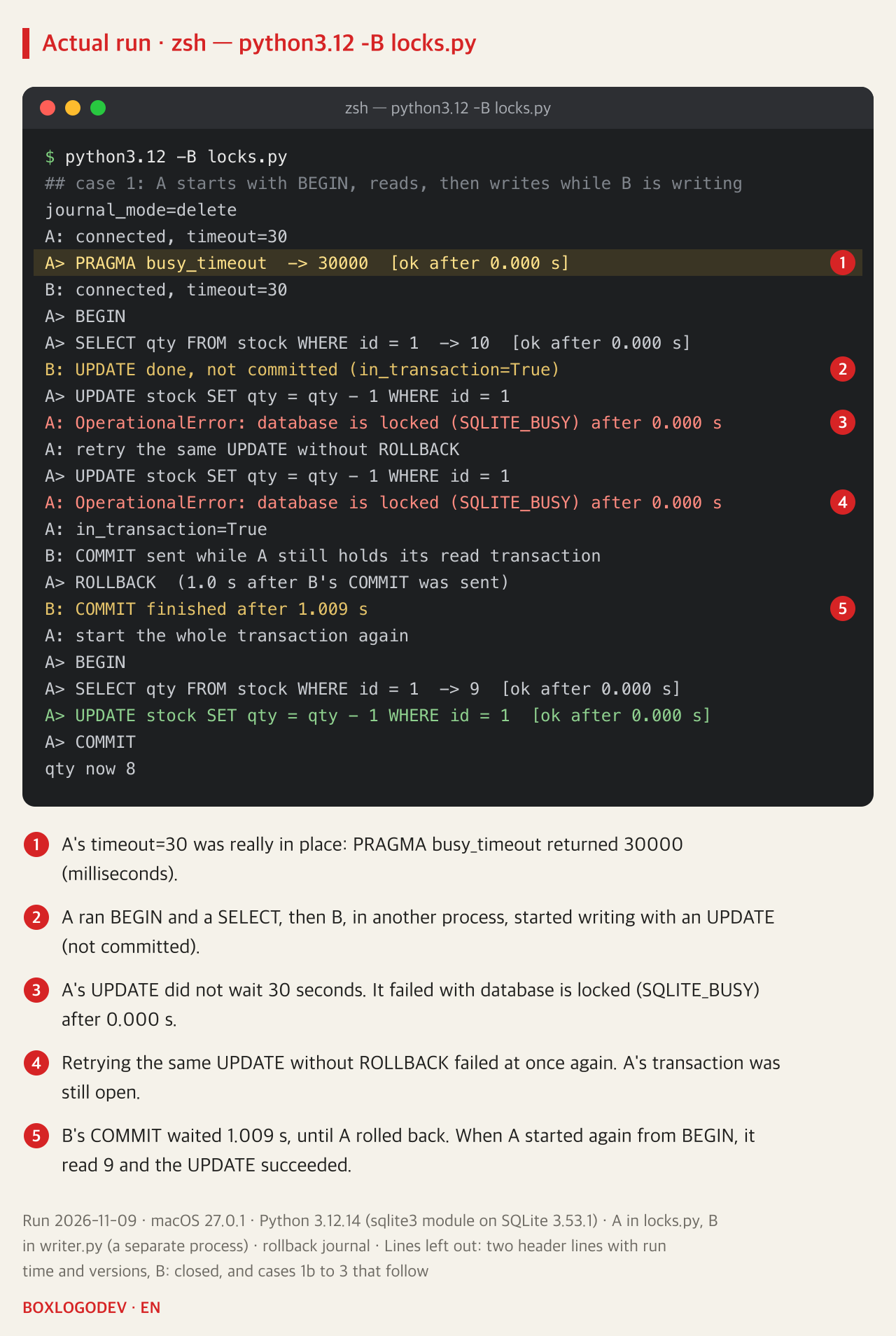
Reading PRAGMA busy_timeout on A returned 30000 (milliseconds), so the timeout was in place. Even so, A's UPDATE ended with OperationalError: database is locked, error name SQLITE_BUSY, after 0.000 s. Sending the same UPDATE again without a ROLLBACK gave the same error after 0.000 s, and A's in_transaction was still True.
The other side was stuck too. B was told to COMMIT, and one second later A rolled back; B's COMMIT then finished after 1.009 s. B had been waiting for A to step back. When A started again from BEGIN it read 9, the value B had written, its UPDATE succeeded, and the final quantity was 8. Three more runs of the same script failed A after 0.000 s every time.
Why SQLite chose not to wait
A plain BEGIN is DEFERRED. It does not start a transaction straight away; if the first statement is a SELECT, a read transaction opens. When a write statement follows, SQLite tries to upgrade it to a write transaction, and if another connection has already changed the database or is in the middle of changing it, the upgrade is impossible and the statement fails with SQLITE_BUSY.
The lock steps show why this failure skipped the timeout. A's SELECT holds a read lock (SHARED), and B's UPDATE holds the reserved write lock (RESERVED). For A to write, B's RESERVED must go. For B to commit, it needs the EXCLUSIVE lock that writes the file, and that lock cannot sit alongside any other lock, so A's SHARED must go first. If both waited, neither would move. SQLite's busy handler description uses a scene like this one, where the second process is already trying to commit: when invoking the busy handler could lead to a deadlock, SQLite does not call it and returns SQLITE_BUSY right away, so that the side holding the read lock lets go and the other side can finish.
Python's timeout is what fills that busy handler slot. As shown above, timeout=30 became SQLite's busy timeout of 30000, and SQLite implements its busy timeout with the busy handler. So at the moment SQLite decides not to call the busy handler, 30 seconds and the default of 5 seconds do the same thing: nothing.
Two things follow. First, as long as B holds its write lock, retrying the same statement is useless: SQLite reaches the same decision every time, and B cannot commit while A holds its read lock. A has to ROLLBACK to drop the lock and start again from BEGIN. Second, a restart must read the value again. The 10 that A first read was already stale once B had changed it to 9.
DEV NOTES
When does the timeout wait, and when is it skipped?
Rollback journal mode, run on 2026-11-09. Boxes 1-2: A with a 30 s timeout and B writing; box 3: Python and the CLI
Read, then write: fails at once
0.000 s- A: SELECT after BEGIN holds SHARED
- B: UPDATE holds the RESERVED lock
- A's UPDATE needs B's RESERVED to go
- B's COMMIT waits on A's SHARED
- Waiting here could deadlock
- So A gets SQLITE_BUSY at once
BEGIN IMMEDIATE: write first
2.071 s- A asks for RESERVED before reading
- It holds no lock, so waiting is safe
- The timeout waits until B commits
- (B was set to commit after 2 s)
- Its SELECT then reads B's new value, 9
No commit: the wait runs out
3.105 s- Python's UPDATE stays uncommitted
- CLI .timeout 3000 failed after 3 s
- The lock goes on COMMIT or ROLLBACK
- Keep writes short, commit at once
Times are from the 2026-11-09 run of locks.py. In WAL mode the first case also failed at once, with SQLITE_BUSY_SNAPSHOT when B had already committed.
When the timeout did wait
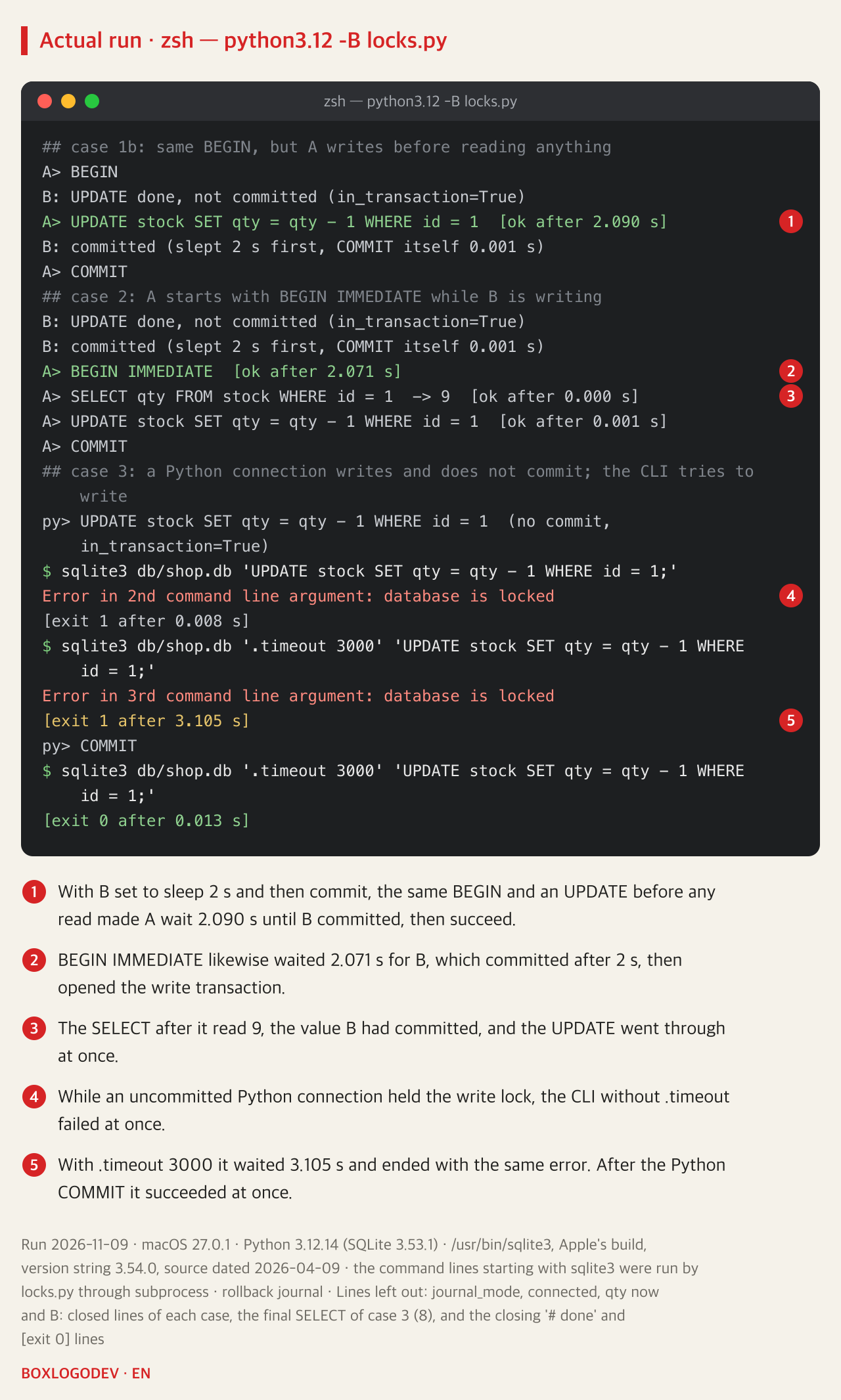
BEGIN DEFERRED itself is not the problem. With B set to commit after 2 seconds, the same BEGIN followed by an UPDATE before any read did not fail: A waited 2.090 s until B committed, then succeeded. It held no lock yet, so waiting could not deadlock, and the timeout worked as expected. The trouble is the order: holding a read lock and then trying to move up to a write.
So the fix for a transaction that reads and then writes is to claim the write from the start. BEGIN IMMEDIATE starts a write transaction at once instead of waiting for the first statement.
a.execute("BEGIN IMMEDIATE")  # claim the write first; this line may wait up to the timeout
a.execute("SELECT qty FROM stock WHERE id = 1").fetchone()
a.execute("UPDATE stock SET qty = qty - 1 WHERE id = 1")
a.commit()
With B writing (again set to commit after 2 seconds) and A changed to this order, BEGIN IMMEDIATE waited 2.071 s, until B committed, and then succeeded, and the SELECT after it read 9, the value B had committed. Once BEGIN IMMEDIATE succeeds, the write slot already belongs to A, so the transaction cannot fail halfway by colliding with another connection's write. BEGIN IMMEDIATE itself can still fail if the timeout runs out, but it fails on the first line, before any work is done, so it can simply be retried.
In rollback journal mode, though, COMMIT waits once more, because writing the file needs every other connection's read to finish. A separate check in the same environment on 2026-11-10 showed it: while another process held a SELECT cursor it had not read to the end, a connection with a 2-second timeout ran BEGIN IMMEDIATE and an UPDATE, both succeeding after 0.000 s, but its commit() failed after 2.166 s, the full timeout, with database is locked (SQLITE_BUSY). The transaction stayed open (in_transaction was True), and once the reader closed its cursor, calling commit() again succeeded in 0.001 s. In WAL mode the same commit() succeeded at once. B's COMMIT waiting 1.009 s for A to step back, earlier, is the same pattern.
Sometimes the timeout waits all the way and still fails. Python's default style implicitly opens a BEGIN before an UPDATE and keeps that transaction until commit() is called. With a Python connection left holding an uncommitted UPDATE, changing the same table from the sqlite3 command-line tool failed at once without .timeout, and with .timeout 3000 it waited 3.105 s and then ended with database is locked. After the Python COMMIT, the same command succeeded in 0.013 s. Here the fix belongs to the side holding the lock, not the side waiting.
It happens without a hand-written BEGIN too
Python's default style opens no transaction before a SELECT. SQLite, however, keeps a read transaction until the SELECT statement finishes. So looping over a cursor with for row in a.execute("SELECT id FROM stock ORDER BY id") and running an UPDATE inside the loop failed with SQLITE_BUSY after 0.000 s while B was writing, with no BEGIN written anywhere. Even after a ROLLBACK the open cursor kept reading, and B's COMMIT waited 1.112 s, until A closed the cursor one second after the COMMIT was sent. Reading the same SELECT to the end with fetchall() before the UPDATE did not fail: A waited 2.103 s for B, which was set to commit after 2 seconds, and then succeeded. It could wait because once the cursor is exhausted Python resets the statement, which ends the SELECT's read transaction, so the read and the write are now separate transactions. A hand-written BEGIN does not get this. In a separate check on 2026-11-10, BEGIN, then the SELECT read to the end with fetchall(), then an UPDATE while B was writing failed with SQLITE_BUSY after 0.000 s. A transaction opened with BEGIN lasts until COMMIT or ROLLBACK, so its read transaction stays even after the cursor is read to the end. If the code decides what to write from what it read, another connection's change in between can be overwritten, so in that case start with BEGIN IMMEDIATE and read inside it.
In WAL mode the read-then-write order also failed at once: SQLITE_BUSY while B was still writing, and SQLITE_BUSY_SNAPSHOT when B had already committed after A's read, both after 0.000 s. In WAL, B's commit was not blocked by A's read, but once B commits after A's read, A's snapshot is stale and that transaction can no longer move up to a write. Starting with BEGIN IMMEDIATE, A waited 2.055 s in WAL mode too, for B set to commit after 2 seconds, and then succeeded.
Start from how long the error took
When you meet 'database is locked', look first at how long it took. If a timeout is set and the error came near 0 seconds, usually a connection holding a read lock tried to move up to a write and was refused. A longer timeout will not help. Roll back the failed transaction, close any open cursor, and start again from BEGIN, and change the code so that a transaction that will write starts with BEGIN IMMEDIATE and reads inside it. If the code loops over a cursor without a hand-written BEGIN (Python's default style) and the write does not depend on what was read, reading the cursor to the end before writing also works. If the error came after the full timeout, some connection holds a lock too long. It may be a write transaction left uncommitted, or, when a COMMIT failed in rollback journal mode, a long read such as a cursor not read to the end. Fix the side holding the lock so that it commits right after writing, or reads its cursor to the end and closes it. For a transaction that reads and then writes, putting BEGIN IMMEDIATE on its first line is the shortest fix.
Add your perspective.
Share a question, another approach, or something you have tried.
Checking sign-in…
Loading comments…