If you add 0.1 ten times and the total is 0.9999999999999999 and not 1, the calculator is not broken. The value you wrote and the value stored were different from the start. After this note you can explain why, pick a comparison tolerance that fits the size of the numbers, and plan a move of money values to whole numbers without losing any of them.
The examples were run on 2026-11-01 on macOS 27.0.1 with Node.js 24.21.0, Bun 1.3.14, CPython 3.9.6, 3.11.17 and 3.12.14, and Apple clang 21.0.0. sum ran on all of them, compare and money on Node.js and Bun, order, cart, migrate, rows and rates on Node.js, and stored and fsum on the three Python versions. Behaviour was checked in the Python 3.15.2 documentation, on MDN and in the ECMAScript 2027 draft. All prices are example values.
This is not about the language
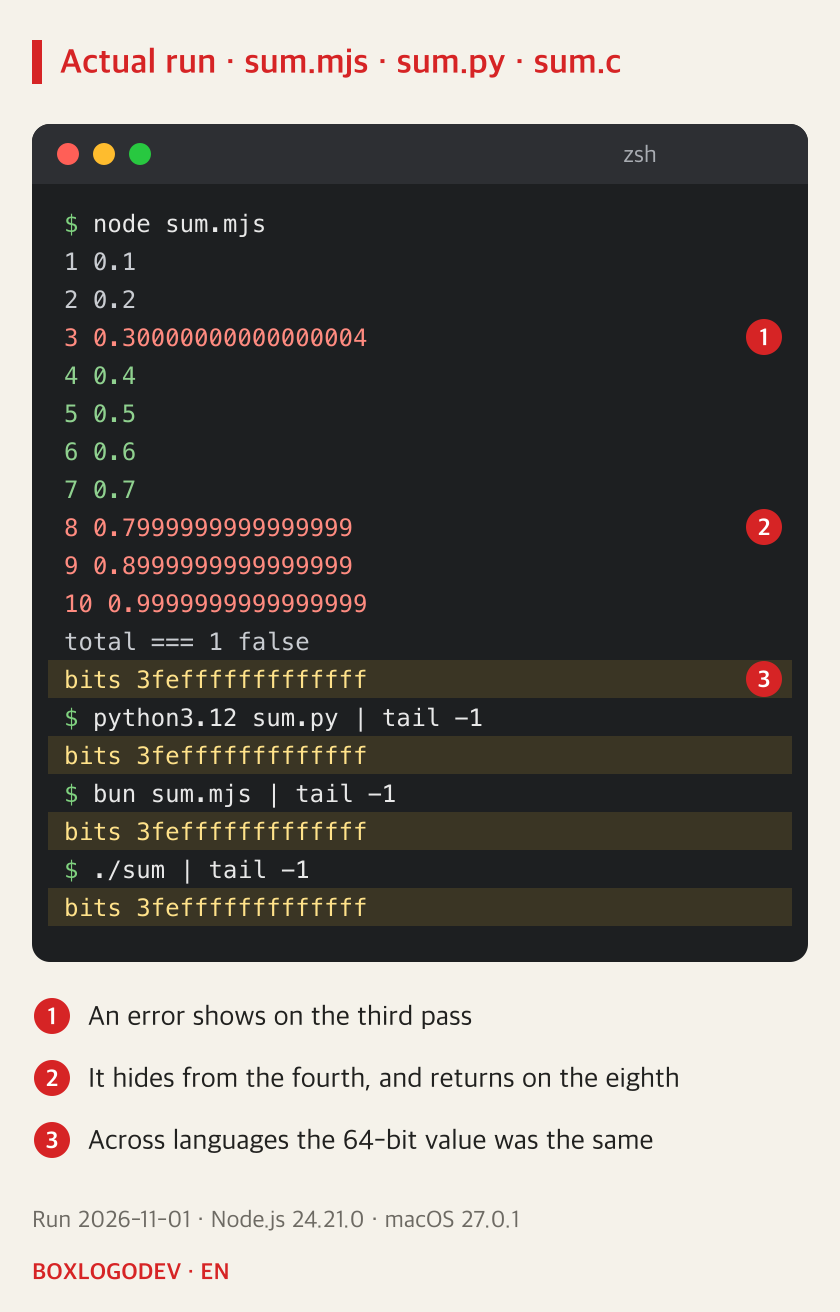
let total = 0;
for (let i = 0; i < 10; i++) {
  total += 0.1;
  console.log(i + 1, total);
}
console.log('total === 1', total === 1);
The same loop was also written in Python and C. What gets printed looks a little different. The C example prints 17 digits with printf, giving 0.99999999999999989. But with the total's 64 bits printed in hexadecimal, Node.js, Bun, the three Python versions and C all gave 3fefffffffffffff. It is the same number. The ECMAScript specification defines Number as IEEE 754 binary64 values, and the Python documentation explains that float is that same format on most machines. That documentation calls this behaviour "not a bug in Python".
0.1 is already not 0.1 once stored
0.1 ends in decimal but never ends in binary, so the nearest value that fits in 64 bits is what gets stored. Passing a float to Python's Decimal shows the stored value as it is.
0.1000000000000000055511151231257827021181583404541015625
0.200000000000000011102230246251565404236316680908203125
0.3000000000000000444089209850062616169452667236328125
0.299999999999999988897769753748434595763683319091796875
From the top these are 0.1, 0.2, 0.1 + 0.2 and 0.3. The third and fourth differ, so 0.1 + 0.2 === 0.3 is false. Each sum is again moved to the nearest value, so errors can pile up or cancel.
DEV NOTES
What you write is not what is stored
How 0.1 becomes a total
The 0.1 you write
total += 0.1- It ends in decimal
- It never ends in binary
The nearest 64-bit value
0.1000000000000000055…- The stored value is a little above 0.1
Rounded again on each addition
- The result goes to the nearest value too
- Errors can pile up or cancel
Printed short
- The shortest digits that point to that value
- So it can look as tidy as 0.4
Values printed on 2026-11-01 on Node.js 24.21.0 and Python 3.9.6, 3.11.17 and 3.12.14. Printing short is how JavaScript and Python behave; the C example prints 17 digits with printf.
That is what the earlier output shows: the error visible on the third line goes away on the fourth and returns on the eighth. The 0.4 on the fourth line does not mean the error is gone. It means the value now equals the one nearest 0.4, so it prints short. A few additions coming out right do not mean the next total will. Order changes the result too. In order.mjs, (0.1 + 0.2) + 0.3 was 0.6000000000000001 and 0.1 + (0.2 + 0.3) was 0.6, while 1e16 + 1 - 1e16 was 0 and 1e16 - 1e16 + 1 was 1.
A comparison tolerance has to follow the size of the values
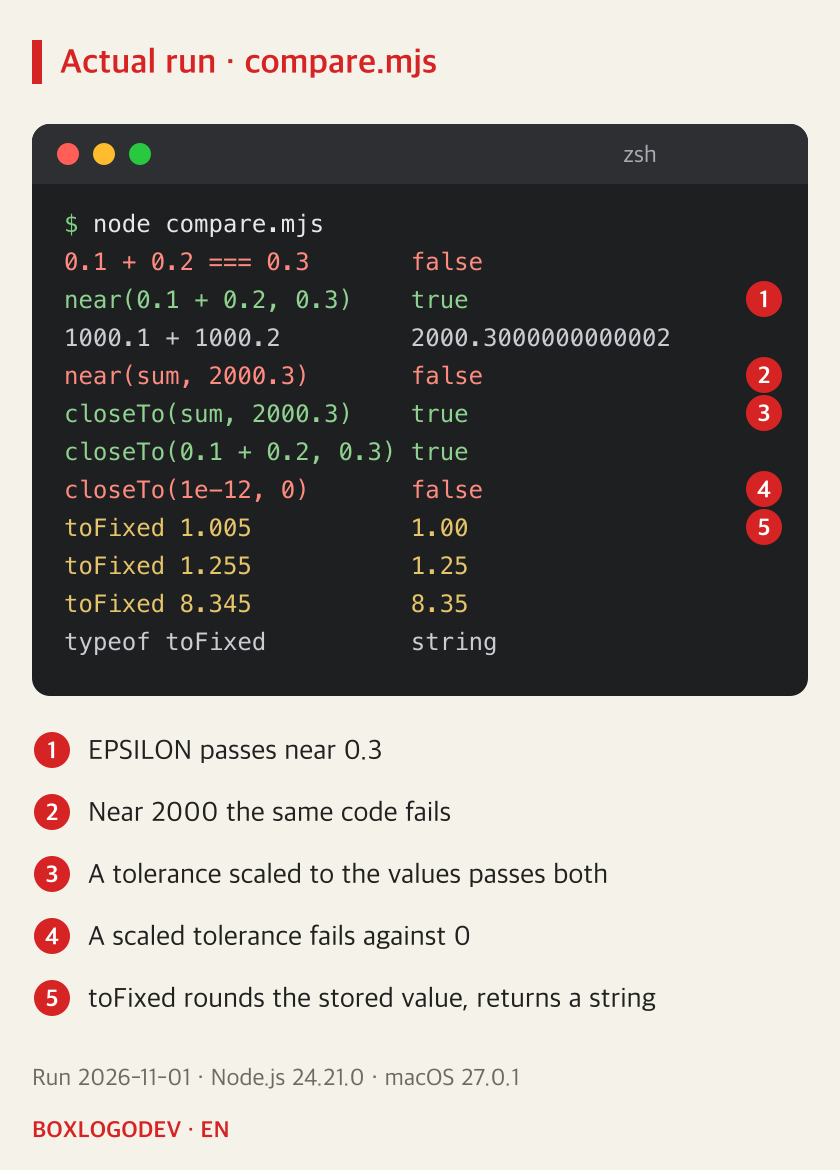
When === fails, Number.EPSILON comes to mind.
const near = (a, b) => Math.abs(a - b) < Number.EPSILON;Run with the same values as MDN's example, this near passes around 0.3 but fails for 1000.1 + 1000.2 against 2000.3. MDN also explains that EPSILON suits magnitudes around 1 and does not suit larger ones. A tolerance proportional to the values passes both.
const closeTo = (a, b, rel = 1e-9) =>
  Math.abs(a - b) <= rel * Math.max(Math.abs(a), Math.abs(b));
This has a gap as well. closeTo(1e-12, 0) was false. Python's math.isclose is the same: isclose(0.1 + 0.2 - 0.3, 0) was False, and with abs_tol=1e-12, as its documentation advises, it was True. Against 0 you need a separate absolute tolerance. 1e-9 and 1e-12 are example values; how much to allow depends on the precision of your data.
toFixed(2) does not solve comparison. It returns a string, and it rounds the stored value. 1.005 is really 1.00499999999999989…, so it became 1.00, and 8.345 is 8.34500000000000063…, so it became 8.35. It can serve as the last step before printing, but it is safer not to use it to make a value that goes back into a calculation.
What summation tools do and do not cover
If all you do is add decimals, there are functions for totals. Python's math.fsum keeps track of the lost digits and rounds only once at the end. sum on the same input differed by version. The Python documentation says the float summation algorithm changed in 3.12 on most builds, and the output on this Mac agreed. Below are the first three lines of each output.
$ python3.9 fsum.py
sum(tens)       0.9999999999999999
fsum(tens)      1.0
fsum 0.1 0.2    0.30000000000000004
$ python3.12 fsum.py
sum(tens)       1.0
fsum(tens)      1.0
fsum 0.1 0.2    0.30000000000000004
3.11.17 also gave 0.9999999999999999, and on 3.12 the earlier for loop still printed total == 1 as False. The third line is the limit. fsum only adds the stored inputs and does not turn them back into decimal 0.1, so 0.1 and 0.2 still total 0.30000000000000004. Its documentation also says the last bit can be off on some builds. JavaScript's Math.sumPrecise gave the same two results on Bun 1.3.14 and was undefined on Node.js 24.21.0. MDN's compatibility data (read 2026-11-01) lists support from Chrome 147, Firefox 137, Safari 26.2 and Deno 2.7.8, and none in Node.js. It was not run on those browsers or Deno.
For calculating in decimal itself, Python has decimal, but do not build values from a float; use strings. Decimal('0.1') * 10 was 1.0, and Decimal(0.1) * 10 was 1.000000000000000055511151231, because passing a float brings the stored binary value along exactly.
Keep money in whole numbers, and watch multiplication even in won
When a total has to match exactly, calculate in whole numbers of the smallest unit. The example below turns a price string into cents without going through a float. A value with a third decimal place or beyond the safe range is rejected, not silently changed. Negative amounts are rejected too, so amounts that can go negative, such as refunds, need separate handling.
function toCents(text) {
  const m = /^(\d+)(?:\.(\d{1,2}))?$/.exec(text);
  if (!m) throw new Error(`not a price: ${text}`);
  const cents = Number(m[1]) * 100 + Number((m[2] ?? '').padEnd(2, '0'));
  if (!Number.isSafeInteger(cents)) throw new Error(`too large: ${text}`);
  return cents;
}
1.1 + 2.2 is 3.3000000000000003, so === 3.3 was false, while toFixed(2) alone looked fine at 3.30. In cents the comparison was 330 against 330, and true. The safe range for integers goes up to Number.MAX_SAFE_INTEGER, 9007199254740991, so larger amounts need another approach.
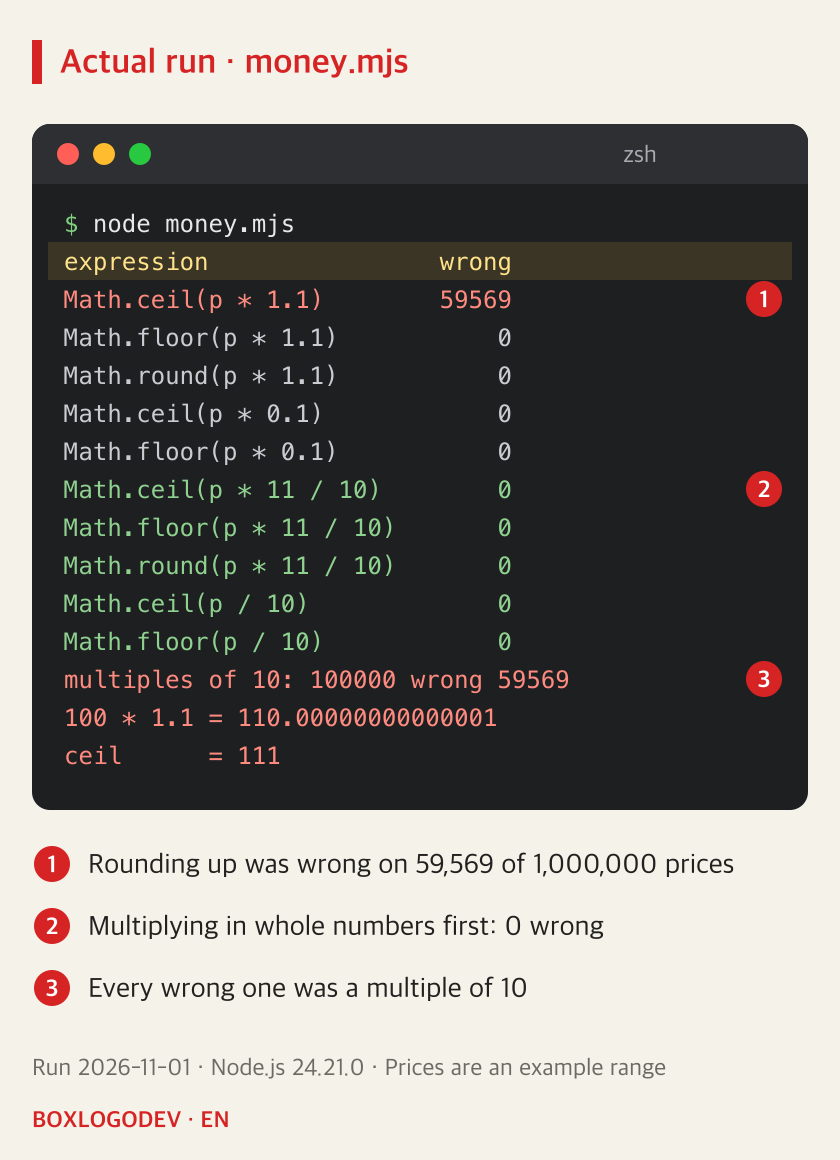
Korean won has no decimals, so it seems safe, but the moment you multiply by a rate written as a decimal, floats are back. 100 * 1.1 is 110.00000000000001, and rounding up gives 111. money.mjs adds 10% to every price from 1 won to 1,000,000 won and compares with the right answer. Math.ceil(p * 1.1) was wrong on 59,569 of them, all multiples of 10. In this range the wrong count for rounding down and to nearest was 0, but that says nothing about other ranges or other rates. Multiplying in whole numbers first, Math.ceil(p * 11 / 10), was wrong on 0. Change the rate and rounding down goes wrong too. In rates.mjs, 100 * 1.15 is 114.99999999999999, so Math.floor gave 114, and over the same range Math.floor(p * 1.15) was wrong on 25,638 prices and Math.floor(p * 115 / 100) on 0. Bun's table matched, and the formula for the right answer was checked separately on a sample in BigInt by check-money.mjs. The legal rounding of tax is outside this note.
Moving values already stored as decimals
The easiest mistake when moving to whole numbers is truncating. 19.99 * 100 is 1998.9999999999998, so Math.trunc gives 1998. In migrate.mjs, moving 100,000 prices from 0.01 to 1000.00, truncating lost a cent on 4,586 of them and Math.round on 0. Rounding is not a free pass either. A value such as 3.305 that does not land on two decimals would quietly become 331, so the script puts no new value in such a row and marks it LOOK.
const raw = row.price * 100;
row.check = Math.abs(raw - Math.round(raw)) > 1e-6;
row.cents = row.check ? null : Math.round(raw);
The 1e-6 threshold is a fixed value for this example, and in rows.mjs 3.30000001 was not flagged and became 330. Set this threshold to suit the precision of your data too.
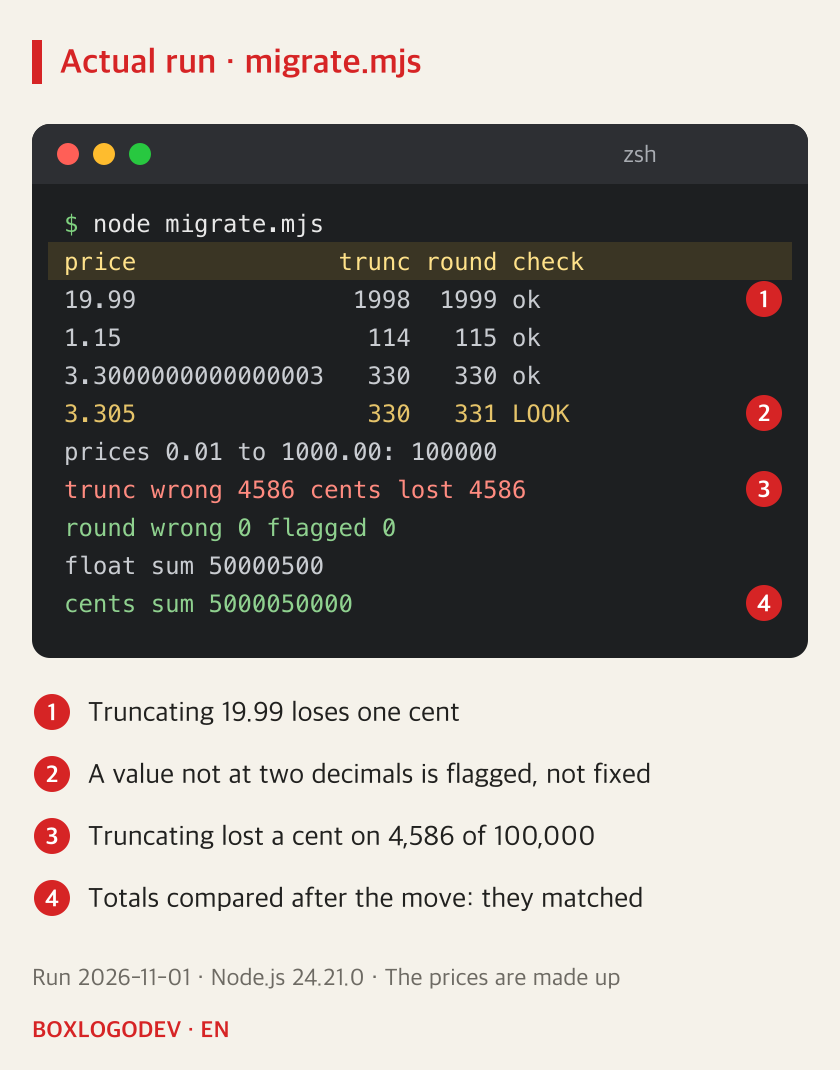
Here is the order. Take a copy first. Put cents in a new column and do not remove the original. Have a person look at the marked rows. Compare the totals from before and after the move; in this script they matched, at 50000500 and 5000050000 cents. A decimal total can change in its last digits with row order (with the rows shuffled, rows.mjs got 50000500.0000003), so round it to cents before comparing, and remember that matching totals do not prove each row matches. Then switch the code to the new column and keep the original for a while. If the service is live, edits and new rows that arrive after the move will be missing from the new column, so pause writes or write to both columns, and compare the two columns again just before switching the code. This order is the author's advice. This script handles values in memory only, and no real database migration was run. Whether values read from a database FLOAT column behave the same way was not checked.
When a decimal turns up, ask this: must this value match to the last digit? If so, move it to a whole number of its smallest unit and multiply rates in whole numbers too. If not, compare with a tolerance that fits the size of the values. This split is the author's own, drawn from the runs above.
Add your perspective.
Share a question, another approach, or something you have tried.
Checking sign-in…
Loading comments…