Save a practice file as random.py with the two lines below (a blank line between them), run it on Python 3.8 to 3.12, and you get AttributeError: partially initialized module 'random' has no attribute 'randint' (from 3.13 the sentence changes). randint is plainly part of the standard random module. After reading this you will be able to spot, in a traceback, the sign that your own file was loaded instead of a standard module, tell which names can be shadowed and which cannot, and choose between the -P option and renaming the file.
import random

print(random.randint(1, 6))
The examples were run on 2026-11-09 on macOS 27.0.1 with three Pythons: /usr/bin/python3 (3.9.6, shipped with Xcode) and CPython 3.11.17 and 3.12.14, already installed on this Mac with uv. The practice folder play holds the random.py above, a dice.py that runs import random and prints the loaded file's path and random.randint(1, 6), and a temp.py that only imports the standard module tempfile.
The error happens inside your own file
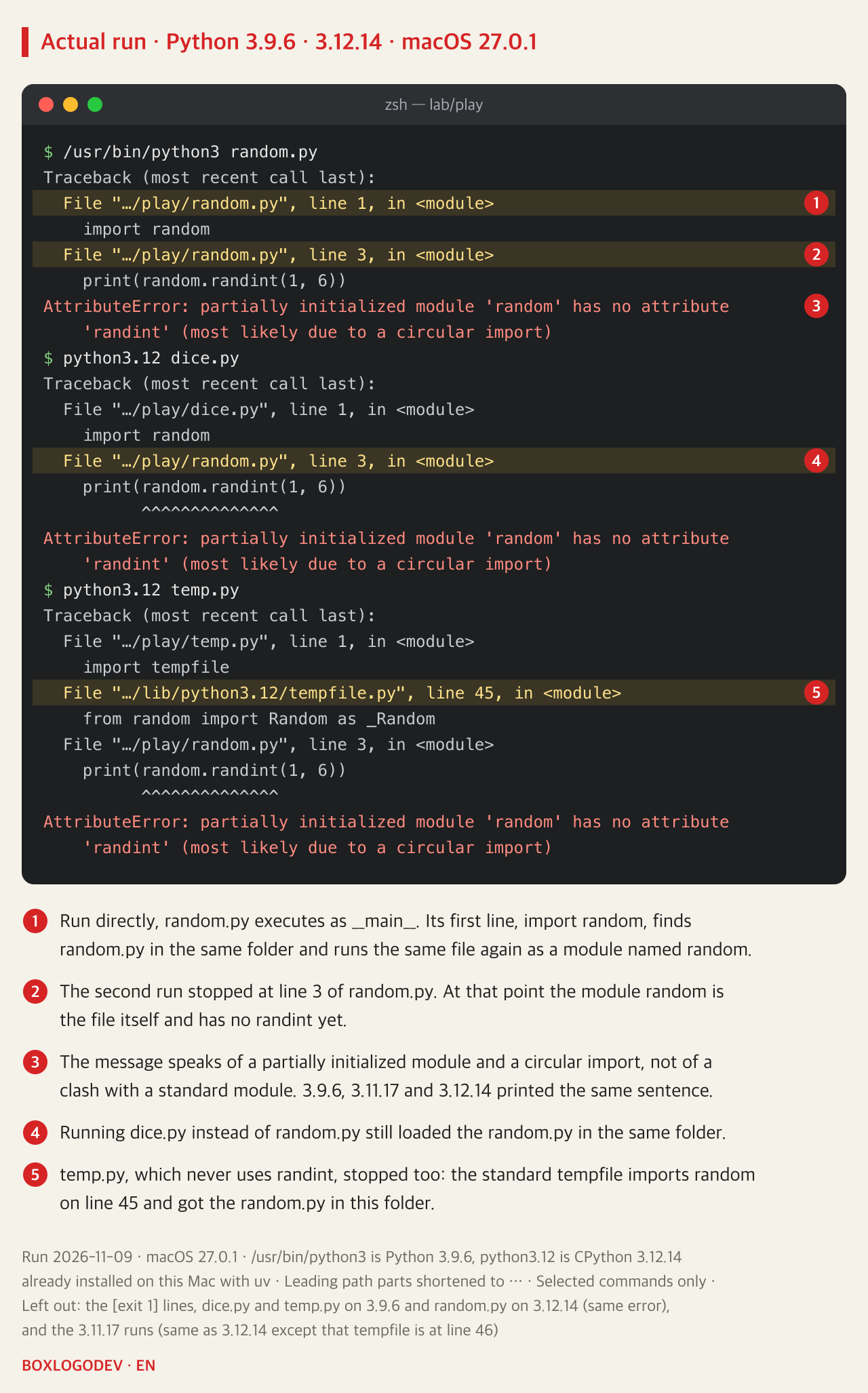
Both frames of the traceback point at the same play/random.py. Run as python3 random.py, the file first executes under the name __main__. Its first line, import random, finds random.py in the same folder and runs the same file again from the top as a module named random. In that second run, import random gets back the module that is still being built, itself, and line 3 stops while looking for a randint that was never defined.
So the message talks about a partially initialized module and a circular import (most likely due to a circular import). That is not wrong, but it does not say the real problem: the name clashes with the standard random. 3.9.6, 3.11.17 and 3.12.14 printed the same sentence; 3.11.17 and 3.12.14 only added the caret (^) line. 3.8 and 3.10 were not run, but the CPython source (Objects/moduleobject.c) has the same sentence for both.
The same thing happens without running random.py directly. Running dice.py next to it ended the traceback at line 3 of play/random.py. Even temp.py, which never uses randint, stopped: on line 45 of the standard tempfile.py in 3.12.14 (line 46 in 3.11.17), from random import Random as _Random loaded the random.py in this folder instead.
The script's folder comes before the standard library
The list of folders that import random searches is sys.path. When you run a file such as python3 dice.py, the folder holding that file goes to the front of sys.path, followed by the folders in the PYTHONPATH environment variable and the installation's default path. Printing the whole sys.path on the three builds showed play at index 0, then python3X.zip, lib/python3.X, lib-dynload and site-packages. 3.9.6 had one more entry, the user site-packages.
The standard random.py lives in lib/python3.X. When the same name turns up first in folder 0, the search ends there and never reaches the standard file.
Index 0 is the folder of the file you ran, not the folder you are standing in. Moving to the parent folder and running python3.12 play/dice.py gave the same error. By contrast, the command line documentation says that python3 -c, the interactive shell and python3 -m module put the current folder first (not run here).
DEV NOTES
Where does import random look first?
The order for python3 dice.py. The first match ends the search
Already imported: sys.modules
- If found there, it is used as is
- time was already there at startup
Built-in, then frozen modules
- Built-in names are in sys.builtin_module_names
- time is built in on all three builds too (already caught at 1)
- math is built in on the uv builds, not on Xcode 3.9.6
sys.path[0]: the script's folder
play/random.py- The folder of the file you ran, not the current folder
- A random.py here ends the search
- From 3.11, -P drops this step
Folders in PYTHONPATH
- Folders added through the environment variable
- Left unset for the examples
The installation default
- Standard library: python3X.zip, lib/python3.X, lib-dynload
- Then site-packages, for pip packages
- The real random.py is never reached
Steps 1 and 2 are checked by the import system before the path; 3 to 5 are the order of sys.path. Checked on 2026-11-09 and 10 on macOS 27.0.1 with Python 3.9.6, 3.11.17 and 3.12.14. Which modules are built in depends on the build, not the version.
Why did time.py do nothing?
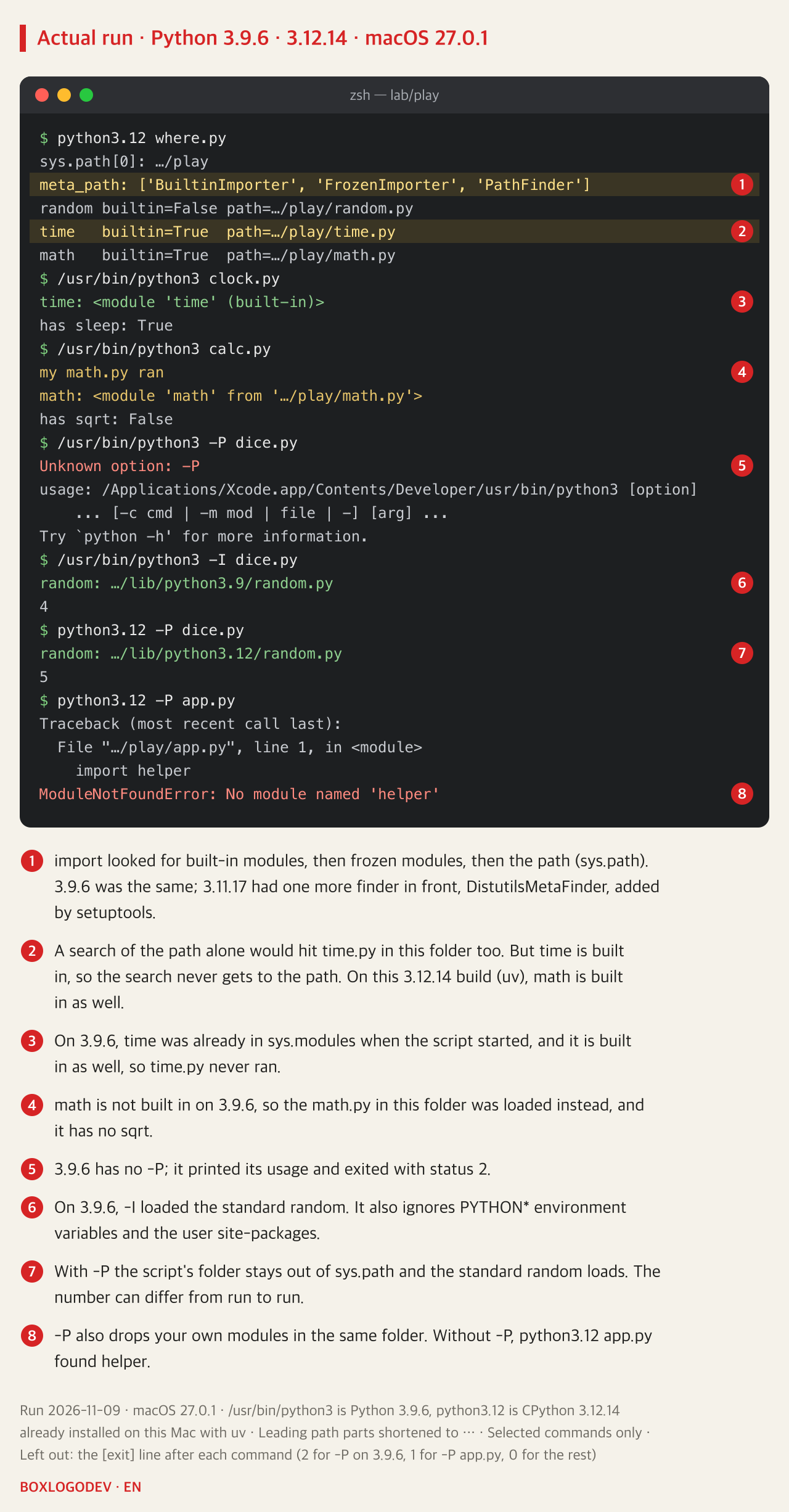
Put a one-line time.py, print("my time.py ran"), in the same folder and import time behaves differently. All three builds loaded the standard time, and my time.py ran was never printed. Before it looks at sys.path, import checks the modules already imported and the built-in modules compiled into the interpreter. Built-in module names are in sys.builtin_module_names, and time was in it on all three builds on this Mac. time was also already in sys.modules before the script started (the cache of modules already imported, the first place import looks), so it was blocked twice over.
Splitting the steps with importlib's finders makes the difference clear. A search of the path alone would also find play/time.py, but the built-in check already returns builtin=True, so the search never gets that far.
Which modules are built in depends on the build. The Xcode 3.9.6 had 31 built-in modules; the uv-installed 3.11.17 and 3.12.14 had 95. math showed the difference directly. With a math.py in the same folder, 3.11.17 and 3.12.14 used the built-in math, but 3.9.6, where math is not built in, printed my math.py ran and returned the local math.py, which has no sqrt.
The difference does not come from version 3.11. A separate look at the lib-dynload folders on November 10 found 74 .so files in the Xcode 3.9.6, one of them math.cpython-39-darwin.so, but only three, _crypt, _dbm and _tkinter, in the two uv builds. They are builds with most extension modules compiled into the interpreter. In a configure build on macOS or Linux, the CPython 3.12 defaults compile time into the interpreter and make math a separate file in lib-dynload (the Windows build settings in PC/config.c compile math in as well). On a Python built that way, a math.py next to the script can shadow the standard math even on 3.11 or later. There is no such build on this Mac, so this was not run, and which kind the python.org installer or Homebrew provides was not checked. That time.py was harmless does not mean other names will be.
-P and PYTHONSAFEPATH, or -I on 3.9
From Python 3.11, the -P option or the PYTHONSAFEPATH environment variable (any non-empty value) keeps the script's folder out of the front of sys.path. python3.12 -P dice.py and PYTHONSAFEPATH=1 python3.12 dice.py loaded the standard lib/python3.12/random.py and printed a die roll. In where.py run with -P, sys.path[0] was python312.zip instead of play. -P on 3.11.17 also loaded the standard random.
3.9.6 does not have this option. With -P it printed Unknown option: -P and its usage and exited with status 2, and it silently ignored PYTHONSAFEPATH=1 and raised the same AttributeError. On 3.9, -I (isolated mode, available since 3.4) leaves the script's folder out. It also ignores every PYTHON* environment variable and the user site-packages, so a script that relies on those will behave differently.
-P is more a diagnostic tool than a fix. It drops the script's folder entirely, so your own modules in that folder disappear too. app.py, which starts with import helper, found helper.py next to it when run normally, but with -P it stopped with ModuleNotFoundError: No module named 'helper'.
From 3.13 the message tells you to rename the file
There is no Python 3.13 or later on this Mac, so this part was not run. What's New in Python 3.13 shows an example in which random.py, run as python random.py, calls randint. There the words partially initialized and circular import are gone, and AttributeError: module 'random' has no attribute 'randint' is followed by this hint:
(consider renaming '/home/me/random.py' since it has the same name as the standard library module named 'random' and prevents importing that standard library module)
It also says that when a script shares its name with an installed package (the example is numpy.py), a similar hint asks you to rename it if it has the same name as a library you meant to import. In the CPython 3.13 source (Objects/moduleobject.c), the standard library hint mainly depends on whether the module name is a standard library name, whether the file sits in the sys.path[0] folder set at startup and whether -P, -I and PYTHONSAFEPATH are all off; it does not look at who did the importing. So the hint should also appear when another file imports it, as dice.py or tempfile did here, but that was not run.
The fix is to rename the file
The real fix is to give the file a name that does not clash with a standard module. In a copy of play, renaming random.py to random_practice.py let dice.py on 3.12.14 load the standard random and print a number. The __pycache__/random.cpython-312.pyc left by the run before the rename was still there but was not loaded.
In the same folder, 3.9.6 raised a different error. This time line 49 of the standard random.py, from math import log as _log, …, failed with ImportError: cannot import name 'log' from 'math', and the path in parentheses was the math.py still in the folder. Standard modules import other standard modules, so fixing one name is not enough if more names clash; the failure just moves elsewhere.
So when you rename, check the folder's .py files once. sys.stdlib_module_names, available from Python 3.10, holds the names of standard library modules of every kind. Running the line below with 3.12.14 in the play folder printed ['math', 'random', 'time']. The line only looks at .py files at the top of the folder; a package folder with an __init__.py and a standard module's name, such as json/, is not caught. 3.9.6 does not have this attribute. time was not shadowed on the builds on this Mac, but a time.py that silently never runs is just as confusing, so rename it as well.
python3.12 -c "import os, sys; print(sorted(f[:-3] for f in os.listdir() if f.endswith('.py') and f[:-3] in sys.stdlib_module_names))"When a traceback names a standard module but the path points into your own project folder, suspect the file name before the code.
Add your perspective.
Share a question, another approach, or something you have tried.
Checking sign-in…
Loading comments…