You add a fee to each invoice amount inside LOOP AT ... INTO, the loop finishes, and the internal table still holds the old numbers. Putting a value into a work area is an ordinary variable assignment, so nothing dumps, and the mistake is easy to miss until someone reads the result. After this note you can tell where each LOOP output option writes its value, and you can find the four places where code rewritten with ASSIGNING goes wrong again.
The basis is the LOOP output options in the ABAP Keyword Documentation, release 7.58, its programming guidelines, the NetWeaver 7.31 Help and a public SAP Learning lesson. The program name, invoice numbers and amounts below are all invented. Nothing here was run on an SAP system: the documented rules were applied to a fictional example and worked out by hand.
INTO writes to a copy
LOOP AT hands over the current row in four ways. INTO copies its content to a work area, ASSIGNING attaches a field symbol to that row, and REFERENCE INTO creates a reference to that row. TRANSPORTING NO FIELDS fills only the system fields and is allowed only with WHERE and without GROUP BY. Of the first three, only the work area is a separate variable with no link back to the table. Changing it leaves the table alone, and writing the value back takes one more MODIFY.
Three fictional invoices make this concrete. The standard internal table lt_inv holds invoice 9001 at KRW 1,000, 9002 at KRW 2,000 and 9003 at KRW 3,000, a total of KRW 6,000. Adding a KRW 100 fee to each row should give KRW 6,300. With INTO alone the table total stays at KRW 6,000, and the work area ends up holding only a copy of the last row, KRW 3,100. Adding MODIFY, or using ASSIGNING, gives KRW 6,300.
SAP NOTES
One loop, three results
Add a KRW 100 fee to 3 fictional invoices. Starting total KRW 6,000
INTO alone
- Table: KRW 1,000, 2,000, 3,000
- Total KRW 6,000, unchanged
- Only the work area holds KRW 3,100
INTO + MODIFY
- Table: KRW 1,100, 2,100, 3,100
- Total KRW 6,300
- Two copies on every pass
ASSIGNING
- Table: KRW 1,100, 2,100, 3,100
- Total KRW 6,300
- The row is changed directly, so no MODIFY
Fictional amounts worked out by hand. Not the result of a run on an SAP system.
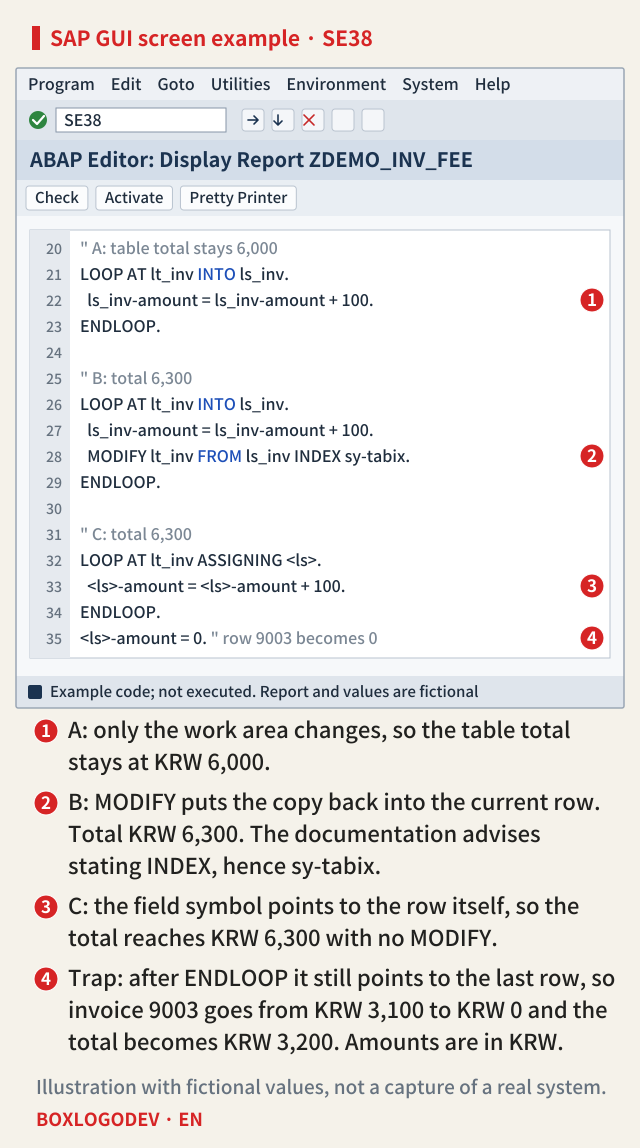
In code the difference is a line or two. A, B and C in the screen below do not run one after another. They are three ways of writing the same loop, each starting from KRW 6,000. The guideline's bad example has the shape of B, and it says that when the purpose is to change the row, two needless copies happen on every pass. The guideline's example is written without INDEX, but the 7.58 MODIFY documentation does not recommend leaving it out inside a loop, so the screen states INDEX sy-tabix.
So is INTO simply wrong?
No. Where you want to change a copy without affecting the table, the guideline itself says to use INTO. It also signals something different to the reader: in code that follows the guideline's recommendations, INTO reads as "this loop does not change the table", and ASSIGNING as "it may".
For performance the deciding factor is the shape of the row. The guideline's rule of thumb is to copy when the row is narrow and not changed, use a field symbol when it is wide or deep and changed, and use a data reference when it is wide or deep and you need to hand on a reference. For flat rows of no more than about 1 KB, it says copying is faster, at least for READ. For LOOP the pointer setup cost is paid only once, so above some number of rows it recommends a pointer. The 7.58 guideline does not give that number, and the NetWeaver 7.31 Help says the gain starts from about 10 rows.
SAP NOTES
Which one to choose
The ABAP guideline's rule of thumb
INTO
- The row is narrow and not changed
- You change a copy and keep the table as it is
ASSIGNING
- The row is wide or deep and changed
- It tells the reader the table may change
REFERENCE INTO
- The row is wide or deep and a reference must be passed
- No other reference and no CLEAR inside the loop
Based on the guideline and the LOOP output options in the ABAP Keyword Documentation 7.58. A rule of thumb, not a measurement.
The public SAP Learning lesson says that updating through a field symbol instead of MODIFY can as a rule save 25-40% of the runtime, and that the gain for reads is smaller. That percentage is SAP's rough figure, not something measured for this note. It can differ with row width and with what the loop does, so the decision belongs to a measurement of your own program.
Four traps after switching to ASSIGNING
The copy problem goes away, and in its place come the problems of touching the row directly.
First, the field symbol still points at a row after ENDLOOP. The NetWeaver 7.31 Help says that when the loop has finished, the field symbol is left on the row of the last pass. The 7.58 LOOP page has no such sentence. The 7.58 READ TABLE page does state the rule that while the field symbol points to a row, assigning to it changes that row, and the LOOP page says its output behaviour is the same as READ TABLE's. In the example, once the total has reached KRW 6,300, running <ls>-amount = 0. turns invoice 9003 from KRW 3,100 into KRW 0, and the total becomes KRW 3,200. The safe habit is to UNASSIGN after the loop or not to use that name again. Loops over the result of a functional method, a constructor expression or a table expression differ: that temporary table is gone when the loop ends, and a field symbol pointing to it becomes invalid.
Second, a loop that never ran leaves the field symbol untouched. With an empty table, or when no row matches WHERE, sy-subrc is 4, and without ELSE UNASSIGN the field symbol stays as it was. By that rule, if the same name was used earlier on another table, it can still point into that table, so IS ASSIGNED is no proof here. That scenario is this note's reading of the rule, not an example from the documentation. For READ TABLE without ELSE UNASSIGN the documentation recommends judging by sy-subrc, and it says that LOOP's output behaviour is the same as READ's. ELSE UNASSIGN arrived in release 7.57 and is not in the 7.50 documentation.
Third, key fields must not be written. The primary key fields of SORTED and HASHED tables are read-only, and writing to one through a field symbol ends the program with an uncatchable exception. Overwriting a primary key with MODIFY ... FROM wa is also caught only at runtime, and for a row specified by INDEX a sorted primary key raises the error only if its value really changes. Secondary keys are trickier. Their fields are read-only only while that key is in use (a LOOP over that key, or MODIFY with USING KEY). Otherwise a field symbol may change them, but the key administration is updated later. A duplicate in a unique secondary key then shows up as an exception at the next use of the table, not on the line that changed the value, so the dump location alone can mislead you.
Fourth, changing the table itself inside the loop. If the current row is deleted, the field symbol is no longer assigned for the rest of that pass. A row inserted after the current one gets processed in a later pass, so the loop may never end. Statements that change the whole body, such as SORT, CLEAR or an assignment to the whole table, are not allowed as a rule. If it is known at compile time, it is a syntax error inside classes, and outside classes, for a table with no secondary key, only a syntax warning. When this cannot be known at compile time, an ASSIGNING loop ends with the runtime error TABLE_FREE_IN_LOOP, while an INTO loop, for compatibility, leaves in an undefined way with no error. No dump does not mean safe.
SAP NOTES
Four lines to check in an ASSIGNING loop
In code order, from the LOOP line to below ENDLOOP
The LOOP line: second trap
LOOP AT lt_inv ASSIGNING <ls>.- If it never runs: sy-subrc 4, field symbol keeps its state
- ELSE UNASSIGN from release 7.57
Writing a key field in the loop: third trap
<ls>-key = ...- SORTED and HASHED primary keys are read-only
- A secondary key duplicate surfaces at the next use
Changing the table in the loop: fourth trap
DELETE lt_inv INDEX sy-tabix.- Current row deleted: field symbol unassigned
- Whole body replaced, not known at compile time:
- runtime error with ASSIGNING, undefined exit with INTO and no error
Below ENDLOOP: first trap
<ls>-amount = 0.- 7.31 Help: it still points to the last row
- One assignment takes the total from KRW 6,300 to KRW 3,200
Based on the ABAP Keyword Documentation 7.58 and the NetWeaver 7.31 Help. Code and amounts are fictional and were not run.
What differs by release
The difference between a copy and a pointer, the key field restriction and the invalidation of temporary-table loops all appear in both 7.50 and 7.58, the two releases compared for this note. Only ELSE UNASSIGN needs 7.57 or later; below that, judge by sy-subrc or UNASSIGN the field symbol yourself before the loop. The "last row is assigned" sentence comes from the older 7.31 Help, so to be certain of the exact behaviour, look in the debugger on your own release. Restrictions in the ABAP Cloud environment were not checked for this note.
In short, when you read a loop that changes values, first check whether INTO has a MODIFY next to it, and if it uses ASSIGNING, look below ENDLOOP for lines that use the same field symbol. This note's reading is that these two checks alone catch many of the cases where the table stays the same or the wrong row changes.
Add your perspective.
Share a question, another approach, or something you have tried.
Checking sign-in…
Loading comments…