Say your production system normally takes the whole import queue once a week. An error appears, so you import one urgent fix on its own in STMS. The program is fixed. Then the next regular import finishes and that program can be back on its old version. After reading this you will know what to look at in the queue and on the Options tab before a single import, and what evidence to check if the old version has already returned.
The systems DV1 and PR1, the request numbers, the program ZDEMO_PRICE_CALC, the version labels v1 and v2, and the days and times are all made up. Nothing here was run on an SAP system. The behaviour comes from reading the Change and Transport System documentation on SAP Help Portal (ABAP Platform 2025 FPS02, compared with SAP NetWeaver 7.50 SPS29 where noted). Why a released request does not show up in production straight away is covered in the note on transport requests and tasks; this one is only about import order.
The same program is in the queue twice
The PR1 queue holds three requests. According to the documentation, an import of all requests follows the queue order, which is the order of export. Request 101, exported first, holds v1 of ZDEMO_PRICE_CALC. Request 102 holds another program. Request 103, the last, holds v2, a fix to the same program (markers 1 and 2).
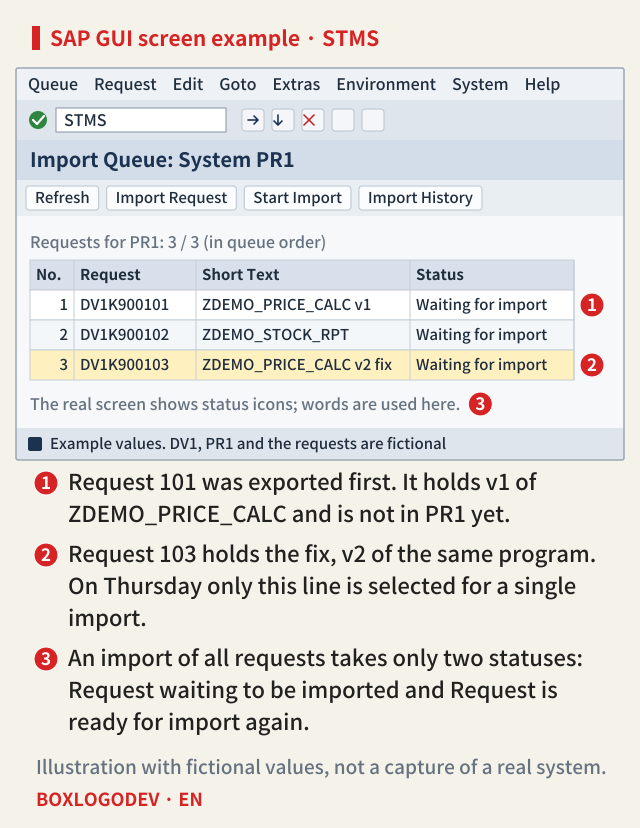
Importing a request early to fix a production error between regular imports is a normal path; the documentation uses it as an example. With a single import, the other requests stay in the queue. Import only 103 on Thursday and ZDEMO_PRICE_CALC in PR1 becomes v2 while 101 keeps waiting. A request exported later has overtaken an earlier one. The trouble is the next import of all requests. It takes requests in only two statuses: Request waiting to be imported and Request is ready for import again (marker 3).
The fork is one checkbox on the Options tab
The Options tab of the single import dialog has Leave Transport Request in Queue for Later Import (marker 1).
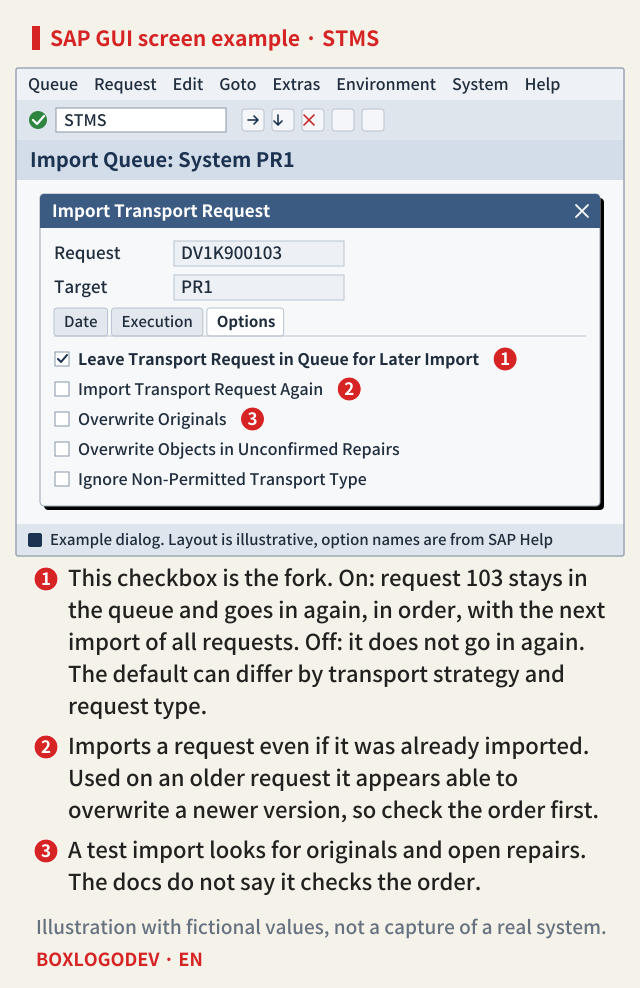
With it on, the single import is handled as a preliminary import. Request 103 stays in the queue with the status Request is ready for import again and goes in again at the next import of all requests. The order is 101, 102, 103, so v2 is written last.
With it off, 103 gets the status Request already imported. The documentation says a request in this status is not imported again at the next import of all requests and is deleted from the queue then. Only 101 and 102 go in, so the last thing written to that program is v1 from request 101.
SAP NOTES
Same queue, one checkbox, a different final version
Fictional queue 101 (v1) → 102 → 103 (v2), with only 103 imported on Thursday
Right after Thursday: the same
ZDEMO_PRICE_CALC = v2- PR1 has v2 in both cases
- 101 is still waiting in the queue
- The program itself shows no difference
Option on
final: v2- 103 status: Ready for import again
- Next import of all: 101 → 102 → 103
- 103 is written last
Option off
final: v1- 103 status: Already imported
- Next import of all: 101 → 102
- 103 does not go in again
The documented rules applied to a fictional case, not the result of a run
The documentation calls this older objects coming in at the next import of all requests the overtaker problem. The 7.50 SPS29 text says overshooter problem in the same place, so search for both words. The v1 and v2 conclusions above are the documented rules applied to a fictional case.
With the option on, v1 still goes in before v2, and the documentation does not say which version can be seen in between. It does say that working during an import can cause temporary problems, and asks you to stop user work and any background jobs the import does not need.
One sentence does not settle the default
The documentation describes this option's default in three places, and differently. The single import page says it is on by default. The options page says it is on by default only for Customizing requests and transportable change requests. The transport strategy page says on for Mass Transports, off for Single Transports, and that the options for Workflow-Controlled Transports match those for single transports. The 7.50 SPS29 pages say the same three things. For the case in this note, a Mass Transports system and a program in a transportable change request, all three point to on, and the documentation's own weekly example leaves it selected. So this note reads the option-off branch there as needing someone to switch it off, or a different setup; that was not checked on a running system. Even so, this note's reading is that it is better to open the tab at every import than to guess the default.
On a system supplied only with single transports there is little reason to switch it on. Requests left in the queue have to be deleted by hand, and Delete Imported Requests under Extras does not delete those left as preliminary imports. In exchange, keeping the order becomes a person's job. The documentation warns you to make sure a request imported on its own does not overtake one holding an older version of the same objects. Under this strategy, importing 101 on its own later appears to leave the old version written last in the same way.
What the option does not do for you
The option only puts the next import of all requests back in order. It does not check the single import you are running now.
SAP NOTES
What the option does not do for you
It only puts the next import of all requests back in order
Links between requests
- A table arrives without its data element
- Activation errors follow
- A single import does not handle such links
Test import
- Looks for: open repairs, originals in the target
- The docs do not describe an order check
Web UI import checks
- Predecessor and Downgrade checks
- Basis: same object, export time stamp
- Predecessor: direct only; some types unsupported
Deleting from the queue
- Docs: inconsistencies possible at the next import
- Deleting the kept 103 appears to undo the option too
Based on the ABAP Platform 2025 FPS02 documentation
- Links between requests. In the documentation's example, you import a request with a table while the data element it references stays in another request, and activation errors follow. It says the system does not support you with such links in single imports.
- Test import. What the documentation lists for it is open repairs and originals in the target system (marker 3 in the dialog figure). It does not describe an order check. The same documentation says these conflicts do not occur in quality and production systems, and PR1 is a production system.
- Import Queue Web UI checks. The Predecessor check looks for earlier, unselected requests that hold the same objects. The Downgrade check treats an earlier export time stamp as an older version. The Predecessor check finds direct predecessors only, and neither check supports every object type. The 2025 FPS02 text says to stay within 50 requests and 5,000 objects per request and, in general, to consider the Downgrade Protection function in SAP Solution Manager instead; the 7.50 SPS29 text has no such wording. Because overlap means the same object, the documentation gave no basis for saying these checks catch a dependency like the data element above.
- Deleting from the queue. The documentation says deleting a request can cause inconsistencies at the next import. That deleting the kept 103 can end up like having the option off is this note's reading. Import Transport Request Again used on an older request appears to carry the same risk (marker 2 in the dialog figure).
Read errors and re-runs separately
A return code of 0 to 4 does not show that the order was right. In the documentation, RC 0 means no errors, 4 means warnings with all objects transported, 8 means some objects failed, and 12 or higher is a critical error. The 2025 FPS02 table also has 0006, giving overtaker transport as an example of a severe warning and saying the action is performed. The 7.50 SPS29 and 2023 FPS03 tables do not have that line. Only the difference between tables was confirmed, not the release from which this code actually appears.
The pages read for this note do not say what status a single import ending in RC 8 leaves in the queue, so go by the status on screen and the log. Under the transport workflow strategy you fix the error and restart with Restart Import from the TMS worklist. According to the tp documentation, a re-run without unconditional mode 1 imports only objects that have not yet been imported successfully. So a plain re-run seems unlikely to fix an old version.
If the old version seems to be back
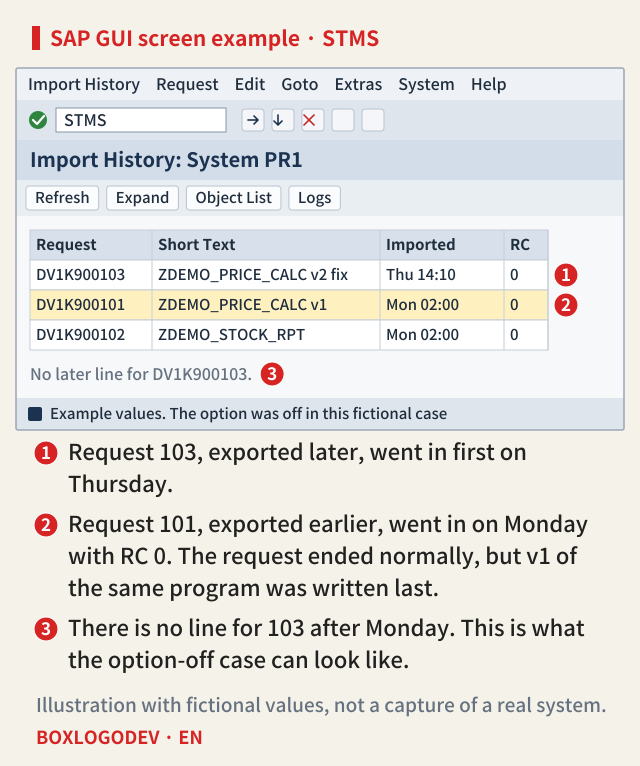
Start with the history. In STMS go to Overview → Imports, pick the system and choose Goto → History → Import History. The default interval is the last seven days, so widen it if needed. If the later-exported request went in first (marker 1), the earlier one went in after it without an error, RC 0 in the figure (marker 2), and the later request has no further line (marker 3), overtaking is worth suspecting. Use Request → Display → Object List to confirm the objects are the same. A request number alone does not prove which was exported later.
Then look at the object. From the editor, Utilities → Versions → Version Management offers a remote comparison with another system. Whether an import creates a version depends on the profile parameter VERS_AT_IMP, so a missing version does not mean there was no import. The documentation says a comment is still added to the version overview when an import changes the object. Analysis Mode in the Import Queue Web UI history shows the status Downgraded on requests that ended with RC 0 to 4, so success and a lost version can sit together. Its details also give the export time stamps of both requests. It needs CTS_PLUG and a local logon to the target system, and the job HISTORY_ANALYSIS_JOB<SID> created on first use has to be released.
For recovery, the documentation's general rule for errors found after an import is to correct them in the source system wherever possible and transport the correction. That page is not about overtaking, so using it as the default here is this note's reading. To reuse 103, if it is no longer in the queue you can add it with Extras → Other Requests → Add and switch on Import Transport Request Again. That chain is a reading of the pages together; no page gives it as a recovery procedure. The documentation also says a request with the status Request already imported cannot be selected, so read the message's long text first. Either way, check the history for other requests holding the same objects.
Before you press import on a single request, note three things: whether a request earlier in the queue holds the same objects, what state the checkbox on the Options tab is in, and that nobody will delete the kept request before the next import of all requests.
Add your perspective.
Share a question, another approach, or something you have tried.
Checking sign-in…
Loading comments…